
![Golang SQLite3 Tutorial [With Examples]](/golang-sqlite3/golang_sqlite3.jpg)
In this tutorial, we will examine some examples of working with
sqlite in Golang. Go talks to SQL databases using the
packagedatabase/sql. This package provides a generic interface to
databases that useSQL. It allows you to connect to and interface with
different databases by providing the queries and statements to execute.
In addition to the packagedatabase/sql, you need access to a specific
driver to connect to the required database. The driver works together
with thedatabase/sqlpackage, implementing the details to interface
with the desired database engine. These database drivers are not part of
Go’s standard library and are generally developed and maintained by the
open source community.
For this application, you’ll use the go-sqlite3 driver. This driver
uses C bindings to connect to SQLite, so you need to have
CGO
enabled and a C compiler available. CGO is part of the Go tools and
the standard way to call C/C++ libraries from Go.
There are numerous SQLite database drivers in Go, but some of them do
not support the database/sql interface standards.
- https://github.com/mattn/go-sqlite3 supports database/sql, based on cgo.
- https://github.com/feyeleanor/gosqlite3 doesn’t support database/sql, based on cgo.
- https://github.com/phf/go-sqlite3 doesn’t support database/sql, based on cgo.
Setting the environment
Install SQLite3 on Windows
Step 1 − Open the download page SQLite download page, and download precompiled binaries for Windows.

It should be noted that I am running the demo on Windows 10. If you have a different operating system, please select the appropriate download option.
Step 2 − Exact zip file to any folder you want
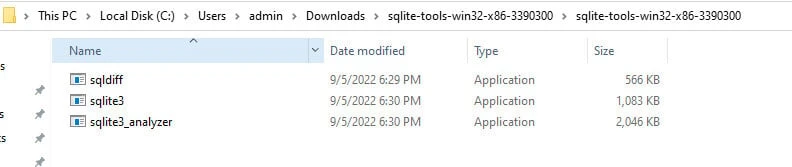
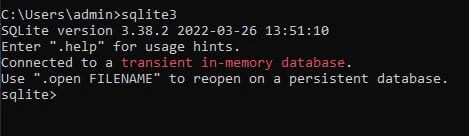
Step 3 − Add the above path to your PATH environment variable. You can go to command line to check if the installation is completed:
For Windows, you need to install a C compiler and toolchain, such as TDM-GCC or MINGW. If you see this error when run first example, you have to install gcc/g++ compilers and libraries:
exec: "gcc": executable file not found in %PATH%
Follow this step:
Step 1: Go to MinGW website and click to Mingw-builds.

Step 2: Download one of the zip file, extract file to any folder.

Step 3: Add the extract folder path to your PATH environment variable.
Install SQLite3 on Linux
Th rpm name or the package name will vary as per distribution. For
Linux, you can usegcc, which is available with most Linux
distributions by default. If it isn’t installed, install it using your
distribution’s package manager.
To install SQLite and it’s dependencies on Ubuntu or Debian based environment, you can use
$ sudo apt-get install sqlite3 libsqlite3-dev gcc
To install SQLite and it’s dependencies in CentOS, Rocky Linux or similar environment, you can use
# yum -y install sqlite gcc
Install Golang SQLite3 driver
The sql package in Go provides a general interface to SQL (or
SQL-like) databases. A database driver must be used in conjunction with
the sql package.
So, in this tutorial, we will use the first driver. Make sure that CGO is enabled in your go workspace.
To install this package, run the below command:
go get github.com/mattn/go-sqlite3
Check connection to SQLite3 Database
Firstly, we will test connection from our application to sqlite3. We
will query and print out sqlite version:
package main

import (
    "database/sql"
    "fmt"
    "log"

    _ "github.com/mattn/go-sqlite3"
)

func main() {

    db, err := sql.Open("sqlite3", ":memory:")

    if err != nil {
        log.Fatal(err)
    }

    defer db.Close()

    var version string
    err = db.QueryRow("SELECT SQLITE_VERSION()").Scan(&version)

    if err != nil {
        log.Fatal(err)
    }

    fmt.Println(version)
}
Output:
3.39.2
Explanation:
_ "github.com/mattn/go-sqlite3": Ifa package is imported with a blank identifier, the package’s init function is called. The driver is registered using this function.db, err := sql.Open("sqlite3", ":memory:"): open a database specified by database driver name and a driver-specific data source name.defer db.Close(): close the connection- The
QueryRowexecutes a query that is expected to return at most one row. The column from the matched row is copied into the version variable by the Scan function.
Perform CRUD Operation using golang sqlite driver
Create a database table and Read from the Table
In this example we will create a new database books.db and insert a
Table with a single row as an example:
package main

import (
    "database/sql"
    "log"

    _ "github.com/mattn/go-sqlite3"
)

// Book is a placeholder for book
type Book struct {
    id     int
    name   string
    author string
}

func main() {
    db, err := sql.Open("sqlite3", "books.db")
    if err != nil {
        log.Println(err)
    }

    // Create table
    statement, err := db.Prepare("CREATE TABLE IF NOT EXISTS books (id INTEGER PRIMARY KEY, isbn INTEGER, author VARCHAR(64), name VARCHAR(64) NULL)")
    if err != nil {
        log.Println("Error in creating table")
    } else {
        log.Println("Successfully created table books!")
    }
    statement.Exec()

    // Create
    statement, _ = db.Prepare("INSERT INTO books (name, author, isbn) VALUES (?, ?, ?)")
    statement.Exec("A Tale of Two Cities", "Charles Dickens", 140430547)
    log.Println("Inserted the book into database!")

    // Read
    rows, _ := db.Query("SELECT id, name, author FROM books")
    var tempBook Book
    for rows.Next() {
        rows.Scan(&tempBook.id, &tempBook.name, &tempBook.author)
        log.Printf("ID:%d, Book:%s, Author:%s\n", tempBook.id,
            tempBook.name, tempBook.author)
    }
}
Output:
]# go run main.go
2022/10/01 23:11:26 Successfully created table books!
2022/10/01 23:11:26 Inserted the book into database!
2022/10/01 23:11:26 ID:1, Book:A Tale of Two Cities, Author:Charles Dickens
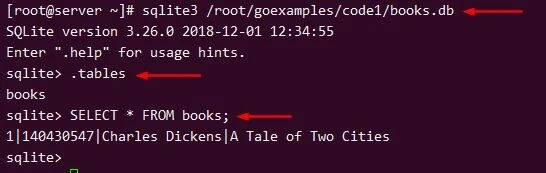
The same can be verified inside the sqlite database of books.db:
Update and Delete Operation using sqlite driver
Now let us perform some update and delete operation on our sqlite database using the go driver:
package main

import (
    "database/sql"
    "log"

    _ "github.com/mattn/go-sqlite3"
)

// Book is a placeholder for book
type Book struct {
    id     int
    name   string
    author string
}

func main() {
    db, err := sql.Open("sqlite3", "books.db")
    if err != nil {
        log.Println(err)
    }

    // Create table
    statement, err := db.Prepare("CREATE TABLE IF NOT EXISTS books (id INTEGER PRIMARY KEY, isbn INTEGER, author VARCHAR(64), name VARCHAR(64) NULL)")
    if err != nil {
        log.Println("Error in creating table")
    } else {
        log.Println("Successfully created table books!")
    }
    statement.Exec()

    // Create
    statement, _ = db.Prepare("INSERT INTO books (name, author, isbn) VALUES (?, ?, ?)")
    statement.Exec("A Tale of Two Cities", "Charles Dickens", 140430547)
    log.Println("Inserted the book into database!")

    // Read before Update
    rows, _ := db.Query("SELECT id, name, author FROM books")
    var tempBook Book
    for rows.Next() {
        rows.Scan(&tempBook.id, &tempBook.name, &tempBook.author)
        log.Printf("ID:%d, Book:%s, Author:%s\n", tempBook.id,
            tempBook.name, tempBook.author)
    }

    // Update
    statement, _ = db.Prepare("update books set name=? where id=?")
    statement.Exec("A Tale of Three Cities", 1)
    log.Println("Successfully updated the book in database!")

    // Read after Update
    rows, _ = db.Query("SELECT id, name, author FROM books")

    for rows.Next() {
        rows.Scan(&tempBook.id, &tempBook.name, &tempBook.author)
        log.Printf("ID:%d, Book:%s, Author:%s\n", tempBook.id,
            tempBook.name, tempBook.author)
    }

    // Delete
    statement, _ = db.Prepare("delete from books where id=?")
    statement.Exec(1)
    log.Println("Successfully deleted the book in database!")

}
Output:
# go run main.go
2022/10/01 23:21:46 Successfully created table books!
2022/10/01 23:21:46 Inserted the book into database!
2022/10/01 23:21:46 ID:1, Book:A Tale of Two Cities, Author:Charles Dickens
2022/10/01 23:21:46 Successfully updated the book in database!
2022/10/01 23:21:46 ID:1, Book:A Tale of Three Cities, Author:Charles Dickens
2022/10/01 23:21:46 Successfully deleted the book in database!
Different go sqlite driver functions
Go sqlite3 Exec
TheExec function executes a query without returning any rows. First
of all, we run a query to create 'students' table:
package main

import (
    "database/sql"
    "fmt"
    "log"

    _ "github.com/mattn/go-sqlite3"
)

func main() {

    db, err := sql.Open("sqlite3", "test.db")

    if err != nil {
        log.Fatal(err)
    }

    defer db.Close()

    sts := `
DROP TABLE IF EXISTS students;
CREATE TABLE students(id INTEGER PRIMARY KEY, name TEXT, score REAL);
INSERT INTO students(name, score) VALUES('Anna',8.5);
INSERT INTO students(name, score) VALUES('Bob',7.5);
INSERT INTO students(name, score) VALUES('Claire',9.5);
INSERT INTO students(name, score) VALUES('Charlie',6.5);
INSERT INTO students(name, score) VALUES('Daniel',8.0);
INSERT INTO students(name, score) VALUES('Hellen',7.0);
INSERT INTO students(name, score) VALUES('Hummer',7.5);
INSERT INTO students(name, score) VALUES('John',10);
`
    // run the query
    _, err = db.Exec(sts)

    if err != nil {
        log.Fatal(err)
    }

    fmt.Println("table created")
}
Output:
table created
And test.db will be created in the working folder.
Select rows with Query
The Query method runs a SELECT query that returns rows. The optional arguments are for any query placeholder parameters. Here’s an example of query all students who have score > 8:
package main

import (
    "database/sql"
    "fmt"
    "log"

    _ "github.com/mattn/go-sqlite3"
)

func main() {

    db, err := sql.Open("sqlite3", "test.db")

    if err != nil {
        log.Fatal(err)
    }

    defer db.Close()

    rows, err := db.Query("SELECT * FROM students where score > 8")

    if err != nil {
        log.Fatal(err)
    }

    defer rows.Close()

        // iterate through all the records
    for rows.Next() {
        var id int
        var name string
        var score float64
        err = rows.Scan(&id, &name, &score)
        if err != nil {
            log.Fatal(err)
        }

        fmt.Printf("%v %v %v\n", id, name, score)
    }
}
Output:
1 Anna 8.5
3 Claire 9.5
8 John 10
Select rows with Prepare statement
Instead of directly writing the values into the statements, we use placeholders. Prepared statements improve database security and performance. This below example shows how to use Prepared Statement to query students with 7 < score < 9
package main

import (
    "database/sql"
    "fmt"
    "log"

    _ "github.com/mattn/go-sqlite3"
)

func main() {

    db, err := sql.Open("sqlite3", "test.db")

    if err != nil {
        log.Fatal(err)
    }

    defer db.Close()

    preState, err := db.Prepare("SELECT * FROM students WHERE score > ? and score < ?")
    minQueryScore := 7
    maxQueryScore := 9
    rows, err := preState.Query(minQueryScore, maxQueryScore)

    if err != nil {
        log.Fatal(err)
    }

    defer rows.Close()

    for rows.Next() {

        var id int
        var name string
        var score float64

        err = rows.Scan(&id, &name, &score)

        if err != nil {
            log.Fatal(err)
        }

        fmt.Printf("%v %v %v\n", id, name, score)
    }
}
Output:
1 Anna 8.5
2 Bob 7.5
5 Daniel 8
7 Hummer 7.5
Print affected rows
The RowsAffected function returns the number of rows that have been
affected by an update, insert, or delete statement.
package main

import (
    "database/sql"
    "fmt"
    "log"

    _ "github.com/mattn/go-sqlite3"
)

func main() {

    db, err := sql.Open("sqlite3", "test.db")

    if err != nil {
        log.Fatal(err)
    }

    defer db.Close()

    res, err := db.Exec(`INSERT INTO students(name, score) VALUES('Kelly',8.0);
    INSERT INTO students(name, score) VALUES('Kai',9.5);
    INSERT INTO students(name, score) VALUES('Ben',9.0);
    INSERT INTO students(name, score) VALUES('Bin',7.5);`)

    if err != nil {
        log.Fatal(err)
    }

    numOfRow, err := res.RowsAffected()
    if err != nil {
        log.Fatal(err)
    }

    fmt.Printf("The statement has affected %d rows\n", numOfRow)
}
Output:
The statement has affected 4 rows
Summary
In this tutorial, we have performed some operations (Create, Read, …)
with sqlite in Go. Using sqlite in Golang is easy because we have
many Go-sqlite drivers and we can write a raw
sql query and
run it within Query() function.
References
https://www.sqlite.org/index.html
https://github.com/mattn/go-sqlite3
