

Introduction to Golang HTTP
In this tutorial, we will dive into the basics of writing HTTP servers. You will learn how handler functions work, discover more about processing requests, and study how to read and write streaming data.
The net/http package gives us the building blocks for writing an HTTP server. A server running on your computer, available at http://localhost:8080, would process a request as follows:
- The server receives a client request at a certain path, say
/api. - The server checks if it can handle this request.
- If the answer is yes, the server calls a handler function to process the request and return the response. If not, it returns an HTTP error as a response to the client.
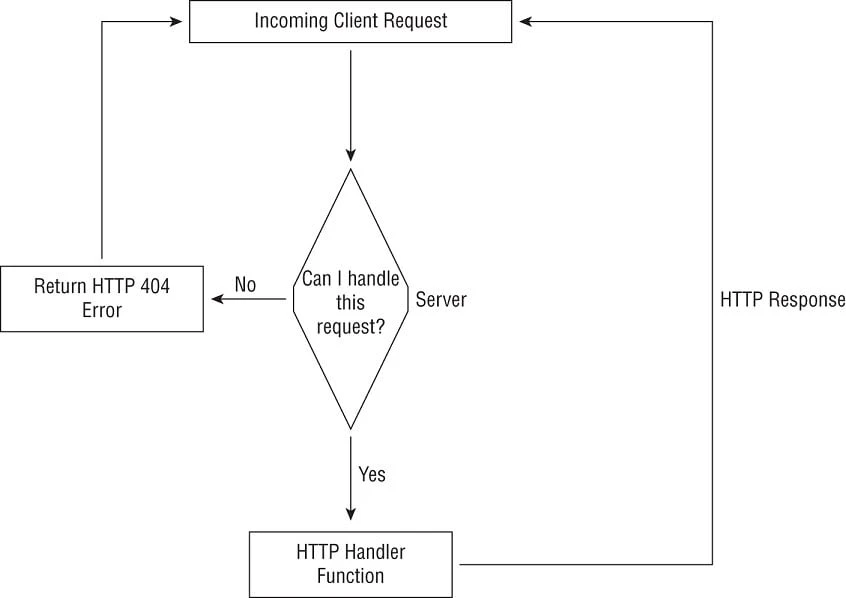
Create your first HTTP web server using golang
Let us create a basic HTTP server which will listen on a pre-defined port number.
package main

import (
    "log"
    "net/http"
    "os"
)

func main() {
    listenAddr := os.Getenv("LISTEN_ADDR")
    if len(listenAddr) == 0 {
        listenAddr = ":8080"
    }

    log.Fatal(http.ListenAndServe(listenAddr, nil))
}
Explanation: TheListenAndServe()function in
thenet/httppackage starts an HTTP server at a given network address.
It is a good idea to make this address configurable.Thus, in
themain()function, the following lines check if
theLISTEN_ADDRenvironment variable has been specified, and if not,
it defaults to":8080"
Next, we call theListenAndServe()function specifying the address to
listen on (listenAddr) and thehandlerfor the server. We will
specifynilas the value for the handler and thus our function call
toListenAndServeis as follows:
log.Fatal(http.ListenAndServe(listenAddr, nil))
TheListenAndServe()returns immediately with an error value if there
is an error when starting the server. If the server has started
correctly, the function only returns when the server is terminated. In
either case, thelog.Fatal()function will log the error value if
there is one.
Let’s start our web server on one terminal
$ go run main.go
On another terminal you can see that port 8080 is in Listening state:
# ss -ntlp | grep 8080
LISTEN    0         4096                     *:8080                   *:*        users:(("main",pid=4073,fd=3))
But if we try to query our web server using curl command, we get 404:
$ curl -X GET localhost:8080/api
404 page not found
This means that the server receives the incoming request, looks at it,
and returns an HTTP 404 response, meaning that it cannot find the
resource,/api, which we are requesting.
Setting up Request Handlers
When you specifiednilas the second argument to
theListenAndServe()function, you asked the function to use the
default handler,DefaultServeMux. It serves as the default registry of
how to handle a request path.
DefaultServeMuxis an object of typeServeMux defined in the http
package. It is a global object, which means that any other code you may
be using in your application can also register handler functions with
your server. There is absolutely nothing preventing a third-party rogue
package from exposing an HTTP path without you even knowing it.
Additionally, as with any other global object, this opens your code up
to unforeseen concurrency bugs and non-robust behavior. Hence, we are
not going to use it. Instead, we will create a newServeMuxobject:
mux := http.NewServeMux()
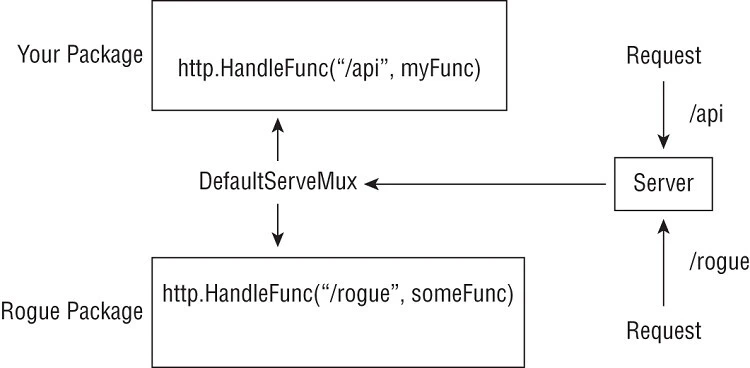
Any package can register a handler function with the DefaultServeMux object
To solve the HTTP 404 issue that you encountered in the previous section, you will need to register a special function called ahandler functionfor the path.
Handler Functions
A handler function must be of
typefunc(http.ResponseWriter, *http.Request),
wherehttp.ResponseWriterandhttp.Requestare twostructtypes
defined in thenet/httppackage. The object of
typehttp.Requestrepresents the incoming HTTP request and
thehttp.ResponseWriterobject is used to write back the response to
the client making the request. The following is an example of a handler
function:
func apiHandler(w http.ResponseWriter, r *http.Request) {
        fmt.Fprintf(w, "Hello World")
}
Here we send the string"Hello World"using
thefmt.Fprintf()function. Note how theFprintf()function, which
we used to write a string to the standard output, is equally applicable
to send back a string as an HTTP response thanks to the power of
theio.Writerinterface. Of course, you could use any other library
function here instead offmt.Fprintf()–io.WriteString(), for
example.
Once you have written your handler function, the next step is to register it with theServeMuxobject that you created earlier:
mux.HandleFunc("/api", apiHandler)
This creates a mapping in themuxobject so that any request for
the/apipath is now handled by theapiHandler()function. Finally,
we will call theListenAndServe()function specifying
thisServeMuxobject:
err := http.ListenAndServe(listenAddr, mux)
The following code registers handler functions for two paths: /api and
/healthz:
package main

import (
    "fmt"
    "log"
    "net/http"
    "os"
)

func apiHandler(w http.ResponseWriter, req *http.Request) {
    fmt.Fprintf(w, "Hello, world!\n")
}

func healthCheckHandler(w http.ResponseWriter, req *http.Request) {
    fmt.Fprintf(w, "ok\n")
}

func setupHandlers(mux *http.ServeMux) {
    mux.HandleFunc("/healthz", healthCheckHandler)
    mux.HandleFunc("/api", apiHandler)

}

func main() {

    listenAddr := os.Getenv("LISTEN_ADDR")
    if len(listenAddr) == 0 {
        listenAddr = ":8080"
    }

    mux := http.NewServeMux()
    setupHandlers(mux)

    log.Fatal(http.ListenAndServe(listenAddr, mux))

}
Explanation: We create a newServeMuxobject,mux, via a call to
theNewServeMux()function and then call
thesetupHandlers()function passingmuxas a parameter. In
thesetupHandlers()function, we call theHandleFunc()functions to
register the two paths and their corresponding handler functions. Then
we call theListenAndServe()function passingmuxas the handler to
use.
From a new terminal,
usecurlto make HTTP
requests to the server. For the/apiand/healthzpaths, you
will see theHello, world!andokresponses respectively.
$ curl -X GET localhost:8080/api
Hello, world!

$ curl -X GET localhost:8080/healthz
ok
Secure Communication over HTTP with TLS and MTLS
Generate certificates
First of all we will generate our own CA certificate:
root@ubuntu:~/goexamples/code1/certs# openssl genrsa -out ca.key 4096
Generating RSA private key, 4096 bit long modulus (2 primes)
...................................................++++
................................................................................++++
e is 65537 (0x010001)

root@ubuntu:~/goexamples/code1/certs# openssl req -new -x509 -days 365 -key ca.key -out cacert.pem -subj "/C=IN/ST=NSW/L=Bengaluru/O=GoLinuxCloud/OU=Org/CN=RootCA"

root@ubuntu:~/goexamples/code1/certs# ls -l
total 12
-rw-r--r-- 1 root root 2025 Oct  5 16:38 cacert.pem
-rw------- 1 root root 3243 Oct  5 16:37 ca.key
Next we will generate server certificate and key which will be signed using the above generated CA certificate. You can refer our OpenSSL tutorial to get more clarity on these individual commands I am executing here as I won’t be able to explain them here.
My server hostname is ubuntu and it has IP of 172.20.10.2 so I have
provided those in my SAN Extension file. These will be used for client
authentication during
MTLS
communication.
root@ubuntu:~/goexamples/code1/certs# cat server_cert_ext.cnf
basicConstraints = CA:FALSE
nsCertType = server
nsComment = "OpenSSL Generated Server Certificate"
subjectKeyIdentifier = hash
authorityKeyIdentifier = keyid,issuer:always
keyUsage = critical, digitalSignature, keyEncipherment
extendedKeyUsage = serverAuth, clientAuth
subjectAltName = @alt_names
[alt_names]
IP.1 = 172.20.10.2
DNS.1 = ubuntu
DNS.2 = localhost

root@ubuntu:~/goexamples/code1/certs# openssl genrsa -out server.key 4096
Generating RSA private key, 4096 bit long modulus (2 primes)
............................................................++++
..................................................................................++++
e is 65537 (0x010001)

root@ubuntu:~/goexamples/code1/certs# openssl req -new -key server.key -out server.csr -subj "/C=IN/ST=NSW/L=Bengaluru/O=GoLinuxCloud/OU=Org/CN=ubuntu"

root@ubuntu:~/goexamples/code1/certs# openssl x509 -req -in server.csr  -CA cacert.pem -CAkey ca.key -out server.crt -CAcreateserial -days 365 -sha256 -extfile server_cert_ext.cnf
Signature ok
subject=C = IN, ST = NSW, L = Bengaluru, O = GoLinuxCloud, OU = Org, CN = ubuntu
Getting CA Private Key

root@ubuntu:~/goexamples/code1/certs# ls -l
total 36
drwxr-xr-x 2 root root 4096 Oct  5 16:38 ./
drwxr-xr-x 4 root root 4096 Oct  5 15:55 ../
-rw-r--r-- 1 root root 2025 Oct  5 16:38 cacert.pem
-rw-r--r-- 1 root root   41 Oct  5 16:38 cacert.srl
-rw------- 1 root root 3243 Oct  5 16:37 ca.key
-rw-r--r-- 1 root root  349 Oct  5 16:36 server_cert_ext.cnf
-rw-r--r-- 1 root root 2399 Oct  5 16:38 server.crt
-rw-r--r-- 1 root root 1695 Oct  5 16:38 server.csr
-rw------- 1 root root 3243 Oct  5 16:38 server.key
Now we have all the files we need to setup HTTPS webserver using golang program.
Using ListenAndServeTLS
We have written detailed tutorial covering Certificate Management so here we
will try to be very brief here. TLS helps secure the communication
between a server and a client using cryptographic protocols. More
commonly, it allows you to implement secure web servers so that
client-server communication happens over Hypertext Transfer Protocol
Secure (HTTPS) rather thanplainHTTP. To start an HTTPS server, you
will use thehttp.ListenAndServeTLS()function or
thesrv.ListenAndServeTLS()method, wheresrvis a
customhttp.Serverobject. The signature of
theListenAndServeTLS()function is as follows:
func ListenAndServeTLS(addr, certFile, keyFile string, handler Handler)
If you compareListenAndServeTLS()to theListenAndServe()function,
it takes two additional arguments—the second and third argument are
string values containing the path to the TLS certificate and key files
Since there is no additional argument supported by ListenAndServeTLS()
to add CA Certificate so we will create a bundle with our server
certificate and CA bundle and pass it as single argument. Here I have
created a new file certbundle.pem and am appending cacert.pem
content inside the certificate.
root@ubuntu:~/goexamples/code1/certs# cp server.crt certbundle.pem

root@ubuntu:~/goexamples/code1/certs# cat cacert.pem >> certbundle.pem

root@ubuntu:~/goexamples/code1/certs# cat certbundle.pem
-----BEGIN CERTIFICATE-----
MIIGvjCCBKagAwIBAgIUaQ1j1dZ2N+OtaD/kYSU/KC98kmMwDQYJKoZIhvcNAQEL
BQAwZTELMAkGA1UEBhMCSU4xDDAKBgNVBAgMA05TVzESMBAGA1UEBwwJQmVuZ2Fs
dXJ1MRUwEwYDVQQKDAxHb0xpbnV4Q2xvdWQxDDAKBgNVBAsMA09yZzEPMA0GA1UE
AwwGUm9vdENBMB4XDTIyMTAwNTExMDg1NloXDTIzMTAwNTExMDg1NlowZTELMAkG
A1UEBhMCSU4xDDAKBgNVBAgMA05TVzESMBAGA1UEBwwJQmVuZ2FsdXJ1MRUwEwYD
VQQKDAxHb0xpbnV4Q2xvdWQxDDAKBgNVBAsMA09yZzEPMA0GA1UEAwwGdWJ1bnR1
MIICIjANBgkqhkiG9w0BAQEFAAOCAg8AMIICCgKCAgEAo2o/2JLSCzeocAn4O5Q8
2fVlCVicQO9ND8DPddPEkNN5C41MQpNYmsoirxBpZ0pf0gObq9jsBCkfETeH1tBb
8ix8jFQFF4FOf/Y4+3FJ38nQk8ncN9NtJxn0SggGv7XP4gv8bqhmdyvyAqAm82Pl
0tgh1VVNZMWSncTPXtFpbSRfKuCkTcq3thskyARe/xlJIeXWoIoVIzFdhVJgUDqS
Qrm8D0qBA0+w8+kZDNYm/3VL8EtbElCKVTOyqePg9ZVyaTZX1H/DyK749kZjRlW0
+/OcsYQ3ZYg7r3q7yh++UaAfUUfHWSLBldGfjHORs4wChym+yvjKHeQsgXCgFelM
6rgi48aixcSw72dCdYL8XX0ducjJzjdSNHoErNXZZryy+Hnw9r3X7HP4XJgjOHsi
tCJmdiO4rxrP8XWCJvRE7x4PMo+YvjkDhEKQ1GfeRB4QIDUrl8rbLKK9RnzVjkcb
+YGCfqaKswwH4NHQwRE/YBrRNKyTZiDkszy+7+Wl5Hep33grK94NC9e69Gl3jkfB
rDESxivxXBtuX8Sa5+G9q8JYHn0D6RyGhJab1MvNEXMTwNMjzJjuAOkqByX9PXSL
dR5HdkY23fU6JhQve6bbat+3L4JtZ8FCa19PIOgJ68MhOw5Gv8EFdgKBvEFOj+PP
FaW8cFzNty+ReLydSIviaGMCAwEAAaOCAWQwggFgMAkGA1UdEwQCMAAwEQYJYIZI
AYb4QgEBBAQDAgZAMDMGCWCGSAGG+EIBDQQmFiRPcGVuU1NMIEdlbmVyYXRlZCBT
ZXJ2ZXIgQ2VydGlmaWNhdGUwHQYDVR0OBBYEFK+ElXc+D9bEFdkpsXSfcbbWiScS
MIGiBgNVHSMEgZowgZeAFNU4pEQJKWSlQ+uO3urf3n+gAHVeoWmkZzBlMQswCQYD
VQQGEwJJTjEMMAoGA1UECAwDTlNXMRIwEAYDVQQHDAlCZW5nYWx1cnUxFTATBgNV
BAoMDEdvTGludXhDbG91ZDEMMAoGA1UECwwDT3JnMQ8wDQYDVQQDDAZSb290Q0GC
FHcJBh8xXeE8IYigpNT0OfN+xbPyMA4GA1UdDwEB/wQEAwIFoDATBgNVHSUEDDAK
BggrBgEFBQcDATAiBgNVHREEGzAZhwSsFAoCggZ1YnVudHWCCWxvY2FsaG9zdDAN
BgkqhkiG9w0BAQsFAAOCAgEAN1D6+XVFF3Q/84M29k8Smqnq+JFYvPSuQwLBJu0L
E1pqznoLvr2kPdvhXSoIobkT7Ah5h8Tj4wJBPjaATx7lWelf9RXgh/5/Yll814Fy
2qVALaFNVNHuDmaHXQYMm+ty+TzFVEH6wJo9Ihn5Jr8vGKB56qQxRNf4R9dSxPM5
qGbfzHhcNPrCy7+2Hkn+7pyUslgYQJ6Jzs17PdG46i5NAYPnz5N4QolGxZX/YGww
cr9VznAbg9Yly4wSGii7zlWeuhrd56Igpzvspr4b63Cq2BddGtTumq0ThWz7/MBs
mZft5p+jVyYUQe70lHVlqWeXZFHvmQf1b97yKnmegm99dgODYSgstAyg9obkiOdi
YghGaFc90BNA8/UNaI+sqc7PmCe/FKmGoS/GXnOP61aWgnJqipy8dw2Oy4ahzDdS
xkMrAgJ8ZBhTl3E4xSuRkAVZcprcXw+4ni34AqOHfEUqSOXCib+MisbhikN5l2Xy
lLtZLLfIoI56z3bESSnxsgjxfXo93yeLDrSppXqc4R4utWyClEhgCwNxAuJZm5xr
Lt5oCx4xzrgv4NcKhAc5OwsN1a21eOunsLSIyr5badxiEv0dN8+GylMI6j3IWmXY
HnHEWf+Fzfrm5WMm3LgdeAfiwbgT0WJFKDMmxgsGqiEJGkr+kYtbm3Va4pi4qCMv
Jvc=
-----END CERTIFICATE-----
-----BEGIN CERTIFICATE-----
MIIFqzCCA5OgAwIBAgIUdwkGHzFd4TwhiKCk1PQ5837Fs/IwDQYJKoZIhvcNAQEL
BQAwZTELMAkGA1UEBhMCSU4xDDAKBgNVBAgMA05TVzESMBAGA1UEBwwJQmVuZ2Fs
dXJ1MRUwEwYDVQQKDAxHb0xpbnV4Q2xvdWQxDDAKBgNVBAsMA09yZzEPMA0GA1UE
AwwGUm9vdENBMB4XDTIyMTAwNTExMDgwMVoXDTIzMTAwNTExMDgwMVowZTELMAkG
A1UEBhMCSU4xDDAKBgNVBAgMA05TVzESMBAGA1UEBwwJQmVuZ2FsdXJ1MRUwEwYD
VQQKDAxHb0xpbnV4Q2xvdWQxDDAKBgNVBAsMA09yZzEPMA0GA1UEAwwGUm9vdENB
MIICIjANBgkqhkiG9w0BAQEFAAOCAg8AMIICCgKCAgEAztpAk6zgSBpq0IelMOjR
8dBG/5ovHf2Ab20iiPyvEqjzKAedPbAcYbouYuQwUjHmhLY8hrT8ndRBFFM+nmuJ
vYvyVj0T/o3i1e8iJS/yBIEmoeW8LtKohuPw8O+/3pGSRD8EPrfoG8/sUlwLp0YV
rZf8rKPXpJyXamfeJhU0726QRD4TiowvKbVK1GYNXByYFMjLY6VqvVG5liR1eAjt
Pk7Ju19jDqgfw20j1rP/mWJO8uSQlG27kjNEBBi2kHbK8vNgPol9vYZjaxRscFpi
UUHAGKzPazmw+GscWu+zKr9QSnOi4Pn673YFphSjexLsbtCw3ebJ649UWwbUDOMb
PMKEkSjOpaackwFIBDogFAX7lcXRG5aojYO2GU3uVDFQe6klnYxgqCpUl0EVdYAh
9XQuuy0u1JDdl2OlnN4efUJBeojAcEKzaWAel53o2t3rDh0Z7xvxQEarj4mYTTA+
T9Of4rYDIdwX3EnmQunRJgV0+CHwF0sLvDxVC6XvSyb0ddzzC0RTSewUG4WTu7wR
s/GJN7C+1DIr19DitI5PiBoFarxgdLDnN9byiAd65brhmEmDNUr2Y8Au6+SHWYTV
C5jDJJGzLDzNvoaDJmHIZcTjG2bbQy8J8WkPqDvYoUpTxLJuQTB8dKDmAyRXGuEZ
WJ2nOaJcdp2k6TKla3w1+AUCAwEAAaNTMFEwHQYDVR0OBBYEFNU4pEQJKWSlQ+uO
3urf3n+gAHVeMB8GA1UdIwQYMBaAFNU4pEQJKWSlQ+uO3urf3n+gAHVeMA8GA1Ud
EwEB/wQFMAMBAf8wDQYJKoZIhvcNAQELBQADggIBAKAYt/+TdJRs+5Z9KwzPj0g4
jcO0Q22nTGJ1pezK79OJpGfGr1iMnMG5CyLhPhlgTG0tY5uLPGPg0SQ6mS3//VYk
z09mwgBlWLXROHYGJBluNiKy6iICXZnfn4kiozaxlJC/Q0+kj6UcoF/KXao8MVTv
6ubpkpbcE8CtuESn9OiNGM1W9MLgb33mODCCI59ti51SuhYFPRDwAVlS4w3Mqb/H
CNshF43tm2hAb13hsMuoqqrUn00AzxAA2Rxk0314EYbRYNI8zTx2SFJUOzRm5Rhg
fwjWGj359GDF0+dAm7Hx2dZdYEs3lq+jO65oGD376rKzWdaKZ5CIrUSVbzAtiOCh
pPk8LCBRBEPnxFfVVFCaqZmqPe318eFlIn51EDoMmsp6lCI5oEb3w3QvvJETlL9x
wiN54NG4i2lGuVM9z9k7pCHhZ6pp4j+QEfWDQ2nLddA76gS6x3sxAfknsFA06nuX
YN764Kd2QhAFAmIo0T9zmwOf/ODUhJVs4Okl8lhGUcv+RfMPT8LH97UCMB28wHrI
aOBEQiqD8iTEL1Ymy6qF/BG85leliyGslzIeBGMyTkU7owUkdnplxDRrmkALMp8J
QEaBNccRzjhdPAMYhGzxdjd6TY7X3WZCs3DwHoIrOAW1n2fu7ROCXeg+6zywbG0I
ZFsjNKejskq6kmEdzkLW
-----END CERTIFICATE-----
Create HTTPS web server
Let us update our previous go code to use ListenAndServeTLS instead of
ListenAndServe to server the traffic over TLS:
package main

import (
    "fmt"
    "log"
    "net/http"
    "os"
)

var tlsCertFile = "/root/goexamples/code1/certs/certbundle.pem"
var tlsKeyFile = "/root/goexamples/code1/certs/server.key"

func welcomeHandler(res http.ResponseWriter, req *http.Request) {
    fmt.Fprintf(res, "Hello GoLinuxCloud Members!\n")
}

func apiHandler(w http.ResponseWriter, req *http.Request) {
    fmt.Fprintf(w, "Hello, world!\n")
}

func healthCheckHandler(w http.ResponseWriter, req *http.Request) {
    fmt.Fprintf(w, "ok\n")
}

func setupHandlers(mux *http.ServeMux) {
    mux.HandleFunc("/healthz", healthCheckHandler)
    mux.HandleFunc("/api", apiHandler)
    mux.HandleFunc("/", welcomeHandler)

}

func main() {

    listenAddr := os.Getenv("LISTEN_ADDR")
    if len(listenAddr) == 0 {
        listenAddr = ":8443"
    }

    mux := http.NewServeMux()
    setupHandlers(mux)

    log.Fatal(http.ListenAndServeTLS(listenAddr, tlsCertFile, tlsKeyFile, mux))

}
Next we can try to query our handlers using curl command and
additionally we will use -k to perform insecure connection. To avoid
this we will have to place CA certificate into our HTTPS server and
establish communication using the same CA certificate from the client.
You can read more about such configuration at
Setup
& verify mutual TLS authentication (MTLS) with openssl
# curl -k -X GET https://localhost:8443/
Hello GoLinuxCloud Members!

# curl -k -X GET https://localhost:8443/api
Hello, world!

# curl -k -X GET https://localhost:8443/healthz
ok
Create Client to connect to HTTPS Server (InSecure, TLS, MTLS)
In this section we will create a client which will communicate with our HTTPS web server over following interfaces:
- Insecure: Client and Server will not perform any kind of validation of the certificates and just establish the communication
- TLS: Server will validate the CA certificate passed by client used to sign the server certificate. The CA certificate available with client must be the one which was used to sign server certificate.
- MTLS: Both server and client will validate each other’s certificate using the CA certificate.
Load Certificate and Key Pair
We will use tls.LoadX509KeyPair to load our certificate and private
key which just takes these two as input argument. The files must
contain PEM encoded data.
// Load client cert
cert, err := tls.LoadX509KeyPair("/root/goexamples/code1/certs/server.crt", "/root/goexamples/code1/certs/server.key")
if err != nil {
    panic(err)
}
Load CA Certificate
We will use ioutil.ReadFile to read the CA certificate file and then
create a certificate bundle using x509.NewCertPool. So we can pass as
many number of CA certificates to this pool. In our case since we have
single CA certificate so we will just add this one:
// Load CA cert
caCert, err := ioutil.ReadFile("/root/goexamples/code1/certs/cacert.pem")
if err != nil {
    panic(err)
}
caCertPool := x509.NewCertPool()
caCertPool.AppendCertsFromPEM(caCert)
Create TLS Config
Next tlsConfig optionally provides a TLS configuration for use by
ServeTLS and ListenAndServeTLS.
tlsConfig := &tls.Config{
    Certificates: []tls.Certificate{cert},
    RootCAs:      caCertPool,
    //InsecureSkipVerify: true,  //Enable this incase the certificate is invalid. example. certificate contains fqdn as CN but we are accessing using IP
}
Create TLS Transport
For control over proxies, TLS configuration, keep-alives, and other settings, create a Transport:
transport := &http.Transport{
    TLSClientConfig: tlsConfig,
    MaxIdleConns:    10,
    IdleConnTimeout: 30 * time.Second,
}
client := &http.Client{Transport: transport}
Create HTTPS client
Following code will communicate with our HTTPS web server using MTLS or
TLS or Insecure based on the AUTH_TYPE environment
variable. In this example I have not created a separate client certificate so I will
use server certificate as my client certificate for performing MTLS
based communication as I have added both serverAuth and clientAuth
in my certificate’s x509 extension.
package main

import (
    "crypto/tls"
    "crypto/x509"
    "fmt"
    "io/ioutil"
    "net/http"
    "os"
    "strings"
    "time"
)

func main() {
    var tlsConfig *tls.Config

    url := "https://localhost:8443/"
    method := "GET"

    switch os.Getenv("AUTH_TYPE") {
    case "mtls":
        fmt.Println("AUTH_TYPE set as mtls")
        // Load public/private key pair from a pair of files. The files must contain PEM encoded data.
        cert, err := tls.LoadX509KeyPair("/root/goexamples/code1/certs/server.crt", "/root/goexamples/code1/certs/server.key")
        if err != nil {
            panic(err)
        }
        // Load CA cert
        caCert, err := ioutil.ReadFile("/root/goexamples/code1/certs/cacert.pem")
        if err != nil {
            panic(err)
        }
        caCertPool := x509.NewCertPool()
        caCertPool.AppendCertsFromPEM(caCert)

        tlsConfig = &tls.Config{
            Certificates: []tls.Certificate{cert},
            RootCAs:      caCertPool,
        }

    case "tls":
        fmt.Println("AUTH_TYPE set as tls")
        // Load CA cert
        caCert, err := ioutil.ReadFile("/root/goexamples/code1/certs/cacert.pem")
        if err != nil {
            panic(err)
        }
        caCertPool := x509.NewCertPool()
        caCertPool.AppendCertsFromPEM(caCert)

        tlsConfig = &tls.Config{
            RootCAs: caCertPool,
        }

    default:
        fmt.Println("Insecure communication selected, skipping server verification")
        tlsConfig = &tls.Config{
            InsecureSkipVerify: true,
        }
    }

    transport := &http.Transport{
        TLSClientConfig: tlsConfig,
        MaxIdleConns:    10,
        IdleConnTimeout: 30 * time.Second,
    }
    client := &http.Client{Transport: transport}

    for i := 1; i < 5; i++ {
        payloadStr := fmt.Sprintf("test the %v time", i)
        payload := strings.NewReader(payloadStr)
        req, err := http.NewRequest(method, url, payload)

        if err != nil {
            fmt.Println(err)
            return
        }
        req.Header.Add("Content-Type", "text/plain")

        res, err := client.Do(req)
        if err != nil {
            fmt.Println(err)
            return
        }
        defer res.Body.Close()

        body, err := ioutil.ReadAll(res.Body)
        if err != nil {
            fmt.Println(err)
            return
        }
        fmt.Print(string(body))
    }
}
When AUTH_TYPE is set to mtls:
# export AUTH_TYPE=mtls

# go run client.go
AUTH_TYPE set as mtls
Hello GoLinuxCloud Members!
Hello GoLinuxCloud Members!
Hello GoLinuxCloud Members!
Hello GoLinuxCloud Members!
When AUTH_TYPE is set to tls:
# export AUTH_TYPE=tls

# go run client.go
AUTH_TYPE set as tls
Hello GoLinuxCloud Members!
Hello GoLinuxCloud Members!
Hello GoLinuxCloud Members!
Hello GoLinuxCloud Members!
When AUTH_TYPE is set to insecure:
# unset AUTH_TYPE

# go run client.go
Insecure communication selected, skipping server verification
Hello GoLinuxCloud Members!
Hello GoLinuxCloud Members!
Hello GoLinuxCloud Members!
Hello GoLinuxCloud Members!
Summary
This article covered a lot of ground, including:
- Basic knowledge of Golang HTTPS and certificates.
- A brief overview of the various software tools available for working with certificates and keys.
- How to write a basic and advanced HTTPS server in Go, with detailed instructions.
- How to write an HTTPS client in Go, with detailed instructions.
- How to have a secure and insecure communication using TLS, MTLS and insecure
References
https://www.ssl.com/
https://www.openssl.org/
https://pkg.go.dev/net/http
https://en.wikipedia.org/wiki/HTTPS
