
Getting started with Go init() function
When developing applications with Go, you often have to define or
declare the state of your application.init()function in Go is used to
declare the state of an application such as initializing connection to
the database, initializing logs and log levels or exporting cloud
credentials. There are more use cases for theinit()function and they
are not limited to the mentioned use cases.
Each Go package can optionally havea
private
function namedinit()that is automatically executed at the
beginning of execution time—init()runs when the package is initialized
at the beginning of program execution. Theinit()function hasthe
following characteristics:
- It takes no arguments.
- Itreturns no values.
- The
init()function is optional. - The
init()function is called implicitly by Go. - You can have an
init()function in themainpackage. In that case,init()is executedbeforethemain()function. In fact, allinit()functions are always executed prior to themain()function. - A source file can contain multiple
init()functions—these are executed in the order of declaration. - The
init()function or functions of a package are executed only once, even ifthe package is imported multiple times. - Go packages can contain multiple files. Each source file can contain
one or more
init()functions.
Order of execution for init() function in golang
Following image explains the flow of execution for init() function:
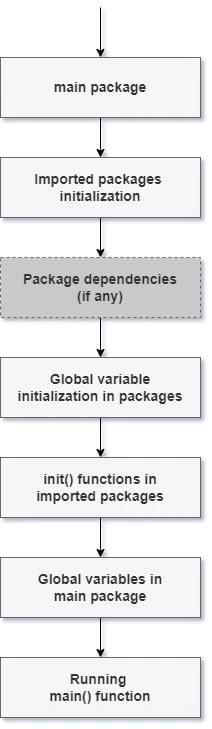
As an example, if amainpackageimports packageAand packageAdepends on packageB, then the following will take place:
- The process starts with
mainpackage. - Themainpackage imports packageA.
- PackageAimports packageB.
- The global variables, if any, in packageBare initialized.
- The
init()function or functions of packageB, if they exist, run. This is the firstinit()function that gets executed. - The global variables, if any, in packageAare initialized.
- The
init()function or functions of packageA, if there are any, run. - The global variables in the
mainpackage are initialized. - The
init()function or functions ofmainpackage, if they exist, run. - The
main()function of themainpackage begins execution.
This is also shown as a practical example later in this article.
init() function syntax
init() function is quite similar to the main()function with
regards to their syntax and declaration.init()function does not take
any arguments. When declared in a package , theinit() function will
always get executed before themain()function. This enables
themain()function to work with variables that have been initialized
already. Create amain.go file in your working directory and add the
below code sample.
Example
package main

import "fmt"

var greetings string
var age int

func init() {
   fmt.Println("I always execute before main() function")
   greetings = "Hello world"
}
func main() {
   fmt.Println("I execute after init() function")
   fmt.Println(greetings)
   fmt.Printf("Go language is %d years old \n", age)
}
Explanation
To test the code, move to your terminal and navigate to your working
directory and enter go run main.go**.**We declare two
variables,greetings and age. We then define theinit()function
whose main job is to initialize thegreetings****variable. The
greetings variable gets initialized in theinit()function while
theagevariable does not. We then print the logs in the terminal
using themain() function. It is important to note that
theinit()function will always be executed before
themain()function. This has been demonstrated in the code example. In
the output theage****does not get assigned any value other than 0
values that it was assigned when declaring it withvar age int.
Output
I always execute before main() function
I execute after init() function
Hello world
Go language is 0 years old
Multiple init() functions in a file
It is possible to have more than oneinit()functions declared in the
same file. The order in which these multipleinit()functions will be
executed determines the behavior of the application. Go determines the
order of execution based on the order in whichinit()functions have
been defined in the file, as shown in the example.
Example
package main

import "fmt"

func init() {
   fmt.Println("<<< First >>>")
}
func init() {
   fmt.Println("<<< Second >>>")
}
func init() {
   fmt.Println("<<< Third >>>")
}

func main() {
   fmt.Println("I execute after init() functions")
}
Explanation
When this code is executed, theinit()functions will be executed in
their respective order of declaration such that the first function
prints on the console , followed by the secondinit() function and
lastly the thirdinit()function. Multiple declaration
ofinit()functions are often used in complex systems. It enables teams
to break complex initialization application states into multiple init()
functions that are easy to read.
Output
<<< First >>>
<<< Second >>>
<<< Third >>>
I execute after init() functions
Multiple packages with init() functions
Some applications can get complex and might require declaration of the
init() function in different files within a package. It is possible to
declare multiple init() functions within a file or package. In Go,
when multiple files are encountered, they are processed alphabetically.
We therefore need to keep in mind how we name our Go files that will
house init() functions.
For example, suppose we have package a , package b and package main, and package main imports package a and package b, below will be the order of execution.
- Global variables in package a will be initialized and then
init()function in package a will be executed. - Global variables in package b will be initialized and then
init()function in package b will be executed. - Global variables in main package will be initialized and
init()function in package main will be executed - Finally the main function will start executing.
To test the above explanation, we need to first of all create a module that will keep track of our code in different packages. To create a module in Go, navigate to your working directory in the terminal and issue this command:
$ mkdir sample && cd sample
$ go mod init example.com/go_init_func
go.mod
module example.com/go_init_func

go 1.18
sample/a/a.go
package a

func init() {
   println("init() function in a/a.go")
}

func Greetings() {
   println("Hello, world from a/a.go")
}
sample/b/b.go
package b

import "fmt"

func init() {
   fmt.Println("init() function in b/b.go")
}

func Greetings() {
   fmt.Println("Hello, world from b/b.go")
}
sample/main.go
func main() {
   fmt.Println("Executing main() function in main.go")
   a.Greetings()
   b.Greetings()
}
Explanation
The above example stresses the point that theinit()function in
different packages will be executed in an order that is determined by
the package names. In our examplea/a.go package gets executed first,
thenb/b.go package follows afterwards. In
themain()function,b.Greetings()is called first , followed
bya.Greetings(). We would expect logs forb/b.go to be printed
first, buta/a.go logs get printed first then b/b.go package logs
follow.
Output
init() function in a/a.go
init() function in b/b.go
init() function in main.go
Executing main() function in main.go
Hello, world from a/a.go
Hello, world from b/b.go
Challenges working with init() function
It is a challenge to name files alphabetically in order to obey package
initialization specification in Go. This will create problems in your
code because it’s common practice to rename files in your code, and
doing so it will affect the order in whichinit()functions will be
processed. One way to prevent having this kind of a scenario is to have
allinit()functions declared in one file. The Go compiler will load
them in the order they have been declared in the file.
Summary
We have learnt that the Goinit()function is useful when defining the
state of your Go application. It is possible to define
multipleinit()functions in one file and multiple packages
withinit()functions.
init()functions in a single file will be loaded in the order that they
have been declared, whileinit()functions in multiple packages will be
loaded based on the file names used in alphabetical order. Declaring
init()functions in multiple packages is not desirable , therefore we
should define ourinit()functions in a single file.
Defininginit()functions in a single file , enables us to comfortably
understand the behavior of our application even after renaming our
files.