

“Hello, world!” in any programming language is the very first basic program. You can also read ourGetting started with GOLANG | Write your first GO Code for more information.
Let’s use the following steps to create the first Go program:
- Install Go (if you haven’t already).
- Write some simple “Hello, world!” code.
- Use the
gocommand to run your code.
Install Golang
Follow the Download and install steps in the official documents.
Create your first Golang Hello World program
Set up the package
You should also learn about golang packaging. Create a new source code folder for a new project. For example, use the following commands in Linux environment:
mkdir hello
When your code imports packages contained in other modules, you manage those dependencies through your code’s own module. That module is defined by a go.mod file that tracks the modules that provide those packages. That go.mod file stays with your code, including in your source code repository.
To enable dependency tracking for your code by creating a go.mod
file, run
thego mod initcommand, giving it the name
of the module your code will be in. The name is the module’s module
path.
In actual development, the module path will typically be the repository
location where your source code will be kept. For example, the module
path might begithub.com/mymodule. If you plan to publish your module
for others to use, the module pathmustbe a location from which Go
tools can download your module. For more about naming a module with a
module path,
seeManaging dependencies.
For this tutorial, run the following command:
go mod init example/hello
go: creating new go.mod: module example/hello
Next step, you have to create a file hello.go in the above folder to
write your code.
Your first Hello, world! code
First, declare the main package into your program:
package main
The package declaration must come first in every program. To organize and reuse code in the Go programming language, packages are needed. Here, the package main tells the compiler to use an executable program rather than a shared library when building the package. It acts as the program’s initial point and holds its primary function.
After adding main package, import
fmt
package in your program. This is one of the standard library packages
you got with Go installation.
import (
"fmt"
)
Write the Go language code to print “hello world” in the main function now:
func main() {
    fmt.Println("Hello, world!")
}
Explanation:
- func: In the Go language, func is used to define functions.
- main(): The main function in the Go programming language is called when a program is run; it has no parameters and returns nothing.
- fmt: The fmt package contains a function called Println() that is used to display the content to the console log
- func Println(a …any) (n int, err error): Println formats using the default formats for its operands and writes to standard output. Spaces are always added between operands and a newline is appended. It returns the number of bytes written and any write error encountered.
Full “Hello, world!” example code:
// first go program
package main

import "fmt"

// main function
func main() {

    fmt.Println("Hello, world!")
}
Output:
Hello, world!
How to Run Golang Program?
A Go compiler is required to run a Go program. After you installed Go compiler, you can check your compiler version and run your go file with the command line:

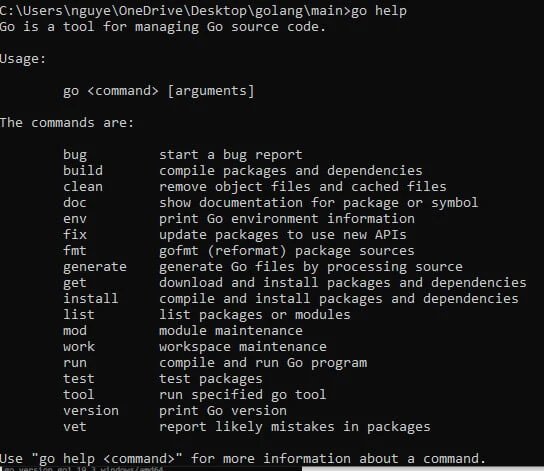
Thego runcommandis one of
manygocommands you’ll use to get things done with Go. Use the
following command to get a list of the others:
go help
Output:
Summary
In this tutorial, I have shown you how to create your first Golang Hello World program. You can modify our code below to print out something such as your name, and your age, ….
