

In this tutorial, we will walk through how we can connect a Golang application with MongoDB.
MongoDB is a document database with the scalability and flexibility that you want with the querying and indexing that you need. MongoDB stores data in flexible, JSON-like documents, meaning fields can vary from document to document and data structure can be changed over time
If we want to connect out Go appication with MongoDB Atlas cluster, we need Go driver.
- The Go driver lets you connect to and communicate with MongoDB clusters from a Go application.
- MongoDB Atlas is a fully-managed cloud database service that hosts your data on MongoDB clusters. In this guide, we show you how to get started with your own free (no credit card required) cluster.
Setup Lab Environment - Install and Setup MongoDB
I am sharing two different ways to install and setup MongoDB. You can choose any one of the preferred method.
Method-1: Set up a Free Cluster in Atlas
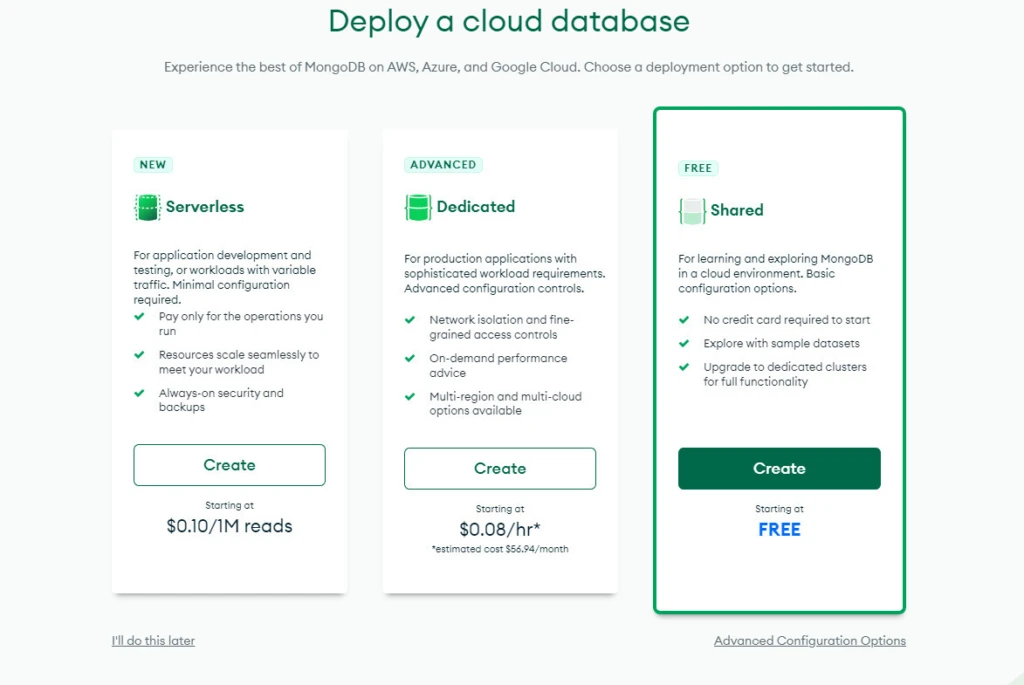
Access https://www.mongodb.com/cloud/atlas/register to sign up a new account. After that, you should have a new MongoDB cluster deployed in Atlas, a new database user, and sample datasets.
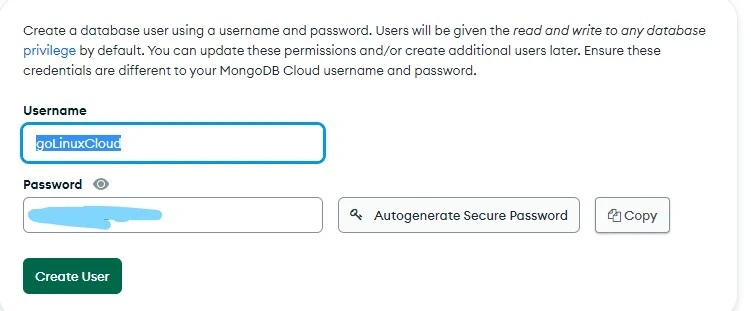
Remember to note the username and password when create database:
It will direct you to the Database Deployments page, where you can manage all your databases.
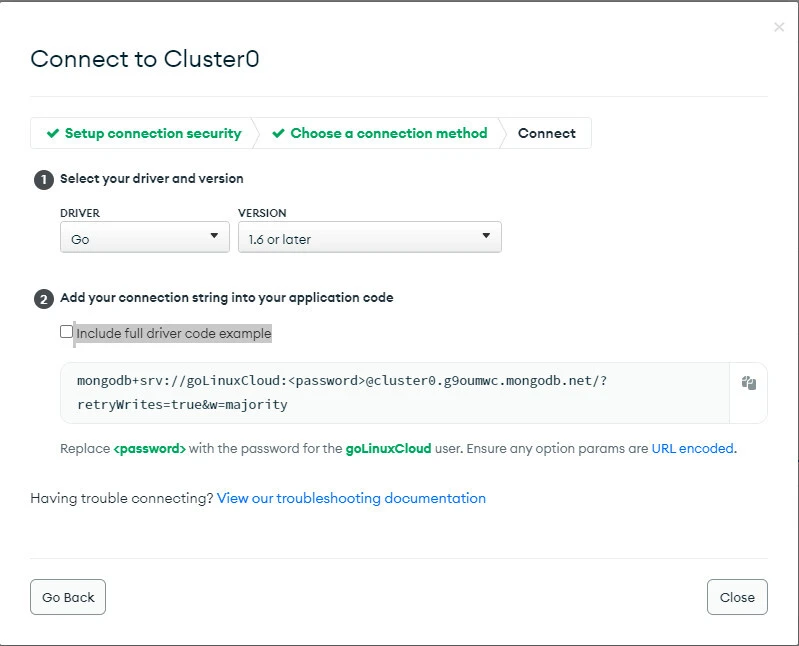
Next step, you create and run an application that uses the Go driver to connect to your MongoDB cluster. You have to provide the driver connection string to connect to your MongoDB cluster. This string includes information on the hostname or IP address and port of your cluster, authentication mechanism, user credentials when applicable, and other connection options.
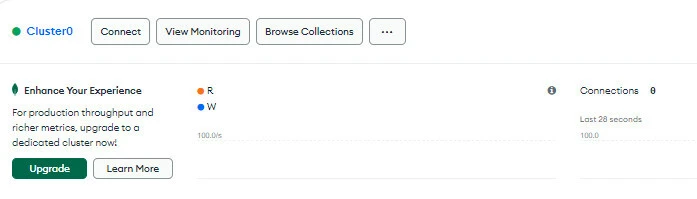
Click the Connect button, then choose the option: Connect your application:

Select the Go version you are using, copy the connection string for future use:
Method-2: Install MongoDB using Package Manager
You can also install MongoDB manually using package manager. I have written another article to install and setup MongoDB on Rocky Linux 8. To install the same on Ubuntu we can simply use apt package manager:
# apt install mongodb
Next start and check the status of the service:
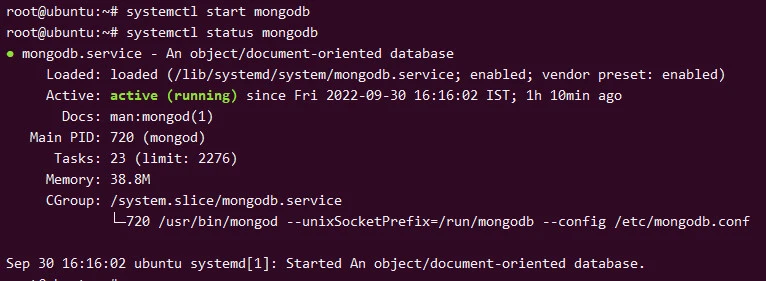
To access the database you can execute mongo from the terminal
Method-1: Using mongo-driver for MongoDB
Create workspace and install mongodb package
We will create a golang workspace to test our code:
$ mkdir ~/goexamples
$ mkdir ~/goexamples/code1
$ touch ~/goexamples/code1/main.go
$ cd ~/goexamples/code1
Usego get to add the Go driver as a dependency:
$ go get go.mongodb.org/mongo-driver/mongo
Create your first database
Databases are collections of data. Records, also known as documents, are stored in collections. Collections are the RDBMS equivalent of tables, and documents are rows in a table.
Here is an example of how to insert a new document to a MongoDB Atlas Cluster database. One document have two field: student’s name (name) and score
package main

import (
    "context"
    "fmt"

    "go.mongodb.org/mongo-driver/bson"
    "go.mongodb.org/mongo-driver/mongo"
    "go.mongodb.org/mongo-driver/mongo/options"
)

func main() {

    // Define the mongodb client URL
    var uri = "mongodb://localhost:27017"

    // Establish the connection
    client, err := mongo.Connect(context.TODO(), options.Client().ApplyURI(uri))
    if err != nil {
        panic(err)
    }

    // Create go routine to defer the closure
    defer func() {
        if err = client.Disconnect(context.TODO()); err != nil {
            panic(err)
        }
    }()

    // begin insertOne and create testDB database
    coll := client.Database("testDB").Collection("scoreCollection")
    doc := bson.D{{"name", "Anna"}, {"score", 9.5}}

    result, err := coll.InsertOne(context.TODO(), doc)
    if err != nil {
        panic(err)
    }
    // end insertOne

    // When you run this file, it should print:
    // Document inserted with ID: ObjectID("...")
    fmt.Printf("Document inserted with ID: %s\n", result.InsertedID)
}
Output:
Document inserted with ID: ObjectID("6333107dd0edee77528fcaf8")
Noted that:
- The database and the collection will automatically created if not existed.
- The _id field is automatically added to each document
- BSON is a binary serialization format used to store documents and make remote procedure calls in MongoDB. The BSON specification is located at bsonspec.org
We can verify the same using mongo client on the terminal:
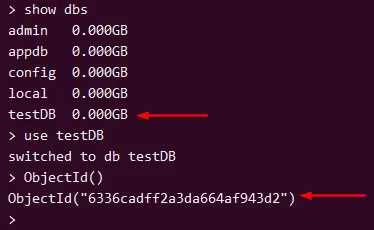
For multiple documents insert, you can change the code to:
package main

import (
    "context"
    "fmt"

    "go.mongodb.org/mongo-driver/bson"
    "go.mongodb.org/mongo-driver/mongo"
    "go.mongodb.org/mongo-driver/mongo/options"
)

func main() {

    // Define the mongodb client URL
    var uri = "mongodb://localhost:27017"

    // Establish the connection
    client, err := mongo.Connect(context.TODO(), options.Client().ApplyURI(uri))
    if err != nil {
        panic(err)
    }

    // Create go routine to defer the closure
    defer func() {
        if err = client.Disconnect(context.TODO()); err != nil {
            panic(err)
        }
    }()

    coll := client.Database("Employee").Collection("scoreCollection")
    docs := []interface{}{
        bson.D{{"name", "Alley"}, {"score", 7.5}},
        bson.D{{"name", "Bob"}, {"score", 8.5}},
        bson.D{{"name", "Carry"}, {"score", 6.8}},
        bson.D{{"name", "Daniel"}, {"score", 5.5}},
        bson.D{{"name", "Danish"}, {"score", 4.8}},
        bson.D{{"name", "Era"}, {"score", 9.2}},
        bson.D{{"name", "Hush"}, {"score", 10}},
        bson.D{{"name", "Halley"}, {"score", 3.6}},
        bson.D{{"name", "John"}, {"score", 7.5}},
    }

    // insertMany
    result, err := coll.InsertMany(context.TODO(), docs)
    if err != nil {
        panic(err)
    }
    // end insertMany

    // When you run this file, it should print:
    // Document inserted with ID: ObjectID("...")
    for _, id := range result.InsertedIDs {
        fmt.Printf("\t%s\n", id)
    }

}
Output:
# go run main.go
        ObjectID("6336d3f9fe33297da558df91")
        ObjectID("6336d3f9fe33297da558df92")
        ObjectID("6336d3f9fe33297da558df93")
        ObjectID("6336d3f9fe33297da558df94")
        ObjectID("6336d3f9fe33297da558df95")
        ObjectID("6336d3f9fe33297da558df96")
        ObjectID("6336d3f9fe33297da558df97")
        ObjectID("6336d3f9fe33297da558df98")
        ObjectID("6336d3f9fe33297da558df99")
We can verify the same inside the Employee db:
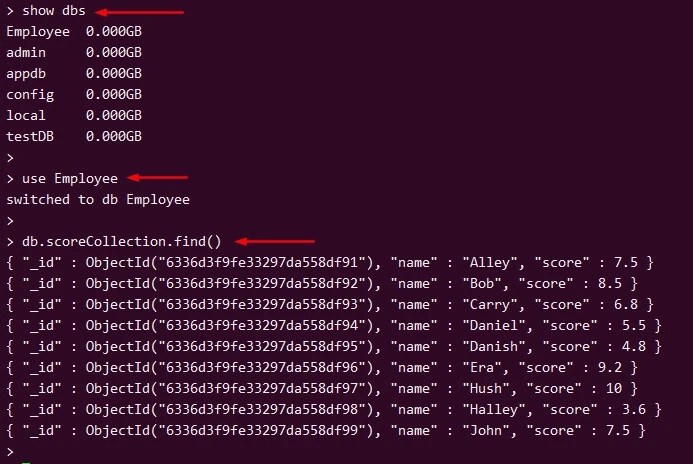
Update one or multiple documents
Here is an example of how to update a student’s score. We first filter by name, then update score for that student:
 coll := client.Database("Employee").Collection("scoreCollection")
    studentName := "Alley"
    // filter by name
    filter := bson.D{{"name", studentName}}
    // set new score for that student
    update := bson.D{{"$set", bson.D{{"score", 5.6}}}}

    result, err := coll.UpdateOne(context.TODO(), filter, update)
    if err != nil {
        panic(err)
    }
    // end updateone

    // When you run this file for the first time, it should print:
    // Number of documents replaced: 1
    fmt.Printf("Documents updated: %v\n", result.ModifiedCount)
Output:
Documents updated: 1
If the score is unchanged or the student is not in collection, the output will be:
Documents updated: 0
We can verify the same on our DB:
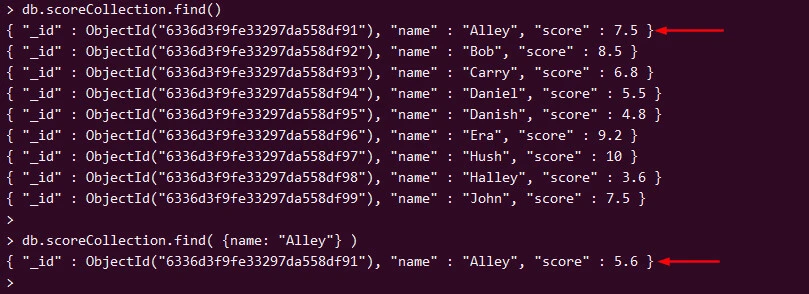
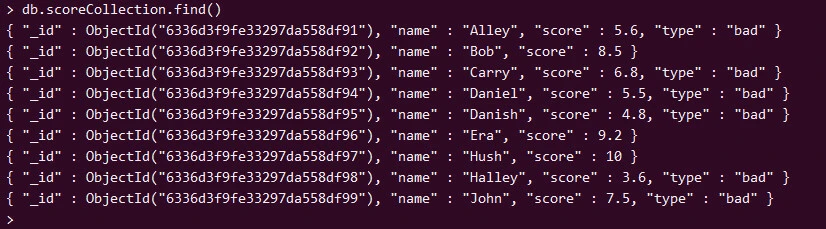
I will demonstrate how to create a new “type” field with value “bad” for all students with score <= 7.5
 filter := bson.D{{"score", bson.D{{"$lte", 7.5}}}}
    update := bson.D{{"$set", bson.D{{"type", "bad"}}}}

    // update Many
    result, err := coll.UpdateMany(context.TODO(), filter, update)
    if err != nil {
        panic(err)
    }
    // end update Many

    // When you run this file for the first time, it should print:
    // Number of documents replaced:
    fmt.Printf("Documents updated: %v\n", result.ModifiedCount)
Output:
Documents updated: 6
We can check the collection after updated:
Delete MongoDB documents
We can filter the student’s name we want to delete then call
DeleteOne() or DeleteMany() method to delete those documents. If
there’s no record meet the filter, no exception or error will be raised.
If you want to check the number of deleted document, you can print the
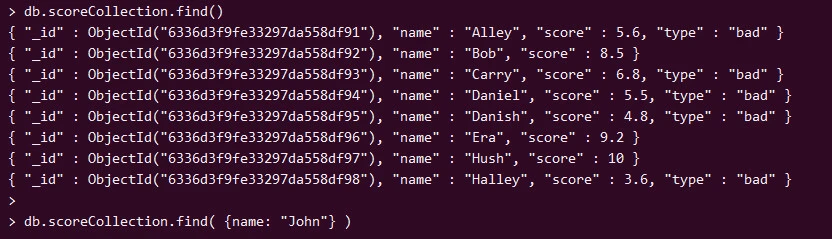
DeletedCount. Here is an example of deleting ‘John’ record
 filter := bson.D{{"name", "John"}}
    result, err := coll.DeleteOne(context.TODO(), filter)
    if err != nil {
        panic(err)
    }

    // When you run this file for the first time, it should print:
    // Documents deleted: 1
    fmt.Printf("Documents deleted: %d\n", result.DeletedCount)
Output:
Documents deleted: 1
Verify the same on the DB:
Filter MongoDB documents using Golang
You can find multiple documents in a collection by using theFind()
method. Here’s example of find student’s name starts with ‘A’
 filter := bson.D{{"name", bson.D{{"$regex", "^A"}}}}

    cursor, err := coll.Find(context.TODO(), filter)
    if err != nil {
        panic(err)
    }
    // end find

    var results []bson.M
    if err = cursor.All(context.TODO(), &results); err != nil {
        panic(err)
    }
    for _, result := range results {
        output, err := json.MarshalIndent(result, "", "    ")
        if err != nil {
            panic(err)
        }
        fmt.Printf("%s\n", output)
    }
Output:
# go run main.go
{
    "_id": "6336d3f9fe33297da558df91",
    "name": "Alley",
    "score": 5.6,
    "type": "bad"
}
Method-2: Using mgo as driver for MongoDB
The third-party
packagemgo, pronounced “mango,” provides support for
working with MongoDB database, and its subpackagebsondoes the
implementation for BSON specification to work with BSON documents. The
values of Go types such asslice,map, andstructcan be persisted into
MongoDB. When a write operation is performed onto MongoDB, the
packagemgoautomatically serializes the values of Go types into BSON
documents. In most use cases, you can define your data model by using
structs and
perform the CRUD
operations against it.
Installing mgo
To install the packagemgo, run the following command:
$ go get gopkg.in/mgo.v2
This will fetch packagemgoand its subpackagebson. To work with
themgopackage, you must addgopkg.in/mgo.v2to the list of imports.
import "gopkg.in/mgo.v2"
If you want to use thebsonpackage, you must
addgopkg.in/mgo.v2/bsonto the list of imports:
import (
        "gopkg.in/mgo.v2"
        "gopkg.in/mgo.v2/bson"
)
Connecting to MongoDB
To perform CRUD operations with MongoDB, you first obtain a MongoDBsessionusing the functionDialas shown here:
session, err := mgo.Dial("localhost")
The functionDialestablishes a connection to the cluster of MongoDB
servers identified by theurlparameter and returns a pointer
tomgo.Session, which is used to perform CRUD operations against the
MongoDB database. The functionDialsupports connection with a cluster
of servers as shown here:
session, err := mgo.Dial("server1.mongolab.com,server2.mongolab.com")
You can also use the functionDialWithInfoto establish connection to
one or a cluster of servers, which returnsmgo.Session. This function
allows you to pass customized information to the server using
typemgo.DialInfoas shown here:
mongoDialInfo := &mgo.DialInfo{
            Addrs:    []string{"localhost"},
            Timeout:  60 * time.Second,
            Database: "testDB",
            Username: "testuser",
            Password: "password123",
        }

 session, err := mgo.DialWithInfo(mongoDialInfo)
Working with Collections
MongoDB stores data as documents, which are organized into collections.
The CRUD operations are performed against a collection, which is mapped
to the typemgo.Collectionin the packagemgo. The methodCof
typemgo.Databaseis used to create anmgo.Collectionobject.
Themgo.Databasetype represents the named database of MongoDB, which
is created by calling the methodDBof typemgo.Session.
The following statement creates a pointer tomgo.Collectionthat
represents the MongoDB collection named"bookmarks" in the “testDB”
database.
collection := session.DB("testDB").C("bookmarks")
Inserting Struct Values into MongoDB
The struct typeshould be your choice when you define a data model for
Go applications. So when you work with MongoDB, you primarily provide
values of the struct type to insert BSON documents into a MongoDB
collection. Themgodriver for MongoDB automatically serializes the
struct values as BSON documents when theInsertmethod is used.
package main

import (
    "fmt"
    "log"

    "gopkg.in/mgo.v2"
    "gopkg.in/mgo.v2/bson"
)

type Category struct {
    Id          bson.ObjectId `bson:"_id,omitempty"`
    Name        string
    Description string
}

func main() {
    session, err := mgo.Dial("localhost")
    if err != nil {
        panic(err)
    }
    defer session.Close()

    // Optional. Switch the session to a monotonic behavior.
    // Reads may not be entirely up-to-date, but they will always see the
    // history of changes moving forward, the data read will be consistent
    // across sequential queries in the same session, and modifications made
    // within the session will be observed in following queries (read-your-writes).
    // http://godoc.org/labix.org/v2/mgo#Session.SetMode
    session.SetMode(mgo.Monotonic, true)

    //get collection
    c := session.DB("taskdb").C("categories")

    doc := Category{
        bson.NewObjectId(),
        "Open Source",
        "Tasks for projects",
    }
    //insert a category object
    err = c.Insert(&doc)
    if err != nil {
        log.Fatal(err)
    }

    //insert two category objects
    err = c.Insert(&Category{bson.NewObjectId(), "R & D", "R & D Tasks"},
        &Category{bson.NewObjectId(), "Project", "Project Tasks"})

    var count int
    count, err = c.Count()
    if err != nil {
        log.Fatal(err)
    } else {
        fmt.Printf("%d records inserted", count)
    }
}
A struct namedCategoryis created to define the data model and
persist struct values into a MongoDB database. You can specify the type
of_idfield asbson.ObjectId. ObjectIdis a 12-byte BSON type
that holds uniquely identified values. BSON documents stored in a
MongoDB collection require a unique_idfield that acts as a primary
key.
When you insert a new document, provide an_idfield with a
uniqueObjectId. If an_idfield isn’t provided, MongoDB will add
an_idfield that holds anObjectId. When you insert records into a
MongoDB collection, you can callbson.NewObjectId()to generate a
unique value forbson.ObjectId. Tag the_idfield to be serialized
as_idwhen themgodriver serializes the values into a BSON
document and also specifies theomitemptytag to omit values when
serializing into BSON if the value is empty.
TheInsertmethod ofmgo.Collectionis used for persisting values into
MongoDB. TheCollectionobject is created by specifying the
name"categories“and inserting values into
the”categories“collection by calling theInsertmethod.
TheInsertmethod inserts one or more documents into the collection.
First, one document with the values of theCategorystruct is inserted
and then two documents are inserted into the collection.
Themgodriver automatically serializes the struct values into BSON
representation and inserts them into the collection.
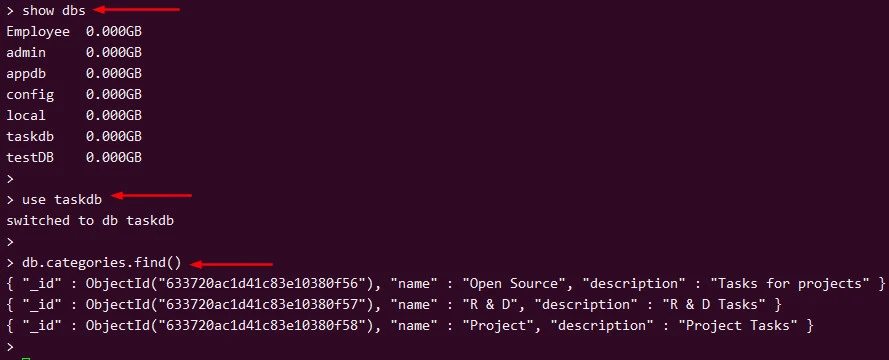
In this example program, three documents are inserted.
TheCountmethod of theCollectionobject is called to get the
number of records in the collection and finally print the count.
When you run the program for the first time, you should get the following output:
3 records inserted
Verify the same on the mongoDB
Summary
Due to a lack of simple resources for using MongoDB with Go, developers must spend a significant amount of time researching documentation. You can confidently integrate MongoDB into a Go application if you use this article as a reference guide. For query and filter operations, you can read the Mongo’s documentations.
You can learn more about MongoDB’s features by visiting the official MongoDB and Go driver documentation.
References:
https://www.mongodb.com/what-is-mongodb
https://www.mongodb.com/docs/drivers/go/current/
https://bsonspec.org/
https://www.mongodb.com/docs/
