![Create AWS DynamoDB CRUD API in Golang [SOLVED]](/aws-dynamodb-golang/golang-dynamodb-crud-api.jpg)
Introduction
In computer programming, Create, Read, Update and Delete are the basic operations that any software can perform. The operations are performed on that data that is stored in a database.
In this article, we are going to build a simple CRUD API that allows us to consume movie data in a database. We will use Go language as the runtime, Go web framework called Gin and AWS DynamoDB as the datastore.
AWS DynamoDB
DynamoDB is a NoSQL database from Amazon Web Services (AWS) that is fully managed , available in multiple regions, fast and has predictable performance with seamless scalability. AWS is a great choice for a CRUD API because we can perform CRUD operations on it.
AWS provides a Software Development Kit (SDK) that can be used to interact with DynamoDB.
Pre-requisite
- Go runtime installed, version 1.18 should be fine.
- Basic Go knowledge i.e function, pointers, methods, slices etc.
- AWS account with necessary permissions for using different AWS services like DynamoDB.
- Postman installed , used for testing API
Setup Lab Environment
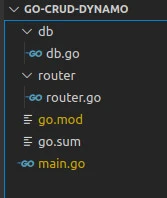
This is a simple API to demonstrate how to integrate Go and DynamoDB. Therefore our application structure is as simple as possible and will contain the following
- db module : Stores code for DynamoDB configurations and all CRUD operations.
- Router module: Stores code for API HTTP CRUD requests.
- main.go file : Spins the server and server HTTP requests.
Use the below steps to create our application structure.
Create a working directory and navigate into it.
$ mkdir go-crud-api && cd go-crud-api
Create application modules with their respective files.
$ mkdir db router
Create main.go file
touch main.go
Initialize Go module
$ go mod init go-crud-api
Install dependencies
$ go get -u github.com/aws/aws-sdk-go
$ go get -u github.com/aws/aws-sdk-go-v2/aws
$ go get -u github.com/aws/aws-sdk-go/aws/session
$ go get -u github.com/aws/aws-sdk-go/service/dynamodb
$ go get -u github.com/aws/aws-sdk-go/service/dynamodb/dynamodbattribute
$ go get -u github.com/aws/aws-sdk-go/service/dynamodb/expression
$ go get -u github.com/google/uuid
Database configuration
In this section we are going to set up the database and create CRUD
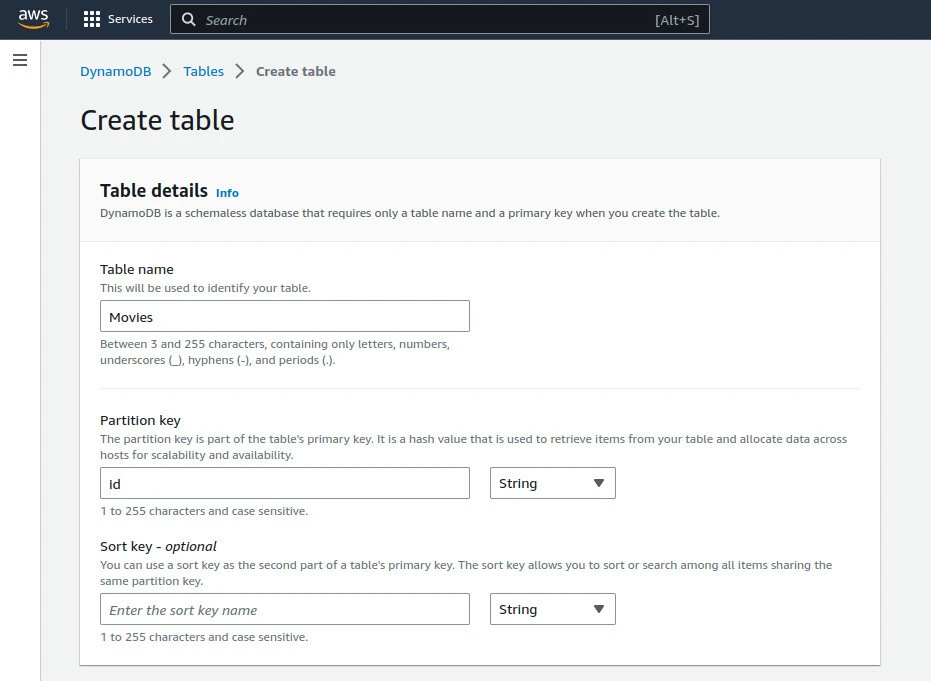
operations. Before proceeding further , create a new table called Movies
in AWS in a region close to you. While creating the database please
ensure that the primary key name is id and is of type string as
shown below**.**
Navigate to the db module and create db.go file and add the below code
sample.
package db

import (
   "errors"
   "fmt"

   "github.com/aws/aws-sdk-go-v2/aws"
   "github.com/aws/aws-sdk-go/aws/session"
   "github.com/aws/aws-sdk-go/service/dynamodb"
   "github.com/aws/aws-sdk-go/service/dynamodb/dynamodbattribute"
   "github.com/aws/aws-sdk-go/service/dynamodb/expression"
   "github.com/google/uuid"
)

type Database struct {
   client    *dynamodb.DynamoDB
   tablename string
}

type Movie struct {
   Id          string `json:"id"`
   Name        string `json:"name"`
   Description string `json:"description"`
}

type MovieService interface {
   CreateMovie(m Movie) (Movie, error)
   GetMovies() ([]Movie, error)
   GetMovie(id string) (Movie, error)
   UpdateMovie(m Movie) (Movie, error)
   DeleteMovie(id string) error
}

func InitDatabase() MovieService {
   sess := session.Must(session.NewSessionWithOptions(session.Options{
       SharedConfigState: session.SharedConfigEnable,
   }))

   return &Database{
       client:    dynamodb.New(sess),
       tablename: "Movies",
   }
}
The database code starts off by defining our db package using the
package db statement at the top. We then import DynamoDB AWS
dependencies together with google uuid package that we will use to
create movie IDs.
Movie database
The next step is to define a Database{} struct that has the client
field of type*dynamodb.DynamoDBand tablename fields. The client
will make accessing AWS DynamoDB a walk in the park. The table name
field defines the table that we have created in AWS.
Movie structure
After defining the database struct, we define our movie model using the
type Movie struct {} statement. Each movie will have an Id, Name
and Description. In order to generate a movie Id, we will use
the github.com/google/uuid package**.**
Movie Service
Movie service is defined using
thetype MovieService interface{}statement**.** This interface
defines all the CRUD operations that can be performed on movie objects
in our application**.**
Initialize Database
The InitDatabase() function is responsible for setting up a new
database client and returning a MovieService**.** In order to create a
client successfully , we initialize a session that the SDK will use to
load credentials from the shared credentials file in
~/.aws/credentials. To obtain the region for AWS, the SDK obtains the
default region from the shared configurations file at ~/.aws/config.
InitDatabase() returns a database instance with the client and
tablename name set. The table name is the same table name we created in
AWS.
Configure for CRUD Operations
In this section you will write the CRUD operations that will be run against the database.
****Create Movie
func (db Database) CreateMovie(movie Movie) (Movie, error) {
   movie.Id = uuid.New().String()
   entityParsed, err := dynamodbattribute.MarshalMap(movie)
   if err != nil {
       return Movie{}, err
   }

   input := &dynamodb.PutItemInput{
       Item:      entityParsed,
       TableName: aws.String(db.tablename),
   }

   _, err = db.client.PutItem(input)
   if err != nil {
       return Movie{}, err
   }

   return
The CreateMovie() method takes a movie argument of type Movie{} ,
and returns the created movie if successful or an error. Before storing
the movie , we assign the movie a UUID using the
movie.ID = uuid.New().String() statement. Next marshal the movie
struct into a map using the dynamodbattribute.MarshalMap(movie)
statement. This statement returns the parsed movie or an error. The
error variable can return “no resource found” type of an error if
the table is not created. To write into the movie to the table, you
prepare the input using the &dynamodb.PutItemInput{} statement , that
requires the parsed movie and the name of the table to write the movie
into. In the next step we write the movie into the database using
db.client.PutItem(input) statement.
****Get Movies
func (db Database) GetMovies() ([]Movie, error) {
   movies := []Movie{}
   filt := expression.Name("Id").AttributeNotExists()
   proj := expression.NamesList(
       expression.Name("id"),
       expression.Name("name"),
   )
   expr, err := expression.NewBuilder().WithFilter(filt).WithProjection(proj).Build()
   if err != nil {
       return []Movie{}, err
   }
   params := &dynamodb.ScanInput{
       ExpressionAttributeNames:  expr.Names(),
       ExpressionAttributeValues: expr.Values(),
       FilterExpression:          expr.Filter(),
       ProjectionExpression:      expr.Projection(),
       TableName:                 aws.String(db.tablename),
   }
   result, err := db.client.Scan(params)

   if err != nil {

       return []Movie{}, err
   }

   for _, item := range result.Items {
       var movie Movie
       err = dynamodbattribute.UnmarshalMap(item, &movie)
       movies = append(movies, movie)

   }

   return movies, nil
}
The GetMovies() method returns all the movies found in the database.
To start off, you create a movies variable that will store all the
movies found in the database. To get the movies in the database,
DynamoDB requires a filter of the field which is the desired item
attribute.The statement
filt := expression.Name("Id").AttributeNotExists() has been used to
define the id as the filter. Next you define a projection that is used
together with the filter to create an expression builder. After creating
the expression builder, we scan the table to read all the movies using
the result, err := db.client.Scan(params) statement. After a
successful scan operation, you iterate over the results and unmarshal
movies returned from the scan operation. After a successful iteration ,
you return all the movies.
****Get movie
func (db Database) GetMovie(id string) (Movie, error) {
   result, err := db.client.GetItem(&dynamodb.GetItemInput{
       TableName: aws.String(db.tablename),
       Key: map[string]*dynamodb.AttributeValue{
           "id": {
               S: aws.String(id),
           },
       },
   })
   if err != nil {
       return Movie{}, err
   }
   if result.Item == nil {
       msg := fmt.Sprintf("Movie with id [ %s ] not found", id)
       return Movie{}, errors.New(msg)
   }
   var movie Movie
   err = dynamodbattribute.UnmarshalMap(result.Item, &movie)
   if err != nil {
       return Movie{}, err
   }

   return movie, nil
}
The GetMovie() method takes as an argument the id of the movie to read
from the database and returns the found movie if successful else returns
an error. To get a movie from the database , we use the GetItem()
function provided by DynamoDB.
****Update Movie
func (db Database) UpdateMovie(movie Movie) (Movie, error) {
   entityParsed, err := dynamodbattribute.MarshalMap(movie)
   if err != nil {
       return Movie{}, err
   }

   input := &dynamodb.PutItemInput{
       Item:      entityParsed,
       TableName: aws.String(db.tablename),
   }

   _, err = db.client.PutItem(input)
   if err != nil {
       return Movie{}, err
   }

   return movie, nil
}
The UpdateMovie() method takes as an argument, a movie data and
returns the updated movie if successful else returns an error. One thing
to not is that the , to update a movie we use the PutItem() function
from DynamoDB.
****Delete Movie
func (db Database) DeleteMovie(id string) error {
   input := &dynamodb.DeleteItemInput{
       Key: map[string]*dynamodb.AttributeValue{
           "id": {
               S: aws.String(id),
           },
       },
       TableName: aws.String(db.tablename),
   }

   res, err := db.client.DeleteItem(input)
   if res == nil {
       return errors.New(fmt.Sprintf("No movie to de: %s", err))
   }
   if err != nil {
       return errors.New(fmt.Sprintf("Got error calling DeleteItem: %s", err))
   }
   return nil
}
The DeleteMovie() method , takes the id of the movie to delete as an
argument and returns an error of any. To delete a movie from the table ,
use the DeleteItem() function.Everything looks good up to this point,
navigate to the router/router.go file and add API endpoints.
Configure Routes
In order to server data using the API endpoint, you need to import the
database functionalities from the db module. Also in order to expose API
endpoints, we import Gin to route all our API calls. Define the
InitRouter() function as shown below. This function creates HTTP
routes that map requests to their respective handler functions that you
will define in the next section.
package router

import (
   "net/http"

   dynamodb "example.com/go-crud-api/db"
   "github.com/gin-gonic/gin"
)

var db = dynamodb.InitDatabase()

func InitRouter() *gin.Engine {
   r := gin.Default()
   r.GET("/movies", getMovies)
   r.GET("/movies/:id", getMovie)
   r.POST("/movies", postMovie)
   r.PUT("/movies/:id", putMovie)
   r.DELETE("/movies/:id", deleteMovie)
   return r
}
Add the below code after the InitRouter() function. Please note all
the handler functions take as an input, a gin
context(ctx *gin.Context).
GET all movies
func getMovies(ctx *gin.Context) {
   res, err := db.GetMovies()
   if err != nil {
       ctx.JSON(http.StatusBadRequest, gin.H{
           "error": err.Error(),
       })
       return
   }
   ctx.JSON(http.StatusOK, gin.H{
       "movies": res,
   })
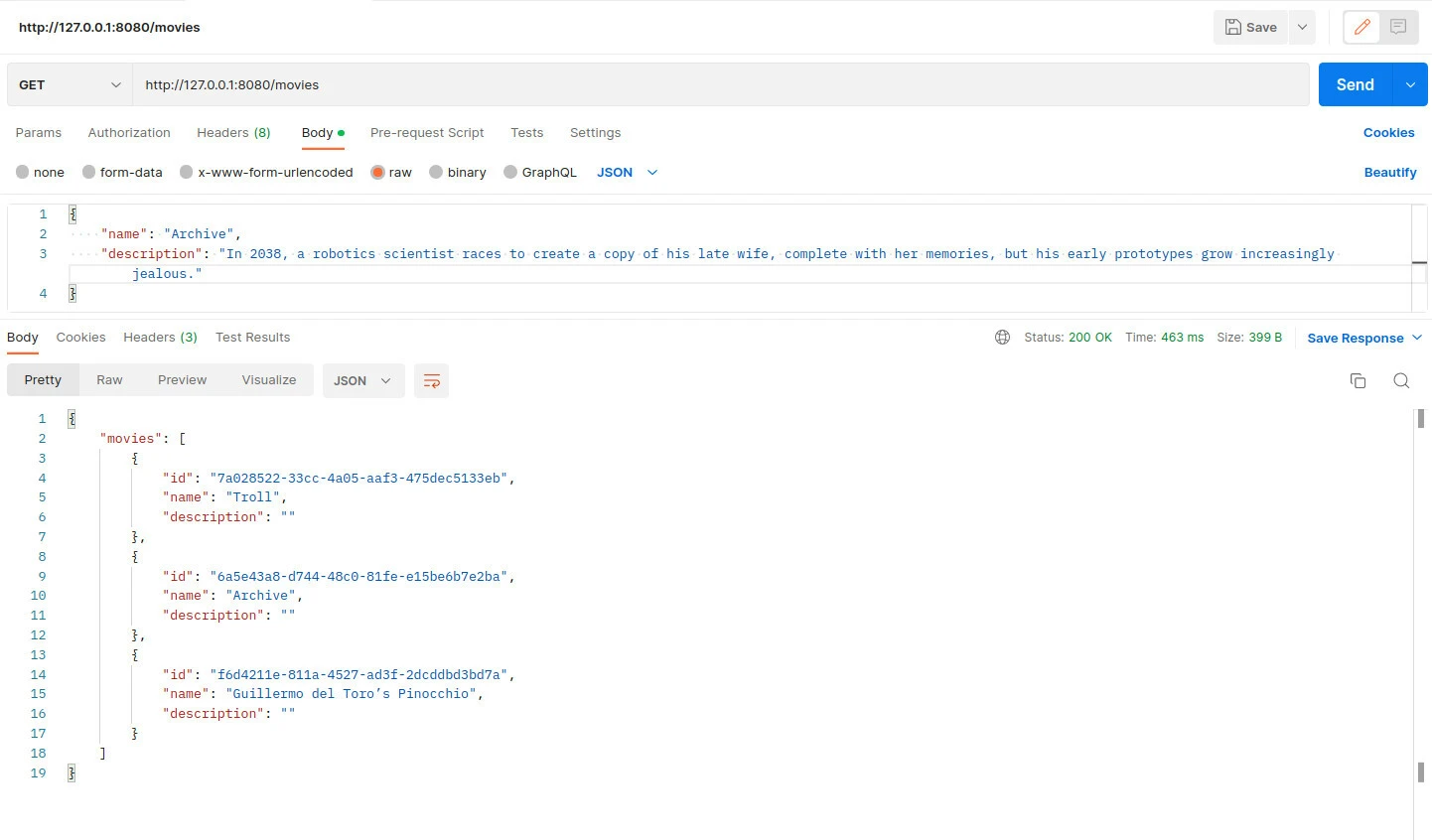
To get all movies from the database, we call the GetMovies() function
defined in the db module.
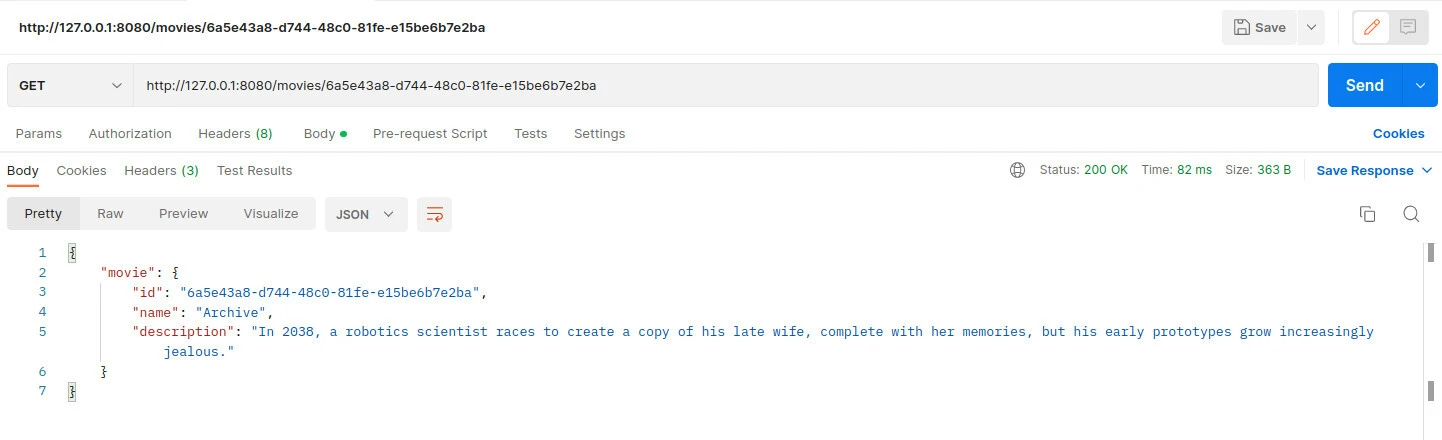
GET a movie
func getMovie(ctx *gin.Context) {
   id := ctx.Param("id")
   res, err := db.GetMovie(id)
   if err != nil {
       ctx.JSON(http.StatusNotFound, gin.H{
           "error": err.Error(),
       })
       return
   }
   ctx.JSON(http.StatusOK, gin.H{
       "movie": res,
   })
}
To get a movie, we first off all get the if of the movie from the gin
context using the id := ctx.Param(“id”) statement. This id variable is
passed the GetMovie() function from the db module.
POST a movie
func postMovie(ctx *gin.Context) {
   var movie dynamodb.Movie
   err := ctx.ShouldBind(&movie)
   if err != nil {
       ctx.JSON(http.StatusBadRequest, gin.H{
           "error": err.Error(),
       })
       return
   }
   res, err := db.CreateMovie(movie)
   if err != nil {
       ctx.JSON(http.StatusBadRequest, gin.H{
           "error": err.Error(),
       })
       return
   }
   ctx.IndentedJSON(http.StatusOK, gin.H{
       "movies": res,
   })
}
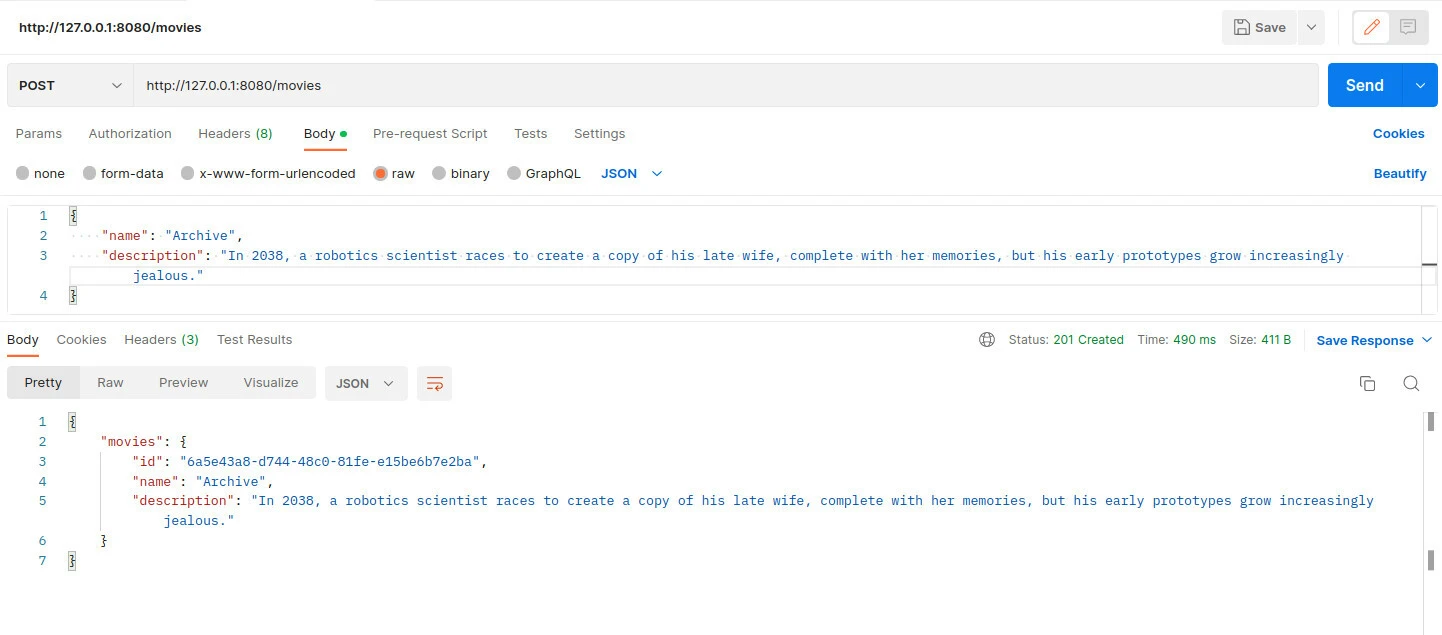
To post/create movie you get movie data from the client, and validate it
using the ctx.ShouldBind() method. To save the movie data call
CreateMovie() method from the db module.
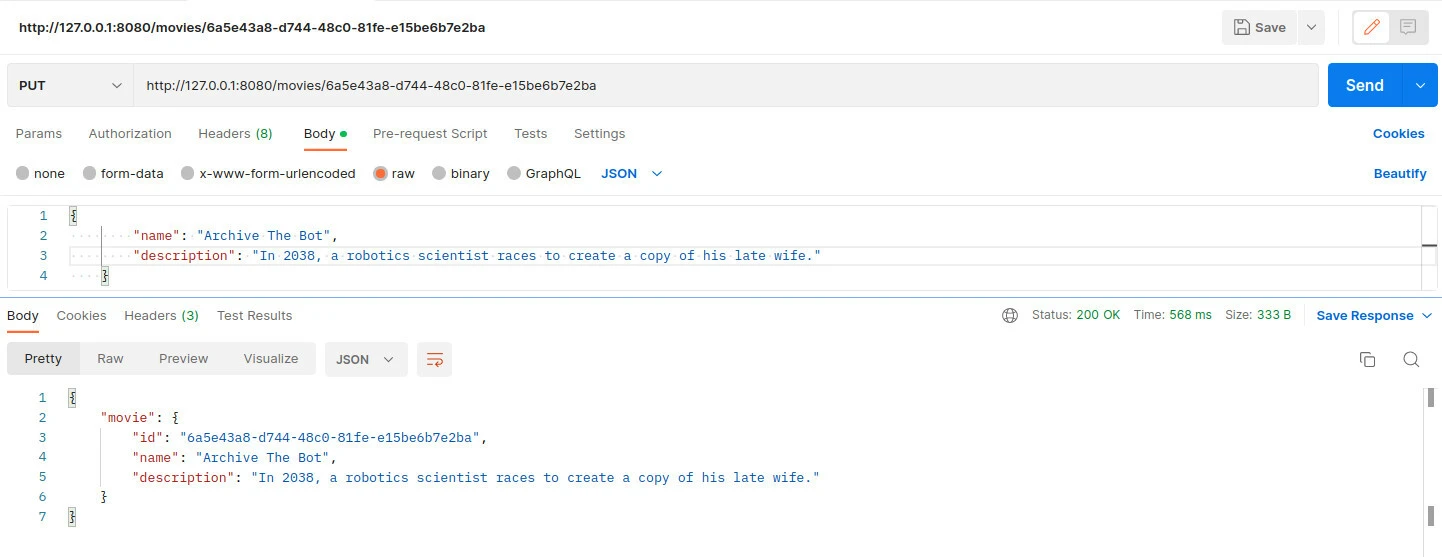
**PUT a movie
**
func putMovie(ctx *gin.Context) {
   var movie dynamodb.Movie
   err := ctx.ShouldBind(&movie)
   if err != nil {
       ctx.JSON(http.StatusBadRequest, gin.H{
           "error": err.Error(),
       })
       return
   }

   id := ctx.Param("id")
   res, err := db.GetMovie(id)
   if err != nil {
       ctx.JSON(http.StatusNotFound, gin.H{
           "error": err.Error(),
       })
       return
   }
   res.Name = movie.Name
   res.Description = movie.Description
   res, err = db.UpdateMovie(res)

   if err != nil {
       ctx.JSON(http.StatusNotFound, gin.H{
           "error": err.Error(),
       })
       return
   }
   ctx.IndentedJSON(http.StatusOK, gin.H{
       "movie": res,
   })
}
To update a movie, validate the data from the client, using the
ctx.ShouldBind(). After a successful validation, fetch the movie to
update from the database using the db.GetMovie(id) statement.The next
step is to update the movie using the res.Name = movie.Name and
res.Description = movie.Description statements. To save these changes
in the database, we call the db.UpdateMovie(res) from the db module.
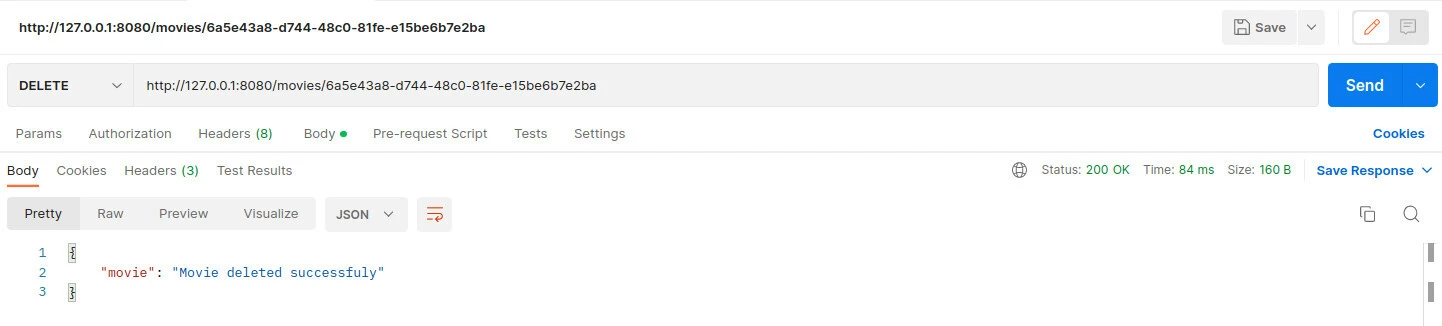
**DELETE a movie
**
func deleteMovie(ctx *gin.Context) {
   id := ctx.Param("id")
   err := db.DeleteMovie(id)
   if err != nil {
       ctx.JSON(http.StatusNotFound, gin.H{
           "error": err.Error(),
       })
       return
   }
   ctx.JSON(http.StatusOK, gin.H{
       "movie": "Movie deleted successfully",
   })
}
To delete a movie, we get the id of the movie to delete from the context
using the id := ctx.Param(“id”) statement and call the
db.DeleteMovie(id) function from the db module.
Update main function (main.go)
Now that we have the database and router module configured , navigate to the root folder and move into the main.go file and add the below code. Up to this point everything should be fine.
package main

import "example.com/go-crud-api/router"

func main() {
   router.InitRouter().Run()
}
Starting server
Before running the server, issue the below command to update our dependencies.
$ go mod tidy
Then run the below command to spin the server.
$ go run main.go
[GIN-debug] [WARNING] Creating an Engine instance with the Logger and Recovery middleware already attached.

[GIN-debug] [WARNING] Running in "debug" mode. Switch to "release" mode in production.
- using env:   export GIN_MODE=release
- using code:  gin.SetMode(gin.ReleaseMode)

[GIN-debug] GET    /movies                   --> example.com/go-crud-api/router.getMovies (3 handlers)
[GIN-debug] GET    /movies/:id               --> example.com/go-crud-api/router.getMovie (3 handlers)
[GIN-debug] POST   /movies                   --> example.com/go-crud-api/router.postMovie (3 handlers)
[GIN-debug] PUT    /movies/:id               --> example.com/go-crud-api/router.putMovie (3 handlers)
[GIN-debug] DELETE /movies/:id               --> example.com/go-crud-api/router.deleteMovie (3 handlers)
[GIN-debug] [WARNING] You trusted all proxies, this is NOT safe. We recommend you to set a value.
Please check https://pkg.go.dev/github.com/gin-gonic/gin#readme-don-t-trust-all-proxies for details.
[GIN-debug] Environment variable PORT is undefined. Using port :8080 by default
[GIN-debug] Listening and serving HTTP on :8080
Perform CRUD operations
In this section, use Postman to make HTTP calls to our server
POST a movie
GET all movies
GET a movie
PUT a movie
DELETE a movie
Conclusion
In this article, you learn how to create a Go CRUD API that consumes data from the AWS DynamoDB. DynamoDB is a scalable and fully managed AWS database. The CRUD operations are performed in separate modules , in the db and router modules. You learn to create a basic CRUD API using Go language and DynamoDB from AWS.