
Introduction to CRUD gRPC API Framework
CRUD is an acronym that refers to operations that are considered necessary to implement in a persistent storage application: Create, Read, Update and Delete. On the other hand, gRPC is an open source Remote Procedure Call(RPC) framework that can run in any environment. CRUD and gRPC can be used together to build scalable and robust applications.
There are many resources online that teach you how to build RESTful applications that make use of CRUD.In this article, we are going to learn how to build CRUD applications together with gRPC and PostgreSQL as the database. Below are the critical advantages that gRPC APIs have over RESTFul APIs.
- gRPC offers three types of data streaming namely : client-side, server-side and bidirectional streaming
- 7 to 10 times faster message transmission
- gRPC uses HTTP 2 instead of HTTP 1.1
In this article, we are going to build a CRUD application using Go as the runtime, gRPC for data exchange and PostgreSQL DB for data storage. The application will be made up of three major parts namely server, client and proto. These parts will be discussed in length later in the articles.
Prerequisite
Go programming language installed. One of the three latest releases should be fine
Protocol buffer compiler version 3
Go plugins for protocol compiler. Use the below commands to install compiler plugins.
go install google.golang.org/protobuf/cmd/protoc-gen-go@v1.28
go install google.golang.org/grpc/cmd/protoc-gen-go-grpc@v1.2
Update your PATH so that protoc compiler can find the plugins
export PATH="$PATH:$(go env GOPATH)/bin"
Code editor of your choice. I will use Visual Studio code.
Postman
Familiarity with Gin RESTful framework
gRPC architecture
gRPC uses the client and server architecture, where the client application can directly make request/call functions on a server. Unlike RESTful architecture where a client makes a request and waits for a response, in gRPC , that client calls a function on the server application hosted in a different machine as if it were in a local object.
gRPC is based around the idea of defining a service on the server side that has methods that can be called remotely with their parameters and return types. On the other hand the client side has a stub that provides the same methods as the one in the server side.
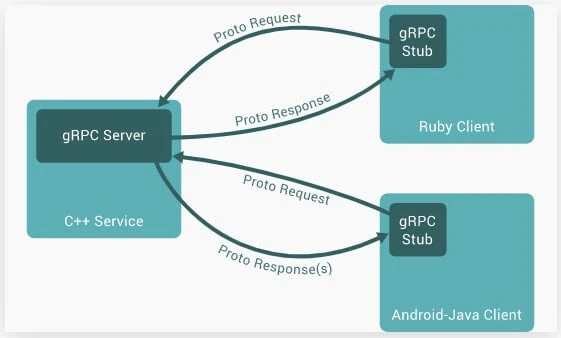
gRPC uses protocol buffers by default, which are basically open source
mechanisms for serializing structured data. When working with protocol
buffers you first of all define the structure of the data you want to
serialize in a file with a .proto extension as we will see later in
this tutorial.
When you are done defining the structured data, you use a protocol
buffer compiler called protoc to generate client and server code.
The order of application development will be ,
- Write protocol buffer data and compile using protoc compiler
- Write server side code
- Write Client side code
Application structure
As mentioned before, this application will be made up of three major parts(modules):
- proto: All our gRPC generated code will be hosted here. When working with gRPC , the gRPC compiler generates the client and server code based on the content of a .proto file.
- Server side: This module will host code for implementing server side code from the proto module. We also add postgres database connection and operations here.We will also have code that responds to client requests.
- Client side: In this module we host code for making requests to the server side.
Please note that the server and client modules will both have a main.go file and will be run in separate terminals.Follow the below steps for building our application structure.
Create working directory and navigate into it using the terminal
mkdir go-grpc-crud-api && cd go-grpc-crud-api
Create module folders
mkdir proto server client
Initialize go module
go mod init example.com/go-grpc-crud-api
Install dependencies
go get -u google.golang.org/grpc
go get -u gorm.io/gorm
go get –u gorm.io/driver/postgres
go get -u github.com/google/uuid
go get -u github.com/gin-gonic/gin
Protocol buffers
gRPC uses protocol buffers by default and the first step when working
with protocol buffers is to define the structure of the data you want to
serialize in a proto file. The proto file lives in a proto directory.
In this section , we are going to create a proto file with the
structured data that we want to work with. In this article, we are going
to use movies as our data. Each movie will have an id, title and
genre.
Move into the the proto directory and create a new file
called movie.proto.Add the below content into the proto file.
proto/movie.proto
proto/movie.proto
syntax="proto3";

package proto;

option go_package="example.com/go-grpc-crud";

message Movie {
   string id =1;
   string title =2;
   string genre =3;
}

message CreateMovieRequest {
   Movie movie = 1;
}
message CreateMovieResponse {
   Movie movie = 1;
}
message ReadMovieRequest{
   string id =1;
}
message ReadMovieResponse{
   Movie movie =1;
}
message ReadMoviesRequest{

}
message ReadMoviesResponse{
   repeated Movie movies =1;
}
message UpdateMovieRequest{
   Movie movie =1;
}
message UpdateMovieResponse{
   Movie movie =1;
}
message DeleteMovieRequest{
   string id =1;
}
message DeleteMovieResponse{
   bool success =1;
}

service MovieService {
   rpc CreateMovie(CreateMovieRequest) returns (CreateMovieResponse) {}
   rpc GetMovie(ReadMovieRequest) returns (ReadMovieResponse) {}
   rpc GetMovies(ReadMoviesRequest) returns (ReadMoviesResponse) {}
   rpc UpdateMovie(UpdateMovieRequest) returns (UpdateMovieResponse) {}
   rpc DeleteMovie(DeleteMovieRequest) returns (DeleteMovieResponse) {}
}
Let’s break down the first three statements in the movie.proto file.
syntax=”proto3”;: Defines the syntax for the protocol buffer code. There is proto2 syntax as well. In this case we are using proto3 syntaxpackage proto;:Declares the package in use.This prevents naming conflict between different projects.Option go_package=”example.com/go-grpc-crud-api”;: This option defines the import path of the package that will contain all the generated code for this file.
In protocol buffers data is structured as a message which is a logical
record of information containing a series of name-value pairs called
fields. To define a message data structure, use the keyword message
followed by the name of the message then end with {}.
In our proto file the first message is the Movie message
(message Movie{}) with an id title and genre as its fields. This
Movie message defines the data we are going to interact with. We also
define other messages namely CreateMovieRequest{},
CreateMovieResponse{} etc. Please note that some messages have a movie
as their fields and some have id as their fields for example
ReadMovieRequest. Just keep in mind that a message can be empty or can
contain fields.
One unique message is the ReadMoviesResponse that has a repeated
Movie field(repeated Movie movies =1;). This is how you define a
response that will return an array of values.
Apart from a message, protocol buffer files have a service object as
well. To define a service start with a keyword service followed by the
name of the service then follow the name with {}.A service refines the
methods that will be implemented by the server. These methods will also
be called directly by the client. To define a method, use the keyword
rpc followed by the name of the method name ,argument list (the round
brackets) a returns keyword and lastly curly {} brackets. For example
in our case
rcp CreateMovie(CreateMovieRequest) returns (CreateMovieResponse) {}.
Generate Client and Server code using proto file
Now that the protocol buffer code is ready, we can use it to generate server and client code. This is the stage where we will use the protoc compiler .Navigate to the root directory at the same level as the proto, server and client folder in the terminal. Use the below instruction in the terminal to generate server and client code.
protoc --go_out=. --go_opt=paths=source_relative --go-grpc_out=. --go-grpc_opt=paths=source_relative proto/movie.proto
The above command basically means to generate server and client code
using the proto file located in the proto/movie.proto path. The
generated server and client code will be added in the proto folder as
proto.pb.go and proto_grpc.pb.go
Configure gRPC Server
Now that we have the server code ready, we need to write code that
implements rcp methods defined in our MovieService in the movie.proto
file. We also write code that ,
- Creates database model and database connection
- Create gRPC server
- Implement RPC methods
In the server folder, create a main.go file that will host the server
side code.
Create database model and database connection
server/main.go
package main

import (
   "context"
   "errors"
   "flag"
   "fmt"
   "log"
   "net"
   "time"

   pb "example.com/grpc-demo/proto"
   "github.com/google/uuid"

   "google.golang.org/grpc"
   "gorm.io/driver/postgres"
   "gorm.io/gorm"
)

func init() {
   DatabaseConnection()
}
var DB *gorm.DB
var err error

type Movie struct {
   ID        string `gorm:"primarykey"`
   Title     string
   Genre     string
   CreatedAt time.Time `gorm:"autoCreateTime:false"`
   UpdatedAt time.Time `gorm:"autoUpdateTime:false"`
}

func DatabaseConnection() {
   host := "localhost"
   port := "5432"
   dbName := "postgres"
   dbUser := "postgres"
   password := "pass1234"
   dsn := fmt.Sprintf("host=%s port=%s user=%s dbname=%s password=%s sslmode=disable",
       host,
       port,
       dbUser,
       dbName,
       password,
   )
   DB, err = gorm.Open(postgres.Open(dsn), &gorm.Config{})
   DB.AutoMigrate(Movie{})
   if err != nil {
       log.Fatal("Error connecting to the database...", err)
   }
   fmt.Println("Database connection successful...")
}
This is the start of the main.go file code. We start by importing some packages.
Using the init() function we call the DatabaseConnection() function
which creates a database client for us to use.
Next we define a Movie struct that ID, Title and Genre as its
attributes. This Movie struct will be used to generate a table in the
postgres database. In the DatabaseConnection() function, add dbUser,
dbName and password that match your database configurations.
Create gRPC server
var (
   port = flag.Int("port", 50051, "gRPC server port")
)

type server struct {
   pb.UnimplementedMovieServiceServer
}
Implement RPC methods
func (*server) CreateMovie(ctx context.Context, req *pb.CreateMovieRequest) (*pb.CreateMovieResponse, error) {
   fmt.Println("Create Movie")
   movie := req.GetMovie()
   movie.Id = uuid.New().String()

   data := Movie{
       ID:    movie.GetId(),
       Title: movie.GetTitle(),
       Genre: movie.GetGenre(),
   }

   res := DB.Create(&data)
   if res.RowsAffected == 0 {
       return nil, errors.New("movie creation unsuccessful")
   }
   return &pb.CreateMovieResponse{
       Movie: &pb.Movie{
           Id:    movie.GetId(),
           Title: movie.GetTitle(),
           Genre: movie.GetGenre(),
       },
   }, nil
}

func (*server) GetMovie(ctx context.Context, req *pb.ReadMovieRequest) (*pb.ReadMovieResponse, error) {
   fmt.Println("Read Movie", req.GetId())
   var movie Movie
   res := DB.Find(&movie, "id = ?", req.GetId())
   if res.RowsAffected == 0 {
       return nil, errors.New("movie not found")
   }
   return &pb.ReadMovieResponse{
       Movie: &pb.Movie{
           Id:    movie.ID,
           Title: movie.Title,
           Genre: movie.Genre,
       },
   }, nil
}

func (*server) GetMovies(ctx context.Context, req *pb.ReadMoviesRequest) (*pb.ReadMoviesResponse, error) {
   fmt.Println("Read Movies")
   movies := []*pb.Movie{}
   res := DB.Find(&movies)
   if res.RowsAffected == 0 {
       return nil, errors.New("movie not found")
   }
   return &pb.ReadMoviesResponse{
       Movies: movies,
   }, nil
}

func (*server) UpdateMovie(ctx context.Context, req *pb.UpdateMovieRequest) (*pb.UpdateMovieResponse, error) {
   fmt.Println("Update Movie")
   var movie Movie
   reqMovie := req.GetMovie()

   res := DB.Model(&movie).Where("id=?", reqMovie.Id).Updates(Movie{Title: reqMovie.Title, Genre: reqMovie.Genre})

   if res.RowsAffected == 0 {
       return nil, errors.New("movies not found")
   }

   return &pb.UpdateMovieResponse{
       Movie: &pb.Movie{
           Id:    movie.ID,
           Title: movie.Title,
           Genre: movie.Genre,
       },
   }, nil
}

func (*server) DeleteMovie(ctx context.Context, req *pb.DeleteMovieRequest) (*pb.DeleteMovieResponse, error) {
   fmt.Println("Delete Movie")
   var movie Movie
   res := DB.Where("id = ?", req.GetId()).Delete(&movie)
   if res.RowsAffected == 0 {
       return nil, errors.New("movie not found")
   }

   return &pb.DeleteMovieResponse{
       Success: true,
   }, nil
}
Explanation
All these functions are implementation of the movie service. We are
implementing methods defined in movie_grpc.pb.go file. Please take
some time to see what this file holds. Each method takes a
Go context as
a first argument and requests as the seconds arguments.These methods
also return a
response and error.
Create movie
The CreateMovie() is responsible for receiving movie data , storing
that data into the database and returning a response to the client.To
get the request data we use the request object and access the GetMovie()
method. We then assign an unique id using uuid.New().String() syntax.
Next we store the new movie into the database using
res :=DB.Create(&data).
Lastly return a protocol buffer CreateMovieResponse response to the
client after successfully storing the data into the database.
Get a movie
GetMovie() method is responsible for using an ID in the request
payload and searching a movie with the given ID. If a movie is found ,
we return the movie to the client else we return an error. We first of
all start by creating a movie variable using the
var movie Movie statement. Next we search the database for a movie
with an id from the req.GetId(). The statement
res := DB.Find(&movie, “id = ?”, req.GetId()) , searches for the movie
in the database. If the movie is found, we return a protocol buffer
ReadMovieResponse to the client, else return an error.
Get movies
GetMovies() returns all the movies in the database to the client. We
start by initializing a movies array using the movies :=
[]*pb.Movie{} statement. This will get assigned all the movies found
in the database. We then return a protocol buffer ReadMoviesResponse
back to the client.
Update movie
The UpdateMovie() receives data from the client and updates the
existing movie in the database. To get the data to update we use the
reqMovie := req.GetMovie() statement. After a successful update we
return a protocol buffer UpdateMovieResponse to the client.
Delete a movie.
The DeleteMovie() method takes the ID from the request and uses it
to delete the movie from the database. After a successful delete
operation we return protocol buffer DeleteMovieResponse back to the
client.
Starting the gRPC server
The server code is hosted in the main function. In the main function we will set up the gRPC server and run it as a separate entity from the client.
server/main.go
func main() {
   fmt.Println("gRPC server running ...")

   lis, err := net.Listen("tcp", fmt.Sprintf(":%d", *port))

   if err != nil {
       log.Fatalf("Failed to listen: %v", err)
   }

   s := grpc.NewServer()

   pb.RegisterMovieServiceServer(s, &server{})

   log.Printf("Server listening at %v", lis.Addr())

   if err := s.Serve(lis); err != nil {
       log.Fatalf("failed to serve : %v", err)
   }
}
A gRPC server
requires a
TCP connection that listens on port 50051. The
statement lis, err := net.Listen("tcp", fmt.Sprintf(":%d", *port))
create the connection that the gRPC server needs.
After a successful connection, we create a new gRPC server using the
s := grpc.NewServer() statement. Next we register our server with the
newly created gRPC server using the statement
pb.RegisterMovieServiceServer(s, &server{}) statement.
After a successful registration, we run the server using the
s.Server(lis) statement.
The moment that we have been waiting for is here. The next thing is to run the server from the terminal. Navigate to the root folder and run the below code.
go run server/main.go
Example
$ go run server/main.go
Database connection successful...
gRPC server running ...
2022/12/14 11:56:33 Server listening at [::]:50051
Configure gRPC Client
On the client side of things, we are going to use gRPC to communicate with the server. The request will start from Gin REST API to gRPC client and then finally to the gRPC server. The response will travel back the same way, from the gRPC server, to the gRPC client and finally to the Gin framework. Please note that we are using Gin only for testing via Postman. gRPC does not have bindings for Postman or browser based support.
We start by importing protocol buffer code from the proto module,
together with Gin and gRPC. Next we define the port number for the gRPC
client to use in order to communicate with our gRPC server using the
statement
addr = flag.String("addr", "localhost:50051", "the address to connect to").
We then define a movie struct with the same properties as the movie
struct in the server slide. In the main function, we create a connection
to the server using the statement
conn, err := grpc.Dial(*addr,rpc.WithTransportCredentials(insecure.NewCredentials())).
After a successful connection, we create an instance of our gRCP client
using the statement client := pb.NewMovieServiceClient(conn)**.**The
client will give us access to all the CRUD methods implemented by the
server . For example,
- GetMovies()
- GetMovie()
- CreateMovie()
- UpdateMovie()
- DeleteMovie().
Each method will take a Gin context as the first argument and a pointer
to protocol buffer request that matches the method being called. For
example, GetMovies() method will take &pb.ReadMoviesReques``t as its
second argument.
The next thing to do is to create a Gin router using the statement
r := gin.Default(). The router will be used to router HTTP CRUD
requests to the gRPC client
package main

import (
   "flag"
   "log"
   "net/http"

   pb "example.com/go-grpc-crud-api/proto"
   "github.com/gin-gonic/gin"
   "google.golang.org/grpc"
   "google.golang.org/grpc/credentials/insecure"
)

var (
   addr = flag.String("addr", "localhost:50051", "the address to connect to")
)

type Movie struct {
   ID    string `json:"id"`
   Title string `json:"Title"`
   Genre string `json:"genre"`
}

func main() {
   flag.Parse()
   conn, err := grpc.Dial(*addr, grpc.WithTransportCredentials(insecure.NewCredentials()))

   if err != nil {
       log.Fatalf("did not connect: %v", err)
   }

   defer conn.Close()
   client := pb.NewMovieServiceClient(conn)

   r := gin.Default()
   r.GET("/movies", func(ctx *gin.Context) {
       res, err := client.GetMovies(ctx, &pb.ReadMoviesRequest{})
       if err != nil {
           ctx.JSON(http.StatusBadRequest, gin.H{
               "error": err,
           })
           return
       }
       ctx.JSON(http.StatusOK, gin.H{
           "movies": res.Movies,
       })
   })
   r.GET("/movies/:id", func(ctx *gin.Context) {
       id := ctx.Param("id")
       res, err := client.GetMovie(ctx, &pb.ReadMovieRequest{Id: id})
       if err != nil {
           ctx.JSON(http.StatusNotFound, gin.H{
               "message": err.Error(),
           })
           return
       }
       ctx.JSON(http.StatusOK, gin.H{
           "movie": res.Movie,
       })
   })
   r.POST("/movies", func(ctx *gin.Context) {
       var movie Movie

       err := ctx.ShouldBind(&movie)
       if err != nil {
           ctx.JSON(http.StatusBadRequest, gin.H{
               "error": err,
           })
           return
       }
       data := &pb.Movie{
           Title: movie.Title,
           Genre: movie.Genre,
       }
       res, err := client.CreateMovie(ctx, &pb.CreateMovieRequest{
           Movie: data,
       })
       if err != nil {
           ctx.JSON(http.StatusBadRequest, gin.H{
               "error": err,
           })
           return
       }
       ctx.JSON(http.StatusCreated, gin.H{
           "movie": res.Movie,
       })
   })
   r.PUT("/movies/:id", func(ctx *gin.Context) {
       var movie Movie
       err := ctx.ShouldBind(&movie)
       if err != nil {
           ctx.JSON(http.StatusBadRequest, gin.H{
               "error": err.Error(),
           })
           return
       }
       res, err := client.UpdateMovie(ctx, &pb.UpdateMovieRequest{
           Movie: &pb.Movie{
               Id:    movie.ID,
               Title: movie.Title,
               Genre: movie.Genre,
           },
       })
       if err != nil {
           ctx.JSON(http.StatusBadRequest, gin.H{
               "error": err.Error(),
           })
           return
       }
       ctx.JSON(http.StatusOK, gin.H{
           "movie": res.Movie,
       })
       return

   })
   r.DELETE("/movies/:id", func(ctx *gin.Context) {
       id := ctx.Param("id")
       res, err := client.DeleteMovie(ctx, &pb.DeleteMovieRequest{Id: id})
       if err != nil {
           ctx.JSON(http.StatusBadRequest, gin.H{
               "error": err.Error(),
           })
           return
       }
       if res.Success == true {
           ctx.JSON(http.StatusOK, gin.H{
               "message": "Movie deleted successfully",
           })
           return
       } else {
           ctx.JSON(http.StatusInternalServerError, gin.H{
               "error": "error deleting movie",
           })
           return
       }

   })

   r.Run(":5000")

}
Executing gRPC Client
After adding the above code in the client/main.go file, run the client by issuing the below project.
$ go run client/main.go
Example
$ go run client/main.go
[GIN-debug] [WARNING] Creating an Engine instance with the Logger and Recovery middleware already attached.

[GIN-debug] [WARNING] Running in "debug" mode. Switch to "release" mode in production.
 - using env:   export GIN_MODE=release
 - using code:  gin.SetMode(gin.ReleaseMode)

[GIN-debug] GET    /movies                   --> main.main.func1 (3 handlers)
[GIN-debug] GET    /movies/:id               --> main.main.func2 (3 handlers)
[GIN-debug] POST   /movies                   --> main.main.func3 (3 handlers)
[GIN-debug] PUT    /movies/:id               --> main.main.func4 (3 handlers)
[GIN-debug] DELETE /movies/:id               --> main.main.func5 (3 handlers)
[GIN-debug] [WARNING] You trusted all proxies, this is NOT safe. We recommend you to set a value.
Please check https://pkg.go.dev/github.com/gin-gonic/gin#readme-don-t-trust-all-proxies for details.
[GIN-debug] Listening and serving HTTP on :5000
Tests gRPC CRUD API using Postman
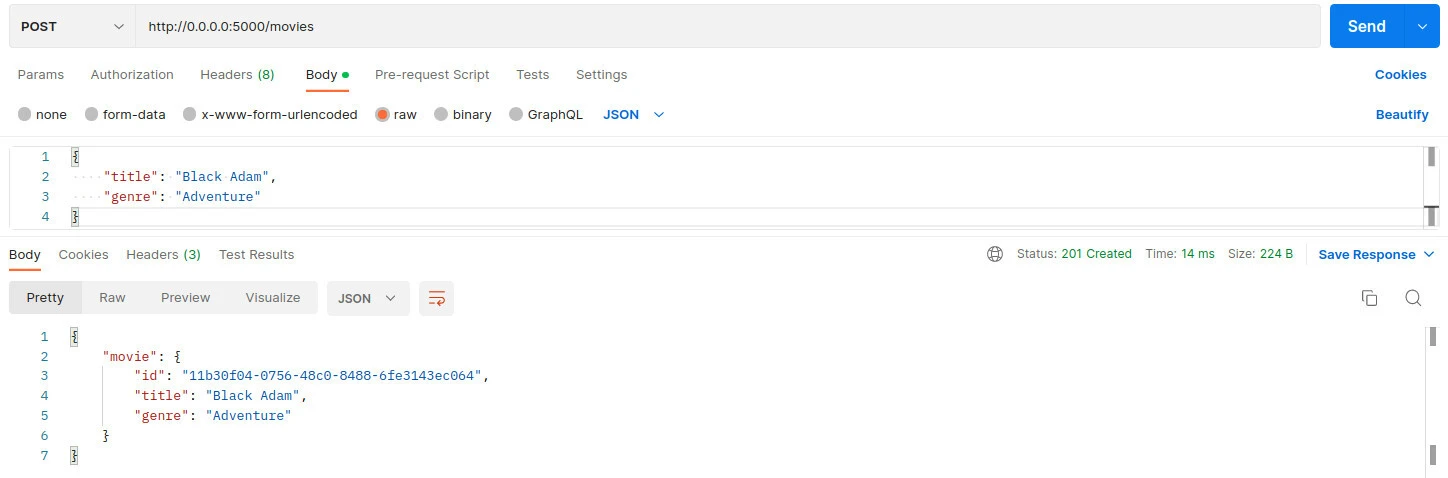
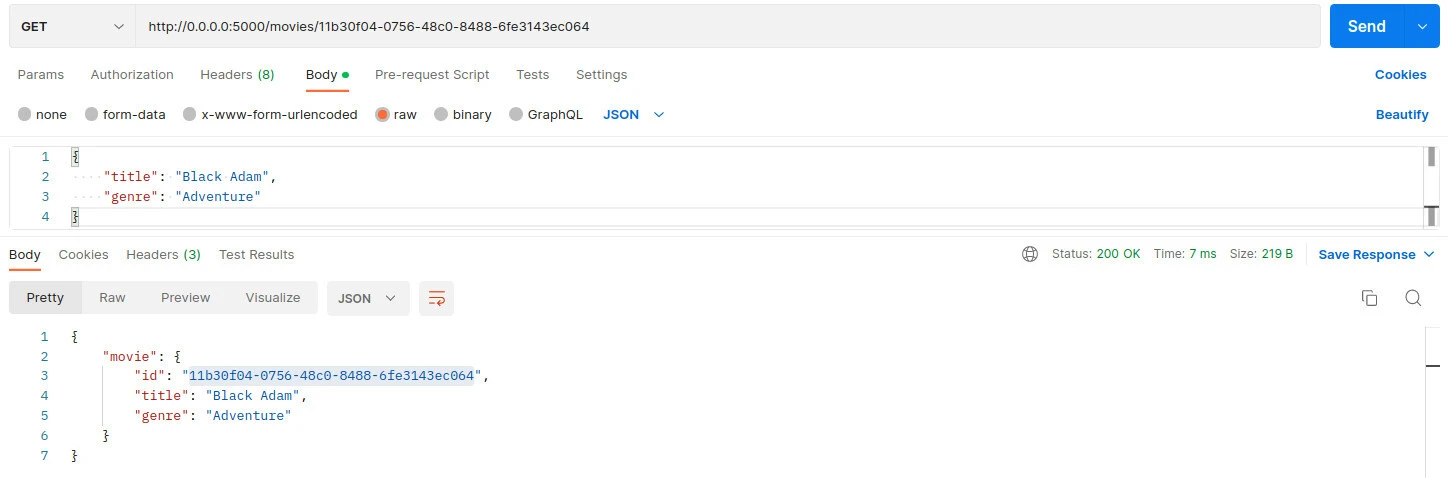
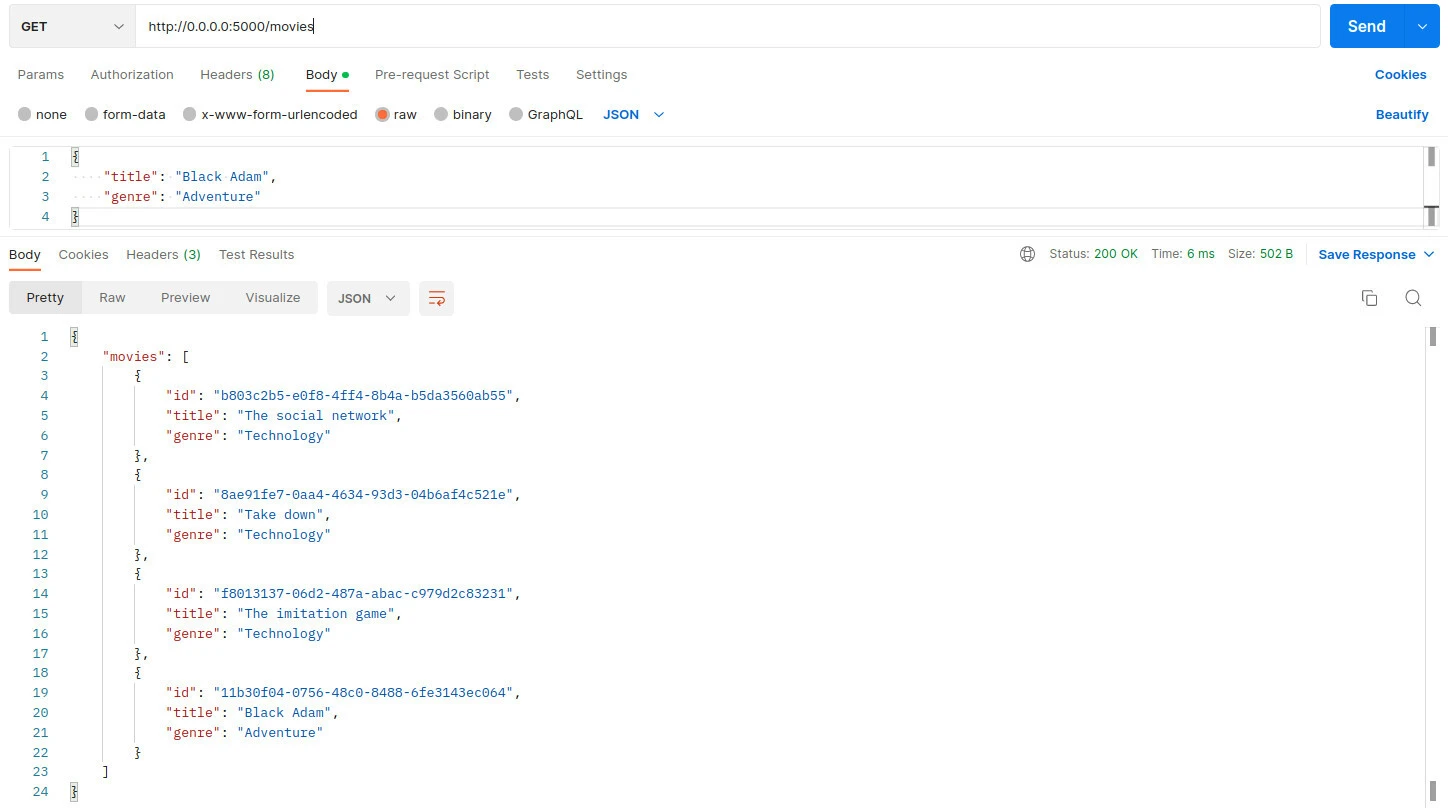
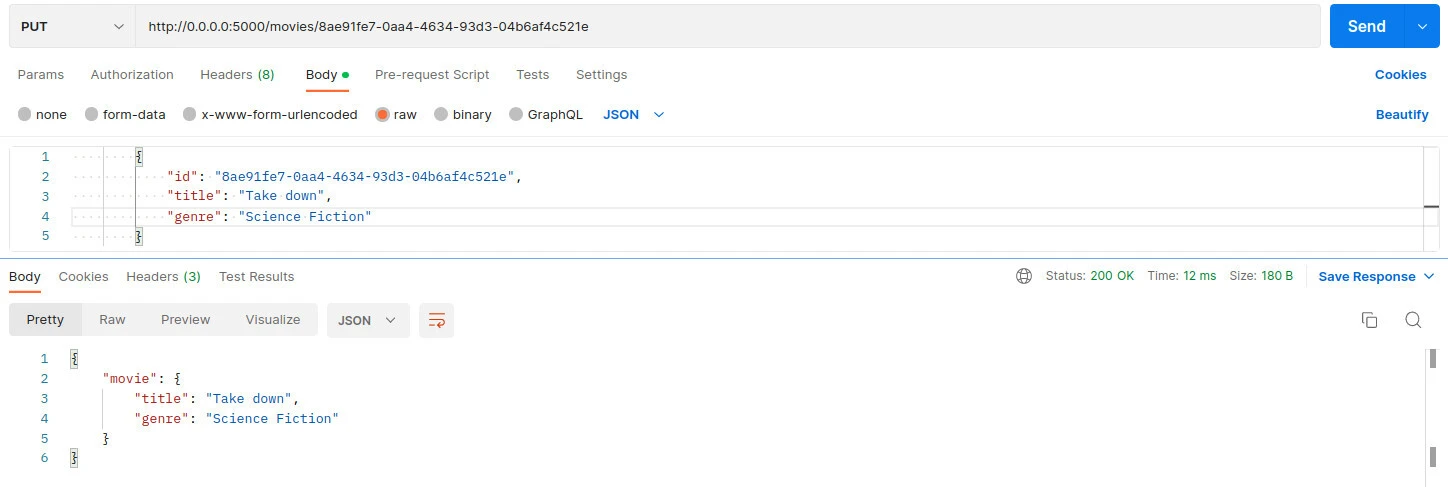
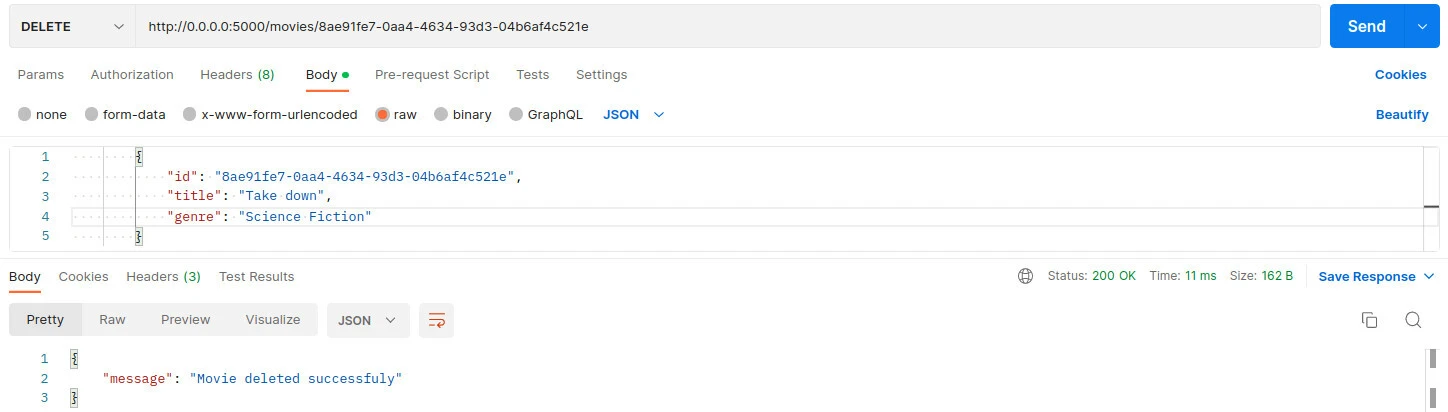
This is the time to test if both the client and server are working as expected. Remember the client and server will be running on different terminals. Ensure that the client and server are running in their own terminal environment before starting these tests.
Create a movie
Read a movie
Read movies
Update movie
Delete movie
Summary
In this article, we learn about gRPC CRUD application, using postgres as the data store and Gin for routing HTTP requests to gRPC clients. We also get to learn about a brief introduction to gRPC architecture that is made up of the client and server. The server connects to the database and responds to the client after every request.