
![How to write logs to file in Golang? [SOLVED]](/golang-log-to-file/golang-log-to-file.jpg)
In this tutorial, we will learn how to write logs to file in Golang. We
have several ways to save the application log to specific files: we can
use the os.Open() to open and append to an existing log file or using
the built-in package
log
in Golang.
Example 1: Logging to syslog file
You can write log messages to log files in Go using the
log
package. This log file can besyslog,mail.log, or our own custom
log file. The example below demonstrates how to write a log to the Unix
operating system’s /var/log/syslog or /var/log/messages file based
on your distribution:
package main

import (
    "log"
    "log/syslog"
)

func main() {
    // Log to syslog
    file, err := syslog.New(syslog.LOG_SYSLOG, "GoLinuxCloud application")
    if err != nil {
        log.Fatalln("Unable to set logfile:", err.Error())
    }
    // set the log output
    log.SetOutput(file)

    log.Println("This is a log from main.go")
}
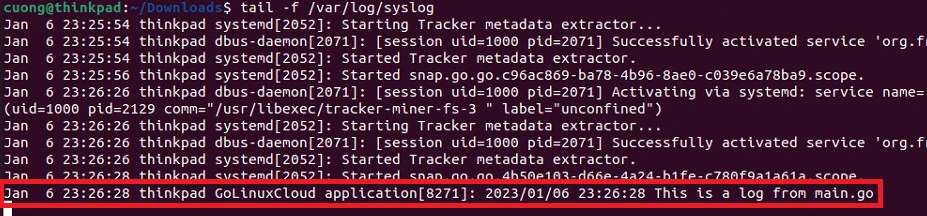
You can use the tail command to check if the message is logged to the
/var/log/syslog or /var/log/messages file by running the below
command:
tail -f /var/log/syslog
Output:
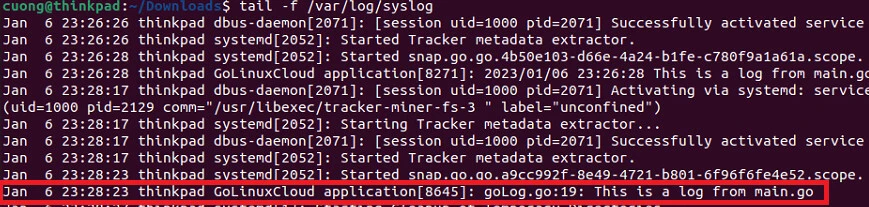
You might need to log the message’s line number. You must set the
Lshortfile flag to the log package in order to accomplish that:
package main

import (
    "log"
    "log/syslog"
)

func main() {
    // Log to syslog
    file, err := syslog.New(syslog.LOG_SYSLOG, "GoLinuxCloud application")
    if err != nil {
        log.Fatalln("Unable to set logfile:", err.Error())
    }
    // set the log output
    log.SetOutput(file)

    log.SetFlags(log.Lshortfile)

    log.Println("This is a log from main.go")
}
Output:
Example 2: Logging to a custom log file
Go requires that we first open a file before writing the logs to that file. Look at the following example if you want to write your log messages to a specific file:
package main

import (
    "log"
    "os"
)

func main() {
    fileName := "logFile.log"

    // open log file
    logFile, err := os.OpenFile(fileName, os.O_APPEND|os.O_RDWR|os.O_CREATE, 0644)
    if err != nil {
        log.Panic(err)
    }
    defer logFile.Close()

    // set log out put
    log.SetOutput(logFile)

    // optional: log date-time, filename, and line number
    log.SetFlags(log.Lshortfile | log.LstdFlags)

    log.Println("This is my first log")
}
Output:
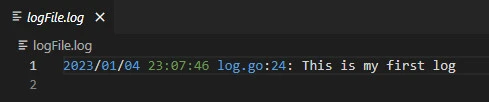
The flags are used in the example above:
os.O_WRONLY: open the file write-onlyos.O_APPEND: append data to the file when writing.os.O_CREATE: create a new file if none exists.
Additionally, the file is created with permission 644 which means this is a configuration file owner can read/write, and group/others can read only.
Example 3: Logging to a custom log file with concurrency
You can use the log package from multiple Goroutines because all of
its functions are concurrency-safe.
A Logger represents an active logging object that generates lines of output to an
io.Writer. Each logging operation makes a single call to the Writer’s Write method. A Logger can be used simultaneously from multiple goroutines; it guarantees to serialize access to the Writer.
You can see a simple example that uses many goroutines to write log messages to a specified file in the example below:
package main

import (
    "log"
    "os"
    "sync"
    "time"
)

func main() {
    fileName := "logFile.log"
    logFile, err := os.OpenFile(fileName, os.O_CREATE|os.O_APPEND|os.O_RDWR, 0644)
    if err != nil {
        log.Fatalln(err)
    }

    defer logFile.Close()

    log.SetOutput(logFile)

    var wg sync.WaitGroup

    wg.Add(3)

    go func() {
        defer wg.Done()
        for i := 0; i < 10; i++ {
            log.Println("From function 1: number", i)
            time.Sleep(1 * time.Second)
        }
    }()

    go func() {
        defer wg.Done()
        for i := 0; i < 10; i++ {
            log.Println("From function 2: number", i)
            time.Sleep(2 * time.Second)
        }
    }()

    go func() {
        defer wg.Done()
        for i := 0; i < 10; i++ {
            log.Println("From function 3: number", i)
            time.Sleep(3 * time.Second)
        }
    }()

    wg.Wait()
}
Output:
Verify the content of logFile.log in your current directory.
2023/01/06 20:56:12 From function 3: number 0
2023/01/06 20:56:12 From function 1: number 0
2023/01/06 20:56:12 From function 2: number 0
2023/01/06 20:56:13 From function 1: number 1
2023/01/06 20:56:14 From function 1: number 2
2023/01/06 20:56:14 From function 2: number 1
2023/01/06 20:56:15 From function 1: number 3
2023/01/06 20:56:15 From function 3: number 1
2023/01/06 20:56:16 From function 1: number 4
Example 4: Use MultiWriter() to write on both console and log file
We can use the io.MultiWriter() function to redirect the logs which
print on the screen to a file. The example below will first open a file
and then redirect all the
stdout to the log file:
package main

import (
    "io"
    "log"
    "os"
)

func main() {
    fileName := "logFile.log"

    // open log file
    logFile, err := os.OpenFile(fileName, os.O_APPEND|os.O_RDWR|os.O_CREATE, 0644)
    if err != nil {
        log.Panic(err)
    }
    defer logFile.Close()

    // redirect all the output to file
    wrt := io.MultiWriter(os.Stdout, logFile)

    // set log out put
    log.SetOutput(wrt)

    // optional: log date-time, filename, and line number
    log.SetFlags(log.Lshortfile | log.LstdFlags)

    log.Println("This is my first log")
}
Output:
You will get the same message on the console as well as your logfile. Verify the content of logFile.log in your current directory.
# go run main.go
2023/01/07 11:23:54 main.go:28: This is my first log

// cat logFile.log
2023/01/06 21:48:08 log.go:95: This is my first log
Summary
It’s crucial to save logs to a file so that we can look back and see
what happened to our program. In this article, I already showed you
several ways to write log to file. You can use the log/syslog package
for writing logs to UNIX /var/log/syslog or a specific log file. It is
concurrency safe to write logs from multiple
goroutines
using this method. Another method that can be used is redirecting the
log from stderr to the file using the io.MultiWriter() function.
Further Reading
You can also prefer to explore other logging module such as logrus and zap module which can also be used to write on console or log file.
References
https://pkg.go.dev/log
https://pkg.go.dev/io
https://en.wikipedia.org/wiki/Standard_streams
go - How to write
log to file - Stack Overflow
