

Linting Go Code
In this article, I will demonstrate how to use lint tools in Golang. A linter is a tool that checks code files using a set of rules that describe problems that cause confusion, produce unexpected results, or reduce the readability of the code. Furthermore, lint can help us find potential bugs in the code, such as assigning undeclared variables, which can cause runtime errors, or getting the value from a global variable, which makes debugging difficult, and so on.
Some go packages which can be used to perform linting such as:
- go vet detects suspicious constructs that the compile may skip, but it only catches a limited number of potential issues such as calling fmt.Printf with the wrong arguments.
- errcheck, An error checker
- golangCI-lint, It’s a linting tool that provides a facade on top of many useful linters and formatters. Also, it allows running the linters in parallel to improve analysis speed, which is quite handy.
We can also use golint which ismaintained by the Go developers. It is intended to enforce the coding conventions described in Effective Go. But for now, this project is frozen and deprecated. You can refer to ‘freeze and deprecate golint thread’ to read more.
Besideslinters, we should also use code formatters to fix code style. Here is a list of some code formatters for you to try:
- gofmt package, which is already present in the installation, so we can run it to automatically indent and format your code. Note that it uses tabs for indentation and blanks for alignment
- goimports, A standard Go imports formatter
Using Golang Vet for linting
go vet: Vet examines Go source code and reports suspicious constructs,
such as Printf calls whose arguments do not align with the format
string. Vet uses heuristics that do not guarantee all reports are
genuine problems, but it can find errors not caught by the compilers.
Let’s look at this below example to understand how Golang Vet works:
package main

import "fmt"

// print out "Anna got 99.5 points in the Maths exam"
func main() {
    name := "Anna"
    score := 99.5
    // %s means the uninterpreted bytes of the string or slice while score is float64
    fmt.Printf("%s got %s points in the Maths exam\n", name, score)
}
When we run ‘go run main.go’, the output will be:
Anna got %!s(float64=99.5) points in the Maths exam
When we run “go vet main.go”, the output will be:
# command-line-arguments
.\milestone32.go:10:2: fmt.Printf format %s has arg score of wrong type float64
Using gofmt to for formatting
The gofmt formatting don’t affect the execution of the code—rather,
they improve codebase readability by ensuring that the code is visually
consistent. gofmt focuses on things like indentation, whitespace,
comments, and general code succinctness. We have written a dedicate
chapter on
go
formatting.
Example:
To check files for unnecessary parentheses:
gofmt -r '(a) -> a' -l *.go
To remove the parentheses:
gofmt -r '(a) -> a' -w *.go
Consider the below example to see how gofmt format the code:
package main

import "fmt"

// print out "Anna got 99.5 points in the Maths exam"
func main() {
    name := "Anna"
            score := 99.5

                              fmt.Printf(("%s got %s points in the Maths exam\n", name, score))
}
The program will automatically format to this:
package main

import "fmt"

// print out "Anna got 99.5 points in the Maths exam"
func main() {
    name := "Anna"
    score := 99.5

    fmt.Printf("%s got %s points in the Maths exam\n", name, score)
}
Using GolangCI-Lint to lint go program
Golangci-lint is a Go linters tool that runs linters in parallel, reuses the Go build cache, and caches analysis results for significantly improved performance on subsequent runs, is the preferred way to configure linting in Go projects
For convenience and performance reasons, the golangci-lint project was
created to aggregate and run several individual linters in parallel.
When you install the program, it will include about 48 linters (at the
time of writing), and you can then choose which ones are important for
your project.
Set up environment
To install golangci-lint , run the command below:
go install github.com/golangci/golangci-lint/cmd/golangci-lint@latest
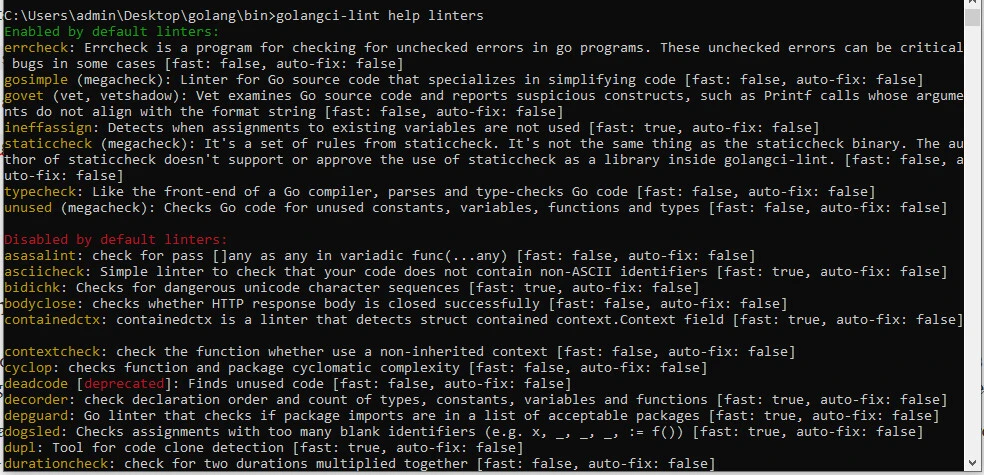
To see a list of supported linters and which linters are enabled/disabled:
golangci-lint help linters
Perform Test Run
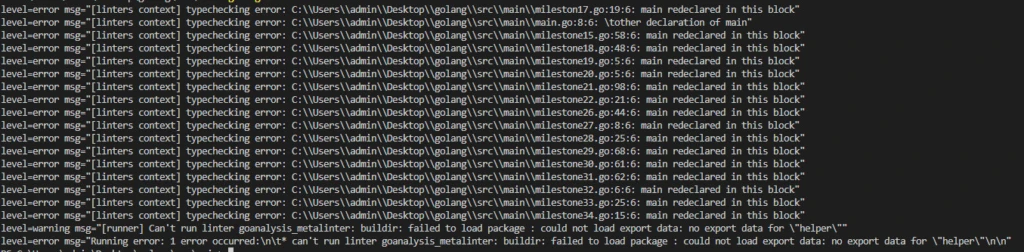
You may encounter errors if you run the enabled linters from the root of your project directory. Each problem is reported with all of the context you need to fix it, including a brief description of the problem as well as the file and line number where it occurred.
golangci-lint run
By passing the path, you can specify which directories and files to analyze.
golangci-lint run dir1 dir2 dir3/main.go
Configuring GolangCI-Lint
The config file has lower priority than command-line options. If the same bool/string/int option is provided on the command-line and in the config file, the option from command-line will be used. Slice options (e.g. list of enabled/disabled linters) are combined from the command-line and config file.
Config File
GolangCI-Lint looks for config files in the following paths from the current working directory:
.golangci.yml.golangci.yaml.golangci.toml.golangci.json
Example of .golangci.yaml config file:
linters:
  # Disable all linters.
  # Default: false
  disable-all: true
  # Enable specific linter
  # https://golangci-lint.run/usage/linters/#enabled-by-default
  enable:
    - asasalint
    - asciicheck
    - bidichk
    - bodyclose
    - containedctx
    - govet
    - grouper
    - ifshort
    - importas
    - ineffassign
    - interfacebloat
    - nakedret
    - nestif
    - wsl
  # Enable all available linters.
  # Default: false
  enable-all: true
  # Disable specific linter
  # https://golangci-lint.run/usage/linters/#disabled-by-default
  disable:
    - asasalint
    - asciicheck
    - bidichk
    - bodyclose
    - goimports
    - golint
    - gomnd
    - gomoddirectives
    - gomodguard
    - goprintffuncname
    - gosec
    - gosimple
    - govet
  # Enable presets.
  # https://golangci-lint.run/usage/linters
  presets:
    - bugs
    - comment
    - complexity
  # Run only fast linters from enabled linters set (first run won't be fast)
  # Default: false
  fast: true
Command-Line Options
$ golangci-lint run -h
Usage:
  golangci-lint run [flags]

Flags:
      --out-format string              Format of output: colored-line-number|line-number|json|tab|checkstyle|code-climate|html|junit-xml|github-actions (default "colored-line-number")
      --print-issued-lines             Print lines of code with issue (default true)
      --print-linter-name              Print linter name in issue line (default true)
      --uniq-by-line                   Make issues output unique by line (default true)
      --sort-results                   Sort linter results
      --path-prefix string             Path prefix to add to output
      --modules-download-mode string   Modules download mode. If not empty, passed as -mod=<mode> to go tools
      --issues-exit-code int           Exit code when issues were found (default 1)
      --go string                      Targeted Go version
      --build-tags strings             Build tags
Pass -E/--enable to enable linter and -D/--disable to disable:
golangci-lint run --disable-all -E errcheck
Suppressing linting errors
Disabling specific linting issues that arise in a file or package is
sometimes necessary. This can be accomplished in two ways: via the
nolint directive and via exclusion rules in the configuration file.
The nolintdirective
Here is an example of generating a random number:
package main

import (
    "fmt"
    "math/rand"
    "time"
)

func main() {
    rand.Seed(time.Now().UnixNano())
    fmt.Println(rand.Int())
}
When we run golangci-lint run -E gosec lint.gothe output will be:
lint.go:11:14: G404: Use of weak random number generator (math/rand instead of crypto/rand) (gosec)
        fmt.Println(rand.Int())
The linter recommends using the Int method from crypto/rand instead
because it is more cryptographically secure, but it has a less friendly
API and slower performance. You can ignore the error by adding a
nolint directive to the relevant line:
func main() {
    rand.Seed(time.Now().UnixNano())
    fmt.Println(rand.Int()) //nolint
}
This inline use of nolint disables all linting issues detected for that line. You can disable issues from a specific linter by naming it in the directive (recommended).
func main() {
    rand.Seed(time.Now().UnixNano())
    fmt.Println(rand.Int()) //nolint:gosec
}
When a nolint directive is used at the top of a file, it disables all
linting issues for that file:
//nolint:govet,errcheck
package main
Exclusion rules
Exclude Issue by Text: Exclude issue by text using command-line
option -e or config option issues.exclude. It’s helpful when you
decided to ignore all issues of this type. Also, you can use
issues.exclude-rules config option for per-path or per-linter
configuration.
issues:
  exclude:
    - "Error return value of .((os\\.)?std(out|err)\\..*|.*Close|.*Flush|os\\.Remove(All)?|.*printf?|os\\.(Un)?Setenv). is not checked"
    - "exported (type|method|function) (.+) should have comment or be unexported"
    - "ST1000: at least one file in a package should have a package comment"
Exclude Issues by Path:
Exclude issues in path by run.skip-dirs, run.skip-files or issues.exclude-rules config options. In the following example, all the reports from the linters (linters) that concerns the path (path) are excluded:
issues:
  exclude-rules:
    - path: '(.+)_test\.go'
      linters:
        - funlen
        - goconst
Summary
The code checking tools mentioned above are mostly the “official” ones
(the ones maintained by Golang developers). IDE integrations are a nice
benefit of having official tooling. For example, Goland includes gofmt
support, and VSCode includes an official Go extension that can check
your code whenever you save a file.
There are plenty of great options for keeping your code clean and
consistent, whether you use these official code checkers or others
provided by the community. This article should have given you a better
understanding of how to use go vet, gofmt to benefit your code.
References
https://pkg.go.dev/cmd/vet
https://github.com/golangci/golangci-lint
https://pkg.go.dev/cmd/gofmt
https://pkg.go.dev/golang.org/x/lint/golint
https://go.dev/doc/effective_go
