
![How to set golang HTTP client timeout? [SOLVED]](/golang-http-client-timeout/golang-set-http-timeout.jpg)
Introduction
In this tutorial, we will explain some methods to set timeout for HTTP requests. A Request Timeout header is defined for Hypertext Transfer Protocol (HTTP). This end-to-end header informs an origin server and any intermediaries of the maximum time that a client will await a response to its request. A server can use this header to ensure that a timely response is generated. This also identifies requests as being potentially long-lived and allows for better resource allocation for these requests.
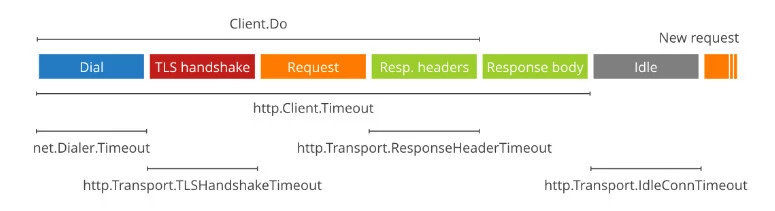
The image below shows multiple phases of sending requests, we can set the timeout for some specific phases:
Building a simple HTTP server (Lab Setup)
If you do not know how to build an HTTP server in Golang, you can visit our post which explains how we can build a simple HTTP server and client in Golang. For demo purposes, in this example, we will have a function that handles all the requests. This function will sleep 5 seconds before returning a message to the client:
package main

import (
    "fmt"
    "log"
    "net/http"
    "time"
)

func main() {
    http.HandleFunc("/", TimeoutFunc)
    err := http.ListenAndServe(":8080", nil)
    if err != nil {
        log.Fatalf("Error creating server %s\n", err.Error())
    }
}
func TimeoutFunc(w http.ResponseWriter, r *http.Request) {
    time.Sleep(time.Second * 15)
    fmt.Fprintf(w, "Welcome to GoLinuxcloud server!")
}
We can use POSTMAN to test our server. We can see that we have to wait for some seconds for the server to return the response.
Method 1: Set timeout for thehttp.Client
The timeout can be specified using the client struct of the HTTP package. We can specify the Timeout value when building the HTTP client. An important thing to note about HTTP Client is that it is only created once and the same instance is used for making multiple HTTP requests. This method covers the entire exchange, from Dial (if a connection is not reused) to reading the body.
type Client struct {
    Transport RoundTripper
    CheckRedirect func(req *Request, via []*Request) error
    Jar CookieJar
    Timeout time.Duration
}
Now let’s take a look at the example below to understand how we can set
the timeout (3 seconds) for http.Client in Golang:
package main

import (
    "fmt"
    "io/ioutil"
    "net/http"
    "time"
)

func main() {

    url := "http://localhost:8080/"
    method := "GET"

    client := &http.Client{
        // set the time out
        Timeout: 5 * time.Second,
    }
    req, err := http.NewRequest(method, url, nil)

    if err != nil {
        fmt.Println(err)
        return
    }
    res, err := client.Do(req)
    if err != nil {
        fmt.Println(err)
        return
    }
    defer res.Body.Close()

    body, err := ioutil.ReadAll(res.Body)
    if err != nil {
        fmt.Println(err)
        return
    }
    fmt.Println(string(body))
}
Output:
Get "http://localhost:8080/": context deadline exceeded (Client.Timeout exceeded while awaiting headers)
Method 2: Set up the timeout for the Transport
There are a number of other specific timeouts we can set for our Transport:
net.Dialer.Timeoutlimits the time spent establishing a TCP connection (if a new one is needed).http.Transport.TLSHandshakeTimeoutlimits the time spent performing the TLS handshake.http.Transport.ResponseHeaderTimeoutlimits the time spent reading the headers of the response.
In addition to the connect timeout, you can also set up the read/write timeout by using the code below:
package main

import (
    "fmt"
    "io/ioutil"
    "net"
    "net/http"
    "time"
)

func main() {

    url := "http://localhost:8080/"
    method := "GET"

    client := &http.Client{
        Transport: &http.Transport{
            Dial: (&net.Dialer{
                Timeout:   3 * time.Second,
                KeepAlive: 3 * time.Second,
            }).Dial,
            TLSHandshakeTimeout:   3 * time.Second,
            ResponseHeaderTimeout: 3 * time.Second,
            ExpectContinueTimeout: 1 * time.Second,
        },
    }
    req, err := http.NewRequest(method, url, nil)

    if err != nil {
        fmt.Println(err)
        return
    }
    res, err := client.Do(req)
    if err != nil {
        fmt.Println(err)
        return
    }
    defer res.Body.Close()

    body, err := ioutil.ReadAll(res.Body)
    if err != nil {
        fmt.Println(err)
        return
    }
    fmt.Println(string(body))
}
Output:
Get "http://localhost:8080/": net/http: timeout awaiting response headers
Method 3: Set up the timeout for the Context
If you want to set time out for each request, you can do it by setting the Context as shown below:
package main

import (
    "context"
    "fmt"
    "io/ioutil"
    "net/http"
    "time"
)

func main() {
    url := "http://localhost:8080/"

    // initial the context
    ctx, cncl := context.WithTimeout(context.Background(), time.Second*3)
    defer cncl()

    // initial the request with time out
    req, err := http.NewRequestWithContext(ctx, http.MethodGet, url, nil)

    if err != nil {
        fmt.Println(err)
        return
    }

    // do the request
    res, err := http.DefaultClient.Do(req.WithContext(ctx))

    if err != nil {
        fmt.Println(err)
        return
    }

    defer res.Body.Close()

    body, err := ioutil.ReadAll(res.Body)
    if err != nil {
        fmt.Println(err)
        return
    }
    fmt.Println(string(body))
}
Output:
Get "http://localhost:8080/": context deadline exceeded
Summary
In this tutorial, I already show you three ways to set the timeout for
HTTP requests. We can set up the timeout for http.Client in case you
want to set up the entire exchange, from Dial (if a connection is not
reused) to reading the body. For a more complex situation of sending a
request, consider setting the Transport. We can specify the timeout for
establishing a TCP or reading headers of the response. The final method
is setting the timeout for the context. The difference between these
methods:
- Using context is for some requests while using the Client timeout might be applied to all requests**.**
- Use context if you want to customize your deadline or timeout to each request; otherwise, use client timeout if you want a single timeout for every request.
References
https://en.wikipedia.org/wiki/Timeout_(computing)
https://datatracker.ietf.org/doc/id/draft-thomson-hybi-http-timeout-00.html
https://pkg.go.dev/net
