

We have already explored basics of Kubernetes ConfigMap. In this tutorial I will concentrate on a scenario wherein you have to mount a file into your Pod’s container into an existing directory.
Our Requirement
- We have a multi-container pod with a main nginx application and one sidecar container with busybox image.
- We have an application based configuration file i.e.
db-app.confwhich must be added under/etc. - This file also should be shared across all the containers inside the Pod.
- Now since
/etcdirectory is already present so we must not overwrite this volume and we just need to place our conf filedb-app.confinside/var/log
Pre-requisites
This article assumes that you already have
- Basic knowledge on Kubernetes ConfigMap
- Kubernetes Cluster with your docker container image to be used to creating the Pod
Create ConfigMap
There can be two possible scenarios to create your ConfigMap.
- You already have
dp-app.conffile with some content and you want to create ConfigMap using existing file. - You want to create this file with some content inside ConfigMap
I will cover ConfigMap examples for all these scenarios, you can choose either based on your requirement:
Scenario-1: Create ConfigMap with existing file using kubectl input arguments
In this scenario we will use kubectl input arguments to create a
configmap using an existing file. This is the content of my
db-app.conf configuration file:
~]# cat db-app.conf
## This is dummy configuration file ##
 conf {
    user: ADMIN
    pwd: PASSWORD
    dir: /home
   }
We will name our configmap as scenario-1-cm, to create the configmap
use following command:
 ~]# kubectl create configmap scnario-1-cm --from-file /root/db-app.conf
configmap/scnario-1-cm created
Check the status:
~]# kubectl get cm
NAME            DATA   AGE
scenario-1-cm   1      4s
You can get the details of the data included in the configmap using
kubectl get command:
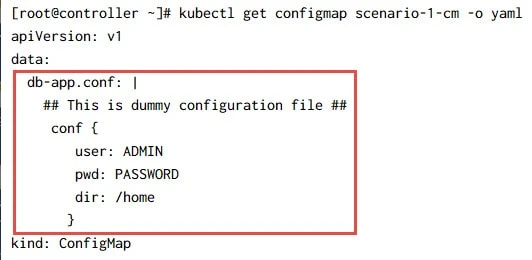
Here you can see that the content of my db-app.conf has been added as
data into the ConfigMap.
Scenario-2: Create ConfigMap manually using existing file (applicable with helm)
In this scenario we will create ConfigMap using YAML file by directly
referring the exiting db-app.conf file. You should use this only if
you are using helm charts to deploy your Pod.
With Helm charts we can use templates to fetch the files inside the ConfigMap or Secrets. Following is an example:
~]# cat scenario-2.cm.yaml
apiVersion: v1
kind: ConfigMap
metadata:
  name: scenario-2-cm
data:
  db-app.conf: |-
    {{ .Files.Get "db-app.conf" | indent 4 }}
Scenario-3: Create file and deploy as ConfigMap manually
In this scenario we will create the file inside ConfigMap YAML file. Here is my YAML file with the data content:
~]# cat scenario-3.cm.yaml
apiVersion: v1
kind: ConfigMap
metadata:
  name: scenario-3-cm
data:
  db-app.conf: |-
    ## This is dummy configuration file ##
      conf {
        user: ADMIN
        pwd: PASSWORD
        dir: /home
        }
Let us create this ConfigMap:
~]# kubectl create -f scenario-3.cm.yaml
configmap/scenario-3-cm created
If you check this ConfigMap in detail then you will see that the data output is same as Scenario-1 where we had create CM using file as an input.
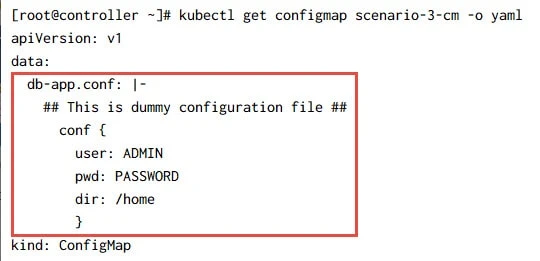
Now that our ConfigMap is in place, we can create our multi-container
pod to share this configuration file across all the containers inside
/etc path.
Create Pod and mount configmap as file in existing directory (path)
I will use the scenario-1-cm in this example but you can use any other
ConfigMap based on your preference. Here is my YAML file to create
multi-container pod:
~]# cat multi-container-pod-1.yaml
apiVersion: v1
kind: Pod
metadata:
  name: multi-container-pod-1
spec:
  containers:
  ## Main Container
  - image: nginx
    name: application
    volumeMounts:
    - name: db-conf
      mountPath: /etc/db-app.conf # This should be your final destination
      subPath: db-app.conf  # The name of the file to be placed inside /etc, the filename used here and in mountPath should be same.

  ## Sidecar Container
  - name: sidecar
    image: busybox
    args:
     - /bin/sh
     - -c
     - sleep 36000
    volumeMounts:
    - name: db-conf
      mountPath: /etc/db-app.conf # This should be your final destination
      subPath: db-app.conf # The name of the file to be placed inside /etc, the filename used here and in mountPath should be same.
  # Define the volumes to be used by these containers
  volumes:
  - name: db-conf # To access this volume, this name must be used inside volumeMounts of the container
    configMap:
       name: scenario-2-cm # Name of the configMap
       items:
         - key: db-app.conf  # Name of the item we had used inside our ConfigMap (under data:)
           path: db-app.conf # Name of the file to be placed inside /etc
I have added enough comments to help you understand the important of each field which is required to mount ConfigMap as file into an existing directory.
Let us create this Pod:
~]# kubectl create -f multi-container-pod-1.yaml
pod/multi-container-pod-1 created
Check the status of the Pod, it should be in Running state:
~]# kubectl get pods
NAME                            READY   STATUS    RESTARTS   AGE
multi-container-pod-1           2/2     Running   0          88s
So both of our containers are in Running state.
Verify ConfigMap mount path
Let us connect to both the containers and make sure that our application configuration file is mounted:
[root@controller ~]# kubectl exec -it multi-container-pod-1 -c application -- bash
root@multi-container-pod-1:/# ls -l /etc/
total 316
-rw-r--r-- 1 root root    2981 May 11 00:00 adduser.conf
drwxr-xr-x 2 root root    4096 May 11 00:00 alternatives
drwxr-xr-x 2 root root    4096 May 11 00:00 cron.daily
-rw-r--r-- 1 root root      47 Jun 13 08:53 db-app.conf
-rw-r--r-- 1 root root    2969 Feb 26  2019 debconf.conf
-rw-r--r-- 1 root root       5 Mar 19 23:44 debian_version

[root@controller ~]# kubectl exec -it multi-container-pod-1 -c sidecar -- sh
/ # ls -l /etc/
total 36
-rw-r--r--    1 root     root            47 Jun 13 08:53 db-app.conf
-rw-rw-r--    1 root     root           306 Jun  6 21:21 group
-rw-r--r--    1 root     root            22 Jun 13 08:53 hostname
-rw-r--r--    1 root     root           217 Jun 13 08:53 hosts
So our file db-app.conf is mounted successfully along with all other
files and /etc is not overwritten so all good.
Further Readings
What’s
the best way to share/mount one file into a pod?
Kubernetes configMap - only
one file
Summary
In this tutorial we explored Kubernetes ConfigMaps, which are maps of configuration properties that may be used in Kubernetes object definitions such as pods, replication controllers, and also to set environment variables and command arguments. We learned to mount ConfigMap as file into an existing directory inside Pod container. This file can be shared across all the containers inside a Pod and can be useful in multi-container pods.
