

YUM is a package manager used with Red Hat, CentOS and many other distributions. Now the world is moving towards DNF which has lot more features compared to YUM
We will cover below topics in this article:
- YUM search package
- YUM show installed packages
- YUM list packages
- YUM install specific version of rpm
- YUM install from specific repo
In this article although I would use YUM install specific version of rpm but in the backend YUM is using DNF in my RHEL 8 environment
[root@rhel-8 ~]# ls -l /usr/bin/yum
lrwxrwxrwx. 1 root root 5 Sep  3  2019 /usr/bin/yum -> dnf-3

[root@rhel-8 ~]# ls -l /usr/bin/dnf
lrwxrwxrwx. 1 root root 5 Sep  3  2019 /usr/bin/dnf -> dnf-3
Although actually it is single step to yum install specific version of rpm but there are certain pre-requisites which may be good for a newbie to understand the process.
If you know what you are doing, you can directly skip to chapter: YUM install specific version of rpm from this article.
YUM list repositories
- To use yum it is mandatory that your repositories are properly configured.
- You can use
yum repolistto list the available repositories - You should get a valid list or repositories available and enabled from this command:
[root@rhel-8 ~]# yum repolist
Updating Subscription Management repositories.
Last metadata expiration check: 0:34:45 ago on Sat 16 May 2020 03:35:19 PM IST.
repo id                                  repo name                                                        status
*epel                                    Extra Packages for Enterprise Linux 8 - x86_64                    5,546
*epel-modular                            Extra Packages for Enterprise Linux Modular 8 - x86_64                0
rhel-8-for-x86_64-appstream-rpms         Red Hat Enterprise Linux 8 for x86_64 - AppStream (RPMs)         10,638
rhel-8-for-x86_64-baseos-rpms            Red Hat Enterprise Linux 8 for x86_64 - BaseOS (RPMs)             4,777
If you get any error for yum repolist output, then you should check
one of the follow articles depending upon your environment
- How to fix “another app is currently holding the yum lock” error
- How to set up proxy for yum repository in Linux?
- Fix “there are no enabled repos” & create local repository in RHEL 7 & 8
- Register RHEL 7 host to RHN using subscription manager (with or without proxy)
If you wish to use specific repo for yum install specific version of rpm, then you can check chapter: YUM install from specific repoin this article
YUM search package
- Do you know the name of the rpm you plan to install?
- It happens many times we actually are not aware of the rpm name and try to find it in repository with no luck
- To yum search package you can use
yum search <rpm_name>which will search the enabled repositories with all the rpms and their descriptions matching the provided name - Now I wish to install
vim-commonbut let me do a search usingvimonly
[root@rhel-8 ~]# yum search vim
Updating Subscription Management repositories.
Last metadata expiration check: 0:05:47 ago on Sat 16 May 2020 03:35:19 PM IST.
========================================= Name & Summary Matched: vim ==========================================
vim-gv.noarch : Git commit browser in Vim
vim-filesystem.noarch : VIM filesystem layout
geany-plugins-vimode.x86_64 : Vim-mode plugin for Geany
vim-minimal.x86_64 : A minimal version of the VIM editor
vim-common.x86_64 : The common files needed by any version of the VIM editor
vim-enhanced.x86_64 : A version of the VIM editor which includes recent enhancements
============================================== Name Matched: vim ===============================================
vim-pathogen.noarch : Manage your runtimepath
vim-gitgutter.noarch : Shows a git diff in the gutter and stages/undoes hunks and partial hunks
vim-nerdtree-git-plugin.noarch : Plugin of NERDTree showing git status
============================================= Summary Matched: vim =============================================
kakoune.x86_64 : Code editor heavily inspired by Vim
Now I have a complete list of rpms from the repository which matches
vim string, so I can yum search package for the rpm name I plan to
install
YUM show installed packages
Before we yum install specific version of rpm, you can YUM show
installed packages list using yum list <rpm_name> --installed
[root@rhel-8 ~]# yum list vim-common --installed
Updating Subscription Management repositories.
Installed Packages
vim-common.x86_64                      2:8.0.1763-10.el8                       @rhel-8-for-x86_64-appstream-rpms
Or we can also use rpm command with a query output
[root@rhel-8 ~]# rpm -qa | grep vim-common
vim-common-8.0.1763-10.el8.x86_64
YUM list packages
- With yum list packages now we know that
vim-commonis installed already but for yum install specific version, I need the available rpm list with their version details. - We will use
yum list <rpm_name>, which will show the installed package information and also if any newer package version is available - In this example
8.0.1763-13.el8which is newer than8.0.1763-10.el8is available in my repository
[root@rhel-8 ~]# yum list vim-common
Snippet from my terminal

yum list packages
If there are no updates available then you will not get
“Available Packages” section as you can check here:
[root@rhel-8 ~]# yum list bash
Updating Subscription Management repositories.
Last metadata expiration check: 0:03:37 ago on Sat 16 May 2020 03:35:19 PM IST.
Installed Packages
bash.x86_64                                       4.4.19-10.el8                                        @anaconda
YUM show duplicate packages
- As the
yum list <rpm_name>shows only one newer rpm version is available for installation, don’t we have any more packages for updates? - We can yum show installed packages in our repository along with
duplicate rpms with different verions using
--showduplicates - This will list even duplicate rpms with different versions available in our repositories
[root@rhel-8 ~]# yum list vim-common --showduplicates
Snippet from my terminal

yum list packages with duplicates
So now we see, there are two different versions of vim-common
available in our repository
YUM install specific version of rpm
Now since we have the rpm name and the version details, we just need to combine them both in the format
<rpm_name>-<version>
So in this case we have two rpm versions available for vim-common
vim-common-8.0.1763-11.el8_0
vim-common-8.0.1763-13.el8
Yum install specific version using yum install <rpm_name-version>, for
example:
[root@rhel-8 ~]# yum install vim-common-8.0.1763-11.el8_0 -y
Snippet from my terminal
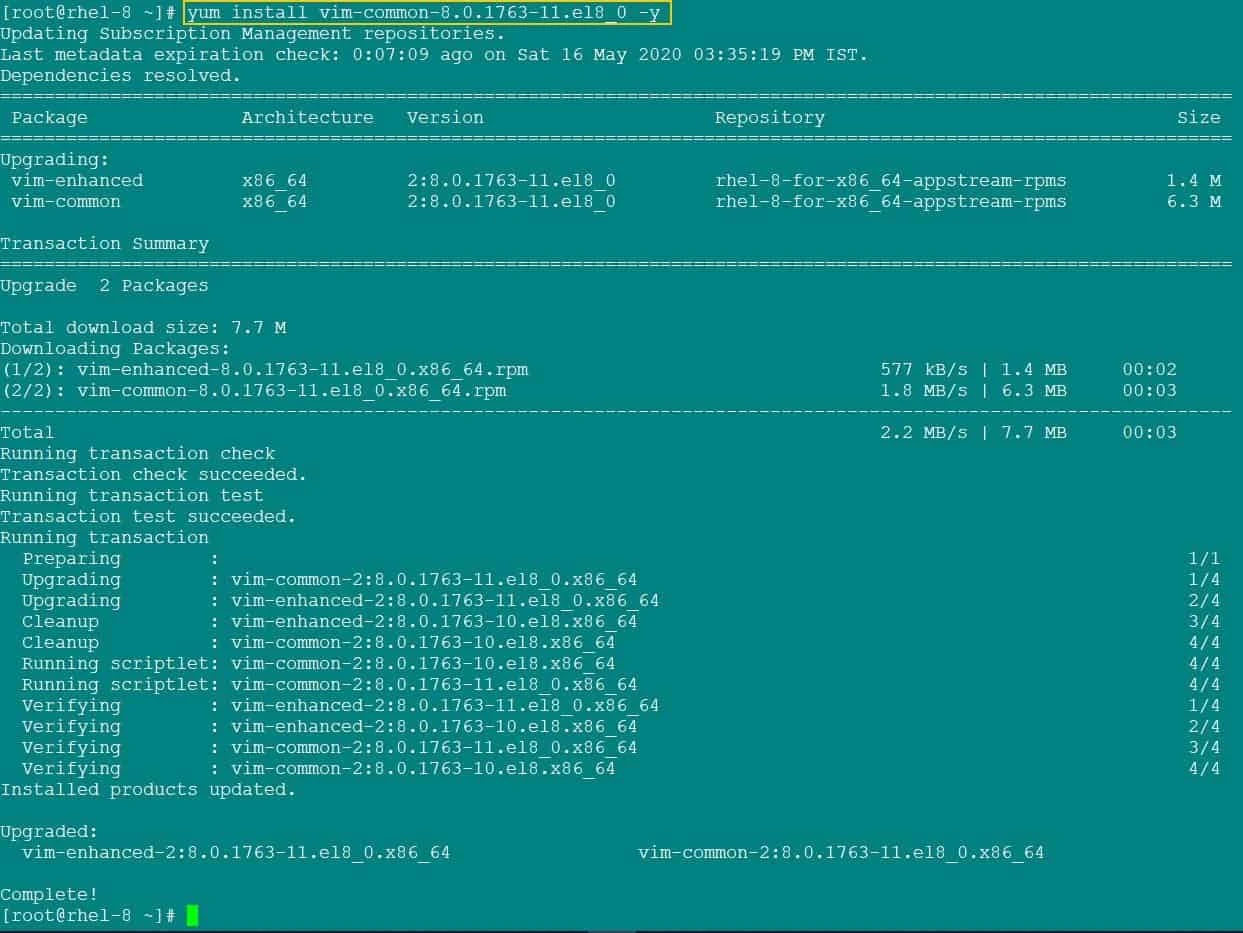
yum install specific version
Since there was a dependency for vim-common with vim-enhanced, both
are automatically downloaded and installed using yum.
YUM install from specific repo
- In our case we have multiple versions of
vim-commonavailable but all these rpms are from the same repositoryrhel-8-for-x86_64-appstream-rpms - But it is possible in your case you have multiple repositories which contains different version of same rpm
- So to yum install from specific repo you can enable a repository only
to install your rpm and disable all other repositories using
--enablerepoand--disablereporespectively - This will enable and disable repository only for the provided command (runtime) and the existing status of these repos would remain same as earlier
For example to yum install from specific repo, I have disabled all other
repositories and only using rhel-8-for-x86_64-appstream-rpms to yum
install specific version of vim-common rpm
[root@rhel-8 ~]# yum --disablerepo=* --enablerepo=rhel-8-for-x86_64-appstream-rpms -y install vim-common-8.0.1763-13.el8
Snippet from my terminal
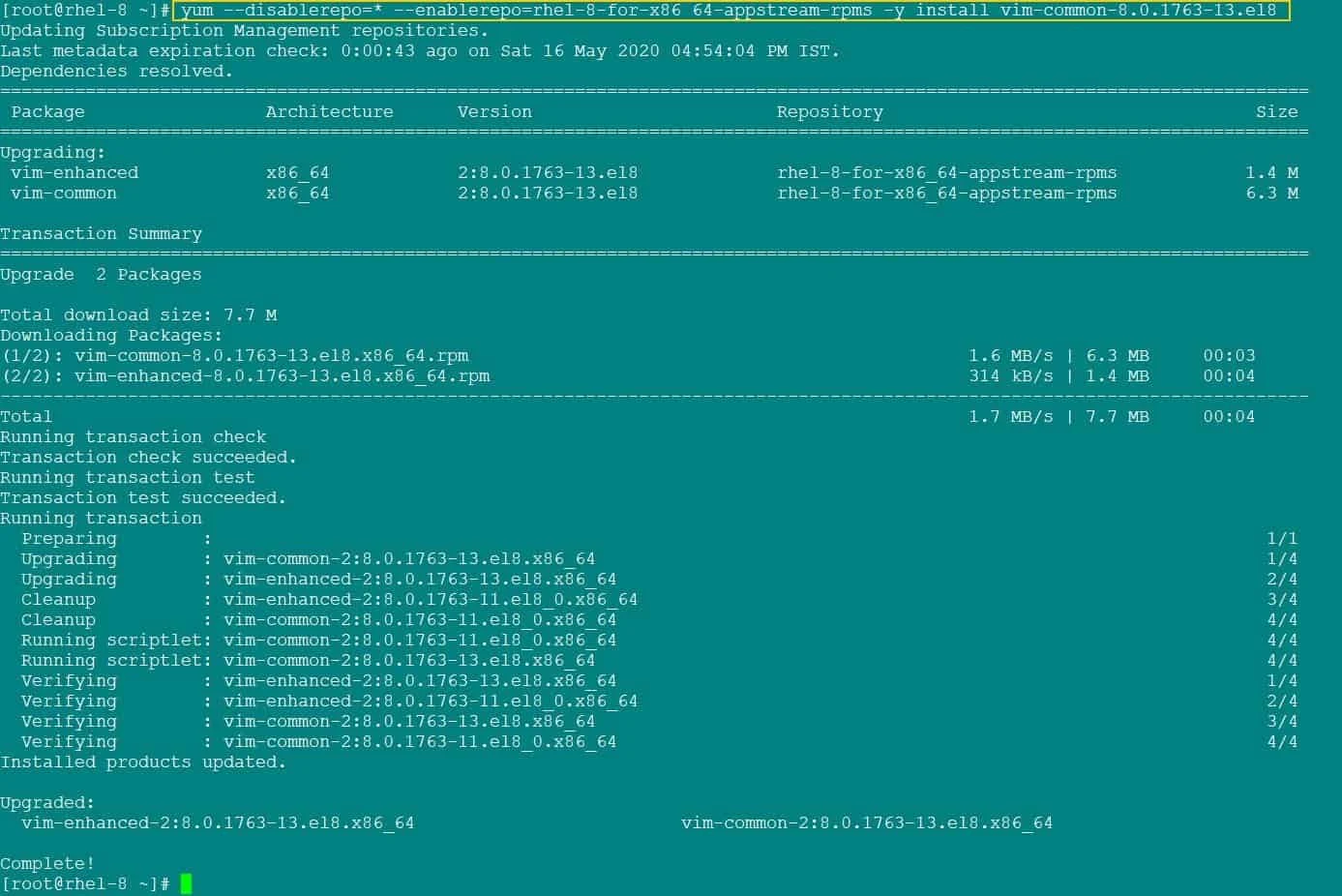
yum install from specific repo
Lastly I hope the steps from the article to yum install specific version of rpm with examples on Linux was helpful. So, let me know your suggestions and feedback using the comment section.
References:
How
to yum install from specific repo?
