
![Locate files using which command in Linux [Cheat Sheet]](/which-command-in-linux/which_command.jpg)
Introduction to which command
which command is used to locate the executable file associated with the specified command in Unix-based operating systems. It searches for the executables in the directories listed in the environment variable PATH using the same algorithm as bash.
Syntax to use command
The syntax for the which command is:
$ which [options] programname
You can check the directories of your environment
variable $PATH using the echo command.
$ echo $PATH
Sample Output:
golinux@ubuntu-PC:~$ echo $PATH
/usr/local/sbin:/usr/local/bin:/usr/sbin:/usr/bin:/sbin:/bin:/usr/games:/usr/local/games:/snap/bin:/home/golinux/hadoop/sbin:/home/golinux/hadoop/bin:/home/hduser/spark/bin:/home/hduser/spark/sbin
Each path is separated with colons : in the output. which command
searches for executables in the above directories.
Different examples to use which command
1. Show the full path of commands
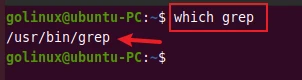
which command prints the full path of the specified command. The following command returns the full path of grep command.
$ which grep
Sample Output:
2. Print all matching executables in PATH
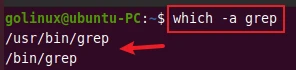
If there are multiple matching executables in the directories listed in
the PATH variable, which only prints the first one. You can use the
-a flag to print all matches found in the path.
$ which -a grep
Sample Output:
3. Find the path of multiple commands
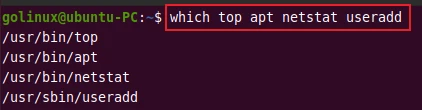
which command also accepts multiple arguments. You can specify
multiple commands to print their full pathnames. The following command
finds the full path of the
top,
apt,
netstat, and
useradd
commands.
$ which top apt netstat useradd
Sample Output:
4. Find the path of which command
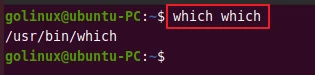
You can use which command to find the full path of the which command
itself.
$ which which
Sample Output:
Conclusion
which command is useful for finding the full path of executable commands in the terminal. If you still have any confusion, please let us know in the comment section.
What’s Next
How to get script name, script path within the bash script in
Linux
How to properly check if file exists in Bash or Shell (with
examples)
