
![vgcreate command examples in Linux [Cheat Sheet]](/vgcreate-command-in-linux/vgcreate__command.jpg)
Introduction to vgcreate command
vgcreate command in Linux creates a new volume group using block devices. Physical volumes (PVs) are combined into volume groups (VGs). This creates a pool of disk space out of which logical volumes can be allocated. In the volume group, the disk space available for allocation is divided into units of a fixed size called extents. An extent is the smallest unit of space that can be allocated. The extents are referred to as physical extents in the physical volume. When physical volumes are used to create a volume group, its disk space is divided into 4MB extents, by default.
Are you new to LVM and still learning how it works?
We have written detailed articles covering different areas of managing logical volumes, which you can follow using the below links:
Manage
Logical Volume in Linux - One STOP Solution
Understand
LVM Architecture
Create
LVM during installation RHEL/CentOS 7/8
How
to use LVM Snapshot for Backup and Restore
Create
Mirrored Logical Volume
Create
Striped Logical Volume
How to install vgcreate
vgcreate command is available in the lvm2package in Linux. You
can use the following command to install thelvm2package according
to your Linux distribution.
To install lvm2 on CentOS, Fedora, and RHEL
$ sudo yum install lvm2
To install lvm2 on Ubuntu and Debian
$ sudo apt install lvm2
Different examples to use vgcreate command
You will need the root privileges to use the vgcreate command. The
syntax for vgcreate command is:
$ sudo vgcreate [option] VG_new PV
1. Create a volume group using one or more physical volumes
The vgcreate command creates a new volume group by name and adds at least one physical volume to it.
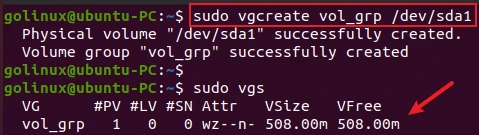
The following command creates a volume group named vol_grp that
contains a physical volume /dev/sda1.
$ sudo vgcreate vol_grp /dev/sda1
Sample Output:
The vgs command is used to view the list of volume groups.
If the device was not previously initialized as a physical volume (PV)
with pvcreate, vgcreate will initialize them, making them PV.
golinux@ubuntu-PC:~$ sudo pvs
  PV         VG      Fmt  Attr PSize   PFree
  /dev/sda1  vol_grp lvm2 a--  508.00m 508.00m
You can specify multiple physical volumes to create a new volume group from them.
golinux@ubuntu-PC:~$ sudo vgcreate vol_grp2 /dev/sda2 /dev/sda5 /dev/sda7
  Volume group "vol_grp2" successfully created
2. Set the physical extent size on physical volumes of this volume group
You can specify the extent size with the -s or --physicalextentsize
option if the default extent size is not suitable. The default is 4 MiB
and it must be at least 1 KiB and a power of 2.
The following command creates a new volume group ext_vg with the
physical extent size of 8MiB that contains the physical volume
/dev/sda1.
$ sudo vgcreate -s 8M ext_vg /dev/sda1
OR
$ sudo vgcreate --physicalextentsize 8M vol_grp /dev/sda1
Sample Output:
golinux@ubuntu-PC:~$ sudo vgcreate -s 8M ext_vg /dev/sda1
  Volume group "ext_vg" successfully created
3. Set the maximum number of physical volumes
You can use -p or --maxphysicalvolumes option to set the maximum
number of physical volumes that can belong to this volume group.
$ sudo vgcreate -p NUM VG_new PV
OR
$ sudo vgcreate --maxphysicalvolumes NUM VG_new PV
4. Set the maximum number of logical volumes
You can use -l or --maxlogicalvolumes to set the maximum number of
logical volumes allowed in this volume group.
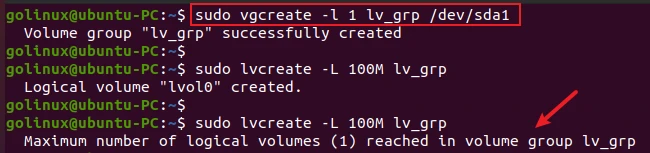
The following command creates a new volume group lv_grp and sets 1
as the maximum number of logical volumes allowed in that volume group.
$ sudo vgcreate -l 1 lv_grp /dev/sda1
OR
$ sudo vgcreate --maxlogicalvolumes 1 lv_grp /dev/sda1
Sample Output:
As you can see, it shows an error when we tried to create the second
logical volume on the volume group lv_grp.
5. vgcreate command to specify the allocation policy
When a command needs to allocate Physical Extents (PEs) from the volume
group, the allocation policy is followed. By default, a volume group
allocates physical extents according to common-sense rules such as not
placing parallel stripes on the same physical volume. It is the normal
allocation policy.
You can use the --alloc option to specify an allocation policy of
contiguous, cling, anywhere, or inherit.
$ sudo vgcreate --alloc contiguous|cling|cling_by_tags|normal|anywhere|inherit VG_new PV
Sample Output:
golinux@ubuntu-PC:~$ sudo vgcreate --alloc contiguous new_vg /dev/sda1
  Volume group "new_vg" successfully created
The allocation policies can be changed by using the vgchange command.
For more information about allocation, see
lvm.
6. Set the desired number of metadata copies in the volume group.
You can use the --vgmetadatacopies to set the desired number of
metadata copies in the volume group. It is useful for volume groups
containing large numbers of physical volumes with metadata as it can
minimize metadata read and write overhead. The default value is
unmanaged.
$ sudo vgcreate --vgmetadatacopies all|unmanaged|Number VG_new PV
Sample Output:
golinux@ubuntu-PC:~$ sudo vgcreate --vgmetadatacopies 50 vg06 /dev/sda1
  Volume group "vg06" successfully created
Conclusion
In this article, we showed you how to use vgcreate command to create a new volume group in the Linux system. If you have any queries, please let us know in the comment section below.
What’s Next
10+ lvcreate command examples in Linux [Cheat
Sheet]
Manage Logical Volume in Linux - One STOP
Solution
