
![vgcfgrestore: Recover LVM without Backup [100% Working]](/vgcfgrestore-recover-lvm-without-backup/vgcfgrestore__command.jpg)
Introduction to vgcfgrestore command
vgcfgrestore restores the metadata of a volume group from a text backup file produced by vgcfgbackup.
Sometimes, you might accidentally remove a logical volume or want to
restore the deleted logical volume from the volume group. The
vgcfgrestore command allows you to recover the logical volume without
losing any data.
vgcfgbackup command creates backup files containing metadata of volume
groups. By default, vgcfgbackup automatically stores the backup files
when the change is made in the LVM configuration. The default location
of the backup files is /etc/lvm/backup andthe metadata archive files
is /etc/lvm/archive.
How to recover the deleted logical volume? [Step-by-Step]
In this tutorial, we will use the vgcfgrestore command to recover the
deleted logical volume lvol1 on the volume group vol_grp.
root@ubuntu-PC:~# lvremove vol_grp/lvol1
Do you really want to remove and DISCARD active logical volume vol_grp/lvol1? [y/n]: y
  Logical volume "lvol1" successfully removed
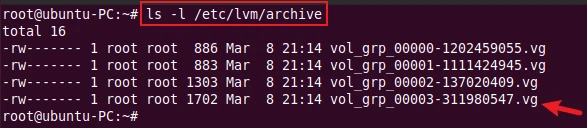
Step-1: Check the archive file under the directory /etc/lvm/archive
You can find the archive file at etc/lvm/archive and verify it by
checking the date and time the file was created. In our case, it is the
last one.
# ls -l /etc/lvm/archive
Step-2: Recover the logical volume
Before starting the actual recovery, you can do a dry run (test mode)
using the -t or --test option. The -f or –file option specifies a
metadata backup
or archive file to be used for restoring.
# vgcfgrestore vol_grp --test -f /etc/lvm/archive/vol_grp_00003-311980547.vg

The test run was successful. Now, run the actual restore.
# vgcfgrestore vol_grp -f /etc/lvm/archive/vol_grp_00003-311980547.vg

Step-3: Check the restored logical volume
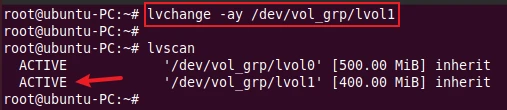
After that, check whether the deleted logical volume is successfully restored or not using the lvscan command.

As we can see, the logical volume lvol1 is restored but it is
inactive. You can activate the logical volume by using the
lvchange
command.
List metadata backup and archive files
The -l or --list option of vgcfgrestore command lists metadata
backup and archive files of the volume group.
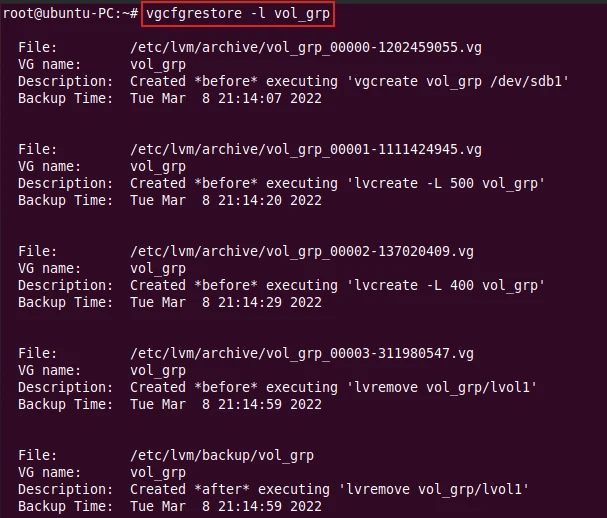
The following command displays all metadata backups and archive files of
the volume group vol_grp.
# vgcfgrestore -l vol_grp
OR
# vgcfgrestore --list vol_grp
Sample Output:
Conclusion
We hope this tutorial gave you an idea of how to restore the deleted logical volume using the vgcfgrestore command. If you have any questions, feel free to ask us in the comment section.
What’s Next
lvremove command examples in Linux [Cheat
Sheet]
5+ lvdisplay command examples in Linux [Cheat
Sheet]
Further Reading
man page for
vgcfgrestore command
5
easy steps to recover LVM2 partition, PV, VG, LVM metdata in Linux
