
![How to Unlink File in Laravel? [SOLVED]](/unlink-file-in-laravel/laravel-unlink-file.jpg)
In Laravel, unlinking files is a common task that arises when deleting a
record or updating a file upload. The unlink() function is used to
delete a file from the server’s file system. When unlinking a file, it
is important to ensure that the file exists and that the user has the
necessary permissions to delete it.
Laravel provides a number of convenient functions to work with files,
including file_exists(), which checks whether a file exists, and
is_writable(), which checks whether a file is writable. Additionally,
the Storage facade provides a convenient way to work with files across
different storage systems.
In this tutorial, we will explore how to unlink a file in Laravel using
the unlink() function and the Storage facade. We will cover the
necessary steps to ensure that the file exists and is writable before
attempting to delete it, as well as how to handle errors that may arise
during the unlinking process.
Different methods to unlink file in Laravel
These are two ways to delete or unlink a file in Laravel.
The unlink(<file>) function is a PHP built-in function used to delete
a file from the server’s file system. It requires the file path as an
argument and returns a boolean value indicating whether the operation
was successful or not.
unlink(<file>);
File::delete(<file>) is a Laravel-specific function that provides a convenient way to <a href="https://www.golinuxcloud.com/laravel-soft-delete/" title="How to perform Soft Delete in Laravel [Tutorial]" target="_blank" rel="noopener noreferrer">delete a file using Laravel's</a> file system. It also requires the file path as an argument and returns a boolean value indicating the success of the operation.
<pre><code class="language-php">File::delete(<file>);
Both functions can be used to delete a file, but File::delete(<file>)
may be a better option in Laravel as it provides a consistent interface
for working with files in different storage systems. Additionally,
File::delete(<file>) handles errors that may arise during the
unlinking process and returns a more detailed error message if the
operation fails.
Set up lab environment
We create a Laravel
project
called unlinkfile. Then, cd into and open the project in Visual
Studio Code before starting the development server.
laravel new unlinkfile
cd unlinkfile
code .
php artisan serve
Creating a File Upload Form and Managing Images in Laravel
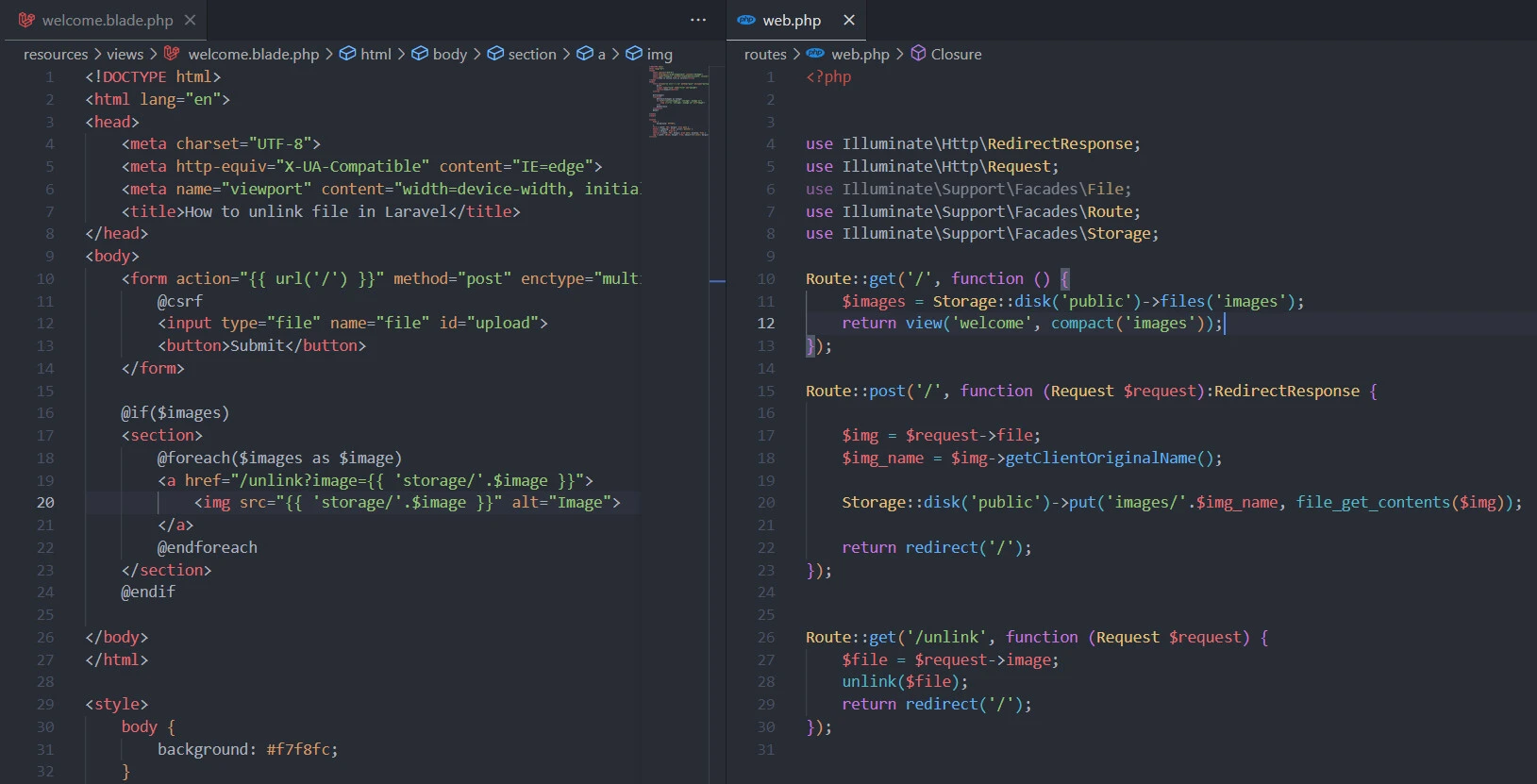
Open the resources/views/welcome.blade.php file and write the frontend
code.
The form has an input field for selecting an image file and a submit
button. The @csrf directive is used to add a CSRF token to the form to
protect against cross-site request forgery attacks.
If the form is submitted, it sends a POST request to the root URL of the
application. The form data includes the selected image file, which is
stored in the $request object as a Illuminate\Http\UploadedFile
instance.
The view also includes a section that displays all the uploaded images.
If any images have been uploaded, they are displayed using an <img>
tag with the image path passed as the src attribute. Each image is
also wrapped in an <a> tag that links to a route for deleting the
image.
When a user clicks on the delete link, it sends a GET request to a route that unlinks or deletes the image from the server. The image path is passed as a query parameter in the URL. The unlinking or deleting operation is performed in the controller method that handles the route.
<!DOCTYPE html>
<html lang="en">
<head>
    <meta charset="UTF-8">
    <meta http-equiv="X-UA-Compatible" content="IE=edge">
    <meta name="viewport" content="width=device-width, initial-scale=1.0">
    <title>How to unlink file in Laravel</title>
</head>
<body>
    <form action="{{ url('/') }}" method="post" enctype="multipart/form-data">
        @csrf
        <input type="file" name="file" id="upload">
        <button>Submit</button>
    </form>

    @if($images)
    <section>
        @foreach($images as $image)
        <a href="/unlink?image={{ 'storage/'.$image }}">
            <img src="{{ 'storage/'.$image }}" alt="Image">
        </a>
        @endforeach
    </section>
    @endif

</body>
</html>

<style>
    body {
        background: #f7f8fc;
    }
    form { width: 75%; margin: 2rem auto }
    button { padding: .3rem; cursor: pointer }
    input { margin: .5rem 0 }
    section { width: 75%; margin: 2rem auto; display: flex }
    img { width: 10rem; height: 7rem; object-fit:cover; margin-right: .3rem }
</style>
Likewise, write the image upload, display and unlink logic in the
routes/web.php file.
Laravel Route Setup for Uploading and Deleting Files
This code sets up Laravel routes for uploading and deleting files. The ‘/’ route displays a form for uploading files and shows all uploaded images. The ‘post/’ route saves the uploaded image to the ‘public/images’ directory. The ‘get/unlink’ route deletes the specified file and redirects to the ‘/’ route. It uses Laravel’s Storage and File facade for file management.
<?php

use Illuminate\Http\RedirectResponse;
use Illuminate\Http\Request;
use Illuminate\Support\Facades\File;
use Illuminate\Support\Facades\Route;
use Illuminate\Support\Facades\Storage;

Route::get('/', function () {
    $images = Storage::disk('public')->files('images');
    return view('welcome', compact('images'));
});

Route::post('/', function (Request $request):RedirectResponse {

    $img = $request->file;
    $img_name = $img->getClientOriginalName();

    Storage::disk('public')->put('images/'.$img_name, file_get_contents($img));

    return redirect('/');
});

Route::get('/unlink', function (Request $request) {
    $file = $request->image;
    File::delete($file);
    return redirect('/');
});
How unlink file in Laravel will work
Display
On launching the application, it checks if any images exist and then
displays them inside the section tag.
@if($images)
    <section>
        @foreach($images as $image)
        <!-- <a href="/unlink?image={{ 'storage/'.$image }}">
            <img src="{{ 'storage/'.$image }}" alt="Image">
        </a> -->
        @endforeach
    </section>
@endif
The control happens in the root / get route.
Route::get('/', function () {
    $images = Storage::disk('public')->files('images');
    return view('welcome', compact('images'));
});
We fetch the uploads in the images folder of the public Laravel storage::disk and send them to the welcome view. If some images are already stored, they are sent for display. Otherwise, we can upload some.
Upload
The form
<form action="{{ url('/') }}" method="post" enctype="multipart/form-data">
  @csrf
  <input type="file" name="file">
  <button>Submit</button>
 </form>
sends image file named file to the root / URL using HTTP post
method.
Route::post('/', function (Request $request):RedirectResponse {

    $img = $request->file;
    $img_name = $img->getClientOriginalName();

    Storage::disk('public')->put('images/'.$img_name, file_get_contents($img));

    return redirect('/');
});
We receive the form data in the anonymous function through the
$request object. Next, we extract the image name and save it in the
images folder on the public disk. We then return to the homepage /
through a redirect.
Now let’s see how to unlink file in Laravel.
Unlink
We surround each image with an a tag.
 <a href="/unlink?image={{ 'storage/'.$image }}">
    <!-- <img src="{{ 'storage/'.$image }}" alt="Image"> -->
  </a>
The link sends it to a /unlink route for unlinking.
At the controller,
Route::get('/unlink', function (Request $request) {
    $file = $request->image;
    File::delete($file);
    return redirect('/');
});
we extract the image and hold it s data in the $file variable. We then
delete it from the public/storage/images/<image>.png using the File
facade’s delete function.
File::delete($file);
Alternatively, we can use the PHP’s unlink function.
Route::get('/unlink', function (Request $request) {
    $file = $request->image;
    unlink($file);
    return redirect('/');
});
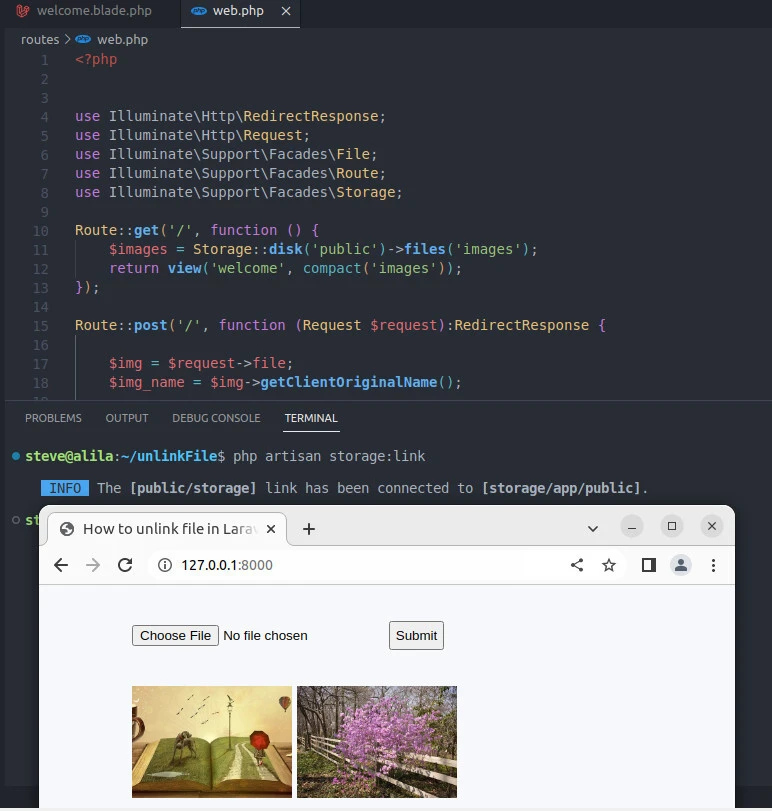
Test the application
Link the storage disks.
php artisan storage:link
Then, launch the application on http://127.0.01:8000.
Now upload two images.
Lastly, unlink the last image by clicking it.
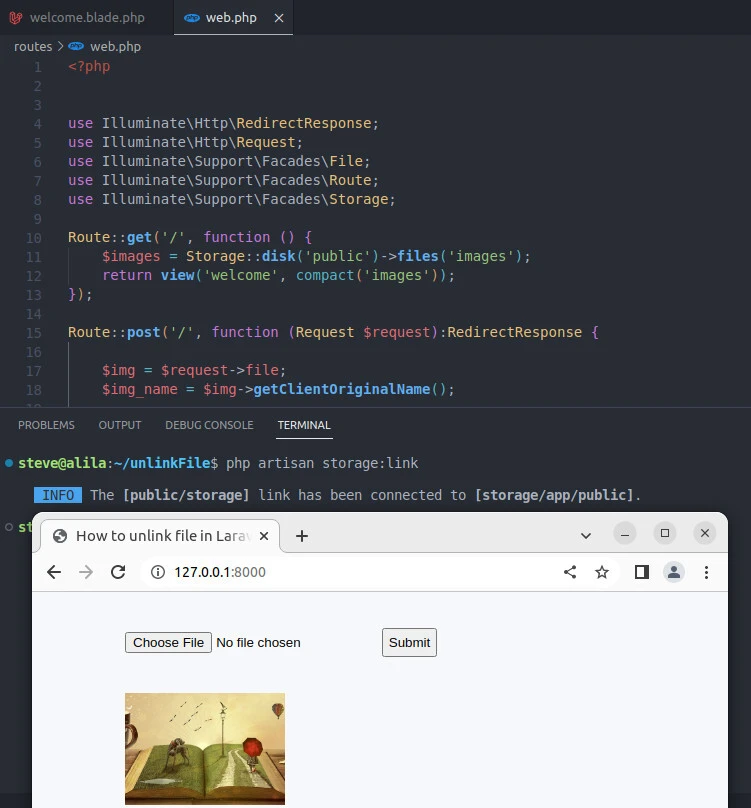
And voila, image 2 has successfully been unlinked!
Conclusion
In Laravel, unlinking files is an essential task to free up storage
space and remove unwanted files. To achieve this, the File facade
provides the delete() method that can be used to delete a file. The
unlink() function is also available, which can be used to delete a
file.
The code shared in this tutorial shows how to unlink files in Laravel
using both the File facade and the unlink() function. It also shows
how to upload and display images in a web application using Laravel’s
built-in Storage facade.
The code creates a web page that allows users to upload images, which
are then stored in Laravel’s public/images directory using the put()
method. The uploaded images are displayed on the page, and each image
has a link that, when clicked, triggers a request to delete the
corresponding image using the File facade’s delete() method.
You can find more ways to unlink files here.
