
![10 tee command examples in Linux [Cheat Sheet]](/tee-command-in-linux/tee_command.jpg)
Introduction to tee command in Linux
tee command reads from standard input (stdin) and writes to standard output (stdout) and files. tee is mainly used with other commands through piping.
Syntax to use tee command
The syntax of the tee command is:
$ tee [option] [file]
The available options are:
- -a: append to the given FILEs, do not overwrite
- -i: ignore interrupt signals
- –help: display help menu
Now, let’s have a look at some practical examples in a Linux system.
Different examples to use tee command
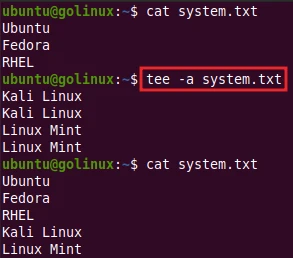
1. tee command to append to the file
-a or --append option appends to the file but does not overwrite the
file. It adds the content to the end of a file.
$ tee -a file
OR
$ tee --append file
Sample Output:
2. Use tee command to append content to multiple files
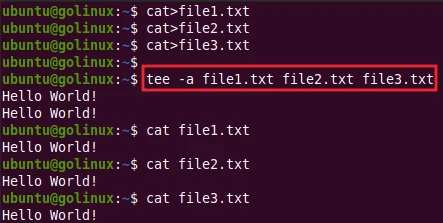
You can also append to the multiple files using -a or --append
option.
$ tee -a file1 file2 file3
OR
$ tee --append file1 file2 file3
Sample Output:
3. Combine tee command with other commands
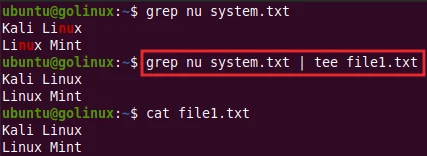
You can combine tee command with other commands through pipe (|). For example, we can combine grep and tee command as follows.
$ grep nu system.txt | tee -a file1.txt
Sample Output:
Here, tee command reads input from
grep and writes
to the output file. When -a is not used, tee overwrites the file.
4. tee command to ignore interrupts
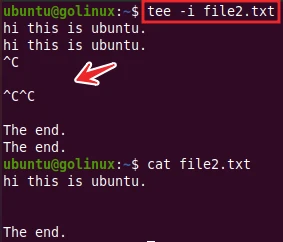
You can use -i or --ignore-interrupts to ignore interrupts signal,
which is done by pressing Ctrl+C.
$ tee -i file
OR
$ tee --ignote-interrupts file
Sample Output:
5. Supress the output from tee command
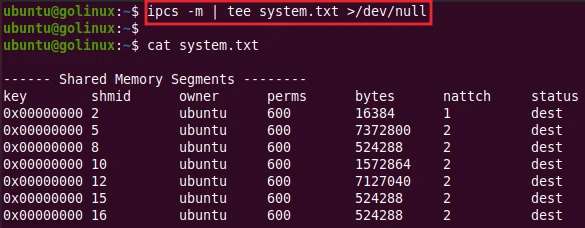
You can use >/dev/null to hide the standard output. tee stores the
content but skips the output.
$ command | tee file >/dev/null
Sample Output:
As you can see, it does not display the standard output but the content is stored in the file.
6. Redirect output of one command to another
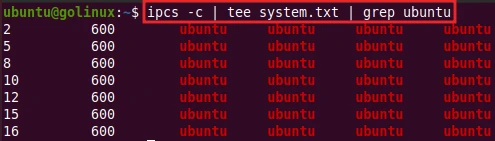
tee can redirect the output of one command to another command when it is used between two commands like below.
$ command | tee [option] file | command
Sample Output:
Here, the output of ipcs -c command is stored by tee in file and
passes to the grep command to complete the action.
7. Using tee command with sudo
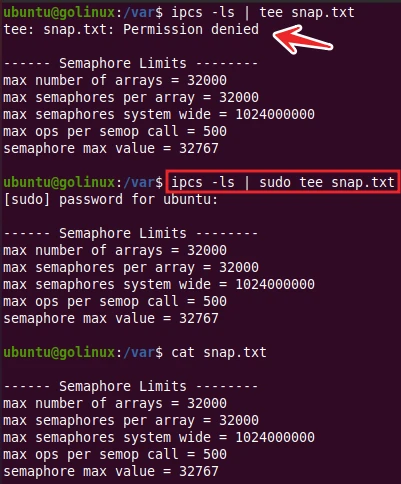
You need to use sudo before tee command to enable write access to
root-owned files and files owned by another user. Or, you can also log
in as a root user.
[command] | sudo tee file
Sample Output:
Without root permission, tee cannot write to root-owned files and files owned by other users.
8. Diagnose errors by writing to non pipes
-p option tells tee to diagnose errors writing to non-pipes.
$ [command] | tee -p file
The default action of -p command is to exit and print an error message
after diagnosing the error writing to a pipe. You can change this
behavior using --output-error[=MODE] option.
[command] | tee --output-error[=MODE] file
MODE determines behavior with write errors on the outputs:
warn: diagnose errors writing to any output
warn-nopipe: diagnose errors writing to any output not a pipe
exit: exit on error writing to any output
exit-nopipe: exit on error writing to any output not a pipe
The default MODE for the -p option is warn-nopipe.
9. Display the version
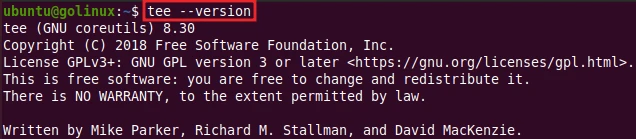
You can use --version option to print the version of tee installed in
the system.
$ tee --version
Sample Output:
10. Display help menu
You can view the syntax and available options of tee command using
--help option.
$ tee --help
Sample Output:
ubuntu@golinux:~$ tee --help
Usage: tee [OPTION]... [FILE]...
Copy standard input to each FILE, and also to standard output.

  -a, --append              append to the given FILEs, do not overwrite
  -i, --ignore-interrupts   ignore interrupt signals
  -p                        diagnose errors writing to non pipes
      --output-error[=MODE]   set behavior on write error.  See MODE below
      --help     display this help and exit
      --version  output version information and exit

MODE determines behavior with write errors on the outputs:
  'warn'         diagnose errors writing to any output
  'warn-nopipe'  diagnose errors writing to any output not a pipe
  'exit'         exit on error writing to any output
  'exit-nopipe'  exit on error writing to any output not a pipe
The default MODE for the -p option is 'warn-nopipe'.
The default operation when --output-error is not specified, is to
exit immediately on error writing to a pipe, and diagnose errors
writing to non pipe outputs.

GNU coreutils online help: <https://www.gnu.org/software/coreutils/>
Full documentation at: <https://www.gnu.org/software/coreutils/tee>
or available locally via: info '(coreutils) tee invocation'
Conclusion
tee is a helpful command that copies standard input to files and standard output. We hope you have learned tee command and its usage from this article. If you still have any confusion, feel free to ask us in the comment section.
What’s Next
20 grep command examples in Linux [Cheat Sheet]
