
![Increase load with stress command in Linux [Cheat Sheet]](/stress-command-in-linux/stress_command.jpg)
stress is a command-line tool in Linux that allows you to load and stress a computer system. It imposes certain types of computing stress such as CPU, memory, I/O, and disk stress on the machine.
How to install stress
You can install stress using the following commands according to your Linux distribution.
Install stress on CentOS, RHEL, Fedora
$ sudo dnf install stress
Install stress on Ubuntu and Debian
$ sudo apt install stress
Syntax to use stress command
The syntax for stress command is as follows:
$ stress [OPTION [ARG]]
Some options available in stress command are:
--cpu: spawn workers spinning on sqrt()--io: spawn workers spinning on sync()--vm: spawn workers spinning on malloc()/free()-t: timeout after N seconds
Different examples to use stress command
1. Increase CPU Load
The -c or --cpu option uses a given number of workers on sqrt()
function to increase the CPU load and make it work harder.
$ stress -c N
OR
$ stress --cpu N
Sample Output:
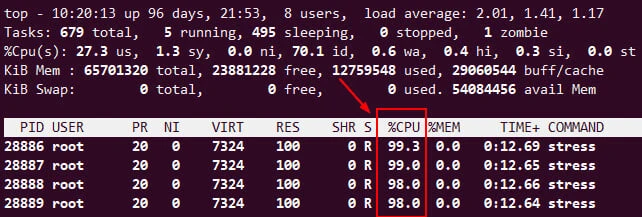
The following command will load 4 CPU cores continuously.
$ stress --cpu 4
2. Provide timeout for stress
To stress for a specific time, you can use -t or --timeout option.
The following commands will stress four CPU cores for 10s only.
$ stress -c 4 -t 10
OR
$ stress --cpu 4 --timeout 10
3. Increase Memory Load
The -v or --vm option allows you to stress a virtual memory.
$ stress -v N
OR
$ stress --vm N
Sample Output:
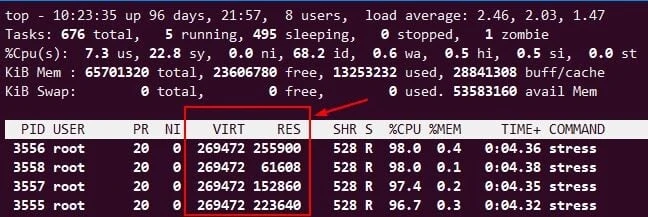
The top command output shows the high VIRT and RES memory. Read more atBeginners guide on linux memory management andHow to check memory usage per process in Linux
4. Increase Disk I/O Load
You can increase I/O load using the -i or --io option.
$ stress -i N
OR
$ stress --io N
Sample Output:
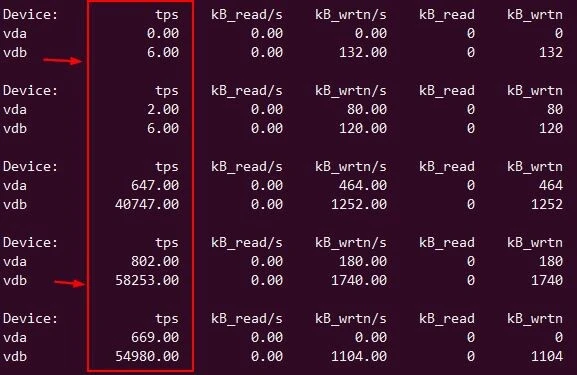
The following example generates a load on the system using two I/O-bound processes.
# stress --io 100
We will check the disk IO load using
iostat
command. I have /dev/vda and /dev/vdb disk available on my
server, you can check your active disk using lsblk or fdisk or any
other preferred command. If you execute this command without any
argument then it will show disk IO for
all the available disks.
# iostat -d /dev/vda -d /dev/vdb 1
Read More:
14 iotop command
examples [Monitor Disk IO]
Top 15
tools to monitor disk IO performance with examples
How to improve disk
IO performance in Linux
5. Increase Load on Disk
The -d or --hdd option is used to create stress on the disk.
$ stress -d N
OR
$ stress --hdd N
Sample Output:
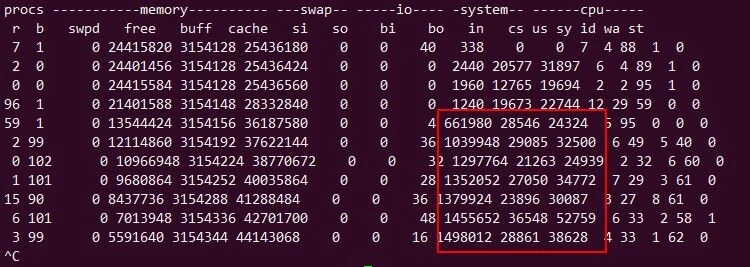
We will use following command to increase stress on the disk
# stress --hdd 100
Monitor the disk throughput using vmstat command:
# vmstat 1 100
6. Increase Load on multiple system resources (CPU, Memory, I/O)
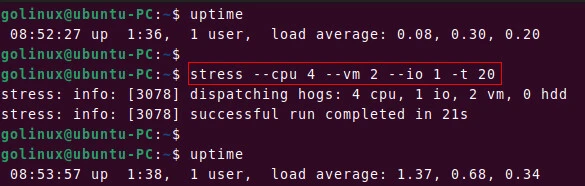
You can specify multiple loads to the stress command. The following example uses 4 CPU cores, 2 virtual memory, and 1 I/O-bound process to stress the system for 20 seconds.
$ stress --cpu 4 --vm 2 --io 1 -t 20
Sample Output:
Conclusion
Now you should know how to use stress command and generate computing stress on the Linux system. If you have any confusion regarding this article, do let us know via comments.
What’s Next
15+ iostat command examples in Linux [Cheat
Sheet]
10+ vmstat command examples in Linux [Cheat
Sheet]
