![Using SQL UPDATE from SELECT statement [7 Methods]](/sql-update-from-select/sql_update_from_select.jpg)
Overview of SQL UPDATE from SELECT
When working with relational databases, we often find ourselves in situations where data from one table needs to influence changes in another. Instead of extracting, processing, and then updating data manually, SQL provides the capability to achieve this directly using a combination of UPDATE and SELECT statements. This powerful technique ensures data integrity, efficient processing, and often results in simpler, more readable SQL scripts.
Syntax:
The precise syntax for combining UPDATE and SELECT varies slightly between database management systems (DBMS). However, the general principle is consistent: use data fetched from a SELECT statement (either from the same or a different table) to update target rows. Here’s a generic representation:
UPDATE target_table
SET column1 = (SELECT column_name FROM source_table WHERE condition)
WHERE condition;
Different methods to UPDATE from SELECT in SQL Server
Here are a list of possible methods to use UPDATE from SELECT in SQL:
- Subquery in SET Clause: Updates target columns using a subquery that returns a single value. This is useful when the updated value depends on some aggregate or computation from another table.
- UPDATE JOIN: Directly joins the table you want to update with a source table. Allows for updating columns based on columns from the joined table. Useful when both tables share a common key or relationship.
- UPDATE with FROM Clause (SQL Server specific): A method in SQL
Server where the
FROMclause is used to specify the source table or tables from which values will be fetched for the update. - Using a Correlated Subquery: Employs a subquery that refers to columns from the outer query. This method is effective when you want to update rows in the target table based on a complex condition evaluated for each row.
- Using a Temporary Table: Involves creating a temporary table or table variable to hold intermediate results. It’s especially handy for complex operations or when multiple updates based on different criteria are required.
- Using ROWID (specific to some databases like Oracle): Utilizes the unique row identifier (ROWID) for efficient updates. It’s useful in systems like Oracle where ROWID represents the unique address of each row.
- Using Common Table Expressions (CTEs): Leverages CTEs to organize the query, especially when the logic behind the update is complex. It breaks down the update process into more readable chunks, making it easier to understand and debug.
Setup Lab Environment
Consider that a company wants to update the salaries of employees based
on their department’s bonus rate. This would be a perfect scenario to
demonstrate using an “UPDATE FROM SELECT” approach, updating the
Employees table’s Salary column by calculating bonuses from the
Department table’s BonusRate.
Employees Table:
| EmpID | Name | Salary | DeptID |
|---|---|---|---|
| 1 | John | 60000.00 | 1 |
| 2 | Jane | 65000.00 | 2 |
| 3 | Alice | 58000.00 | 3 |
| 4 | Bob | 62000.00 | 2 |
Department Table:
| DeptID | DeptName | BonusRate |
|---|---|---|
| 10 | HR | 5.0 |
| 20 | Engineering | 7.50 |
| 30 | Marketing | 6.0 |
1. Subquery in SET Clause
The “Subquery in SET Clause” method involves using a subquery within the
SET portion of an UPDATE statement. This is useful when the value
you’re updating in the target table depends on some computation or
aggregation derived from another table (or even from the same table).
The subquery should ideally return a single value for each row being
updated. If it returns multiple values for a single row update, the
database system may throw an error.
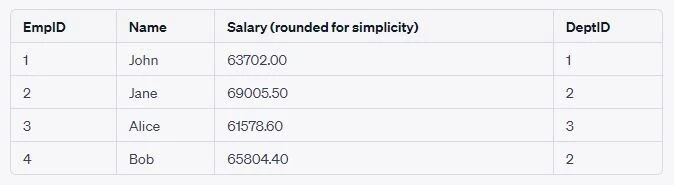
Suppose we want to increase the salary of each employee by the average
bonus amount derived from all departments.First, we would compute the
average bonus amount. Then, we’d update each employee’s salary using
this computed bonus.Here’s how we can achieve this using a subquery in
the SET clause:
UPDATE Employees
SET Salary = Salary + (Salary * (SELECT AVG(BonusRate) FROM Department) / 100);
In this query:
- The subquery
(SELECT AVG(BonusRate) FROM Department)calculates the average bonus rate from theDepartmenttable. - The main
UPDATEquery then takes each employee’s salary and increases it by this average bonus rate.
After running this update query, the salaries in the Employees table
would increase by the average bonus rate calculated from the
Department table.
Output:
2. UPDATE JOIN
The UPDATE JOIN method is useful when you want to update one table
based on the values of another table. This approach is especially
beneficial when both the source and target tables have a common field or
relationship that can be used to determine which records should be
updated. The most common use case for an UPDATE JOIN is when the data
from a related table determines the update criteria or the update values
for the target table.
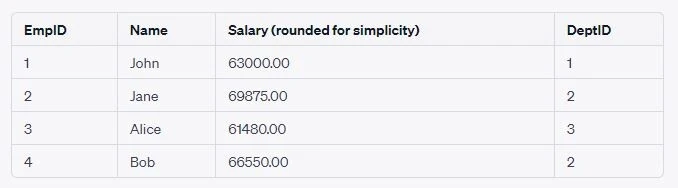
Suppose you want to increase the salary of each employee based on the
specific bonus rate of their department. You would join the Employees
table with the Department table on the DeptID and then increase the
salary of each employee by their department’s bonus rate.
UPDATE Employees e
JOIN Department d ON e.DeptID = d.DeptID
SET e.Salary = e.Salary + (e.Salary * d.BonusRate / 100);
In this query:
- The
Employeestable (aliased ase) is joined with theDepartmenttable (aliased asd) on theDeptID. - The
SETclause updates theSalarycolumn in theEmployeestable, increasing it by theBonusRatefrom the joinedDepartmenttable.
3. UPDATE with FROM Clause (SQL Server Specific)
SQL Server provides a unique syntax to update one table using another
table’s values. The FROM clause specifies the data sources that
provide the data needed for the update operation, while the UPDATE
statement specifies the table to be updated.
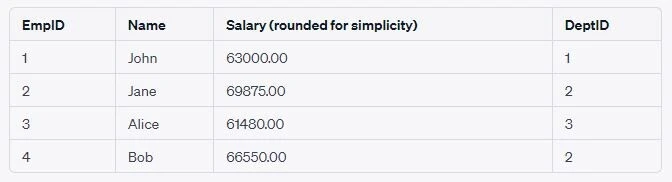
Increase the salary of each employee based on the specific bonus rate of
their department. You would use the Employees table in the UPDATE
clause and then join it with the Department table in the FROM clause
based on the DeptID. Then, increase the salary of each employee by
their department’s bonus rate.
UPDATE e
SET e.Salary = e.Salary + (e.Salary * d.BonusRate / 100)
FROM Employees e
INNER JOIN Department d ON e.DeptID = d.DeptID;
Output:
4. Using a Correlated Subquery
A correlated subquery is a subquery that refers back to the outer query.
It’s executed repeatedly, once for each row evaluated by the outer
query. In the context of an UPDATE statement, a correlated subquery
can be used to update column values based on data from another table
that is related row-by-row to the table being updated.
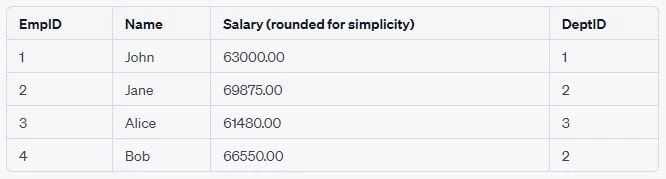
Increase the salary of each employee based on the specific bonus rate of
their respective department. Instead of a join, we can use a correlated
subquery that, for each employee, fetches the BonusRate of their
department and uses it for the salary update.
UPDATE Employees
SET Salary = Salary + (Salary * (SELECT BonusRate FROM Department WHERE DeptID = Employees.DeptID) / 100);
In this query:
- The outer query is targeting the
Employeestable. - For each employee, the inner (correlated) subquery fetches the
BonusRatefrom theDepartmenttable where theDeptIDmatches that of the current employee from the outer query.
5. Using a Temporary Table
A temporary table can be thought of as a short-lived table that exists
only for the duration of the user’s session or even just the current
query, depending on the database system. In SQL Server, for instance,
temporary tables are prefixed with #.
Suppose you want to increase the salary of each employee based on the specific bonus rate of their department, but you want to stage the computed increases in a temporary table first.
Solution:
- Create a temporary table to hold the computed new salaries.
- Populate this temporary table with the computed values.
- Update the
Employeestable using the data from the temporary table.
Create and populate the temporary table:
<a href="https://www.golinuxcloud.com/sql-create-table-statement/" title="SQL CREATE TABLE Statement with Practical Examples" target="_blank" rel="noopener noreferrer">CREATE TABLE</a> #TempSalaries (
    EmpID INT PRIMARY KEY,
    NewSalary DECIMAL(10, 2)
);

INSERT INTO #TempSalaries (EmpID, NewSalary)
SELECT e.EmpID, e.Salary + (e.Salary * d.BonusRate / 100)
FROM Employees e
JOIN Department d ON e.DeptID = d.DeptID;
Update the Employees table using the temporary table:
UPDATE e
SET e.Salary = t.NewSalary
FROM Employees e
JOIN #TempSalaries t ON e.EmpID = t.EmpID;
(Optional) Drop the temporary table:
<a href="https://www.golinuxcloud.com/delete-table-in-sql/" title="Delete table in SQL / DROP TABLE in SQL [Practical Examples]" target="_blank" rel="noopener noreferrer">DROP TABLE</a> #TempSalaries;
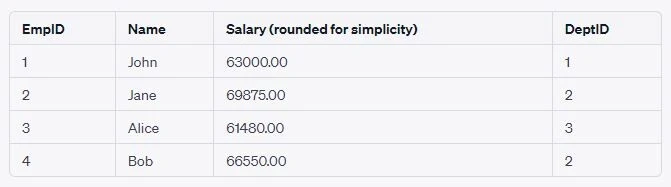
Here,
- We first created a temporary table (
#TempSalaries) to store the new computed salaries for each employee. - The computed salaries were based on joining the
Employeestable with theDepartmenttable and applying the department-specific bonus rate to each employee’s salary. - We then updated the
Employeestable’sSalarycolumn using the new salaries from our temporary table.
6. Using ROWID (Oracle Specific)
When you perform a join operation in Oracle without creating a new
result set, you can use the ROWID to quickly identify and update
specific rows in a table. This approach is particularly efficient
because ROWID offers the fastest way to access a particular row.
As before, let’s say we want to increase the salary of each employee
based on the specific bonus rate of their department. We can use a
combination of the ROWID pseudo-column and a correlated subquery to
achieve this:
UPDATE Employees e1
SET Salary = Salary + (Salary *
    (SELECT d.BonusRate / 100
     FROM Department d
     WHERE d.DeptID = e1.DeptID))
WHERE ROWID IN
    (SELECT e2.ROWID
     FROM Employees e2
     JOIN Department d ON e2.DeptID = d.DeptID);
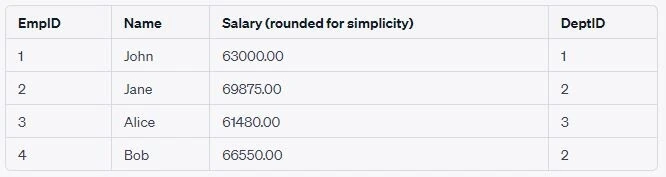
Here,
- The outer
UPDATEstatement targets rows in theEmployeestable that have aROWIDfound in the subquery’s result set. - The subquery performs a join between the
Employeestable and theDepartmenttable based on matchingDeptIDvalues. It returns theROWIDof the employees who have a matching department. - The correlated subquery within the
SETclause fetches theBonusRatefor each employee’s department and applies the increase.
7. Using Common Table Expressions (CTEs)
Common Table Expressions, commonly known as CTEs, are a powerful tool
available in many modern relational database systems. A CTE allows you
to define a temporary result set that can be referred to within a
SELECT, INSERT, UPDATE, or DELETE statement.CTEs can simplify
the structure of complex queries, making them more readable and
maintainable.
A CTE is introduced by the WITH keyword, followed by the CTE name and
as its definition enclosed in parentheses. The main query can then
reference this CTE as if it were an actual table.
Suppose we want to increase the salary of each employee based on the
specific bonus rate of their respective department. We can use a CTE to
first compute the new salaries for each employee and then use an
UPDATE statement to apply these new salaries.
WITH UpdatedSalaries AS (
    SELECT
        e.EmpID,
        e.Salary + (e.Salary * d.BonusRate / 100) AS NewSalary
    FROM Employees e
    JOIN Department d ON e.DeptID = d.DeptID
)

UPDATE Employees
SET Salary = us.NewSalary
FROM Employees e
JOIN UpdatedSalaries us ON e.EmpID = us.EmpID;
Note: The syntax might differ slightly depending on the database system you’re using. The above syntax is for SQL Server.
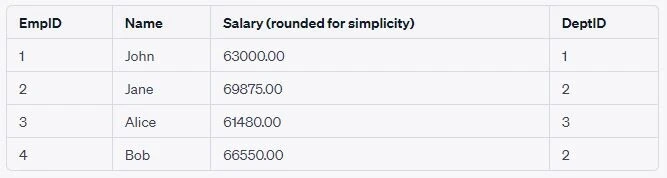
Here,
- We first define a CTE named
UpdatedSalariesto compute the new salaries for each employee. - This CTE joins the
Employeestable with theDepartmenttable and calculates the new salary for each employee based on the department-specific bonus rate. - In the main
UPDATEstatement, we then join theEmployeestable with our CTE and update the salaries in theEmployeestable using the new salaries from the CTE.
Handling Duplicates
Handling duplicates, especially when working with an UPDATE statement
combined with a SELECT operation, can pose challenges. If the SELECT
statement returns multiple rows that match a single row for the
UPDATE, it can lead to unexpected and inconsistent results.
Using DISTINCT:
When using a SELECT to derive values for an update, DISTINCT can
eliminate duplicates.
UPDATE Employees
SET DeptID = (SELECT DISTINCT DeptID FROM Department WHERE DepartmentName = 'Engineering')
WHERE EmpID = 1;
Aggregation:
Aggregate functions (MAX, MIN, AVG, etc.) can ensure that only a single value is returned, even if the underlying query has duplicates.
UPDATE Employees
SET Salary = (SELECT AVG(Salary) FROM Employees WHERE DeptID = 2)
WHERE EmpID = 1;
Using LIMIT or TOP:
In databases that support it, using LIMIT or TOP can ensure only one
row is used. However, this might still be ambiguous if there’s no
ORDER BY.
UPDATE Employees
SET ManagerID = (SELECT ManagerID FROM Managers WHERE DeptID = 2 LIMIT 1)
WHERE EmpID = 1;
Using Subquery with EXISTS:
Instead of directly getting values, you can use a correlated subquery
with EXISTS to check conditions without worrying about duplicates.
UPDATE Employees e1
SET Salary = Salary * 1.1
WHERE EXISTS (
  SELECT 1 FROM Department d WHERE d.DeptID = e1.DeptID AND d.DepartmentName = 'Engineering'
);
Summary
In the realm of SQL operations, the pattern of using
UPDATE FROM SELECT offers a powerful and flexible approach to
modifying data based on values from other tables or subqueries. This
technique can be indispensable when data from one table needs to
influence changes in another, making it essential for database
administrators and developers to understand. The article delved into the
syntax of combining UPDATE and SELECT, discussing varied methods
like using subqueries in the SET clause, leveraging joins, utilizing
the SQL Server-specific FROM clause, and other techniques like
correlated subqueries, temporary tables, ROWIDs, and Common Table
Expressions (CTEs). However, with the power of this pattern comes the
responsibility of handling challenges like duplicate data, which can
pose risks to data integrity and consistency. Effective strategies, such
as employing the DISTINCT keyword or aggregating data, can mitigate
these challenges. Performance, another critical aspect, is significantly
influenced by indexing. While indexes can speed up seek operations and
make large-scale updates more efficient, they also introduce concerns
like the overhead of index updates, fragmentation, and concurrency
issues. Periodic maintenance, informed indexing decisions, and regular
performance testing are essential to harness the full potential of the
UPDATE FROM SELECT pattern while ensuring optimal performance and data
integrity.
References
SQL
UPDATE
SQL INNER
JOIN
How do I UPDATE
from a SELECT in SQL Server?