
![How to sort by multiple columns in Laravel? [SOLVED]](/sort-by-multiple-columns-in-laravel/laravel-sort-columns.jpg)
Sorting query results is a common requirement in web development, and Laravel’s query builder provides a powerful and flexible way to perform sorting operations on database queries. While sorting by a single column is straightforward, there are situations where you may need to sort the results based on multiple columns simultaneously. This allows for more refined and specific sorting arrangements that cater to complex sorting requirements.
When handling complex data structures, it is often necessary to sort by
multiple columns to structure the data in a way that is meaningful and
useful. Fortunately, Laravel provides developers with a variety of
methods to efficiently “sort by multiple columns”. These methods range
from basic ordering functions, like orderBy(), to more complex
options, such as using raw SQL expressions with the orderByRaw()
method. Each method has its own unique advantages and uses, making
Laravel a versatile tool for handling and displaying database data.
Before we dive into the details, it’s worth noting that a basic understanding of Laravel’s query builder and SQL syntax will be beneficial. Familiarity with the Eloquent ORM and database concepts will also enhance your comprehension of the examples and techniques discussed throughout the blog post.
Sorting by a Single Column
Basic sorting using orderBy()
When working with
Laravel’s
query builder, sorting by a single column is a fundamental
operation. The orderBy() method allows us to specify the column by
which we want to sort the query results. Let’s take a look at a code
example to illustrate the process:
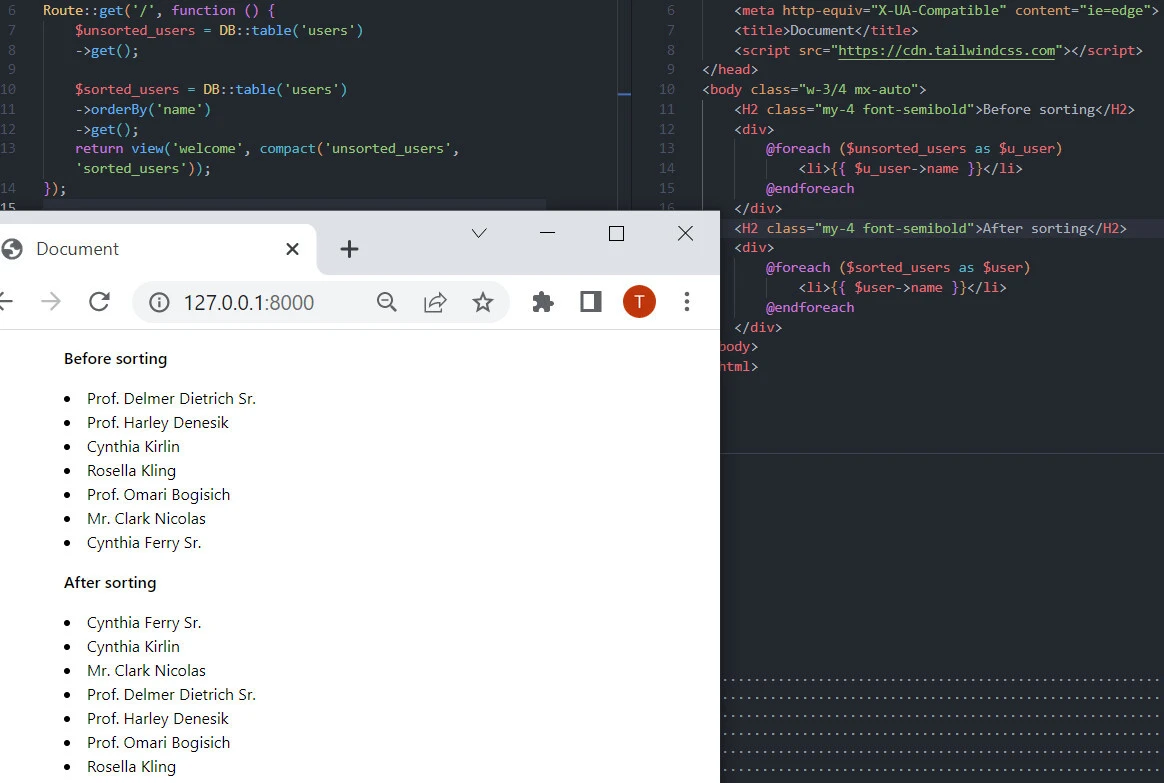
$sorted_users = DB::table('users')
    ->orderBy('name')
    ->get();
In the above code snippet, we have a query builder instance targeting
the “users” table. By calling the orderBy() method and passing the
column name 'name' as its argument, we instruct the query builder to
sort the results based on the “name” column. The resulting rows will be
arranged in ascending order by default.
It’s worth noting that the orderBy() method can be placed anywhere in
the query builder chain, but it is typically used before the get() or
first() method to ensure the sorting is applied to the final results.
Sorting by Multiple Columns
Sorting query results by multiple columns allows for more granular
control over the order of the data. Laravel’s query builder facilitates
this functionality by enabling us to chain multiple orderBy() calls
together. Each orderBy() call specifies a column to sort by, and the
order in which the orderBy() calls are chained determines the priority
of the sorting columns.
1. Using orderBy() Method
To sort query results by multiple columns, we can make use of the
orderBy() method multiple times in the query builder chain. Let’s
consider an example where we sort a list of users by names and emails:
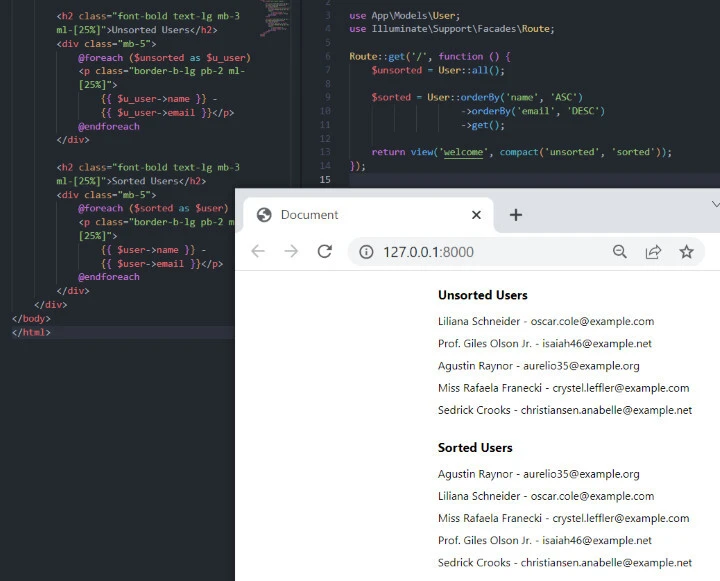
    $unsorted = User::all();

    $sorted = User::orderBy('name', 'ASC')
                    ->orderBy('email', 'DESC')
                    ->get();

    return view('welcome', compact('unsorted', 'sorted'));
- We retrieve all the records from the
userstable and assign them to the$unsortedvariable using theall()method of theUsermodel. This variable contains the unsorted list of users. - We retrieve the records from the
userstable, but this time we apply sorting based on two columns: ’name’ in ascending order (ASC) and ’email’ in descending order (DESC). TheorderBy()method is used to specify the sorting criteria. The sorted results are assigned to the$sortedvariable. - We return a view called ‘welcome’ and pass the
$unsortedand$sortedvariables to the view using thecompact()function. This allows the view to access these variables and display the data.
In the view file, you can access the $unsorted and $sorted variables
to display the user data as needed. The $unsorted variable will
contain all the users in the order they were retrieved from the
database, while the $sorted variable will contain the users sorted by
name in ascending order and then by email in descending order.
2. Using orderByDesc() Method
The orderByDesc() method sorts the query results by a column in
descending order. It can be used in conjunction with orderBy() for
multiple columns. Here’s an example:
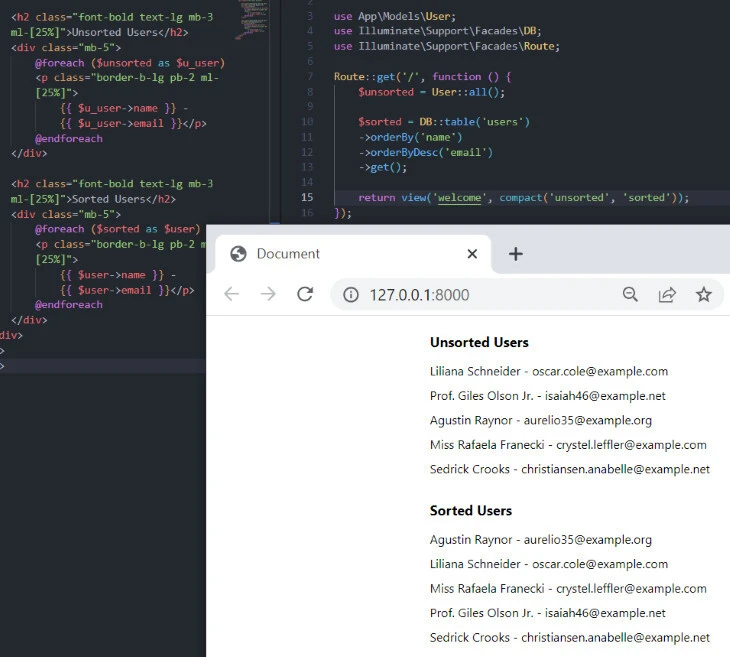
$users = DB::table('users')
    ->orderBy('name')
    ->orderByDesc('email')
    ->get();
In this example, the query results will be sorted by ’name’ in ascending order and then by ’email’ in descending order.
3. Sorting using Collections
Laravel collections provide a sortBy() method that you can use for
sorting. Here’s an example:
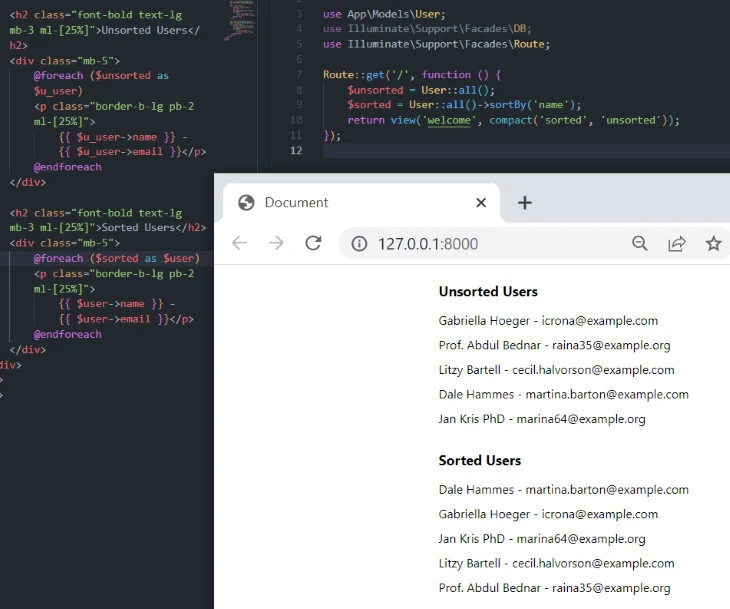
$users = User::all()->sortBy('name');
In this example, the collection of users is sorted by the ’name’ attribute in ascending order.
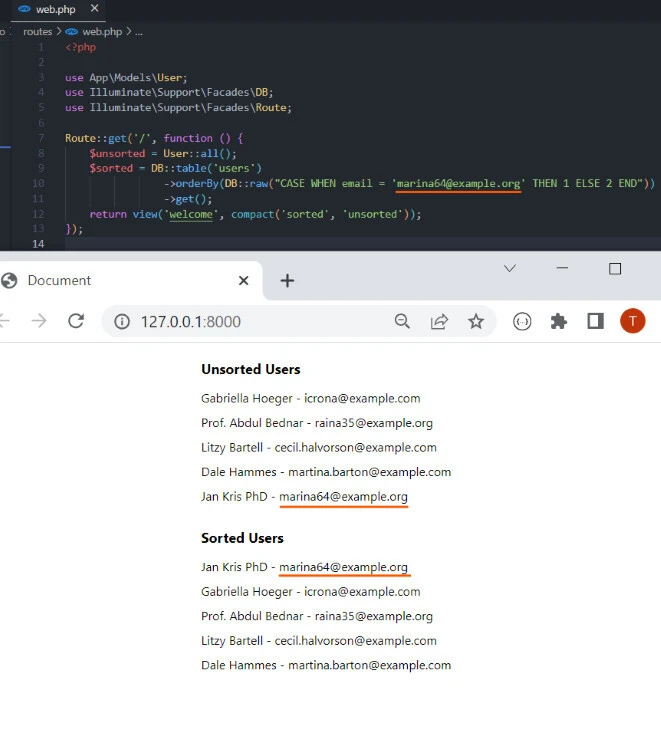
4. Using orderBy() with CASE statement
Using a CASE statement in conjunction with orderBy() enables you to
conditionally order your data. Here’s an example:
$users = DB::table('users')
    ->orderBy(DB::raw("CASE WHEN column1 = 'value' THEN 1 ELSE 2 END"))
    ->get();
In this example, the query results are ordered using a CASE statement. Rows where ‘column1’ equals ‘value’ will be sorted first (assigned a value of 1), and the rest will be sorted afterward (assigned a value of 2).
Best Practices and Tips
When sorting query results by multiple columns in Laravel using the query builder, it’s important to consider some best practices and tips to ensure optimal performance and handle specific considerations. Let’s explore some of these practices:
Optimizing performance when sorting by multiple columns
- Indexing: To improve sorting performance, consider adding indexes to the columns involved in the sorting operation. Indexing can significantly speed up the sorting process by allowing the database engine to efficiently retrieve and order the data.
- Limit the result set: If you’re dealing with a large dataset,
consider using pagination or adding a
limitclause to your query to retrieve and sort smaller subsets of data at a time. This can enhance performance by reducing the amount of data being sorted.
Considering the order of columns for sorting
- Order significance: The order of the
orderBy()calls determines the priority of the sorting columns. Ensure that you define the order of columns based on their significance in the sorting arrangement. Columns specified earlier will have higher precedence in sorting. - Sorting direction: When sorting by multiple columns, consider the sorting direction for each column. Be mindful of the logical order and whether each column should be sorted in ascending or descending order to achieve the desired sorting behavior.
Using column aliases for complex sorting scenarios
- Aliasing columns: In some cases, you may need to perform complex sorting operations involving expressions, calculations, or joins. In such scenarios, it can be useful to alias the columns involved in sorting to provide more descriptive and meaningful names for sorting purposes.
selectRaw() and orderByRaw(): Use the selectRaw() method to define custom <a title="Select specific columns in Laravel Eloquent? [SOLVED]" href="https://www.golinuxcloud.com/select-specific-columns-in-laravel-eloquent/" target="_blank" rel="noopener noreferrer">column aliases in the select</a> statement. Then, utilize the <code>orderByRaw()method to order the results based on the aliased columns.
Dealing with null values in sorting
- Null handling: When sorting by multiple columns, you may encounter situations where some columns contain null values. By default, null values are treated as the smallest possible value and are typically ordered first in ascending order and last in descending order.
- Custom null handling: If you want to customize the sorting behavior
for null values, you can use the
orderByRaw()method and provide a conditional expression to handle null values explicitly.
Conclusion
In this blog post, we explored how to sort query results by multiple
columns using Laravel’s query builder. We learned how to use the
orderBy() method to sort by a single column and then dived into
sorting by multiple columns by chaining multiple orderBy() calls. We
also discussed best practices, including optimizing performance,
considering column order, using column aliases, and handling null values
in sorting.
Sorting query results by multiple columns in Laravel provides powerful customization options for data presentation and organization. By understanding and implementing these techniques, you can efficiently sort and display data in your applications, enhancing user experience and flexibility.
