![How to search SQL for column name? [SOLVED]](/search-sql-for-column-name/sql_search_for_column_name.jpg)
Query information_schema to find specified column name into all tables
A database in SQL has multiple tables and each table has contain multiple columns. In SQL, We can search for a specific column name in a table by using the SELECT statement and specifying the column name after the SELECT keyword.
Finding all tables containing a column with a specified name in a
database can be done by querying the information_schema, which is a
database that contains metadata about all the other databases in a
system. The information_schema contains several tables that provide
information about the structure of the database, such as the columns
table.
We can use a SQL query to select the table name from the columns table
in the information_schema, where the column name is equal to the
specified column name and the table schema is equal to the specified
database name.
What is INFORMATION_SCHEMA.COLUMNS ?
It is a system table in most relational database management systems that contains information about the columns in all the tables in a database. The table has a row for each column in each table, and the columns in the table provide metadata about the corresponding column in the table.
The columns in the INFORMATION_SCHEMA.COLUMNS table typically include:
- TABLE_CATALOG: The name of the catalog that contains the table.
- TABLE_SCHEMA: The name of the schema that contains the table.
- TABLE_NAME: The name of the table that the column belongs to.
- COLUMN_NAME: The name of the column.
- ORDINAL_POSITION: The position of the column within the table.
- COLUMN_DEFAULT: The default value for the column, if any.
- IS_NULLABLE: Indicates whether the column can contain NULL values.
- DATA_TYPE: The data type of the column.
- CHARACTER_MAXIMUM_LENGTH: The maximum length of the column for character and binary data types.
- NUMERIC_PRECISION: The precision for numeric data types.
Syntax of find all tables containing specified column name
SELECT TABLE_CATALOG, TABLE_SCHEMA, TABLE_NAME, COLUMN_NAME, ORDINAL_POSITION, COLUMN_DEFAULT, IS_NULLABLE, DATA_TYPE
FROM INFORMATION_SCHEMA.COLUMNS
WHERE (COLUMN_NAME LIKE '%search_column_name%')
[ORDER BY TABLE_NAME]
Here,
- search _column _NAME– This is where the search for column name in SQL Server should be specified, also under single quotation marks
- COLUMN_NAME - This is the keyword specify to search for column name
Setup Lab Environment
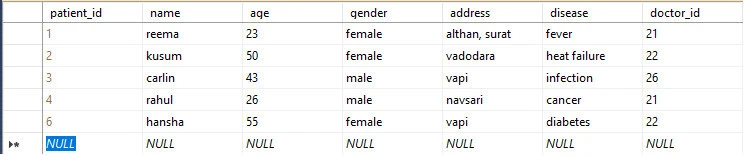
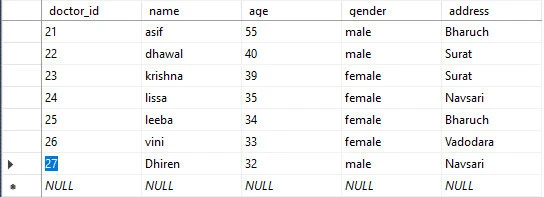
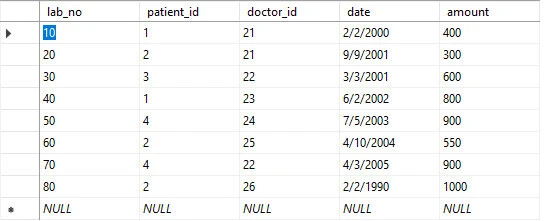
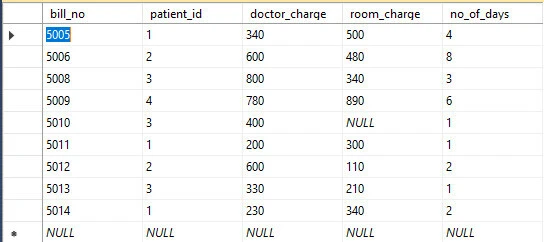
Consider Hospital management database with seven tables to perform practical examples
Patient Table
Doctor Table
Laboratory Table
Bill table
Example-1: Find all tables containing specified single column name
Write SQL query to search for column name ‘patient_id’ in hospital management database
SELECT  TABLE_CATALOG, TABLE_SCHEMA, TABLE_NAME, COLUMN_NAME, ORDINAL_POSITION,
COLUMN_DEFAULT, IS_NULLABLE, DATA_TYPE
FROM  INFORMATION_SCHEMA.COLUMNS
WHERE (COLUMN_NAME LIKE '%patient_id%')
ORDER BY TABLE_NAME;
- This query is used to retrieve information about columns whose name
contains “
patient_id” from theinformation_schema.COLUMNStable and it will return columns with the name of the table, name of the column, its default value, if it is nullable, the data type and its ordinal position in the table. - In this query, the condition is that the COLUMN_NAME column must
contain the string “
patient_id”. The query uses the LIKE operator with the wildcard character ‘%’ to match any string that contains “patient_id” - ORDER BY clause is used to sort the result set by one or more columns. In this query, the result set is sorted by the TABLE_NAME column in ascending order.
OUTPUT:

Example 2: Find all tables containing specified two column names
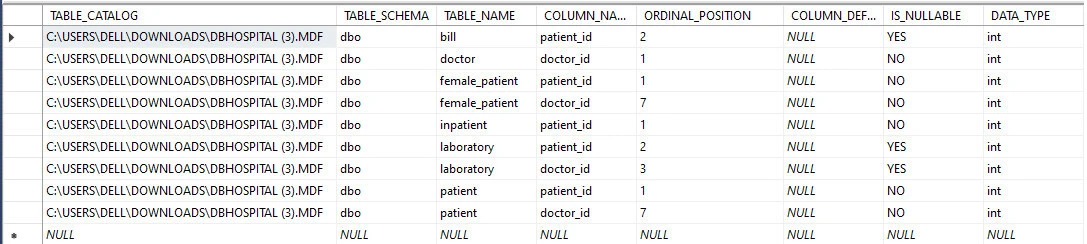
Write SQL query to search for patient_id and doctor_id column names
in hospital management database
SELECT   TABLE_CATALOG, TABLE_SCHEMA, TABLE_NAME, COLUMN_NAME, ORDINAL_POSITION,
COLUMN_DEFAULT, IS_NULLABLE, DATA_TYPE
FROM   INFORMATION_SCHEMA.COLUMNS
WHERE  (COLUMN_NAME LIKE '%patient_id%') OR (COLUMN_NAME LIKE '%doctor_id%')
ORDER BY TABLE_NAME;
- This query is used to retrieve information about columns whose name
contains “
patient_id” or “doctor_id” from theinformation_schema.COLUMNStable and it will return columns with the name of the table, name of the column, its default value, if it is nullable, the data type and its ordinal position in the table. - In this query, the condition is that the
COLUMN_NAMEcolumn must contain the string “patient_id” or “doctor_id” . The query uses the LIKE operator with the wildcard character ‘%’ to match any string that contains “patient_id” or “doctor_id”; - ORDER BY clause is used to sort the result set by one or more columns.
In this query, the result set is sorted by the
TABLE_NAMEcolumn in ascending order.
OUTPUT:
Summary
In this article on Find all tables containing column with specified name - MS SQL Server , We have explain overview of how to find table name which contains searched column name, what is INFORMATION_SCHEMA.COLUMNS table, syntax to find all tables contain specified column name and also covered practical examples of find all tables contains single column name and two column name.
References
Read More
Querying the SQL
Server System Catalog FAQ
Find all
tables containing column with specified name