Confused about restarting crontab in Linux? Short answer:
👉 In most cases, you should NOT restart cron — and this guide
explains exactly why.
Cron automatically detects changes made using crontab -e and reloads
them on its own. Restarting the cron service is required only in
specific system-level scenarios, which we’ll cover below.
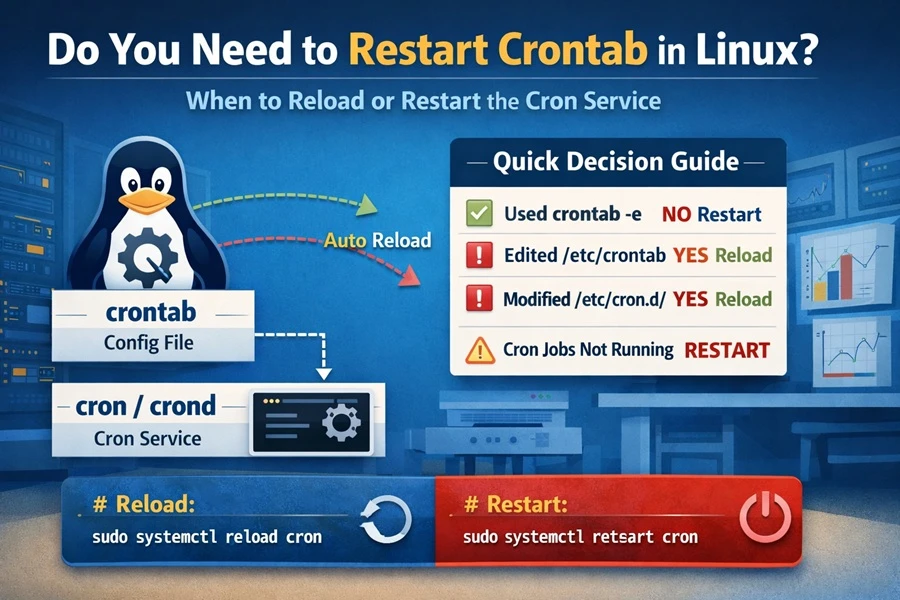
Most Linux cron changes do NOT require a restart — this diagram shows exactly when reload or restart is needed.
Quick Commands & Decision Matrix
Use this table to decide if a manual intervention is actually necessary:
| Situation | Action Required | Command (Ubuntu/Debian) | Command (RHEL/CentOS) |
|---|---|---|---|
Used crontab -e |
None (Automatic) | N/A | N/A |
Edited /etc/crontab |
Reload | sudo systemctl reload cron |
sudo systemctl reload crond |
Modified /etc/cron.d/* |
Reload | sudo systemctl reload cron |
sudo systemctl reload crond |
| Cron jobs not running or ignored | Restart | sudo systemctl restart cron |
sudo systemctl restart crond |
Crontab vs Cron (Why Restart Is Usually Not Needed)
- crontab → a configuration file containing scheduled jobs
- cron / crond → the background service that executes those jobs
Editing a crontab file does not require restarting the cron service in normal cases.
This is the official statement from man page of cron
cron checks each minute to see if its spool directory’s modification time (or the modification time on /etc/crontab) has changed,
and if it has, cron will then examine the modification time on all crontabs and reload those which have changed. Thus cron need not be
restarted whenever a crontab file is modified.
✅ You do NOT need to restart cron when:
- You edit jobs using
crontab -e - You add or remove normal user cron jobs
- You list jobs using
crontab -l
cron.service while on RHEL/Fedora/CentOS/AlmaLinux/RockyLinux/Fedora
serversyou will have crond.service.
How to Check if Cron is Working
Before restarting, always verify the service state.
# Ubuntu / Debian / Mint
sudo systemctl status cron

# RHEL / CentOS / Rocky / Alma
sudo systemctl status crond
How to Restart Cron Service (All Linux Distros)
# Debian / Ubuntu / Mint
sudo systemctl restart cron

# Alternative methods:
sudo service cron restart
sudo /etc/init.d/cron restart

# RHEL / CentOS / Rocky / AlmaLinux
sudo systemctl restart crond

# Deprecated but still seen:
sudo service crond restart
Restart vs Reload Cron (Important Difference)
- Restart: Completely stops and starts the cron process. This may briefly interrupt or skip a job scheduled at that exact second.
- Reload: Keeps the process running but tells it to refresh its configuration. This is the safer “production-friendly” option.
Reload Cron (Preferred When Available)
# Debian / Ubuntu
sudo systemctl reload cron

# RHEL / CentOS
sudo systemctl reload crond
⚠️ Not all cron implementations support reload. If reload fails, use restart instead.
Frequently Asked Questions (FAQ)
Does crontab -e restart the cron service?
No. crontab -e simply updates your user-specific cron file. Once you
save and exit, the cron daemon notices the timestamp change on the file
and reloads the configuration internally without stopping the service.
Why is my crontab not running even after a restart?
Restarting rarely fixes a broken script. If your job isn’t running,
check for:
Absolute Paths: Cron doesn’t know where /usr/local/bin is unless
you tell it. Use /usr/bin/python3 instead of python3.
Permissions: Ensure the script is executable
(chmod +x script.sh).
Mailing: Check local mail (mail command) to see errors cron sent
to your user.
What is the difference between restart and reload in cron?
Restart stops and starts the cron process, while reload refreshes configuration without interrupting running jobs.
Is there a crontab service in Linux?
No, crontab is a configuration file; cron (or crond) is the actual service.
Why is my crontab not running even after restart?
Most cron failures are caused by incorrect paths, missing permissions, or environment differences rather than the cron service itself.
Summary
- There is no crontab service to restart
- Cron automatically reloads user crontab changes
- Restart cron only for system-level changes or troubleshooting
- Reload cron when supported to avoid interrupting running jobs
Understanding when not to restart cron is just as important as knowing how to do it.