

In this article I will share a sample systemd unit file which can be used to read user input during boot stage using shell script with systemd in RHEL/CentOS 7/8 Linux. It is possible that for a system administrator there are some tasks such as setting hostname or something which requires him/her to read user input during boot stage before login prompt comes up. And then based on the user input certain task is performed using a background script.
This is possible using systemd unit service file in RHEL/CentOS 7/8 Linux.
Step 1: Overview on systemd
If you are a beginner to systemd then I would recommend you to also readOverview on systemd and how it is different from legacy SysV scriptsbefore starting with this tutorial.
Step 2: Create Sample script
We will use a custom small script with until loop to read user input during boot stage. So unless the script gets the user input, it will not allow the boot stage to complete.
[root@centos-8 ~]# cat /tmp/welcome.sh
#!/bin/bash
until [[ -n ${REPLY} ]]; do
    read -ep "Enter your name: "
done
echo "WELCOME ${REPLY^^}"; sleep 5
Here the script will prompt “Enter your name” and then will wait for user input. If we call this script at boot up stage then the script will read user input during boot stage and proceed accordingly.
Step 3: Create systemd unit service file to read user input during boot stage
Now we need a
systemd
unit service file which will call our script at boot stage to read
user input. The file should be located in either
/usr/lib/systemd/system/ or /etc/systemd/system/. Below is a sample
systemd unit service file:
[root@centos-8 ~]# cat /etc/systemd/system/take-user-input.service
[Unit]
Description=Get user input at boot stage
After=network.target
Before=sshd.service systemd-logind.service getty@tty1.service

[Service]
Type=oneshot
TTYPath=/dev/tty13
ExecStartPre=/usr/bin/chvt 13
ExecStart=/tmp/welcome.sh
ExecStartPost=/usr/bin/chvt 1
TimeoutStartSec=0
StandardInput=tty
TTYVHangup=yes
TTYVTDisallocate=yes

[Install]
WantedBy=default.target
RequiredBy=sshd.service systemd-logind.service getty@tty1.service
Here,
After=      If the script needs any other system facilities (networking, etc), modify the [Unit] section to include appropriate
        After=, Wants=, or Requires= directives, as described in: man systemd.unit

Before=    If the script needs to be run before other services--for example, prior to starting sshd or console/graphical
        logins--ensure there is a Before=XYZ.service in the [Unit] section and a corresponding RequiredBy=XYZ.service
        in the [Install] section.

TTYPath=       Specify a tty number here (the writer's choice of tty13 here was mostly arbitrary; however, keep in mind that
        numbers higher than 12 require the chvt command to access them).

ExecStartPre=/usr/bin/chvt 13   This changes the physical console to tty13 (i.e., the tty specified with TTYPath=).

ExecStart=   The full path to the main script, including any desired script arguments.

ExecStartPost=/usr/bin/chvt 1   This changes the physical console back to tty1 after the script finishes (this line
                is not always necessary, e.g., if a display manager starts after the script, it will
                probably steal focus by changing the physical console back to whichever tty it is running on).

TimeoutStartSec=    When a service doesn't signal start-up completion within TimeoutStartSec, systemd considers the service failed;
            for long-running shell scripts it is essential to modify TimeoutStartSec or disable the timeout logic altogether
            as above, with TimeoutStartSec=0. See man systemd.service for more details

StandardInput=tty   This line is absolutely necessary; without specifying the value tty here, this setting defaults to null.
                    (Note that StandardOutput= and StandardError= can also be independently set;
                    however, by default they inherit their value from StandardInput=.)

For more information check man page of systemd.exec
Refresh the systemd configuration files
systemctl daemon-reload
Enable the service to automatically start at next boot
[root@centos-8 ~]# systemctl enable take-user-input.service
Created symlink /etc/systemd/system/default.target.wants/take-user-input.service → /etc/systemd/system/take-user-input.service.
Created symlink /etc/systemd/system/sshd.service.requires/take-user-input.service → /etc/systemd/system/take-user-input.service.
Created symlink /etc/systemd/system/systemd-logind.service.requires/take-user-input.service → /etc/systemd/system/take-user-input.service.
Created symlink /etc/systemd/system/getty@tty1.service.requires/take-user-input.service → /etc/systemd/system/take-user-input.service.
Now you are all done, proceed with the reboot of the Linux node.
Step 4: Verify the systemd unit file configuration
Post reboot connect to the GUI console of you Linux host, since I am using Oracle VirtualBox, I will connect to the console of my Virtual Machine.
Here as you see the booting has halted and is awaiting for user input
from our script /tmp/welcome.sh
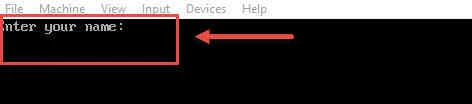
Once you give the input the booting of your Linux OS will continue.
As this stage we had explicitly used Before=sshd.service and
After=network.target to execute script before activating sshd hence
sshd will not be active at this stage although network should be active.
Lastly I hope the steps from the article to read user input during boot stage using systemd on CentOS/RHEL 7 Linux was helpful. So, let me know your suggestions and feedback using the comment section.
Related Searches: read user input in shell script at boot stage in Linux. bash read input from stdin during boot up. take input at the startup script in Linux.
