

In this Python tutorial we will learn about Python split() string
function. Unlike len(), some functions are specific to strings. To use
a string function, type the name of the string, a dot, the name of the
function, and any arguments that the function needs:
string.function(arguments). You can use the built-in string split()
function to break a string into a list of smaller strings based on some
separator.
Python string.split() syntax
The syntax as per
docs.python.org to use
string.split():
string.split([separator[, maxsplit]])
Here,
- separator is the delimiter string
- If maxsplit is given, at most
maxsplitsplits are done (thus, the list will have at most maxsplit+1 elements) - If
maxsplitis not specified or-1, then there is no limit on the number of splits (all possible splits are made). - If
separatoris given, consecutive delimiters are not grouped together and are deemed to delimit empty strings (for example,'1,,2'.split(',')returns['1', '', '2']) - If
separatoris not specified or is None, runs of consecutive whitespace are regarded as a single separator, and the result will contain no empty strings at the start or end if the string has leading or trailing whitespace. For example,' 1 2 3 '.split()returns['1', '2', '3']
Example-1: Split string with whitespace
In this example script we will split a sentence containing strings into
multiple sub string using whitespace as the separator. If you don’t have
a separator to be defined then you can just provide split() which will
by default consider separator as None.
#!/usr/bin/env python3

mystring = "This is Python Tutorial"

print(type(mystring)) ## This will return type as string
newstring = mystring.split() ## split the string and store into newstring var
print(newstring)  ## print the content of newstring
print(type(newstring))  ## the new type would be list after splitting
Output from this script:
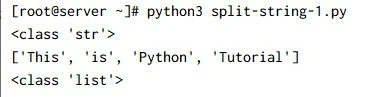
string.split() will break and split the string on the
argument
that is passed and return all the parts in a list. The list will not
include the splitting character(s).
Example-2: Use comma as separator
In this example we will define a separator as comma(,) and split the
strings into list
#!/usr/bin/env python3

mystring = "abc,def,ghi"

print(type(mystring)) ## This will return type as string
newstring = mystring.split(',') ## split the string using ',' and store into newstring var
print(newstring)  ## print the content of newstring
print(type(newstring))  ## the new type would be list after splitting
Output from this script:
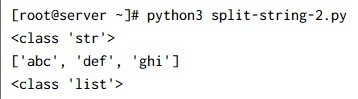
So the output is split using the comma character this time because we
used string.split(,). Similarly you can use any other character to
split your string.
Example-3: Define maximum split limit
By default if your don’t specify split limit, then all the possible
values will be slit from the provided string. In this example we will
define maxlimit as 1 so after the first split, python will ignore
the remaining separators.
#!/usr/bin/env python3

mystring = "abc,def,ghi,tre,deb"

print(type(mystring)) ## This will return type as string

## split the string using sep=',' with maxlimit=1 and store into newstring var
newstring = mystring.split(',',1)

print(newstring)  ## print the content of newstring
print(type(newstring))  ## the new type would be list after splitting
Output from this script:
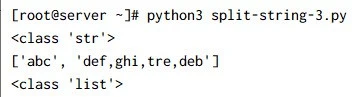
As you can see from the output, our string was split into two parts wherein after the first separator match, all other commas are ignored.
Example-4: Count occurrences of word in a file
The split() method separates a string into parts wherever it finds a
space and stores all the parts of the string in a list. The result is a
list of words from the string, although some punctuation may also appear
with some of the words.
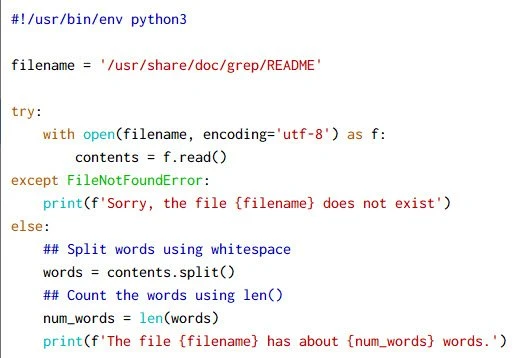
We will use split() to count
the number of word in “/usr/share/doc/grep/README” file. You can
ignore the try and
except block if you are not yet familiar with it, you can
concentrate on the else block where I am performing the actual task:
Output from this script:
~]# python3 count-words.py
The file /usr/share/doc/grep/README has about 372 words.
Let us verify the output with wc:
~]# wc -w /usr/share/doc/grep/README
372 /usr/share/doc/grep/README
So the output from our script and wc are same which means split()
has successfully separated the words.
Example-5: Split string using one liner with for loop
In this example we will use one liner code to split the string and print words having more than 4 characters.
#!/usr/bin/env python3

mystring = 'This is a dummy text we are testing python split string'

## One-Liner
w = [[x for x in line.split() if len(x)>4] for line in mystring.split('\n')]

## Result
print(w)
Here,
- The inner list comprehension expression
[x for x in line.split() if len(x)>4]uses the stringsplit()function to divide a given line into a sequence of words. We iterate over all wordsxand add them to the list if they have more than three characters. - The outer list comprehension expression creates the string line
used in the previous statement. Again, it uses the
split()function to divide themystringon the newline characters'\n'.
Output from this script:
 ~]# python3 one-liner-split.py
[['dummy', 'testing', 'python', 'split', 'string']]
Conclusion
In this tutorial we learned about string.split() using different
examples. We can combine split with regex to add more powerful features
which will cover in different tutorial. Here I have covered limited
examples on using it with string in different scenarios.
