

In this article we will explore different methods to sort dictionary by key in Python programming. But before that, you should be aware that as of Python 3.6, now dictionary can remember the order of insertion of items unlike older versions of Python.
The order-preserving aspect of this new implementation is considered an implementation detail and should not be relied upon (this may change in the future, but it is desired to have this new dict implementation in the language for a few releases before changing the language spec to mandate order-preserving semantics for all current and future Python implementations; this also helps preserve backwards-compatibility with older versions of the language where random iteration order is still in effect, e.g. Python 3.5).
Performing list(d) on a dictionary returns a list of all the keys used in the dictionary, in insertion order (if you want it sorted, just use sorted(d) instead).
Method-1: Python sort dictionary by key using for loop with sorted()
In this example we will sort the dictionary items based on key and then store it in a new dictionary. This method will work on any version of Python, although for long dictionaries, this method can be performance intensive.
Here we will use sorted() to sort the dictionary based on keys and
store it in a variable and then we will run a
nested for
loop to match the sorted keys to create our new dictionary.
#!/usr/bin/env python3

mydict_1 = {'key5': 'value5', 'key3': 'value3', 'key1': 'value1', 'key2': 'value2'}

# Create new dictionary
new_dict = {}

# sort the keys and store them in a new variable
sorted_value = sorted(mydict_1.keys())

# for all the values in sorted_value
for i in sorted_value:
   # match the key element with un-sorted dictionary
   for key, value in mydict_1.items():
       if key == i:
          # when matched place the key and value in the new dict
           new_dict[key] = value

print(new_dict)
Output from this script:

Method-2: Python sort dictionary by key using sorted() with lambda
The lambda statement in Python is simply an
anonymous
function. Due to the syntax, it is slightly more limited than
regular functions, but a lot can be done through it. Here, the
dictionary returns the (key, value) pair. The lambda function makes
key = value, thus the ordered dictionary will be sorted by its key.
#!/usr/bin/env python3

mydict = {'key5': 'value4', 'key3': 'value2', 'key1': 'value5', 'key2': 'value1'}

print('Without sort: ', mydict)

# Sort based on item[0] i.e. key in the dictionary
sorted_mydict = dict(sorted(mydict.items(), key=lambda item: item[0]))
print('After sort: ', sorted_mydict)

# Check type of the new dictionary
print(type(sorted_mydict))
Output from this script:

Method-3: Python sort dictionary by key using for loop with sorted() and lambda
This method is similar to method-2 we used above with one difference,
here we will use for loop to iterate over the key value pair and create
our sorted dictionary. In the previous example we had to use dict() to
convert the list into dictionary but here with for loop we don’t have to
worry about that.
#!/usr/bin/env python3

mydict = {'key5': 'value4', 'key3': 'value2', 'key1': 'value5', 'key2': 'value1'}

# Empty dictionary to store the sorted items
new_dict = {}

print('Without sort: ', mydict)

# This will sort the dictionary by key of each entry
# within the dictionary from smallest to largest
for key, value in sorted(mydict.items(), key=lambda item: item[0]):
    # store the sorted items in new dictionary
    new_dict[key] = value

print('After sort: ', new_dict)
print(type(new_dict))
Output from this script:

Method-4: Python sort dictionary by key using itemgetter()
Instead of
lambda
function there’s a version available in the operator module named
itemgetter(). These are higher-order functions. The expression
itemgetter(0) creates a function. We can then apply the function to a
collection to select an object, like this.
>>> from operator import itemgetter
>>> itemgetter(0)([1, 2, 3])
1
Let’s use this in our example to sort dictionary by key:
#!/usr/bin/env python3

from operator import itemgetter

mydict = {'key5': 'value4', 'key3': 'value2', 'key1': 'value5', 'key2': 'value1'}

print('Without sort: ', mydict)
sorted_mydict = dict(sorted(mydict.items(), key=itemgetter(0)))
print('After sort: ', sorted_mydict)
print(type(sorted_mydict))
Output from this script:

Method-5: Python sort dictionary by key using sorted() with zip()
We can use sorted() to sort the dictionary keys and values
individually and later zip will make an iterator that aggregates
elements from each of the iterables. Since zip() returns an iterator
of tuples so we use dict() to convert it to dictionary type.
#!/usr/bin/env python3

mydict = {'key5': 'value4', 'key3': 'value2', 'key1': 'value5', 'key2': 'value1'}

print('Without sort: ', mydict)

# create (value, key) pairs using zip()
sorted_mydict = dict(sorted(zip(mydict.keys(), mydict.values())))
print('After sort: ', sorted_mydict)

print(type(sorted_mydict))
Output from this script:

Method-6: Python sort dictionary by key using sorted() with get()
In this example we will use dict.get(key[, default]) along with
sorted() to sort dictionary by key. Here, dict.get(key[, default])
returns the value for key if the key exists; if the key doesn’t exist,
the optional default value is returned. If default is not defined, then
None is returned; this prevents an error from being generated.
Since this method returns value of a key, we use reverse=True to sort
based on key of the dictionary.
#!/usr/bin/env python3

mydict = {'key5': 'value4', 'key3': 'value2', 'key1': 'value5', 'key2': 'value1'}

new_dict = {}

print('Without sort: ', mydict)

# sort dictionary keys using sorted()
sorted_keys = sorted(mydict, key=mydict.get, reverse=True)

# map the sorted keys with values from original dictionary
for word in sorted_keys:
    new_dict[word] = mydict[word]

print('After sort: ', new_dict)
print(type(new_dict))
Output from this script:

Method-7: Python sort dictionary by key using sorted()
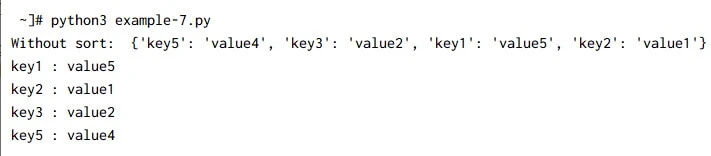
This is a very simple example where we use sorted to sort the dictionary elements based on it’s key and then use for loop to print both key and it’s mapping value pair:
#!/usr/bin/env python3

import collections
mydict = {'key5': 'value4', 'key3': 'value2', 'key1': 'value5', 'key2': 'value1'}

print('Without sort: ', mydict)

for key in sorted(mydict.keys()):
    print(key, ":", mydict[key])
Output from this script:
Method-8: Python sort dictionary by key using JSON
JavaScript Object Notation (JSON) is a standard way of representing simple objects, such as lists and dicts, in the form of text strings. Although, it was originally developed for JavaScript, JSON is language independent and most languages can work with it.
We use the json.dumps() function for converting an object to a JSON
string. If sort_keys is true (default: False), then the output of
dictionaries will be sorted by key.
#!/usr/bin/env python3

import json
mydict = {'key5': 'value4', 'key3': 'value2', 'key1': 'value5', 'key2': 'value1'}

print('Without sort: ', mydict)
print(json.dumps(mydict, sort_keys = True))
Output from this script:

Method-9: Sort dictionary by key in python using pprint
The
pprint module provides a capability
to “pretty-print” arbitrary Python data structures in a form which can
be used as input to the interpreter.The pprint module defines one
class:
class pprint.PrettyPrinter(indent=1, width=80, depth=None, stream=None, *, compact=False, sort_dicts=True)
If sort_dicts=true (the default), dictionaries will be formatted with
their keys sorted, otherwise they will display in insertion order.
#!/usr/bin/env python3

import pprint
mydict = {'key5': 'value4', 'key3': 'value2', 'key1': 'value5', 'key2': 'value1'}

print('Without sort: ', mydict)
print('After sort: ', end =' ')
pprint.pprint(mydict)
Output from this script:

Method-10: Python sort dictionary by key using pandas module
Pandas
introduces two new data types to Python: Series and DataFrame. The
DataFrame represents your entire spreadsheet or rectangular data,
whereas the Series is a single column of the DataFrame. A Pandas
DataFrame can also be thought of as a dictionary or collection of Series
objects.
This column-less row of values is the index label of the dataframe. Think of the index label as being like a column name, but for rows instead of columns. By default, Pandas will fill in the index labels with the row numbers (note that it starts counting from 0).
#!/usr/bin/env python3

import pandas as pd
mydict = {'key5': 'value4', 'key3': 'value2', 'key1': 'value5', 'key2': 'value1'}

df=pd.DataFrame(mydict,index=[0]).sort_index(axis=1)
print(df)
Output:
~]# python3 example-10.py
     key1    key2    key3    key5
0  value5  value1  value2  value4
Use the .to_dict method to generate dictionaries.
#!/usr/bin/env python3

import pandas as pd
mydict = {'key5': 'value4', 'key3': 'value2', 'key1': 'value5', 'key2': 'value1'}
print('Without sort: ', mydict)

df=pd.DataFrame(mydict,index=[0]).sort_index(axis=1)
#print(df)
print('Ater sort', df.to_dict('int')[0])
Output from this script:

Summary
In this Python programming tutorial we learned about different methods
to
sort
dictionary by key. You must make sure that the chosen method is
supported on your version of Python as before Python 3.6, a dictionary
was unordered and was not capable to remember the order of items
inserted and we had to rely on OrderedDictionary. But with Python 3.6
we can directly use dictionary as it can now remember the insertion
order.
