

In this tutorial we will learn about python sort() function which can be used to sort different data types in Python such as List, Dictionary, Tuple etc
Python sorting syntax
You can use different function to sort different data types in Python.
Using list.sort()
Lists have only one special method:
list.sort(*, key=None, reverse=False)
By default, sort() performs an A-Z-style sort, with lower values on
the left. Using key allows the use of an additional function to modify
the default sort, while reverse performs a Z-A sort.
Using sorted()
Alternatively we can also use sorted() built-in function with
following syntax:
sorted(iterable, *, key=None, reverse=False)
Here, key specifies a function of one argument that is used to extract a
comparison key from each element in iterable. reverse is a boolean
value. If set to True, then the list elements are sorted as if each
comparison were reversed.
Python sort list
In this section we will sort Python List data type.
Example-1: Using sort.list() for strings and integers
I have an example script with one list containing strings and other list with integers.
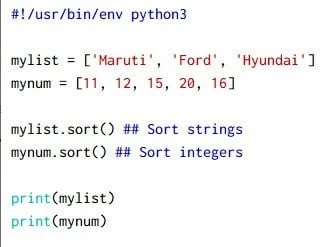
For strings, sort will arrange the items alphabetically while for integers in the numerical order. Output from this script:
 ~]# python3 sort-list.py
['Ford', 'Hyundai', 'Maruti']
[11, 12, 15, 16, 20]
Example-2: using sort.list() with key
If you wanted a different sorting, such as sorting by the second item in each list item, you can pass that as a argument into a function:
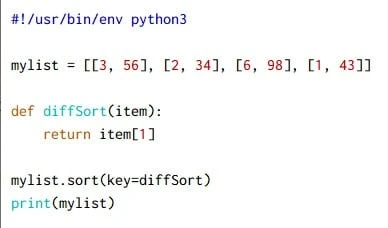
Output from this script:
~]# python3 sort-list.py
[[2, 34], [1, 43], [3, 56], [6, 98]]
In this example, you can see that the sorting isn’t by the first item in
each sublist, but by the second item, that is, it is now
34->43->56->98 instead of 1->2->3->6.
Python sort Tuple
We can use sorted() to sort any
tuple in the
Python script:
#!/usr/bin/env python3

mytuple = ( 4, 5, 1, 3, 9)

mytuple_sorted = sorted(mytuple)
print(mytuple_sorted)
Output from this script:
~]# python3 sort-tuple.py
[1, 3, 4, 5, 9]
Python sort dictionary by Key
In this section I will share different methods which can be used to sort
python dictionary items by KEY. We will look into more complex usage of
key feature with sorted()
Example-1: Using sorted() with lambda in dict()
This method is supported with Python 3.6 and above. I have defined a
dictionary with some key value pairs. We will use sorted() function to
sort the content of the dictionary by key:
#!/usr/bin/env python3

mydict = {'key1': 'val5', 'key3': 'val2', 'key2': 'val3'}

print('Without sort: ', mydict)
sorted_mydict = dict(sorted(mydict.items(), key=lambda item: item[0]))
print('After sort: ', sorted_mydict)
print(type(sorted_mydict))
Here item[0] represents the key of the dictionary, output from this
script:
 ~]# python3 sort-dictionary.py
Without sort:  {'key1': 'val5', 'key3': 'val2', 'key2': 'val3'}
After sort:  {'key1': 'val5', 'key2': 'val3', 'key3': 'val2'}
<class 'dict'>
Example-2: Using sorted() with dictionary items
We will use the same method as we used earlier but instead we will use
convert dictionary to OrderedDict because standard
Python
dictionaries are unordered. Even if you sorted the (key,value)
pairs, you wouldn’t be able to store them in a dict in a way that
would preserve the ordering.
#!/usr/bin/env python3

from collections import OrderedDict

mydict = {'key1': 'val5', 'key3': 'val2', 'key2': 'val3'}

print('Without sort: ', mydict)

## Using dict() with items
sorted_mydict = dict(sorted(mydict.items()))
print('After sort: ', sorted_mydict)
print(type(sorted_mydict))

## Using dict() with items, sorted in reverse order
sorted_mydict = dict(sorted(mydict.items(), reverse=True))
print('After sort(reverse): ', sorted_mydict)
print(type(sorted_mydict))

## Using OrderedDict()
sorted_mydict = OrderedDict(sorted(mydict.items()))
print('After sort: ', sorted_mydict)
print(type(sorted_mydict))

## Using OrderedDict(), sorted in reverse order
sorted_mydict = OrderedDict(sorted(mydict.items(), reverse=True))
print('After sort (reverse): ', sorted_mydict)
print(type(sorted_mydict))
Output from this script:
 ~]# python3 sort-dictionary.py
Without sort:  {'key1': 'val5', 'key3': 'val2', 'key2': 'val3'}
After sort:  {'key1': 'val5', 'key2': 'val3', 'key3': 'val2'}
<class 'dict'>
After sort(reverse):  {'key3': 'val2', 'key2': 'val3', 'key1': 'val5'}
<class 'dict'>
After sort:  OrderedDict([('key1', 'val5'), ('key2', 'val3'), ('key3', 'val2')])
<class 'collections.OrderedDict'>
After sort (reverse):  OrderedDict([('key3', 'val2'), ('key2', 'val3'), ('key1', 'val5')])
<class 'collections.OrderedDict'>
I have 4 different scenarios covered in this Example-2:
- sorting the dictionary with
sorted()and converting back to un-ordered dictionary usingdict() - Reverse the order of sort using
reverse=Truefor un-ordered dictionary - sorting the dictionary with
sorted()and converting the new variable toOrderedDict() - Reverse the order of sort using
reverse=TrueforOrderedDict()
Example-3: Using sorted() with lambda and OrderedDict
In this example we can again use either dict or OrderedDict to sort
the Python dictionary based on key:
#!/usr/bin/env python3

from collections import OrderedDict

mydict = {'key1': 'val5', 'key3': 'val2', 'key2': 'val3'}

print('Without sort: ', mydict)
sorted_mydict = OrderedDict(sorted(mydict.items(), key=lambda item: item[0]))
print('After sort: ', sorted_mydict)
print(type(sorted_mydict))
Output from this script:
~]# python3 sort-dictionary.py
Without sort:  {'key1': 'val5', 'key3': 'val2', 'key2': 'val3'}
After sort:  OrderedDict([('key1', 'val5'), ('key2', 'val3'), ('key3', 'val2')])
<class 'collections.OrderedDict'>
Example-4: Iterate over dictionary using for loop
We can sort the dictionary key using sorted() and iterate over individual keys using for loop:
#!/usr/bin/env python3

mydict = {'key1': 'val5', 'key3': 'val2', 'key2': 'val3'}

for key in sorted(mydict.keys()):
    print(key, mydict[key])
Output from this script:
 ~]# python3 sort-dictionary.py
key1 val5
key2 val3
key3 val2
Example-5: Using sorted() with itemgetter
We can also use itemgetter from operator module which returns a
callable object that fetches item from its operand using the operand’s
__getitem__() method. In this case itemgetter[0] returns the key of
the dictionary.
#!/usr/bin/env python3

from collections import OrderedDict
from operator import itemgetter

mydict = {'key1': 'val5', 'key3': 'val2', 'key2': 'val3'}

print('Without sort: ', mydict)
sorted_mydict = dict(sorted(mydict.items(), key=itemgetter(0)))
print('After sort: ', sorted_mydict)
print(type(sorted_mydict))

sorted_mydict = OrderedDict(sorted(mydict.items(), key=itemgetter(0)))
print('After sort: ', sorted_mydict)
print(type(sorted_mydict))
Output from this script:
 ~]# python3 sort-dictionary.py
Without sort:  {'key1': 'val5', 'key3': 'val2', 'key2': 'val3'}
After sort:  {'key1': 'val5', 'key2': 'val3', 'key3': 'val2'}
<class 'dict'>
After sort:  OrderedDict([('key1', 'val5'), ('key2', 'val3'), ('key3', 'val2')])
<class 'collections.OrderedDict'>
We have used itemgetter with both dict() and OrderedDict()
Python sort dictionary by value
In this section we will learn different methods which can be used to sort dictionary items based on value.
Example-1: Using sorted() with lambda
This method is supported with Python 3.6 and above. We have used the
same method while performing the dictionary sort using keys, here we
will change item[0] to item[1] to perform the sorting by value:
#!/usr/bin/env python3

mydict = {'key1': 'val5', 'key3': 'val2', 'key2': 'val3'}

print('Without sort: ', mydict)
sorted_mydict = dict(sorted(mydict.items(), key=lambda item: item[1]))
print('After sort: ', sorted_mydict)
print(type(sorted_mydict))
Output from this script:
 ~]# python3 sort-dictionary.py
Without sort:  {'key1': 'val5', 'key3': 'val2', 'key2': 'val3'}
After sort:  {'key3': 'val2', 'key2': 'val3', 'key1': 'val5'}
<class 'dict'>
You can check the values are in sorted format now.
Example-2: Using for loop with sorted() and lambda
We can iterate over our Example-1 code to get the values in sorted order or we can also get both key value pair.
#!/usr/bin/env python3

mydict = {'key1': 'val5', 'key3': 'val2', 'key2': 'val3'}

print('Without sort: ', mydict)

for key, value in sorted(mydict.items(), key=lambda item: item[1]):
    print(key + ':' + value)
Output from the script shows the values in sorted order:
~]# python3 sort-dictionary.py
Without sort:  {'key1': 'val5', 'key3': 'val2', 'key2': 'val3'}
key3:val2
key2:val3
key1:val5
Example-3: Using for loop with sorted()
We can also use simple for loop to iterate over the values of a
dictionary, additionally we will add sorted() to sort the values:
#!/usr/bin/env python3

mydict = {'key1': 'val5', 'key3': 'val2', 'key2': 'val3'}

for item in sorted(mydict.values()):
    print(item)
Output from this script:
 ~]# python3 sort-dictionary.py
val2
val3
val5
Example-4: using sorted() with itemgetter
We had already used itemgetter while sorting the dictionary for key by
using item[0] i.e. index position 0 now we can use the same code but
with index position 1 i.e. item[1] to access the values of
dictionary:
#!/usr/bin/env python3

from collections import OrderedDict
from operator import itemgetter

mydict = {'key1': 'val5', 'key3': 'val2', 'key2': 'val3'}

print('Without sort: ', mydict)
sorted_mydict = dict(sorted(mydict.items(), key=itemgetter(1)))
print('After sort: ', sorted_mydict)
print(type(sorted_mydict))

sorted_mydict = OrderedDict(sorted(mydict.items(), key=itemgetter(1)))
print('After sort: ', sorted_mydict)
print(type(sorted_mydict))
Output from this script:
~]# python3 sort-dictionary.py
Without sort:  {'key1': 'val5', 'key3': 'val2', 'key2': 'val3'}
After sort:  {'key3': 'val2', 'key2': 'val3', 'key1': 'val5'}
<class 'dict'>
After sort:  OrderedDict([('key3', 'val2'), ('key2', 'val3'), ('key1', 'val5')])
<class 'collections.OrderedDict'>
Python sort list of dictionaries
In this section we will sort a list containing dictionary based on the value.
Example-1: Using lambda with sorted()
To support this use case, the sorted method accepts a key
parameter that’s expected to be a function. . The key function is passed
a single argument, which is an item from the list that is being sorted.
The return value of the key function should be a comparable value (i.e.,
with a natural ordering) to use in place of an item for sorting
purposes.
Here, I use the lambda keyword to define a function for the key
parameter that enables me to sort the list of Tool objects numerically
by their Price and Make:
#!/usr/bin/env python3

cars = [
        {'Model': 'Creta', 'Make': 2007, 'Price': 1500000},
        {'Model': 'Jazz', 'Make': 2010, 'Price': 3000000},
        {'Model': 'Ecosport', 'Make': 2009, 'Price': 2000000},
        {'Model': 'Brezza', 'Make': 20012, 'Price': 2500000},
    ]

## sort based on Price value
cars_sorted_Price = sorted(cars, key=lambda item:item['Price'])
print(cars_sorted_Price)

## sort based on Make value
cars_sorted_Make = sorted(cars, key=lambda item:item['Make'])
print(cars_sorted_Make)
Output from this script:
 ~]# python3 sort-dictionary.py
[{'Model': 'Creta', 'Make': 2007, 'Price': 1500000}, {'Model': 'Ecosport', 'Make': 2009, 'Price': 2000000}, {'Model': 'Brezza', 'Make': 20012, 'Price': 2500000}, {'Model': 'Jazz', 'Make': 2010, 'Price': 3000000}]
[{'Model': 'Creta', 'Make': 2007, 'Price': 1500000}, {'Model': 'Ecosport', 'Make': 2009, 'Price': 2000000}, {'Model': 'Jazz', 'Make': 2010, 'Price': 3000000}, {'Model': 'Brezza', 'Make': 20012, 'Price': 2500000}]
Example-2: Using lambda with get()
In this example we will use python lambda with get() method.
#!/usr/bin/env python3

cars = [
        {'Model': 'Creta', 'Make': 2007, 'Price': 1500000},
        {'Model': 'Jazz', 'Make': 2010, 'Price': 3000000},
        {'Model': 'Ecosport', 'Make': 2009, 'Price': 2000000},
        {'Model': 'Brezza', 'Make': 20012, 'Price': 2500000},
    ]

## sort based on Price value
cars_sorted_Price = sorted(cars, key=lambda item: item.get('Price'))
print(cars_sorted_Price, end='\n\n')

## sort based on Make value
cars_sorted_Make = sorted(cars, key=lambda item: item.get('Make'))
print(cars_sorted_Make)
Output from this script:
~]# python3 sort-dictionary.py
[{'Model': 'Creta', 'Make': 2007, 'Price': 1500000}, {'Model': 'Ecosport', 'Make': 2009, 'Price': 2000000}, {'Model': 'Brezza', 'Make': 20012, 'Price': 2500000}, {'Model': 'Jazz', 'Make': 2010, 'Price': 3000000}]

[{'Model': 'Creta', 'Make': 2007, 'Price': 1500000}, {'Model': 'Ecosport', 'Make': 2009, 'Price': 2000000}, {'Model': 'Jazz', 'Make': 2010, 'Price': 3000000}, {'Model': 'Brezza', 'Make': 20012, 'Price': 2500000}]
Example-3: Using sorted() with itemgetter()
We will use itemgetter() with the name of the key for which the
sorting must be done for list of dictionary.
#!/usr/bin/env python3

from operator import itemgetter

cars = [
        {'Model': 'Creta', 'Make': 2007, 'Price': 1500000},
        {'Model': 'Jazz', 'Make': 2010, 'Price': 3000000},
        {'Model': 'Ecosport', 'Make': 2009, 'Price': 2000000},
        {'Model': 'Brezza', 'Make': 20012, 'Price': 2500000},
    ]

## sort based on Price value
cars_sorted_Price = sorted(cars, key=itemgetter('Price'))
print(cars_sorted_Price, end='\n\n')

## sort based on Make value
cars_sorted_Make = sorted(cars, key=itemgetter('Make'))
print(cars_sorted_Make)
Output from this script:
 ~]# python3 sort-dictionary.py
[{'Model': 'Creta', 'Make': 2007, 'Price': 1500000}, {'Model': 'Ecosport', 'Make': 2009, 'Price': 2000000}, {'Model': 'Brezza', 'Make': 20012, 'Price': 2500000}, {'Model': 'Jazz', 'Make': 2010, 'Price': 3000000}]

[{'Model': 'Creta', 'Make': 2007, 'Price': 1500000}, {'Model': 'Ecosport', 'Make': 2009, 'Price': 2000000}, {'Model': 'Jazz', 'Make': 2010, 'Price': 3000000}, {'Model': 'Brezza', 'Make': 20012, 'Price': 2500000}]
Conclusion
In this tutorial we learned about sorting different types of Python data types with multiple examples. With earlier releases of Python before 3.6 it was not possible to sort a dictionary, although we can get a representation of a dictionary that is sorted. Dictionaries are inherently orderless, unlike other Python data types, such as lists and tuples. So you need an ordered data type to represent sorted values.
