

In this Python Tutorial we will concentrate on Regex. A regular expression is a pattern you specify, using special characters to represent combinations of specified characters, digits, and words.
I will cover the basics of different regular expressions in the first part of this tutorial, if you are already familiar with the basics then you can directly jump to Python RegEx section in this tutorial
Introduction to regular expressions
A regular expression can be as simple as a series of characters that match a given word. For example, the following pattern matches the word “hat”; no surprise there.
hat
But what if you wanted to match a larger set of words? For example, let’s say you wanted to match the following combination of letters:
- Match a “h” character.
- Match any number of “a” characters, but at least one.
- Match a “t” character.
Here’s the regular expression that implements these criteria:
ha+t
Here,
- Literal characters, such as “h” and “t” in this example, must be matched exactly
- The plus sign (
+) is a special character. - It does not cause the regular-expression processor to look for a plus sign. Instead, it forms a subexpression, together with “a” that says, “Match one or more ‘a’ characters.”
The pattern ha+t therefore matches any of the following:
hat
haat
haaat
haaaat
..
This was just an overview of regular expression, we will look into different meta characters which we can use with Python regex.
Different meta characters
These are tools for specifying either a specific character or one of a number of characters, such as “any digit” or “any alphanumeric character.” Each of these characters matches one character at a time.
| Character | Name | Description |
|---|---|---|
. |
Dot (Period) | Matches any one character except a newline. If the DOTALL flag is enabled, it matches any character at all. |
^ |
Caret | Matches the beginning of the string. If the MULTILINE flag is enabled, it also matches beginning of lines (any character after a newline). |
$ |
Dollar | Matches the end of a string. If the MULTILINE flag is enabled, it matches the end of a line (the last character before a newline or end of string). |
[] |
Square brackets | A set of characters you wish to match. |
\ |
Backslash | This is used to escape various characters. One of the functions of escape sequences is to turn a special character back into a literal character. |
expr* |
Wild character(Star) | Modifies meaning of expression expr so that it
matcheszero or more occurrences rather than one. For
example,a* matches “a”, “aa”,
and “aaa”, as well as an empty string. |
expr+ |
Plus | Modifies meaning of expressionexprso
that it matchesone or more occurrencesrather than
only one. For example,a+matches “a”,
“aa”, and “aaa”. |
expr{n} |
Curly braces | Modifies expression so that it matches
exactlynoccurrences of expr. For
example,a{3}matches “aaa”; |
expr{m, n} |
Matches a minimum of m occurrences
ofexprand a maximum ofn. For
example,x{2,4}ymatches “xxy”,
“xxxy”, and “xxxxy” |
|
expr{m,} |
Matches a minimum ofmoccurrences of
expr with no upper limit to how many can be matched. For
example,x{3,}finds a match if it can match the pattern
“xxx” anywhere. But it will match more than three if it
can. Thereforezx(3,)ymatches “zxxxxxy”. |
|
expr{,n} |
Matches a minimum of zero, and a maximum
ofn, instances of the expressionexpr. For
example,ca{,2}tmatches “ct”,
“cat”, and “caat” but not
“caaat”. |
|
expr1 | expr2 |
Alternation | Matches a single occurrence ofexpr1,
or a single occurrence ofexpr2, but not both. For
example,a|bmatches “a” or “b”.
Note that the precedence of this operator is very low,
socat|dogmatches “cat” or
“dog”. |
() |
Parentheses | This is used to capture and group sub-patterns |
expr? |
Question mark | Modifies meaning of expressionexprso
that it matcheszero or one
occurrenceofexpr. For
example,a?matches “a” or an empty
string. |
. - dot (period)
A dot . matches any one character except a newline character.
| Pattern | What does pattern mean? | String | Match? | Description |
|---|---|---|---|---|
<strong>c..f</strong> |
cmatches
the charactercliterally (case
sensitive).matches any character (except for line
terminators).matches any character (except for line
terminators)fmatches the
characterfliterally (case
sensitive) |
cdef |
YES | Exactly two characters
betweencandf |
c12f |
YES | Exactly two characters
betweencandf |
||
abcdefgh |
YES | Doesn't matter what is the starting or ending
character. There are exactly two characters
betweencandf |
||
| conef | NO |
More than 2 characters
betweencandf |
||
| c1f | NO |
Less than 2 characters
betweencandf |
||
| Cdef | NO |
Cis uppercase while pattern contains
lowercasec |
^ - caret
A caret sign ^ matches the beginning of the string.
| Pattern | What does Pattern mean? | String | Match? | Description |
|---|---|---|---|---|
<strong>^a</strong> |
^asserts
position at start of a lineamatches the
characteraliterally (case
sensitive) |
apple |
YES | The first
characteraofapplematches the pattern |
abcd |
YES | The first
characteraofapplematches the pattern |
||
| Abcd | NO |
The first character ofAbcdis
uppercaseAwhile the pattern has
lowercasea |
||
| Cat | NO |
The first character
ofCarisCis not matching the pattern |
||
<strong>^en</strong> |
^asserts
position at start of a lineenmatches the
charactersenliterally (case
sensitive) |
end |
YES | The first two character ofendmatches
the patternen |
| east | NO |
The first two character ofeastis not
matching our patternen |
||
| bend | NO |
The first two character ofbendis not
matching our patternen |
||
| End | NO |
The pattern expects the first two characters to
beenin lowercase while the string has
uppercaseE |
$ - dollar
The dollar symbol $ is used to check if a string ends with provided
expression.
| Pattern | What does Pattern mean? | String | Match? | Description |
|---|---|---|---|---|
<strong>e$</strong> |
ematches
the charactereliterally (case
sensitive)$asserts position at the end of a
line |
apple |
YES | The last character ofapplematches
the pattern |
| ABCDE | NO |
The last character ofABCDEis in
Uppercase while our pattern expects lowercaseein the
end |
||
e |
YES | The provided string contains single
characterewhich can be considered as both first and last
so it will be a match |
||
<strong>ee$</strong> |
eematches the
characterseeliterally (case
sensitive)$asserts position at the end of a
line |
tree |
YES | The last two character oftreematches
our patterneeat the end oftree |
| eye | NO |
The pattern expectseein the end of
the stringeye, since we have singleehence
the match fails |
[] - square backets
You can add a set of characters inside square brackets which you wish to match.
| Pattern | What does pattern mean? | String | Match? | Description |
|---|---|---|---|---|
BL460C_G[789]_DISK |
BL460C_Gmatches the
charactersBL460C_Gliterally (case
sensitive)
Match asingle characterpresent in the
list |
BL460C_G9_DISK |
YES | 9is a matching character in the
list[789]while other character also match literally |
BL460C_G8_DISK |
YES | 8is a matching character in the
list[789]while other character also match literally |
||
| BL460C_G5_DISK | NO |
5is not part of the
list[789]even when rest of the characters match so this
will not be matched |
||
| BL460C_G78_DISK | NO |
78is part of the
list[789]but it can match only single character out of
all the values in the list and here there are two characters so it is
not a match. |
\ - backslash
The backslash can be used to “escape” special characters, making them
into literal characters. The backslash can also add special meaning to
certain ordinary characters—for example, causing \d to mean “any
digit” rather than a “d”. We will learn about these special sequences
later in this tutorial
| Pattern | What does this pattern mean? | String | Match? | Description |
|---|---|---|---|---|
p@$$w0rd |
p@matches the
charactersp@literally (case
sensitive)$asserts position at the end of a
line$asserts position at the end of a
linew0rdmatches the
charactersw0rdliterally (case
sensitive) |
p@$$w0rd | NO |
In the
pattern$means end of line so it won't
matchpa$$w0rdfrom the string. |
p@\$\$w0rd |
p@matches the
charactersp@literally (case
sensitive)\$matches the
character$literally (case sensitive)\$matches the
character$literally (case
sensitive)w0rdmatches the
charactersw0rdliterally (case
sensitive) |
p@$$w0rd |
YES | Now since we are using backslash as a escape
sequence to now$is considered as a
string instead of meta character. |
* - Wild character (Star)
The asterisk (*) modifies the meaning of the expression immediately
preceding it, so the a, together with the *, matches zero or more
“a” characters.
| Pattern | What does Pattern mean? | String | Match? | Description |
|---|---|---|---|---|
<strong>ca*t</strong> |
cmatches the
charactercliterally (case sensitive)a*matches the characteraliterally (case
sensitive)*Quantifier - Matches between zero and unlimited times, as
many times as possible, giving back as neededtmatches the charactertliterally (case
sensitive) |
cat |
YES | ais followed bytwhere
a is present in the string for zero or more times |
ct |
YES | acan be present zero or more times in
our string so this is also a match |
||
caat |
YES | acan be present zero or more times
and hereais present twice followed bytso
this is a match |
||
caaats |
YES | acan be present zero or more times
and here 'a' is present thrice followed bytso this is a
match |
||
| castle | NO |
ais present zero or more times but it
is not followed bytso not a match |
||
| cart | NO |
ais present zero or more times but it
is not followed bytso not a match |
+ - plus
The plus (+) sign will match exactly one or more characters of the
preceding expression.
| Pattern | What does Pattern mean? | String | Match? | Description |
|---|---|---|---|---|
<strong>ca+t</strong> |
cmatches the
charactercliterally (case sensitive)a+matches the character a literally (case sensitive)+Quantifier - Matches between one and unlimited times, as
many times as possible, giving back as neededtmatches the charactertliterally (case
sensitive) |
cat |
YES | ais followed bytwhere
a is present in the string for one or more times |
ct |
NO |
amust be present one or more times in
our string so this is not a match |
||
caat |
YES | acan be present one or more times and
hereais present twice followed bytso this
is a match |
||
caaats |
YES | acan be present one or more times and
hereais present thrice followed bytso this
is a match |
||
| castle | NO |
ais present more or more times but it
is not followed bytso not a match |
||
| cart | NO |
ais present one or more times but it
is not followed bytso not a match |
? - question
This means that the preceding expression can be present zero or one times only. So this can be helpful when you feel a certain character in a string can be there or may be not.
| Pattern | What does this pattern mean? | String | Match? | Description |
|---|---|---|---|---|
<strong>cas?t</strong> |
camatches the
characterscaliterally (case sensitive)s?matches the charactersliterally (case
sensitive)?Quantifier - Matches between zero and one times |
cat |
YES | sis present zero times so it is a
match |
cast |
YES | sis present one time so it is a
match |
||
| casst | NO |
sis present more than one time so it
is not a match |
{} - curly braces
You can use {n,m} curly braces to match exactly the specified number
of occurrences in a string. Here n means the minimum number of
occurrence while m represents maximum number of occurrence to match.
| Pattern | What does pattern mean? | String | Match? | Description |
|---|---|---|---|---|
<strong>al{2}</strong> |
amatches the
characteraliterally (case sensitive)l{2}matches the characterlliterally (case
sensitive){2}Quantifier — Matches exactly 2 times |
call |
YES | Theacharacter is followed
byltwo times as expected by the pattern |
| tale | NO |
Theacharacter is followed
bylbutlis present only single time
while{2}expects l to be present at least 2 times |
||
falls |
YES | Theacharacter is followed
bylandlis present 2 times so it is a
match |
||
| troll | NO |
l is present two times as expected
by{2}butacharacter is missing
beforelso it is not a match |
| - alteration
The alteration operator matches a single occurrence of expr1, or a single occurrence of provided expression, but not both.
| Pattern | What does pattern mean? | String | Match? | Description |
|---|---|---|---|---|
<strong>cat|dog</strong> |
1st
Alternativecatcatmatches the characterscatliterally (case
sensitive)
2nd Alternative |
cattle |
YES | The pattern will matchcatin the
stringcattle |
| boggy | NO |
As there is
nocatordogin this
stringboggy, there is no match |
||
doggy |
YES | The pattern will matchdogin the
stringdoggy |
||
| battle | NO |
As there is
nocatordogin this
stringbattle, there is no match |
() - parenthesis (group)
Causes the regular-expression evaluator to look at all of expr as a
single group. There are two major purposes for doing so. First, a
quantifier applies to the expression immediately preceding it; but if
that expression is a group, the entire group is referred to. For
example, (ab)+ matches “ab”, “abab”, “ababab”, and so on.
| Pattern | What does pattern mean | String | Match? | Description |
|---|---|---|---|---|
<strong>(ac)t</strong> |
acmatches the
charactersacliterally (case sensitive)tmatches the charactertliterally (case
sensitive) |
fact |
YES | The patternacis present followed
bythence this is a match |
| cat | NO |
The patternacshould be in the same
order as it is a group item so this is not a match. |
||
<strong>(a|c)t</strong> |
amatches the
characteraliterally (case sensitive)cmatches the charactercliterally (case
sensitive) |
fact |
YES | As we are using alteration with group, either
ofaorcfollowed bytshould be
present so it is a match |
cat |
YES | Here also the pattern expects
eitheraorcin the string so this is also a
match |
Special Sequences
These are different set of pre defined special sequences which can be used to capture different types of patterns in a string.
\n as a
newline.
| Special character | Description |
|---|---|
\A |
Matches beginning of a string |
\b |
Word boundary which returns a match where the specified characters are at the beginning or at the end of a word. For example,r'at\b'matches ‘cat’ and ‘at’ but not ‘cats’. |
\B |
Nonword boundary which returns a match where the specified characters are present, but NOT at the beginning (or at the end) of a word. For example,r'at\B'matchesbatsandatlantabut notcat |
\d |
Any digit character. This includes the digit characters 0 through 9. |
\D |
Returns a match where the string DOES NOT contain digits |
\s |
Any whitespace character; may be blank space or any of the following:\t,\n,\r,\f, or\v |
\S |
Any character that is not a white space, as defined just above. |
\w |
Matches any alphanumeric character (letter or digit) or an underscore (_) |
\W |
Matches any character that is not alphanumeric |
\Z |
Matches the end of a string |
Examples
Here I have consolidated all these special sequence and different examples to give you an overview on individual operator:
| Regex | Pattern | Test String | Match? | Explanation |
|---|---|---|---|---|
\A |
r'\Ais' |
isthis good? |
YES | Sinceisis at the starting so it is a match |
| I hope this is good | NO | Sinceisis not at the starting so no match |
||
\b |
r'\bPython' |
Pythonis <a |
||
| href=“https://www.golinuxcloud.com/beginners-tips-for-learning-python/" | ||||
| target="_blank” rel=“noopener noreferrer” | ||||
| title=“Beginners Tips for Learning Python”>easy | YES | Pythonis at the beginning of the string so it is a match |
||
How easy isPython |
YES | Pythonis again at the beginning of the string so it is a Match. Word boundary is for a word and not sentence so doesn’t matter isPythonis not at the starting of sentence |
||
Python2 is easy |
YES | Pythonis again at the beginning of the stringPython2so it is a match. It doesn’t matter ifPython2was at the beginning of sentence. |
||
| Download iPython | NO | Pythonis not at the beginning of the stringiPythonso no match |
||
r'Python\b' |
Pythonis easy |
YES | Pythonis itself a string so it is a match |
|
How easy isPython |
YES | AgainPythonitself is a word in the sentence, it’s position in the sentence doesn’t matter so this is a match |
||
| Python2 is easy | NO | Pythonis supposed to be at the end so this is not a match |
||
Download iPython |
YES | TheiPythonstring ends withPythonso this is a match |
||
| \B | r'\BPython' |
Python is easy | NO | \Bassert position where\bdoes not match |
| Python2 is easy | NO | |||
Download iPython |
YES | |||
r'Python\B' |
Python is easy | NO | \Bassert position where\bdoes not match |
|
Python2 is easy |
YES | |||
| Download iPython | NO | |||
\d |
r'\d' |
Passw0rd |
YES | The string contains a numerical digit between0-9 |
| Password | NO | There are no numerical digit in the provided string | ||
\D |
r'\D' |
Passw0rd |
YES | \Dmatches any character that’s not a digit (equal to[^0-9]) |
| 12345 | NO | |||
\s |
r'\s' |
Hello``World | YES | \smatches any whitespace character (equal to[\r\n\t\f\v ]) |
| HelloWorld | NO | No whitespace character | ||
\S |
r'\S' |
Hello``World |
YES | \Sis opposite to\s |
| `` | NO | |||
\w |
r'\w' |
Passw0rd_123 |
YES | \wmatches any word character (equal to[a-zA-Z0-9_]) |
| [{(<>)}] | NO | |||
\W |
r'\w' |
Passw0rd_123 | NO | \Wis opposite to \w |
[{(<>)}] |
YES | |||
\Z |
r'Python\Z' |
I likePython |
YES | \Zasserts position at the end of the string, or before the line terminator right at the end of the string (if any). |
| Python is easy | NO |
Python regex
- The
remodule supplies the attributes listed in the earlier section. - It also provides a function that corresponds to each method of a
regular expression object (
findall,match,search,split,sub, andsubn) each with an additional first argument, a pattern string that the function implicitly compiles into a regular expression object. - It’s generally preferable to compile pattern strings into regular
expression objects explicitly and call the regular expression object’s
methods, but sometimes, for a one-off use of a regular expression
pattern, calling functions of module
recan be slightly handier.
Iterative searching with re.findall
One of the most common search tasks is to find all substrings matching
a particular pattern. The syntax to use findall would be:
list = re.findall(pattern, target_string, flags=0)
Here in this syntax, pattern is a regular-expression string or
precompiled object, target_string is the string to be searched, and
flags is optional. The return value of re.findall is a list of
strings, each string containing one of the substrings found. These are
returned in the order found.
Example-1: Find all the digits in a string
In this example we will search for all digit in the provided string.
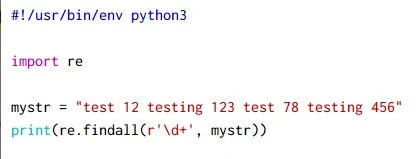
Here we are using \d operator with re.findall to find all the digits
and ‘\d+’ means to match all digits present one or more times from the
provided string. Output from this script:
~]# python3 regex-eg-1.py
['12', '123', '78', '456']
Example-2: Find words with 6 or more characters
In this example we will write a sample code to find all the words with 6
or more than 6 characters from the provided string using re.findall.
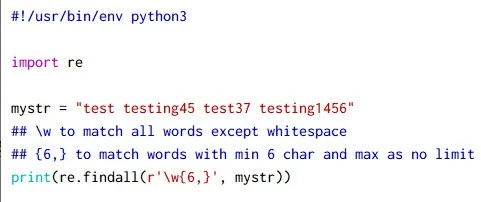
Here we are using re.findall with \w to match alpha numeric
character in combination with {6, } to list words with minimum 6
letters or more. Output from this script:
~]# python3 regex-eg-2.py
['testing45', 'test37', 'testing1456']
Example-3: Split all characters in the string
We have a string which contains mathematical operators but we want it to be recognized as strings and each character should be broken down into a list of strings.
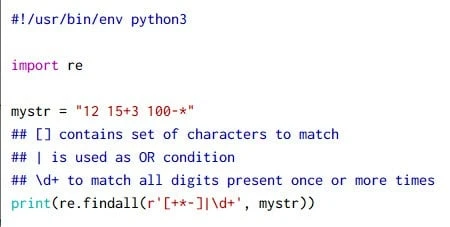
Here we are using re.findall to get a list of strings with individual
characters from the provided text. Output from this script:
~]# python3 regex-eg-3.py
['12', '15', '+', '3', '100', '-', '*']
-) has a special meaning within square brackets unless
it appears at the very beginning or end of the range which is why we
have placed it accordingly in our sample code.
Example-4: Find all the vowels from the string
In this example we will identify all the vowels from the provided string:
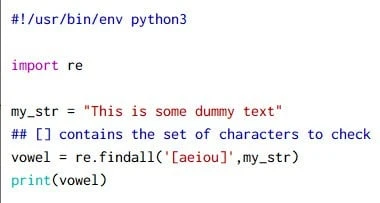
Output from this script:
~]# python3 regex-eg-4.py
['12', '15', '+', '3', '100', '-', '*']
Example-5: Find vowels case-insensitive
In the last example we listed the vowels from a string but that was case
sensitive, if we had some text with UPPERCASE then they won’t be
matched. To perform case insensitive match we need to add an additional
IGNORECASE flag using flags=re.I or flags=re.IGNORECASE
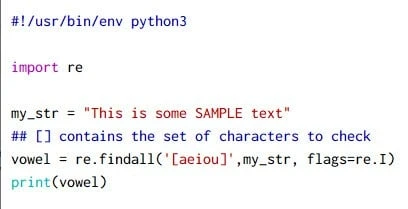
Output from this script:
 ~]# python3 regex-eg-5.py
['i', 'i', 'o', 'e', 'A', 'E', 'e']
The re.split function
Another way to invoke regular expressions to help analyze text into
tokens is to use the re.split function. The general syntax to use
re.split would be:
list = re.split(pattern, string, maxsplit=0, flags=0)
In this syntax,
patternis a regular-expression pattern supporting all the grammar shown until now; however, it doesn’t specify a pattern to find but to skip over. All the text in between is considered a token. So thepatternis really representative of token separators, and not the tokens themselves.- The string, as usual, is the target string to split into tokens.
- The
maxsplitargument specifies the maximum number of tokens to find. If this argument is set to 0, the default, then there is no maximum number.
Example-1: Split using whitespace
In this example we have a string where we will split the line using whitespace
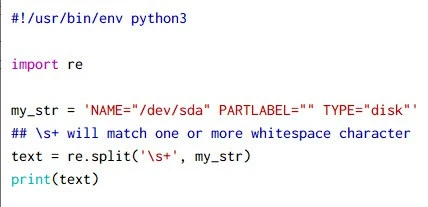
Output from this script:
~]# python3 regex-eg-1.py
['NAME="/dev/sda"', 'PARTLABEL=""', 'TYPE="disk"']
Example-2: Strip using whitespace from a file
In this example we will create a list of elements using whitespace as
stripping pattern. We will take the output of who command into a file
who.txt
~]# who > who.txt
Now using our python script we will strip each element into a list.
#!/usr/bin/env python3

import re

f = open('who.txt', 'r')
for eachline in f:
    print(re.split(r'\s\s+|\t', eachline))
f.close()
We have defined \s\s+ which means at least two whitespace characters
with an alteration pipe and \t to match tab. Output from this script:
~]# python3 regex-eg-2.py
['root', 'pts/0', '2020-11-02 12:07 (10.0.2.2)\n']
['root', 'pts/1', '2020-11-02 19:14 (10.0.2.2)\n']
Now at the end of each line we are getting a newline character, to strip
that we can use rstrip(\n) so the updated code would be:
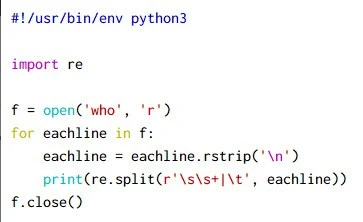
Output from this script:
~]# python3 regex-eg-3.py
['root', 'pts/0', '2020-11-02 12:07 (10.0.2.2)']
['root', 'pts/1', '2020-11-02 19:14 (10.0.2.2)']
Replace text using re.sub()
Another tool is the ability to replace text—that is, text substitution. We might want to replace all occurrences of a pattern with some other pattern. This almost always involves group tagging, described in the previous section.
The re.sub function performs text substitution.
re.sub(find_pattern, repl, target_str, count=0, flags=0)
In this syntax, find_pattern is the pattern to look for, repl is the
regular-expression replacement string, and target_str is the string to
be searched. The last two arguments are both optional.
The return value is the new string, which consists of the target string after the requested replacements have been made.
Example-1: Replace multiple spaces with single space
In this example I have a string with multiple whitespace characters
where we will use re.sub() to replace multiple whitespace with single
whitespace character.
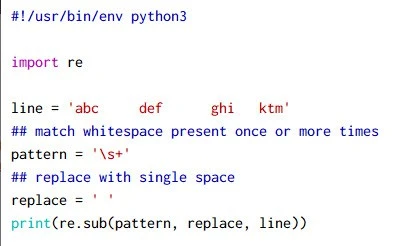
Output from this script:
~]# python3 regex-eg-1.py
abc def ghi ktm
Example-2: Replace duplicates
In this example I have a string with multiple duplicate words which I wish to replace with single occurrence of each duplicate word.
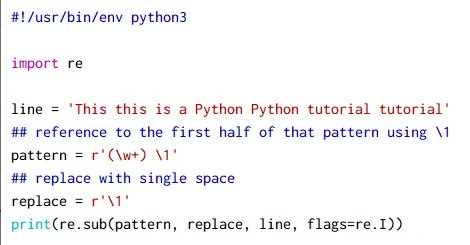
Here the replacement string, contains only a reference to the first half of that pattern. This is a tagged string, so this directs the regular-expression evaluator to note that tagged string and use it as the replacement string.
r'\1'
Second, the repeated-word test on “This this” will fail unless the,
flags argument is set to re.I (or re.IGNORECASE).
\1; therefore, if
you don’t specify the replacement text as a raw string, nothing
works—unless you use the other way of specifying a literal backslash
\\1
Output from this script:
 ~]# python3 regex-eg-2.py
This is a Python tutorial
Searching a string for patterns using re.search
In this section we will learn how to find the first substring that
matches a pattern. The re.search function performs this task using
following syntax:
match_obj = re.search(pattern, target_string, flags=0)
In this syntax, pattern is either a string containing a
regular-expression pattern or a precompiled regular-expression object;
target_string is the string to be searched. The flags argument is
optional and has a default value of 0.
The function produces a match object if successful and None otherwise. This function is close to re.match in the way that it works, except it does not require the match to happen at the beginning of the string.
By default re.search will search into complete string and will print
only the first matching pattern. Let us verify this concept, here I
have a text which contains ‘python’ two times. So we will use
re.search to find ‘python’ word in the sentence.
#!/usr/bin/env python3

import re

line = "This is python regex tutorial. We are using python3"
pat = r'\bpython'
print(re.search(pat, line))
Output from this script:
~]# python3 regex-eg-1.py
<_sre.SRE_Match object; span=(8, 14), match='python'>
As you see the re.search function has stopped searching after first
match i.e. ‘python’ even when ‘python3’ was also a match for our
pattern.
Match Object
If you observe the output from re.search, we get a bunch of
information along with the matched object. To further optimize the
output and get the desired information we can use match object group
with re.search
#!/usr/bin/env python3

import re

line = "This is python regex tutorial. We are using python3"
pat = r'\bpython'
match_ob = re.search(pat, line)
print('matched from the pattern: ', match_ob.group())
print('starting index: ', match_ob.start())
print('ending index: ', match_ob.end()-1)
print('Length: ', match_ob.end() - match_ob.start())
Here I am printing different information based on the output from
re.search using the index position. Output from this script:
 ~]# python3 regex-eg-2.py
matched from the pattern:  python
starting index:  8
ending index:  13
Length:  6
Example-1: Search for a pattern in a log file
Let us take a practical example where we will go through a log file and
print all the lines with text CRITICAL
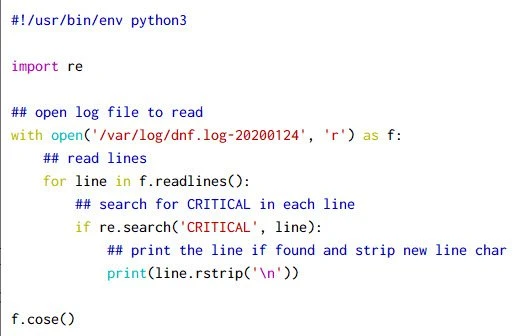
Output from this script:
~]# python3 regex-eg-1.py
2019-11-13T13:03:03Z CRITICAL Error: Unable to find a match
2019-11-13T13:03:14Z CRITICAL Importing GPG key 0x8483C65D:
2019-11-13T13:11:06Z CRITICAL Error: No Matches found
Refining matches with re.match
The re.match function returns either a match object, if it succeeds,
or the special object None, if it fails. The syntax to use re.match
would be:
re.match(s,start=0,end=sys.maxint)
Returns an appropriate match object when a substring of s, starting at
index start and not reaching as far as index end, matches r.
Otherwise, match returns None.
Let us use our example from previous section where I have added an additional python if else block:
#!/usr/bin/env python3

import re

line = "This is python regex tutorial. We are using python3"
pat = r'\bpython'
match_ob = re.match(pat, line)
if match_ob:
    print(match_ob)
    print('matched from the pattern: ', match_ob.group())
    print('starting index: ', match_ob.start())
    print('ending index: ', match_ob.end()-1)
    print('Length: ', match_ob.end() - match_ob.start())
else:
    print('No match found')
Here now instead of re.search we will use re.match to find our
pattern in the provided string. Output from this script:
~]# python3 regex-eg-1.py
No match found
Now even though we have python in our string, re.match returns
“No match found”, this is because re.match will only search at the
first index position. So to get a match we will rephrase our text in
the script:
#!/usr/bin/env python3

import re

line = "python regex tutorial. We are using python3"
pat = r'\bpython'
match_ob = re.match(pat, line)
if match_ob:
    print(match_ob)
    print('matched from the pattern: ', match_ob.group())
    print('starting index: ', match_ob.start())
    print('ending index: ', match_ob.end()-1)
    print('Length: ', match_ob.end() - match_ob.start())
else:
    print('No match found')
Output from this script:
 ~]# python3 regex-eg-1.py
<_sre.SRE_Match object; span=(0, 6), match='python'>
matched from the pattern:  python
starting index:  0
ending index:  5
Length:  6
So now re.match was able to match the pattern since the pattern was
available at index position 0 so the basic difference between
re.search and re.match is that re.match will search for the
pattern at first index while re.search will search for the pattern in
the entire string.
Example-1: Match for a telephone number
In this example we will collect telephone number from the user and using
re.match we will confirm if the syntax of the input number is correct
or incorrect. Normally in US, the telephone syntax is:
xxx-xxx-xxxx
Sample script:
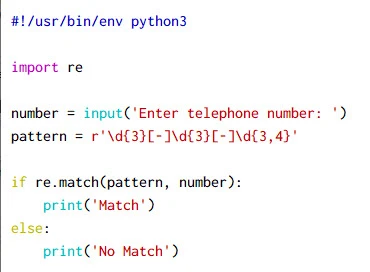
Here,
\d{3}matches a digit (equal to[0-9]) where{3}Quantifier — Matches exactly 3 times- Match a single character present in the list below
[-]where - matches the character - literally (case sensitive) \d{3}matches a digit (equal to[0-9]) where{3}Quantifier — Matches exactly 3 times- Match a single character present in the list below
[-]where - matches the character - literally (case sensitive) \d{3,4}matches a digit (equal to[0-9]) where{3,4}Quantifier — Matches between 3 and 4 times, as many times as possible, giving back as needed (greedy)
Output from this script for different inputs:
 ~]# python3 regex-eg-1.py
Match

 ~]# python3 regex-eg-1.py
Enter telephone number: 123-456-1111
Match

 ~]# python3 regex-eg-1.py
Enter telephone number: 1234-123-111
No Match
Using re.compile
If you’re going to use the same regular-expression pattern multiple times, it’s a good idea to compile that pattern into a regular-expression object and then use that object repeatedly. The regex package provides a method for this purpose called compile with the following syntax:
regex_object_name = re.compile(pattern)
You will understand better with this example. Here I have used some of the python regex function which we learned in this tutorial. Now if you see we had to use the same pattern multiple times for different regex search so to avoid this we can create a regex pattern object and then use this object to perform your search.
#!/usr/bin/env python3

import re

line = "This is python regex tutorial using python3"
pat = r'\bpython\d'
print('using re.search: ', re.search(pat, line))
print('using re.findall: ', re.findall(pat, line))
print('using re.match: ', re.match(pat, line))

pat_ob = re.compile(pat)
print('Pattern Object: ', pat_ob)
print('using re.compile with re.search: ', pat_ob.search(line))
print('using re.compile with re.findall: ', pat_ob.findall(line))
print('using re.compile with re.match: ', pat_ob.match(line))
As you can see the output from first section without re.compile
and second section with re.compile has same output:
 ~]# python3 regex-eg-2.py
using re.search:  <_sre.SRE_Match object; span=(36, 43), match='python3'>
using re.findall:  ['python3']
using re.match:  None
Pattern Object:  re.compile('\\bpython\\d')
using re.compile with re.search:  <_sre.SRE_Match object; span=(36, 43), match='python3'>
using re.compile with re.findall:  ['python3']
using re.compile with re.match:  None
Conclusion
Python regex is a very vast topic but I have tried to cover the most
areas which are used in most codes. re.search and re.match can be
confusing but you have to remember that re.match will search only at the
first index position while re.search will search for the pattern in
entire string.
We mostly end up using re.compile, you could perform these tasks
without precompiling a regular-expression object. However, compiling can
save execution time if you’re going to use the same pattern more than
once. Otherwise, Python may have to rebuild a state machine multiple
times when it could have been built only once.
