

In this article of Python programming, we will learn about copy module.
We will use and compare Python deepcopy(), shallow copy() and normal
assignment to copy or clone a list with multiple examples.
Python copy list using normal assignment
In python we use = operator to create a copy of an object.
Example-1: Use = operator to copy a list in Python
For example I have a list called myList with some elements. Next I
copy the myList content into newList using = operator.
#!/use/bin/env python3

myList = [1, 2, 3, 4]
print('myList contains: ', myList)

# assign the content of myList to newList
newList = myList
print('newList contains: ', newList)

if id(myList) == id(newList):
    print('Both the lists have same id!')
else:
    print('Both the lists have different id!')
Output from this script:
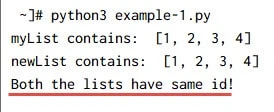
So as you see the list elements were successfully copied to a new list.
Example-2: Append elements to old list after copying
In the same example I will append some element to the original list after copying the list.
#!/use/bin/env python3

myList = [1, 2, 3, 4]
print('myList: ', myList)

# assign the content of myList to newList
newList = myList
print('newList: ', newList, "\n")

# append elements to old list
print('Appending content to OLD LIST (myList)'')
myList.append('a')

print('myList content after adding new elements: ', myList)
print('newList content after adding new elements: ', newList, "\n")

if id(myList) == id(newList):
    print('Both the lists have same id!')
else:
    print('Both the lists have different id!')
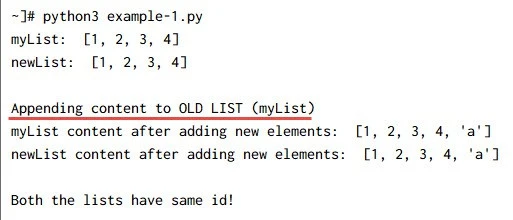
In the output you can see that the same element is also automatically appended to the new list. So any such changes performed to the old list will also reflect in the newly copied list.
Output from the script:
Example-3: Modify elements of new list after copying
Similar to example-2, we will now modify the content of newList (in
the previous example we modified original list so here we are doing vice
versa) which is a copy of old list created using normal assignment.
#!/use/bin/env python3

myList = [1, 2, 3, 4]
print('myList: ', myList)

# assign the content of myList to newList
newList = myList
print('newList: ', newList, "\n")

# Modify elements in the new list
print('Modifying content of NEW LIST (newList)')
newList[1] = 'TEST'

print('myList content after modifying elements: ', myList)
print('newList content after modifying elements: ', newList, "\n")

if id(myList) == id(newList):
    print('Both the lists have same id!')
else:
    print('Both the lists have different id!')
Here from the output you can see, the same modification has also been performed on old list.
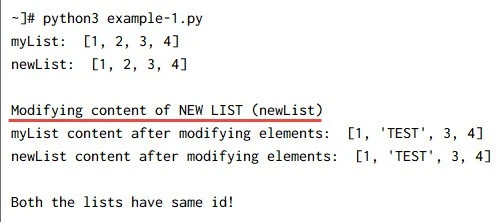
So this shows that using an = operator we don’t create a new object,
instead it just creates a new variable which will share the reference of
the original object.
Python copy module
The python copy module provides functions for making shallow and deep
copies of compound objects, including lists, tuples, dictionaries, and
class instances.
import copy

copy(x)
copy.copy(x)
copy.deepcopy(x)
The copy module provides two functions
- shallow
copy() deepcopy()
The copy functions don’t work with modules, class objects, functions,
methods, tracebacks, stack frames, files, sockets, and other similar
types. When an object can’t be copied, the copy.error exception is
raised.
Python shallow copy() function
When you create a shallow copy, you create a new instance of the current object and copy values of members of the original to the new one but do not create copies of children (referenced) objects.
The copy() function only creates a shallow copy of the original list.
This means it copies the top level of the list only. If in that list
you have more complex data structures having nested elements, then
those will not be cloned. So the new list only hold half the reference
of the original list.
Example-4: Use copy() function to create a shallow copy of a list
In this example we will use shallow copy() function to create a clone
of a list.
#!/use/bin/env python3

import copy

myList = [1, 2, 3, 4]
print('myList: ', myList)

# assign the content of myList to newList
newList = copy.copy(myList)

# OR you can also using the range selector syntax
# newList = myList[:]

print('newList: ', newList, "\n")

if id(myList) == id(newList):
    print('Both the lists have same id!')
else:
    print('Both the lists have different id!')
Here you can see that even though we have an exact copy of the original
list. Although the id of both the lists are different, this is because
copy() created a new object here unlike the = operator we used
earlier. Output from this script:
~]# python3 example-2.py
myList:  [1, 2, 3, 4]
newList:  [1, 2, 3, 4]

Both the lists have different id!
Example-5: Append and modify top level elements in a list with shallow copy()
In this example we will append and modify some existing elements of our list. Tis is to verify if modifying an element in original list is also reflected in new list and vice versa. Let us verify this theory with some practical examples:
#!/use/bin/env python3

import copy

myList = [1, 2, 3, 4]
print('myList: ', myList)

# assign the content of myList to newList
newList = copy.copy(myList)

print('newList: ', newList, "\n")

# Modify elements of the new list
print('Modifying content of NEW LIST (newList)')
newList[1] = 'TEST'

print('myList content after modifying elements: ', myList)
print('newList content after modifying elements: ', newList, "\n")

if id(myList) == id(newList):
    print('Both the lists have same id!')
else:
    print('Both the lists have different id!')
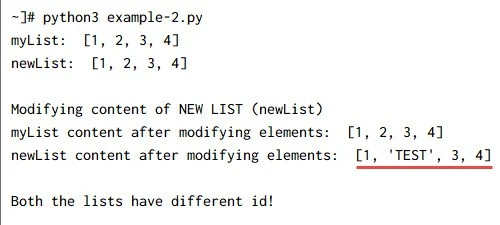
Here you can see that the content of newList is only modified with no
changes to the original list i.e. myList. Similarly you can modify or
add new elements to the original list and it will not reflect on the new
list as long as we are not doing any changes to nested data.
Example-6: Modify nested object with python shallow copy() function
In this example we will create a dictionary inside the original list and
clone it to a new list variable using shallow copy() function.
#!/use/bin/env python3

import copy

myList = [{'car': 'maruti'}, 2, 'apple']
newList = myList[:]

print('Appending content to OLD LIST (myList)'')
myList.append('TEST')

print('myList content after appending elements: ', myList)
print('newList content after appending elements: ', newList, "\n")

# Modifying elements in the old list
print('Modifying content in the OLD LIST (myList)')
myList[0]['car']='honda'

print('myList content after modifying elements: ', myList)
print('newList content after modifying elements: ', newList, "\n")

if id(myList) == id(newList):
    print('Both the lists have same id!')
else:
    print('Both the lists have different id!')
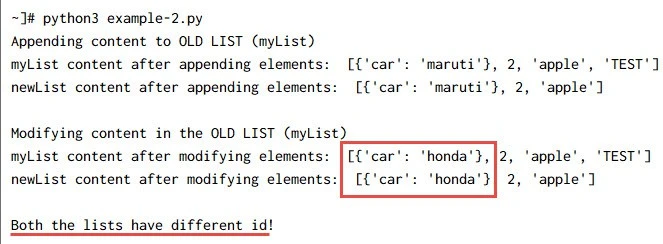
In the script we are modifying the dictionary value from ‘maruti’ to
‘honda’ in the old list and the same is also reflecting in the new
list because shallow copy doesn’t store the nested data in the memory.
Hence both lists share the reference of same nested objects.
Output from the script:
Python deepcopy() function
Python deepcopy() function is more subtle as it copies even the nested
objects recursively. Although copy.deepcopy() is slightly slower than
copy.copy(), it’s safer to use if you don’t know whether the list
being copied contains other lists (or other mutable objects like
dictionaries or sets).
Example-7: Use python deepcopy() function to create a deep copy of a list
We will use the same code from Example-6, just replace copy.copy()
with copy.deepcopy() function.
#!/use/bin/env python3

import copy

myList = [{'car': 'maruti'}, 2, 'apple']
print('myList: ', myList)

# assign the content of myList to newList
newList = copy.deepcopy(myList)

print('newList: ', newList, "\n")

if id(myList) == id(newList):
    print('Both the lists have same id!')
else:
    print('Both the lists have different id!')
The output will have two different objects with same content. Since
deepcopy() creates a new object, the ids are expected to be different
of both the variables.
~]# python3 example-3.py
myList:  [{'car': 'maruti'}, 2, 'apple']
newList:  [{'car': 'maruti'}, 2, 'apple']

Both the lists have different id!
Example-8: Modify nested object in the list using python deepcopy() function
Since we know that appending/modifying element of top level lists are
not cloned to the new list or vice versa. So I will not repeat example-5
use case with python deepcopy().
But let us validate Example-6 use case wherein we modify the dictionary content within the list as shallow copy was not able to retain the changes there.
#!/use/bin/env python3

import copy

myList = [{'car': 'maruti'}, 2, 'apple']
print('myList: ', myList)

# assign the content of myList to newList
newList = copy.deepcopy(myList)

print('newList: ', newList, "\n")

# Modifying elements in the old list
print('Modifying content in the OLD LIST (myList)')
myList[0]['car']='honda'

print('myList content after modifying elements: ', myList)
print('newList content after modifying elements: ', newList, "\n")
Output from the script:
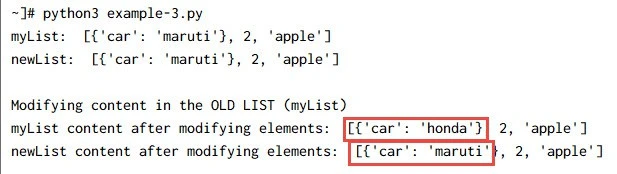
As expected, python deepcopy() function has successfully copied the
content of original list into a new one recursively. Hence any change to
the old list is not visible in the new list and they both are completely
independent.
Normal assignment vs shallow copy() vs deepcopy()
Here is a short table which briefs the difference of behaviour between
normal assignment operator, shallow copy() and deepcopy()
function
available in Python:
| Normal Assignment(=) | Python shallow copy() | Python deepcopy() | |
|---|---|---|---|
| Clones an object | YES | YES | YES |
| Creates new object | NO | YES | YES |
| <a | |||
| href=“https://www.golinuxcloud.com/check-top-memory-cpu-consuming-process-script/" | |||
| target="_blank” rel=“noopener noreferrer” | |||
| title=“Shell script to check top memory & cpu consuming process in Linux”>Top | |||
| level data stored in memory | NO | YES | YES |
| Nested level data stored in memory | NO | NO | YES |
Summary
In this tutorial we learned about list cloning using different available
methods. We learned that we can create an identical new object from an
existing one using = operator and copy module. The copy module
contains shallow copy() function as well as deepcopy() function. The
major difference between shallow copy() and deepcopy() function is
that the deepcopy() function copies the data of an object
“recursively”. This means that any complex data structures and
nested elements are also copied from the original list unlike shallow
copy which ignored the nested data. This is the reason why any change
made to the nested data in the original list is also cloned in the new
list when using shallow copy() function.
Further Readings
What
is the difference between shallow copy, deepcopy and normal assignment
operation?
copy —
Shallow and deep copy operations
