
![What does Python __all__ mean? [SOLVED]](/python-all/python-__all__-1.jpg)
Introduction to Python __all__
Python is a versatile programming language that can be used for a wide
range of tasks. It has a large community of developers, which means that
there are a variety of tools and libraries available to help you get
your work done. It has a large number of modules that we can import and
use in our program. However, sometimes importing module does not import
all the variable,
especially those which starts with an underscore (_). In such cases
Python __all__ helps to import those variables.
Python __all__ is a variable that can be set in the __init__.py file
of a package. The __all__ variable is a list of strings that defines
those symbols that are imported when a program runs.
Before understanding how the Python __all__ variable works, let us
understand what is Python module and how we can import it.
What is a Python module and how to import it?
A Python module is a file containing Python definitions and statements. A module can define functions, classes, and variables. A module can also include runnable code. Grouping related code into a module makes the code easier to understand and use. It also makes the code logically organized. There are a large number of different kinds of modules available in Python. But in this section, we will create our own module to understand how it works.
# Import a library
import random

# Define constants
COLORS = ("red", "blue", "yellow", "green")
NAMES = ("jake", "alam", "DK")

# Define a custom class
class Person:

    #init method
    def __init__(self, color: str, name: str):
        self.color = color
        self.name = name

    def __str__(self):
        return f"Name: {self.name},  Fav color is:  {self.color}"

# Define a custom function
def get_random_name():

    # returning random names and colors
    return Person(random.choice(COLORS), random.choice(NAMES))

# Create a random object
random_person = get_random_name()
As you can see, the above Python program gives a random name from the list and then return the favorite color of the person randomly.
Now save the file and give it any name you want. In my case, I will assign module.py.
Next, open another new Python and import the module.py file to get access to its functionalities.
Now, we can import the file/module using various methods. We can either use IMPORT FROM or just the IMPORT keyword to import the functionalities of the module.
Let us first import the method from the module using IMPORT FROM keywords.
# importing the module
from module import get_random_name

# accessting the method from module
person = get_random_name()

# printing
print(person)
Output:

As you can see, by using the IMPORT FROM keyword, we were able to get access to the get_random_name() method inside the module.
The second way to import is to import everything that is inside the module. For example, see the code below:
# importing everything
from module import *

# accessting the method from module
person2 = get_random_name()

# printing
print(person2)
Output:

As you can see, we were able to import everything from the module using IMPORT *. However, even importing all methods, variables, and classes from modules cannot import some of the variables. Let’s discuss them in detail.
Python __all__ to import everything
As we discussed even import * can not import some variables. For example, let us now change the names of variables in our module and try to import again.
# Import a library
import random

# Define constants
__COLORS__ = ("red", "blue", "yellow", "green")
__NAMES__ = ("jake", "alam", "DK")

# Define a custom class
class Person:

    #init method
    def __init__(self, color: str, name: str):
        self.color = color
        self.name = name

    def __str__(self):
        return f"Name: {self.name},  Fav color is:  {self.color}"

# Define a custom function
def get_random_name():

    # returning random names and colors
    return Person(random.choice(__COLORS__), random.choice(__NAMES__))

# Create a random object
random_person = get_random_name()
As you can see, we have changed the variable’s names in our module and now they are starting with underscores (_).
Now let us try to import again and access the variables.
# importing the module
from module import *

# Create new object using Class using protected constants
person2 = Person(__COLORS__[0], __NAMES__[1])
Output:
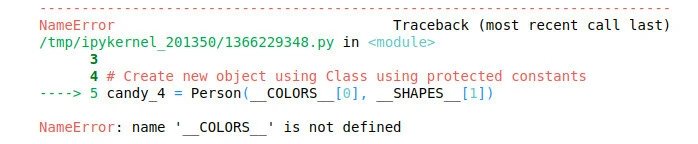
As you can see, we get an error because IMPORT * cannot import the
protected variables. So, to import such
variables and
methods, we need to use Python __all__ variable.
Using Python __all__ to import protected variables
As we have seen above, we get an error when we tried to access the
protected variables from the module. What we can do is we can use a
variable named python __all__ inside our module and provide the list
of protected variables that we want to access using IMPORT *. For
example, add the following line of code inside your module.
__all__ = ['__COLORS__', '__NAMES__', 'Person', 'random_person', 'random']
This line will tell python that when the module is imported, import the given variables as well. Let us run the above code again.
# importing the module
from module import *

# Create new object using Class using protected constants
person2 = Person(__COLORS__[0], __NAMES__[1])

# printing
print(person2)
Output:

As you can see, this time we didn’t get any error because we specified
the protected variables inside the Python __all__ variable.
Summary
Python __all__ is a list of public objects of that module, as
interpreted by import *. It overrides the default of hiding everything
that begins with an underscore. When we are importing a module, the
protected variables and methods (starting with underscores) are not
imported. So, in order to import protected variables, we need to create
a Python __all__ list that contains those variables. And anything that
will be inside the python __all__ will be imported,
In this short article, we discussed how we can use the Python __all__
method to import the protected variables using various examples.
Further Reading
Python module
Python import
Python class
What does
all mean in Python? - Stack Overflow
