
![SOLVED: Get script directory path in Node.js [4 Methods]](/node-js-get-script-directory-path/nodejs_get_script_dir_path.jpg)
Different methods to get script directory path in Node.js
We can classify the four main ways of handling a Node.js get script directory according to the path returned.
Methods returning the absolute path
1.__dirname object
console.log(__dirname)
2. __filename object
console.log(__filename)
3. __process.cwd() method
console.log(process.cwd())
OR
Methods to return the directory name
4. path.basename() method
console.log(require('path').basename(__dirname))
Here is an in-depth explanation of how each method works.
Method-1: Using __dirname and __filename objects
Node.js wraps the script file with an immediately invoked function
expression (IIFE) with file arguments: exports, require, module,
__dirname, and __filename.
exports is a mutable object. It is where you attach file contents
before exporting them to another file. module.exports is an alias to
exports.
// moduleA.js
const cube = (number) => number * number * number;
module.exports.customFunction = cube;
module refers to the (current) file you are modifying/running. It
imports another module’s content using the require method.
// moduleB.js
const { customFunction } = require('./moduleA.js');

const cubeOfThree = customFunction(3);
console.log(cubeOfThree); // 27
__dirname returns the absolute path of the script directory.
const absolutePathWithoutFilename = __dirname;
console.log(absolutePathWithoutFilename);
Lastly, the __filename object attaches the script name to the absolute
path of the script directory.
const absolutePathWithFilename = __filename;
console.log(absolutePathWithFilename);
Method-2: Using the process object
The process object is involved in (almost) all script and operating
system interactions. It creates an interface for your Node.js script to
read from the operating system or write to it. You can import or use it
without importing it.
The process object exposes multiple properties and methods for your
script to communicate with the operating system. For example, the env
property reads
environment variables, while the cwd() method helps during a
Node.js get script directory.
// env property
if (process.env.NODE_ENV !== "production") console.log("Node.js get script directory in development mode!");

// cwd() method
console.log(process.cwd());
cwd is the short form of the Current Working Directory. So,
console-logging the process.cwd() method reveals the absolute path of
the current script directory.
Method-3: Using the path module
The path module provides utilities to work with directory and file
paths. You can import and utilize its methods like join() and
basename().
const path = require('path');

// join()
const customPath = path.join('Users', 'doe', 'moduleA.js');
console.log(customPath);

// basename()
const scriptDirectory = path.basename(__dirname);
console.log(scriptDirectory);
path.basename() returns the script directory’s name, not the absolute
path. We can use it to get the script directory, as shown in the
subsequent sections of this tutorial.
Setup Lab Environment
This section prepares a simple directory structure to practice getting the script directory. We will set up a lab for
a Linux workflow using the Vim Editor and the terminal
AND
a Windows workflow using Visual Studio Code and its integrated terminal.
You should have installed Node.js. Better yet, follow this link to install and use Node.js and Visual Studio Code on Ubuntu.
Linux
Launch the terminal by simultaneously pressing the ctrl+alt+t keys.
Make the script directory and cd into it. Next, create and open the
script file using the Vim Editor.
mkdir getScriptDirectory && cd getScriptDirectory
vim index.js
Windows
Open the terminal by searching cmd. Make the project directory and
open it with Visual Studio Code. I am using Git Bash, a terminal
emulator you get after a Git installation on Windows, and runs
most Linux commands on Windows.
mkdir getScriptDirectory
cd getScriptDirectory
code .
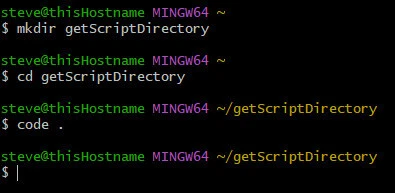
Lastly, create an index.js script file in readiness for Node.js get
script directory examples.
Some practical examples to get script directory in Node.js
Update the script file with code for each example (1 to 4 below), then
save and run the file on the terminal using the node command.
node index.js
Example~1: Node.js get script directory using __dirname
Input
const filePath = __dirname
console.log(filePath)
We store __dirname in the filePath variable before printing the
variable.
Output
Linux
/home/[username]/getScriptDirectory
We get the script directory’s path from the /home directory.

Windows
C:\Users\[username]\getScriptDirectory
The system returns the script directory’s absolute path from the C:\
root directory.
Example~2: Node.js get script directory using __filename
Input
const filePath = __filename
console.log(filePath)
Output
Linux
/home/[username]/getScriptDirectory/index.js
Windows
c:\Users\[username]\getScriptDirectory\index.js
This time around, the system appends the index.js file’s name to the
script directory’s absolute path.
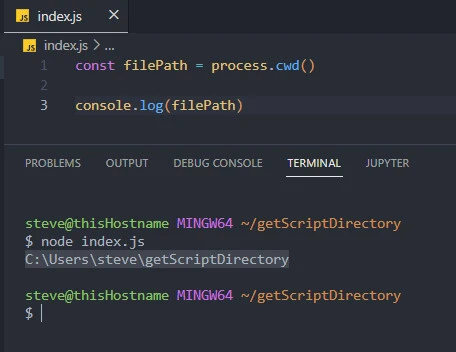
Example~3: Node.js get absolute directory path using process.cwd() method
Input
const filePath = process.cwd()
console.log(filePath)
Output
Linux
/home/[username]/getScriptDirectory
Windows
c:\Users\[username]\getScriptDirectory
Like __dirname, process.cwd() returns the absolute path of the
script directory.
Example~4: Node.js get script directory using path.basename()
Assume we want to get the script directory’s name and NOT its absolute
path. We can use the basename() method of the path module.
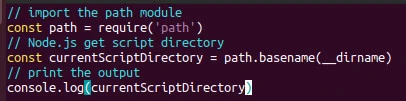
Input
// import the path module
const path = require('path')
// Node.js get script directory
const currentScriptDirectory = path.basename(__dirname)
// print the output
console.log(currentScriptDirectory)
We dissect the last portion of __dirname using the basename() method
and store the result in currentScriptDirectory variable. Lastly, we
console-log the result.
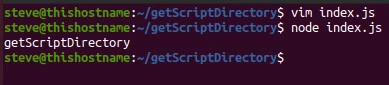
Output
getScriptDirectory
And voila, we get the script directory’s name getScriptDirectory we
created in the lab setup section!
Additionally, we can use the path.basename() method with
process.cwd() and get similar results.
// import the path module
const path = require('path')
// Node.js get script directory
const currentScriptDirectory = path.basename(process.cwd())
// print the output
console.log(currentScriptDirectory)
Output
getScriptDirectory
Conclusion
You can Node.js get script directory’s absolute path by console-logging
the __dirname, __filename, and process.cwd().
Besides, you can get the exclusive directory name by running __dirname
and process.cwd() objects inside the path.basename() method, as
shown in this tutorial.
Related Keywords: Node.js get script directory, node.js get current directory, node.js get absolute path, node.js get absolute directory path
