
![[SOLVED] Check if file or directory exists in Node.js](/node-js-check-if-file-or-directory-exists/NODEJS_CHECK_FILE_DIR_EXISTS.jpg)
3 Methods to check if file or directory exists in Node.js
There are 3 typical methods to check if file or directory exists in Node.js.
1.fs.existsSync()
fs.existsSync([file or directory path])
2. fs.access()
fs.access([file or directory path], [callback function])
3. fs.statSync()
fs.statSync([file or directory path])
This tutorial shows you how to use the three methods practically. It
would be helpful to understand how the fs module works to enable you
to apply the three methods comfortably.
Let’s do this!
Using fs module (synchronous and asynchronous)
Understanding the synchronous and asynchronous nature of the fs module
is a key step toward Node.js checking if file or directory exists.
The file system (fs) module simplifies reading from or writing to the
operating system. All
you do is import the module and apply its target method.
const fs = require('fs')
fs.existSync([path])
We are importing the module and then calling its existsSync() method.
Alternatively, we can destructure the module’s existsSync() method as
follows.
const { existsSync } = require('fs')
The existsSync is a compound word of exists + Sync. In this case, we
are telling the system to use the method synchronously. That means
halting subsequent processes until the existsSync() method has been
executed.
Like other built-in node modules, using the fs module’s methods
without the Sync part implies allowing other code portions to run
alongside the current method.
Another point worth noting is that Node.js rapidly evolves. It releases
libraries and modules that (unfortunately) sometimes become deprecated.
An example of such methods is the fs.exists().
It is advisable to stick to the synchronous fs.existsSync() method
instead. Alternatively, you can Node.js check if file or directory
exists using fs.access() and fs.stat() methods.
Use the fs.access method to check a file path’s existence and
permissions. The fs.stat() returns an object with various properties
and methods to get specific file path details.
Now that you understand the origin of the methods to Node.js check if file or directory exists and when to apply them, let’s set up a lab and use the methods practically.
Setup Lab Environment
Launch the terminal and make the project directory.
mkdir pathExists
cd into the new directory and create three files: access.js,
existsSync.js, and stat.js.
cd pathExists
touch access.js existsSync.js stat.js

In the examples section, we will implement the fs.access(),
fs.existsSync(), and fs.stat() methods in the access.js,
existsSync.js, and stat.js files, respectively.
You can open the script file using a preferred code editor.
Example~1: Node.js check if file or directory exists using fs.existsSync()
Assume we want to check if a file exists or create it.
Input
const { writeFile, existsSync, readFile } = require('fs')

!existsSync('file1.js')
?
writeFile('file1.js', 'console.log("Nodejs check if file or directory exists")', e => e ? console.log(e) : console.log('file1 written successfully...'))
:
readFile('file1.js', 'utf8', (e, d) => {
    e ? console.log(e) : console.log('\nfile1 already exists...\n')
    console.log("And file1's content is:")
    console.log("\t\t\t\t\t", d)
})
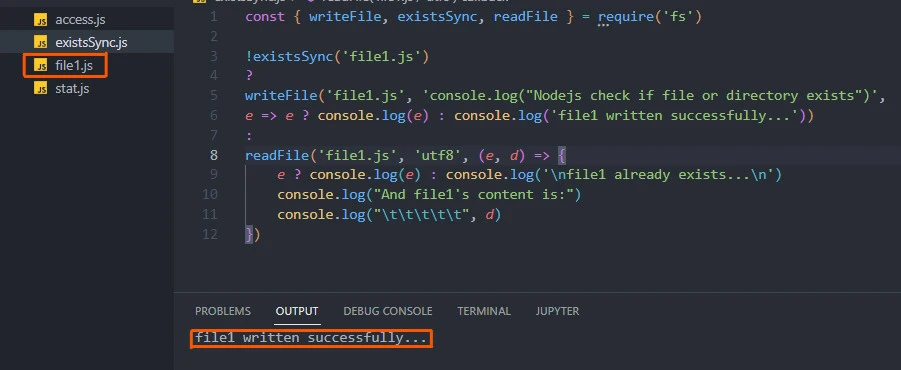
Using the fs.existsSync() method, we check if file1.js does not
exist. If the file has not been created, we create and write the file
using the fs.writeFile() method, console-logging a message: file1
written successfully… Otherwise, we read the file’s content using the
fs.readFile() method.
Output
Initially, running the file creates the file1.js file and prints the
confirmatory message on the terminal.
file1 written successfully...
Subsequently, running the script file tells us the checked file already exists.
file1 already exists...

And file1's content is:
        console.log("Nodejs check if file or directory exists")
Example~2: Node.js check if file or directory exists using fs.access()
Assume we want to check the existence of a directory.
Input
const { access, mkdirSync } = require('fs')

const dir = "dir"

access(dir, err => {

 if (!err) {
 console.log(dir, 'directory already exists')
 }

 else if (err.code === 'ENOENT') {
    mkdirSync(dir)
    console.log(dir, "created successfully... ")
 }

})
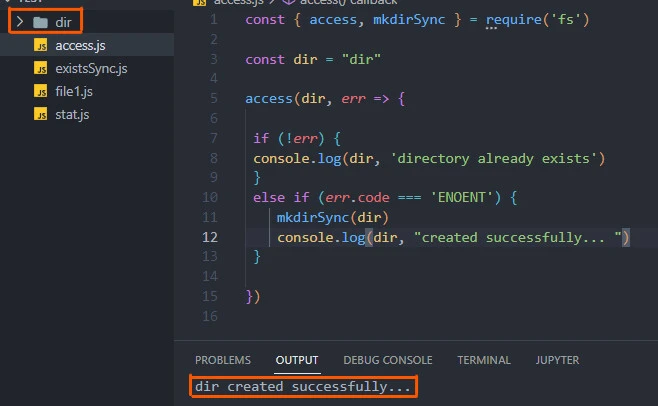
Using the fs.access() method, we check whether the dir directory
exists in the current working directory.
If we can access the directory, we console-log a message: directory already exists.
If there is an error accessing the directory and the error code (ENOENT)
means the specified file path does not exist, we make the dir
directory before console-log a message: dir created successfully…
Output
dir created successfully...
Example~3: Node.js check if file or directory exists using fs.stat()
Assume we want to check if the given path exists and whether it is a file and not a directory.
Input
const { statSync } = require('fs')

const filePath = "dir"

try {
    if (statSync(filePath).isFile()){
        console.log('file exists')
    }
    else {
        console.log(filePath, 'exists but it is NOT A FILE!')
    }
}

catch (err) {

 if (err.code === 'ENOENT') {
    console.log(filePath, 'file path does NOT exist');
 }

}
The try block checks:
- does the file path exist?
- if the file path exists, is it a file or directory?
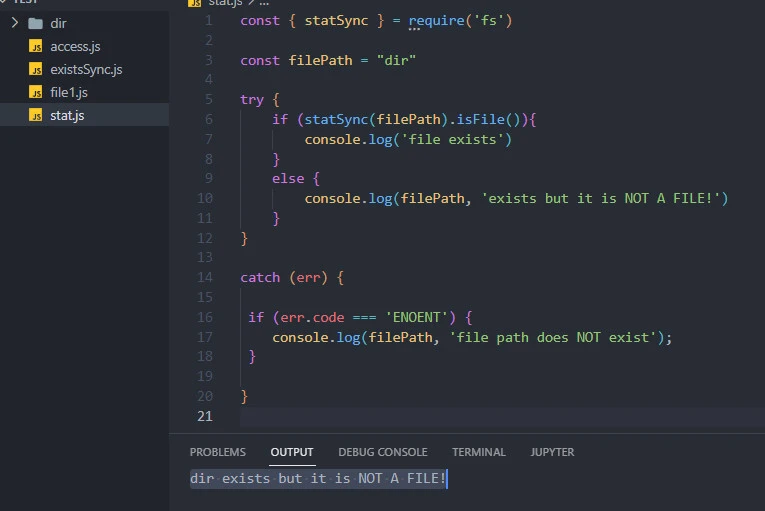
Using the fs.statSync() method, we synchronously check whether the
filePath exists. We then run the resulting object’s isFile() method
to ascertain the output is a file.
If the output is of a file type, we console-log file exists. Otherwise, we know the output is a directory because the given path exists, but it is NOT a file.
The catch block checks whether the resulting error code means the file does not exist.
Output
dir exists but it is NOT A FILE!
Since we created the dir directory in the previous example, the
fs.statSync() method sensed its existence. It then proceeded to
confirm that the resulting file path is a directory.
Summary
Although there could be multiple ways to Node.js check if file or
directory exists, the most familiar methods are fs.existsSync(),
fs.access(), and fs.statSync().
It would help to understand how modules work in Node.js and synchronous vs asynchronous file handling to apply the methods comfortably.
Related Keywords: Check synchronously if file/directory exists in Node.js, How to check whether a directory exists in node.js?, NodeJs: fs.stat() or fs.access() to check if a folder exists, Node - Check to see if a directory exists, Node.js check if path is file or directory, node js check if file exists, javascript check if file exists, node js check if file exists async, fs check if file exists, fs check if directory exists, node create directory if not exists
