
![20 netstat command examples in Linux [Cheat Sheet]](/netstat-command-in-linux/netstat_command.jpg)
Introduction to netstat command
netstat (network statistics) is a command-line utility in the Linux system to display network connections, routing tables, interface statistics, masquerade connections, and multicast memberships.netstat prints information about the Linux networking subsystem.
The output of the netstat command shows the information on active internet connections and active UNIX domain sockets.
The columns of the active internet connections contain the following information.
**Proto:**The protocol used by the socket: TCP, UDP, raw.
Recv-Q: The number of bytes that are not copied by the user program connected to this socket.
**Send-Q:**The number of bytes that are not acknowledged by the remote host.
Local Address: It is theaddress and port number of the local end of the socket.
Foreign Address: It is the address and port number of the remote end of the socket.
**State:**The state of the socket.
- ESTABLISHED: The socket has an established connection.
- SYN_SENT: The socket is actively attempting to establish a connection.
- SYN_RECV: A connection request has been received from the network.
- FIN_WAIT1: The socket is closed, and the connection is shutting down.
- FIN_WAIT2: A connection is closed, and the socket is waiting for a shutdown from the remote end.
- TIME_WAIT: The socket is waiting after close to handle packets still in the network.
- CLOSED: The socket is not being used.
- CLOSE_WAIT: The remote end has shut down, waiting for the socket to close.
- LAST_ACK: The remote end has shut down, and the socket is closed. (Waiting for acknowledgement)
- LISTEN: The socket is listening for incoming connections. Such sockets are not shown in the output unless you use the option –listening(-l) or**–all**(-a).
- CLOSING: Both sockets are shut down, but still all data has not been sent.
- UNKNOWN: The state of the socket is unknown.
**User:**The username or the user id (UID) of the owner of the socket.
**PID/Program name:**The process id (PID) and process name of the process that owns the socket.
**Timer:**It contains information about networking timers.
We can see the following column headers in the active UNIX domain sockets.
**Proto:**The protocol used by the socket: UNIX.
RefCnt: The reference count (i.e. attached processes via this socket).
Flags: It displays the flags: SO_ACCEPTON (displayed as ACC), SO_WAITDATA (W) or SO_NOSPACE (N). ACC is used on unconnected sockets if their corresponding processes are waiting for a connection request.
**Type:**It contains the different types of socket access.
- SOCK_DGRAM: It is used in Datagram (connectionless) mode.
- SOCK_STREAM: It is a stream (connection) socket.
- SOCK_RAW: The socket is used as a raw socket.
- SOCK_RDM: It serves reliably delivered messages.
- SOCK_SEQPACKET: It is a sequential packet socket.
- SOCK_PACKET: Raw interface access socket.
**State:**The state of the socket.
- FREE: The socket is not allocated.
- LISTENING: The socket is listening for a connection request. Such
sockets are not displayed in the output without
-lor-aoption. - CONNECTING: The socket is establishing a connection.
- CONNECTED: The socket is connected.
- DISCONNECTING: The socket is disconnecting.
- (empty): The socket is not connected to another one.
I-Node: The inode of the socket.
PATH: The pathname to which the corresponding processes are attached to the socket.
Different examples to use netstat command
In this tutorial, we will go through different practical examples of netstat commands to print network connections.
Syntax of netstat command
The general syntax of the netstat command is:
$ netstat [options]
We will explore the different OPTIONS which we can use with netstat command in the next section.
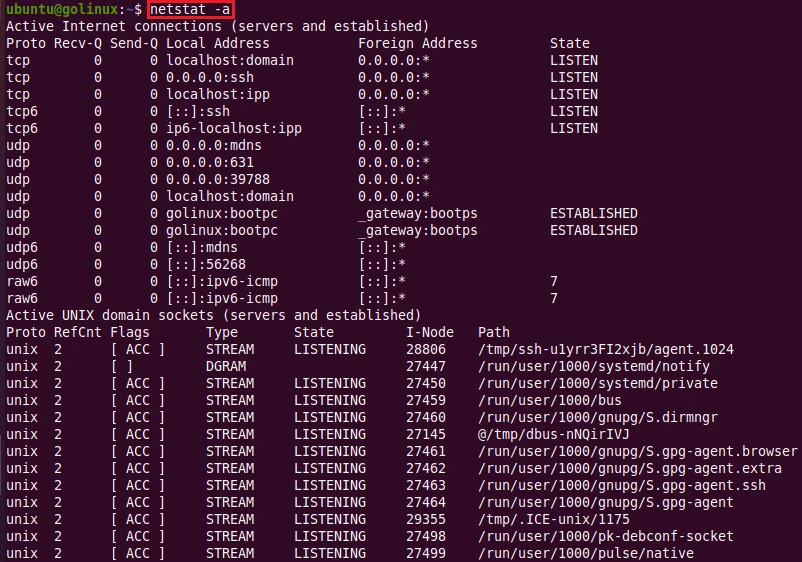
1. netstat command to display all connections
By default, netstat shows only connected connections/sockets. To view
all of them in the output, you can use -a or -all option.
$ netstat -a
OR
$ netstat --all
Sample Output:
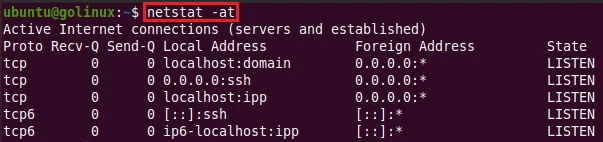
2. netstat command to list all TCP ports connections
-t or --tcp option displays the TCP connections. To display the list
of all TCP ports connections, you can run the following command.
$ netstat -at
OR
$ netstat -a --tcp
Sample Output:
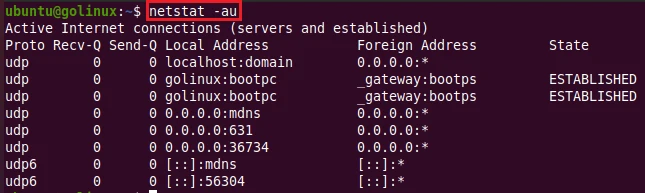
3. netstat command to list all UDP ports connections
-u or --udp option displays the list of UDP connections. You can run
the following command to print the list of all UDP ports connections.
$ netstat -au
OR
$ netstat -a --udp
Sample Output:
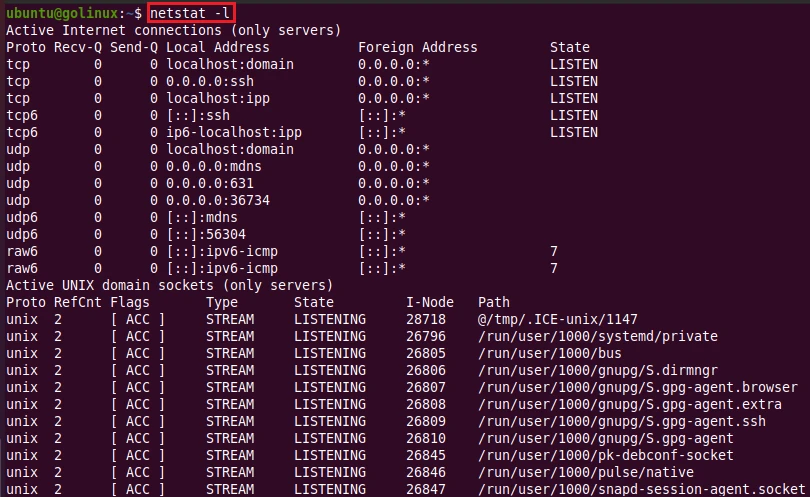
4. netstat command to display only listening connections
You can use -l option to get the list of only listening connections.
$ netstat -l
Sample Output:
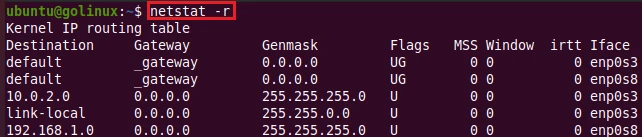
5. Display routing table with netstat command
The following command displays the Kernel routing tables.
$ netstat -r
OR
$ netstat --route
Sample Output:
6. Display available network interfaces with netstat command
To view the list of all network interfaces, you can execute the command below.
$ netstat -i
OR
$ netstat --interfaces
Sample Output:

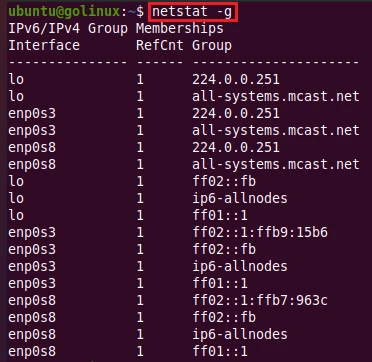
7. netstat command to display multicast group membership
You can view the multicast group membership information for IPv4 and IPv6 with the execution of the following command.
$ netstat -g
OR
$ netstat --groups
Sample Output:
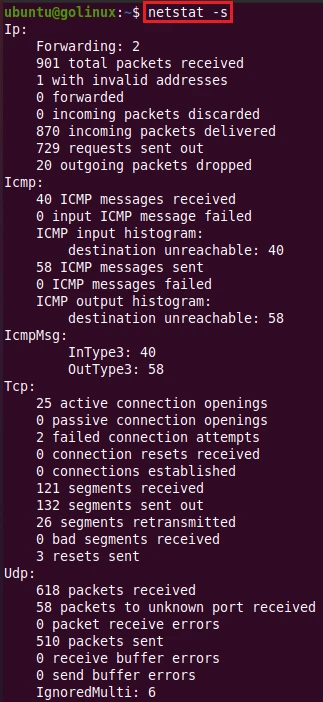
8. Display network statistics using netstat command
The following command prints summary statistics for each protocol: TCP, UDP, ICMP, and IP.
$ netstat -s
OR
$ netstat --statistics
Sample Output:
9. Display interface table for specific interface with netstat command
You can display interface table for any specific interface using
-I=<iface> or --interfaces=<iface> option as shown below:
$ netstat -I=<Iface>
OR
$ netstat --interfaces=<Iface>
Sample Output:
~]# netstat -I=eth0
Kernel Interface table
Iface             MTU    RX-OK RX-ERR RX-DRP RX-OVR    TX-OK TX-ERR TX-DRP TX-OVR Flg
eth0             9000  4580575      0      0 0       2428046      0      0      0 BMRU
10. Extend the information with netstat command
-e or --extend option displays the additional information in the
output. You can use this option twice for maximum detail.
$ netstat -e
OR
$ netstat --extend
Sample Output:
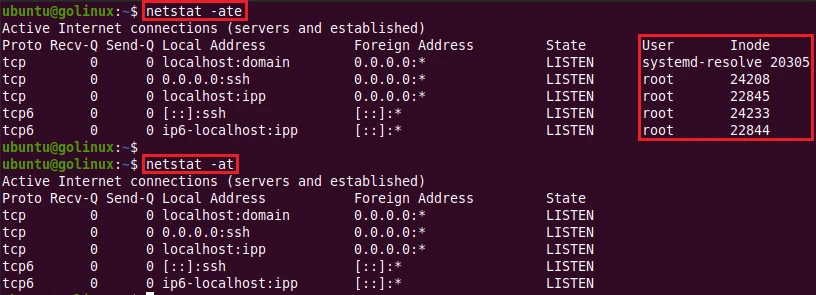
As we can see, the additional columns are shown when using -e option.
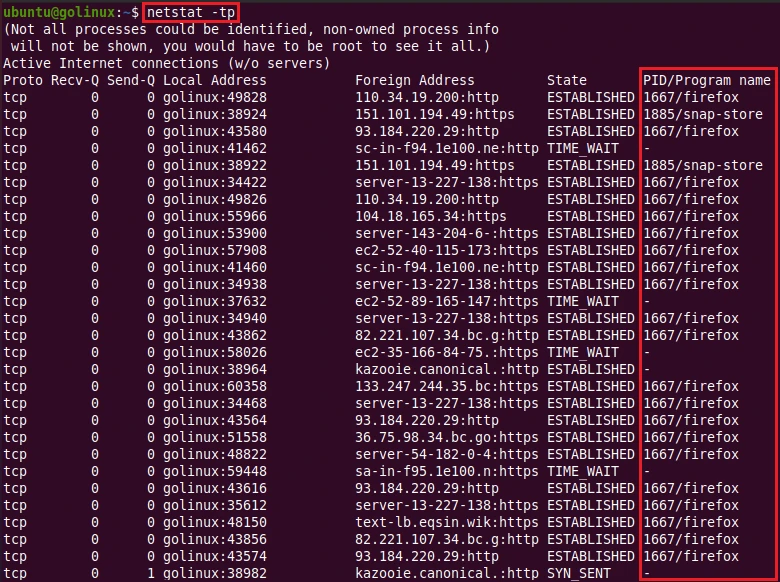
11. Display PID/Program name with netstat command
-p or --program option shows PID and name of the program for
sockets.
$ netstat -p
OR
$ netstat --progress
Sample Output:
12. netstat command to print verbose output
You can use -v or --verbose option to print verbose or additional
useful information. It also prints the information about unconfigured
address families.
$ netstat -v
OR
$ netstat --verbose
Sample Output:
]# netstat -v
Active Internet connections (w/o servers)
Proto Recv-Q Send-Q Local Address           Foreign Address         State
tcp        0      0 fi-758-ncs20fp2-5:43986 gatekeeper-webhoo:https ESTABLISHED
tcp        0      0 fi-758-ncs20fp2-5:44442 fi-758-ncs20fp2-5-:2379 ESTABLISHED
tcp        0      0 localhost:36472         localhost:9250          TIME_WAIT
tcp        0      0 localhost:37830         localhost:9250          TIME_WAIT
tcp        0      0 localhost:37534         localhost:9250          TIME_WAIT
tcp        0      0 fi-758-ncs:pcsync-https 192.100.8.63:38200      ESTABLISHED
tcp        0      0 fi-758-ncs:pcsync-https fi-758-ncs20fp2-5:47440 ESTABLISHED
tcp        0      0 fi-758-ncs20fp2-5:42104 fi-758-ncs20fp2-5-:2379 ESTABLISHED
tcp        0      0 localhost:37522         localhost:9250          TIME_WAIT
tcp        0      0 fi-758-ncs:pcsync-https 192.100.8.63:31598      ESTABLISHED
tcp        0      0 localhost:65432         localhost:47750         TIME_WAIT
tcp        0      0 fi-758-ncs20fp2-5:42106 fi-758-ncs20fp2-5-:2379 ESTABLISHED
tcp        0      0 localhost:37880         localhost:9250          TIME_WAIT
tcp        0      0 localhost:65432         localhost:47242         TIME_WAIT
tcp        0      0 localhost:38612         localhost:9250          TIME_WAIT
tcp        0      0 fi-758-ncs20fp2-5:52960 fi-758-ncs20fp2-5-:9250 TIME_WAIT
tcp        0      0 fi-758-ncs20fp2-5:34028 kubernetes.defaul:https ESTABLISHED
13. Print routing information from the route cache with netstat command
-C option prints the routing information from the route cache instead
of FIB (Forwarding Information Base). The default is FIB.
$ netstat -C
OR
$ netstat --cache
Sample Output:

14. Show complete IP addresses with netstat command
By default, netstat truncate IP addresses. To view the full address, you can use the following command.
$ netstat -W
OR
$ netstat --wide
Sample Output:

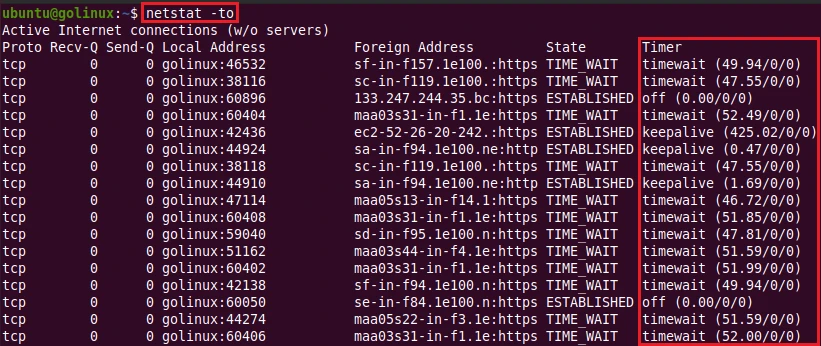
15. netstat command to display timers
-o or --timers option shows the information related to networking
timers.
$ netstat -o
OR
$ netstat --timers
Sample Output:
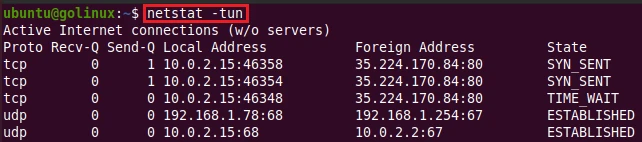
16. Display numeric values instead of names with netstat command
-n or --numeric option shows the numerical values instead of names
for the symbolic host, port, and user.
$ netstat -n
OR
$ netstat --numeric
Sample Output:
You can also use:
--numeric-hosts : To show numerical host addresses. It does not affect the port or user names.
--numeric-ports : To show numerical port addresses. It does not affect the host or user names.
--numeric-users : To show numerical user IDs. It does not affect the host or port.
17. Display information continuously using netstat command
-c or --continuous option forces netstat to print the information
every second continuously.
$ netstat -c
OR
$ netstat --continuous
Use the command in your terminal to see the output.
18. Display Listening TCP and UDP connections
This is one of the most used commands by system administrators to check the list of listening TCP and UDP ports on any Linux server. We can combine following arguments for this purpose:
- -n: Show numerical addresses instead of trying to determine symbolic host, port or user names.
- -t: Show TCP connections
- -u: Show UDP connections
- -p: Show the PID and name of the program to which each socket belongs
- -l: Show only listening sockets
Sample Output:
~]# netstat -ntlpu
Active Internet connections (only servers)
Proto Recv-Q Send-Q Local Address           Foreign Address         State       PID/Program name
tcp        0      0 127.0.0.1:44899         0.0.0.0:*               LISTEN      9372/kubelet
tcp        0      0 192.100.4.199:49155     0.0.0.0:*               LISTEN      4015/glusterfsd
tcp        0      0 0.0.0.0:30086           0.0.0.0:*               LISTEN      17179/kube-proxy
tcp        0      0 192.100.4.199:24007     0.0.0.0:*               LISTEN      3763/glusterd
tcp        0      0 192.100.4.199:49154     0.0.0.0:*               LISTEN      3985/glusterfsd
tcp        0      0 192.100.8.210:9250      0.0.0.0:*               LISTEN      1291/coredns
tcp6       0      0 :::18080                :::*                    LISTEN      8476/nginx: worker
tcp6       0      0 :::9090                 :::*                    LISTEN      8476/nginx: worker
udp        0      0 0.0.0.0:30086           0.0.0.0:*                           17179/kube-proxy
udp        0      0 192.100.8.210:53        0.0.0.0:*                           1291/coredns
udp        0      0 0.0.0.0:68              0.0.0.0:*                           1389/dhclient
udp        0      0 0.0.0.0:68              0.0.0.0:*                           1374/dhclient
udp        0      0 0.0.0.0:714             0.0.0.0:*                           979/rpcbind
udp6       0      0 :::111                  :::*                                979/rpcbind
udp6       0      0 :::714                  :::*                                979/rpcbind
As you can see, the above command shows both IPv4 and IPv6 based connections. We can further filter it out, let’s check the same in next example from our cheat sheet.
19. Display only IPv6 connections with netstat command
We can use -6 argument with netstat command to only display only tcp6
and udp6 based connections. We will combine -6 with our above set of
arguments to display listening TCP6 and UDP6 connections:
~]# netstat -6tulnp
Active Internet connections (only servers)
Proto Recv-Q Send-Q Local Address           Foreign Address         State       PID/Program name
tcp6       0      0 :::9091                 :::*                    LISTEN      10419/calico-node
tcp6       0      0 :::10251                :::*                    LISTEN      11111/kube-schedule
tcp6       0      0 :::8044                 :::*                    LISTEN      11224/k8s-scheduler
tcp6       0      0 :::111                  :::*                    LISTEN      979/rpcbind
tcp6       0      0 :::10258                :::*                    LISTEN      22093/openstack-clo
tcp6       0      0 :::8082                 :::*                    LISTEN      8476/nginx: worker
tcp6       0      0 :::10259                :::*                    LISTEN      11111/kube-schedule
tcp6       0      0 :::8086                 :::*                    LISTEN      21965/bcmt-controll
tcp6       0      0 :::22                   :::*                    LISTEN      3343/sshd
tcp6       0      0 :::8090                 :::*                    LISTEN      18470/manager
tcp6       0      0 :::18080                :::*                    LISTEN      8476/nginx: worker
tcp6       0      0 :::9090                 :::*                    LISTEN      8476/nginx: worker
udp6       0      0 :::111                  :::*                                979/rpcbind
udp6       0      0 :::123                  :::*                                998/chronyd
udp6       0      0 ::1:323                 :::*                                998/chronyd
udp6       0      0 :::714                  :::*                                979/rpcbind
20. Display only IPv4 connections with netstat command
Similar to Ipv6, we can also force netstat to only print IPv4
connections using -4 argument. We will re-use our previous set of
argument combining with -4 as shown below:
~]# netstat -4tulnp
Active Internet connections (only servers)
Proto Recv-Q Send-Q Local Address           Foreign Address         State       PID/Program name
tcp        0      0 127.0.0.1:44899         0.0.0.0:*               LISTEN      9372/kubelet
tcp        0      0 192.100.4.199:49155     0.0.0.0:*               LISTEN      4015/glusterfsd
tcp        0      0 0.0.0.0:30086           0.0.0.0:*               LISTEN      17179/kube-proxy
tcp        0      0 192.100.4.199:24007     0.0.0.0:*               LISTEN      3763/glusterd
tcp        0      0 127.0.0.1:10249         0.0.0.0:*               LISTEN      17179/kube-proxy
tcp        0      0 192.100.4.199:5001      0.0.0.0:*               LISTEN      1727/dockerd
tcp        0      0 192.100.8.210:10250     0.0.0.0:*               LISTEN      9372/kubelet
tcp        0      0 127.0.0.1:9250          0.0.0.0:*               LISTEN      1291/coredns
udp        0      0 0.0.0.0:30086           0.0.0.0:*                           17179/kube-proxy
udp        0      0 0.0.0.0:68              0.0.0.0:*                           1357/dhclient
udp        0      0 0.0.0.0:68              0.0.0.0:*                           1383/dhclient
udp        0      0 0.0.0.0:68              0.0.0.0:*                           1365/dhclient
udp        0      0 0.0.0.0:68              0.0.0.0:*                           1356/dhclient
udp        0      0 0.0.0.0:68              0.0.0.0:*                           1353/dhclient
udp        0      0 0.0.0.0:68              0.0.0.0:*                           1374/dhclient
udp        0      0 0.0.0.0:111             0.0.0.0:*                           979/rpcbind
Conclusion
Now, we have come to the end of the tutorial. We hope we have helped you
to learn netstat command. netstat is a helpful tool to view the
information of network connections. If you still have any confusion,
please let us know in the comment section.
What’s Next
30 nmap command examples in Linux [Cheat Sheet]
