
![10+ lvchange command examples in Linux [Cheat Sheet]](/lvchange-command-in-linux/lvchange__command.jpg)
Introduction to lvchange command
lvchange is one of the command-line tools to configure and manage the logical volume in the Linux system. lvchange command allows you to change attributes of a logical volume in the volume group. You can perform different operations such as activate/deactivate, change access permission and set/reset contiguous allocation policy on the logical volume.
Are you new to LVM and still learning how it works?
We have written detailed articles covering different areas of managing logical volumes, which you can follow using the below links:
Manage
Logical Volume in Linux - One STOP Solution
Understand
LVM Architecture
Create
LVM during installation RHEL/CentOS 7/8
How
to use LVM Snapshot for Backup and Restore
Create
Mirrored Logical Volume
Create
Striped Logical Volume
Syntax to use lvchange command
lvchange command is available in the lvm2 package in Linux. You will
need the root privileges to run the lvchange command.
The syntax for lvchange command is:
$ sudo lvchange option LV
Different examples to use lvchange command
1. Deactivate or Activate any logical volume
One of the important functions of lvchange command is to control the
availability of the logical volumes for use. You can activate or
deactivate a logical volume with the -a option of the lvchange
command. By default, when you create a logical volume it is activated.
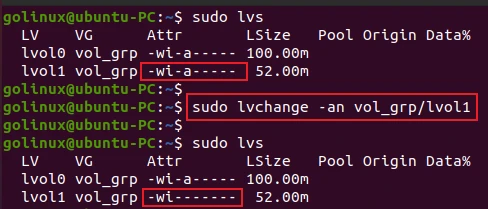
The following command deactivates the logical volume lvol1 in the
volume group vol_grp.
$ sudo lvchange -an vol_grp/lvol1
Sample Output:
The a attribute represents the active logical volume.
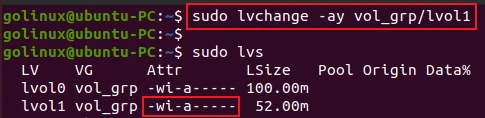
The -ay option activates the logical volume in the volume group.
$ sudo lvchange -ay vol_grp/lvol1
Sample Output:
2. Set or reset the contiguous allocation policy for logical volumes
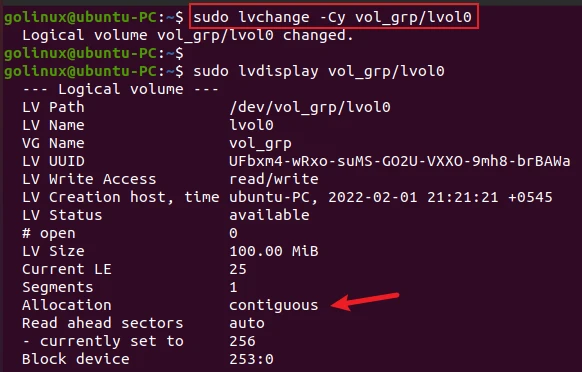
The -C option with y argument sets the contiguous allocation policy
for the logical volume.
$ sudo lvchange -Cy vol_grp/lv_one
Sample Output:
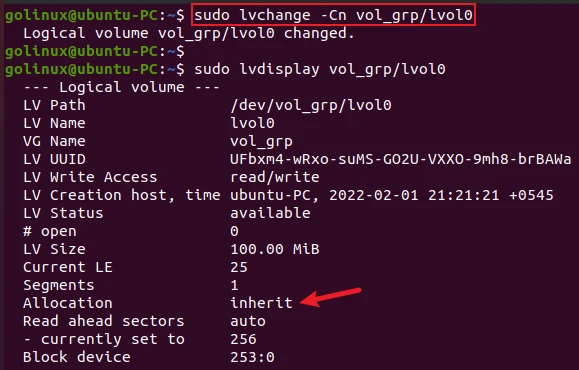
The -C option with n argument resets the contiguous allocation
policy for the logical volume.
$ sudo lvchange -Cn vol_grp/lv_one
Sample Output:
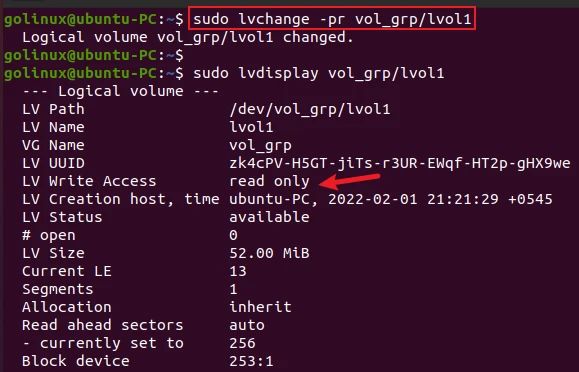
3. Change access permission of logical volume to read-only
The -p or --permission option changes access permission to read-only
or read/write.You can use r flag for the read-only permission.
For example, the following command changes the permission of the logical
volume lvol1 in the volume group vol_grp to be read-only.
$ sudo lvchange -pr vg00/lvol1
OR
$ sudo lvchange --permission r vg00/lvol1
Sample Output:
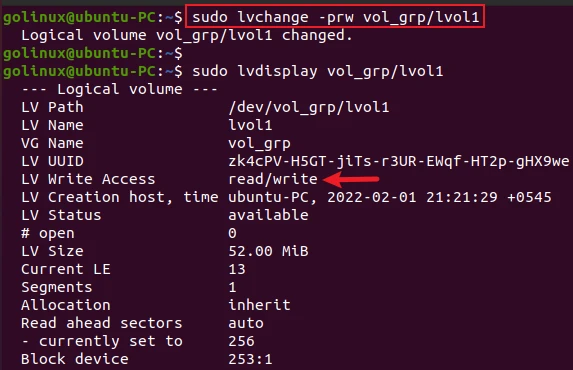
4. Change access permission of logical volume to read/write
The rw flag with -p or --permisssion option changes the access
permission of the logical volume to read/write.
$ sudo lvchange -prw vol_grp/lvol1
OR
$ sudo lvchange --permission rw vol_grp/lvol1
Sample Output:
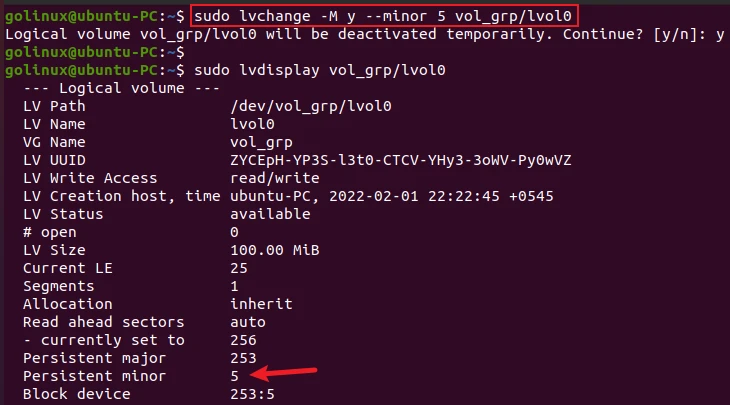
5. Make the minor number specified persistent for logical volume
The -M or --persistent option with y flag makes the minor device
number persistent for the logical volume.
$ sudo lvchange -M y --minor NUM vol_grp/lvol0
OR
$ sudo lvchange --persistent y --minor NUM vol_grp/lvol0
Sample Output:
6. Start or stop monitoring of a logical volume
The --monitor option is used to start or stop monitoring a mirrored or
snapshot logical volume from
dmeventdif it is installed.
To start monitoring, use y flag:
$ sudo lvchange --monitor y vol_grp/lvol1
To stop monitoring, use n flag:
$ sudo lvchange --monitor n vol_grp/lvol1
7. Resynchronize a mirror or raid logical volume
The --resync of lvchange command forces the complete
resynchronization of a mirrored or raid logical volume. Normally, it is
not required as synchronization happens automatically.
$ sudo lvchange --resync vol_grp/lvol_mirror
8. Resynchronize or check a raid logical volume
The --syncaction option initiates different types of RAID
synchronization. It reads all data and parity blocks in the array and
checks for discrepancies (mismatches between mirrors or incorrect parity
values).
check flag counts discrepancies.
$ sudo lvchange --syncaction check vol_grp/lvol_raid
repair flag corrects discrepancies.
$ sudo lvchange --syncaction repair vol_grp/lvol_raid
9. Reconstruct data on specific PVs of a raid logical volume
The --rebuild option selects a physical volume to rebuild in a raid
logical volume. You can use this option instead of --resync or
--syncaction repair when the PVs with corrupted data are known. It is
because their data should be reconstructed rather than reconstructing
default (rotating) data.
$ sudo lvchange --rebuild vol_grp/lvol_raid
10. Poll a logical volume to restart its incomplete process
Without polling, the backgrounded transformation process of a logical
volume will never be complete. For example, if there is an incomplete
transformation, e.g. pvmove or lvconvert interrupted by reboot or
crash, you can use --poll y to restart the process from its last
checkpoint.
$ sudo lvchange --poll y vol_grp/lvol0
--poll n to defer polling and then
--poll y to restart the process.
11. Reactivate a logical volume using the latest metadata
If the logical volume is active, you can use the --refresh option to
reload its metadata. It is useful when something has gone wrong or
you’re doing clustering manually without a clustered lock manager.
$ sudo lvchange --refresh vol_grp/lvol1
12. Set zeroing mode for thin pool logical volume
The -Z or --zero option sets or resets zeroing mode for thin pool
logical volume.
$ sudo lvchange -Z n vol_grp/thinpool_lv
OR
$ sudo lvchange --zero n vol_grp/thinpool_lv
Sample Output:
golinux@ubuntu-PC:~$ sudo lvchange -Z n vol_grp/thinpool_lv
  Logical volume vol_grp/thinpool_lv changed.
y.
Conclusion
This article teaches you to use lvchange command to change the attributes of a logical volume. We hope this article was helpful for you to understand lvchange command in Linux. If you have any queries, please share them in the comment section below.
What’s Next
10+ lvcreate command examples in Linux [Cheat
Sheet]
vgcreate command examples in Linux [Cheat
Sheet]
