![How to count files in directory in Linux? [SOLVED]](/linux-count-files-in-a-directory/linux-count-files-in-a-directory.jpg)
When managing files and directories in Linux operating systems, there may be a need to know how many files are in a given directory. For example:
- You may need to check the number of files to check that a backup was successful
- You may need to check the number of files to make sure your app is deleting temporary files correctly
- In a bash script you have prepared, you may need to determine how long the loop will continue based on the number of files in the directory.
For these and similar reasons, this article will help you if you need to determine the number of files in a directory.
Method 1: Use ls command
You can list files under a directory with the ls command. Some
terminal applications count the number of files listed. The wc command
can be used to count the files in the ls command output:
foc@fedora:~$ ls /var/log/ | wc
     79  _    79     986
Result: 79 words, 79 lines, 986 characters.The number of lines gives the number of files:
foc@fedora:~$ ls /var/log/ | wc -l
79
You can print the number of lines with the -l parameter of the wc
command.
In this method, the files listed with ls are counted with the -c,
(--count) parameter of the egrep command:
foc@fedora:~$ ls -l . | egrep -c '^-'
64
In this method, the ls command and the grep command are used. Files
listed with ls are counted with the -c (--count) parameter of the
grep command:
$ ls -1 /etc/ | grep -c ""
302
Those listed with the ls and tr commands are counted with the -w
(print the word counts) parameter of the wc command:
$ ls -1 /home/faruk | tr '\n' ' ' | wc -w
118
The ls command lists one file per line(-1), followed by the awk
command counts the files:
$ ls -1 | awk 'END { print NR }'
108
We can also use ls command to recursively count number of files combined
with awk. Here withawk, we first check if the line starts with
./. If it does, it means that it’s a directory, so we store its name
in the dir variable and skip to the next line.
If the line doesn’t start with ./, it means that it’s a file. We
increment the file counter for each file encountered.
Finally, the END block in awk is executed after all records have
been processed, so we print the value of the file counter. This will
give you the total number of files in the directory and its
subdirectories recursively.
$ ls -R /var/log | awk '/^\.\//{dir=$0; next} /^\.+/{next} {file++} END{print file}'
188
Method 2: Use the tree command
If no directory is given after the tree command, it counts the lines in the active directory. Given a directory after it, it counts the files under that directory:
foc@fedora:~$ tree /etc/pam.d/
/etc/pam.d/
├── atd
├── config-util
├── cups
├── fingerprint-auth -> /etc/authselect/fingerprint-auth
├── gdm-autologin
...
├── liveinst
├── login
├── other
├── passwd
├── password-auth -> /etc/authselect/password-auth
├── polkit-1
├── postlogin -> /etc/authselect/postlogin
...
├── sshd
├── sssd-shadowutils
├── su
├── sudo
├── sudo-i
├── su-l
├── system-auth -> /etc/authselect/system-auth
├── vlock
├── vmtoolsd
└── xserver

0 directories, 33 files
You can also use these 3 parameters in the tree command:
-d: List directories only.-l: Follow symbolic links like directories.
Count directories with the -d parameter:
foc@fedora:~$ tree -d /boot/
/boot/
├── efi [error opening dir]
├── extlinux
├── grub2 [error opening dir]
├── loader
│ └── entries [error opening dir]
└── lost+found [error opening dir]

6 directories
With the -l parameter, symbolic links are also shown:
foc@fedora:~$ tree -l /etc/sysconfig/
/etc/sysconfig/
├── anaconda
├── atd
├── chronyd
├── console
├── firewalld
├── grub -> ../default/grub
├── htcacheclean
├── kdump
├── kernel
...
├── samba
├── saslauthd
├── selinux -> ../selinux/config
├── sheepdog
├── sshd
├── unbound
├── virtinterfaced
├── virtlockd
...
├── virtstoraged
├── virtvboxd
├── virtxend
├── wpa_supplicant
└── zfs-fuse

3 directories, 39 files
The number of files and directories is shown at the end of the output.
Method 3: Use find Command
To count the number of files in a directory recursively in Linux,
you can use the find command along with the wc command.
Here’s the syntax to count files in a directory recursively:
find /path/to/directory -type f | wc -l
Explanation:
find /path/to/directory: This command searches for files in the specified directory recursively.-type f: This option specifies that only files should be included in the search, not directories or other types of files.|: This is a pipe symbol that connects the output of thefindcommand to the input of thewccommand.wc -l: This command counts the number of lines in the output, which corresponds to the number of files found by thefindcommand.
Example
$ find /var/log -type f | wc -l
182
This will output the total number of files found in the directory and its subdirectories.
Alternatively use the ls command with the find command. Here’s the
syntax:
find /path/to/directory -type f -exec ls -l {} + | wc -l
Explanation:
find /path/to/directory: This command searches for files in the specified directory recursively.-type f: This option specifies that only files should be included in the search, not directories or other types of files.-exec ls -l {} +: This option executes thelscommand on each file found byfindand displays the file details, including the file size and name.|: This is a pipe symbol that connects the output of thefindandlscommands to the input of thewccommand.wc -l: This command counts the number of lines in the output, which corresponds to the number of files found by thefindcommand.
To count the number of files in a directory including symbolic links
recursively, you can use the find command along with awk. Here’s an
example command:
find /path/to/directory -type f -o -type l | awk 'END {print NR}'
This command will find all regular files (-type f) and symbolic links
(-type l) in the /path/to/directory directory and its subdirectories
recursively, and then pass the list of files to awk. NR in awk is
a built-in variable that counts the number of records (lines) processed
so far. The END block in awk is executed after all records have been
processed, so it will print the total number of regular files and
symbolic links found.
To count the number of regular files in a directory recursively while
excluding symbolic links, you can use the find command along with
awk. Here’s an example command:
find /path/to/directory -type f ! -type l | awk 'END {print NR}'
This command will find all regular files (-type f) in the
/path/to/directory directory and its subdirectories recursively, while
excluding symbolic links (! -type l), and then pass the list of files
to awk. NR in awk is a built-in variable that counts the number of
records (lines) processed so far. The END block in awk is executed
after all records have been processed, so it will print the total number
of regular files found.
Method 4: Use du Command
You can use du to count the number of files recursively:
du -a /path/to/directory | grep -v "/$" | wc -l
This command uses du with the -a option to print the size of each
file in the specified directory and all its subdirectories. The output
is then piped to grep -v "/$", which filters out any lines that end
with a forward slash (i.e., directories). Finally, wc -l counts the
number of remaining lines, which represents the number of files.
Note that this command counts all files, including hidden files and
directories. If you want to exclude hidden files and directories, you
can use the -A option with du instead of -a. This will exclude
entries that start with a dot (.), which is the convention for hidden
files and directories.
Method 5: Use stat Command
Give a format with -c instead of the stat command standard output.
This format should be %h (number of hard links). In this way, you can
count the files under the specified directory:
foc@fedora:~$ stat -c "%h" /tmp/
23
We can also use the stat command to count the number of files in a
directory:
stat -c '%F' /var/log/** | awk '/^regular file$/ {count++} END {print count}'
42
This command uses the stat command with the -c option to display the
file type (%F) of all files in the /path/to/directory and its
subdirectories (**).
The output of stat is then piped to awk, which uses a pattern
matching rule to check if the file type is a “regular file”. If it is,
then the count variable is incremented.
Finally, the END block in awk is executed after all records have
been processed, so the total number of regular files found is printed.
Method 6: Counting files using GUI
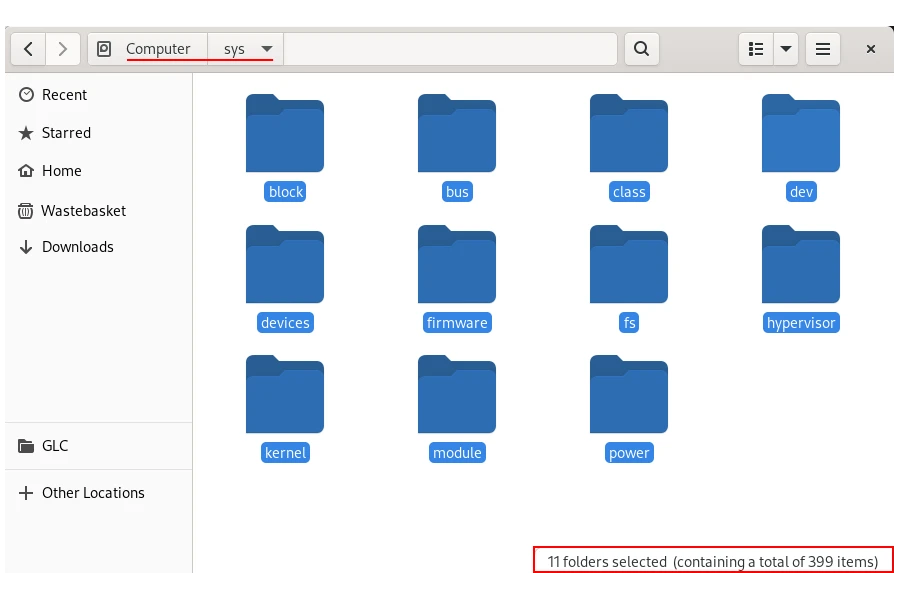
Finally, if you are using a graphical interface (XFCE, KDE, Gnome etc), the applications used to open directories (Dolphin, Files etc) will count the files under the selected directory:
Summary
To count the number of files in a directory in Linux, you can use
various commands such as ls, find, and stat. However, the most
commonly used command is find.
To count the total number of files in a directory recursively using
find, you can use the command
find /path/to/directory -type f | wc -l. This command will find all
regular files in the specified directory and its subdirectories
recursively and count the number of files using the wc -l command.
If you want to exclude symbolic links from the count, you can use the
command find /path/to/directory -type f ! -type l | wc -l. This
command will find all regular files in the specified directory and its
subdirectories recursively, while excluding symbolic links, and count
the number of files using the wc -l command.
Alternatively, you can also use the ls command with awk to count the
number of files in a directory recursively. The command
ls -R /path/to/directory | awk '/^\.\//{dir=$0; next} /^\.+/{next} {file++} END{print file}'
will list all files and directories in the specified directory and its
subdirectories recursively using the -R option of ls. The output of
ls will then be passed to awk to count the number of regular files.
References
stackoverflow.com - Recursively counting files in a
Linux directory
stackoverflow.com - Count number of files within a
directory in Linux?