
![Laravel withCount() Explained [In-Depth Tutorial]](/laravel-withcount/laravel-withcount.jpg)
Laravel is a popular PHP web application framework. It offers a wide range of features and tools to help developers build scalable and robust applications.
The Laravel withCount() method is provided by Laravel’s Eloquent ORM
to help retrieve a count of related records without having to load them.
This can greatly enhance performance when you’re only interested in the
count rather than the details of the related records.
Syntax and usage:
You would typically use withCount() on an Eloquent query builder instance. It’s pretty straightforward:
$records = <Model>::withCount('<related_table>')->get();
In this article, we’ll explore Laravel’s withCount method in detail
and demonstrate how it can be used to retrieve related counts of a
model’s associated data efficiently.
We’ll also discuss various use cases and scenarios where withCount can
be used effectively to optimize query performance and reduce database
overhead.
Using withCount() with Different Relationship Types
Using withCount() with One-to-Many relationships
For instance, consider a Post model and a Comment model, where a
post can have many comments. If you wish to retrieve all posts with
their respective comment count:
$posts = Post::withCount('comments')->get();

foreach ($posts as $post) {
    echo $post->comments_count;
}
Using withCount() with Many-to-Many relationships
Imagine a User model and a Role model, where users can have multiple
roles and roles can be assigned to multiple users. If you want to get
all users along with the number of roles each user has:
$users = User::withCount('roles')->get();

foreach ($users as $user) {
    echo $user->roles_count;
}
Using withCount() with Polymorphic Relations
Let’s take the example of a Comment model that can be related to both
Post and Video models through a polymorphic relation. If you wanted
to retrieve all posts along with their respective comment count:
$posts = Post::withCount('comments')->get();

foreach ($posts as $post) {
    echo $post->comments_count;
}
Similarly, to get all videos with their respective comment count:
$videos = Video::withCount('comments')->get();

foreach ($videos as $video) {
    echo $video->comments_count;
}
Set up Application Environment
In these steps, we’re preparing a foundational environment to
demonstrate Laravel’s withCount() functionality. Here’s a breakdown of
what we’re doing:
- Model & Factory Creation: We’re creating a
Postmodel to represent articles or entries by users. Alongside this, a factory for thePostmodel is generated. Factories in Laravel provide a convenient way to create instances of models and store them in the database. - Migrations: The migrations will determine the structure of the
poststable in our database. Ourpoststable will have a reference to the user who created the post (theuser_idcolumn), ensuring a relationship between users and their posts. - Defining Relationships: Within our models, we specify the
relationships between
UserandPost. A user can have many posts (one-to-many relationship), and a post belongs to one user. - Factory Definitions: The Post factory is set up to generate sample post data. This includes creating titles, bodies, and assigning each post to a random user.
- Database Seeding: Using seeders, we populate our database with dummy data. In our example, we’re generating 10 users and 100 posts. This simulates a scenario where users have written multiple posts.
- Migration & Seeding: Finally, the migration command structures our database tables based on our migrations, and the seed command populates these tables with the dummy data we’ve specified.
Once these steps are completed, our application environment will be
ready. We’ll have a set of users and their associated posts, allowing us
to delve into practical examples showcasing the power and utility of
Laravel’s withCount() method.
Let’s start by creating the Post model and factory.
 php artisan make:model Post -mcr
 php artisan make:factory PostFactory --model=Post
Next, open the following files and insert the respective code.
Posts table
Open the database/migrations/<timestamp>_create_posts_table.php file
and create a post blue print.
...
    public function up(): void
    {
        Schema::create('posts', function (Blueprint $table) {
            $table->id();
            $table->unsignedBigInteger('user_id');
            $table->string('title');
            $table->text('body');
            $table->foreign('user_id')->references('id')->on('users')->onDelete('cascade');
            $table->timestamps();
        });
    }
  ...
Post model
Open the app/Models/Post.php file and create
the fillable array and user
relationship method.
<?php

namespace App\Models;

use Illuminate\Database\Eloquent\Factories\HasFactory;
use Illuminate\Database\Eloquent\Model;

class Post extends Model
{
    use HasFactory;

    protected $fillable = [
        'title',
        'body',
    ];

    public function user(){
        return $this->belongsTo(User::class);
    }
}
User model
Open the app/Models/User.php file and create the posts relationship
method.
...
    public function posts() {
        return $this->hasMany(Post::class);
    }
...
Post factory
Return the following array from the definition method of the
database/factories/PostFactory.php file.
...
        return [
            'title' => fake()->sentence(),
            'body' => fake()->paragraph(),
            'user_id' => rand(1,10),
        ];
...
Database seeder
Open the database/seeders/DatabaseSeeder.php file and create 10 users
and 100 posts in the run method.
...
    public function run(): void
    {
        \App\Models\User::factory(10)->create();
        \App\Models\Post::factory(100)->create();
    }
...
Finally, create the database and migrate the changes, while seeding the database.
php artisan migrate --seed
Now that we have users with posts, we can head straight to the
routes/web.php and practice using Laravel withcount.
Practical explanation of Laravel withCount()
Example-1: Retrieving Related Model Counts
Open the routes/web.php file and write the following code:
<?php

use App\Models\User;
use Illuminate\Support\Facades\Route;

Route::get('/', function () {
    $users = User::withCount('posts')->get();
    foreach ($users as $user) {
        echo "User {$user->id} has {$user->posts_count} posts.<br>";
    }
});
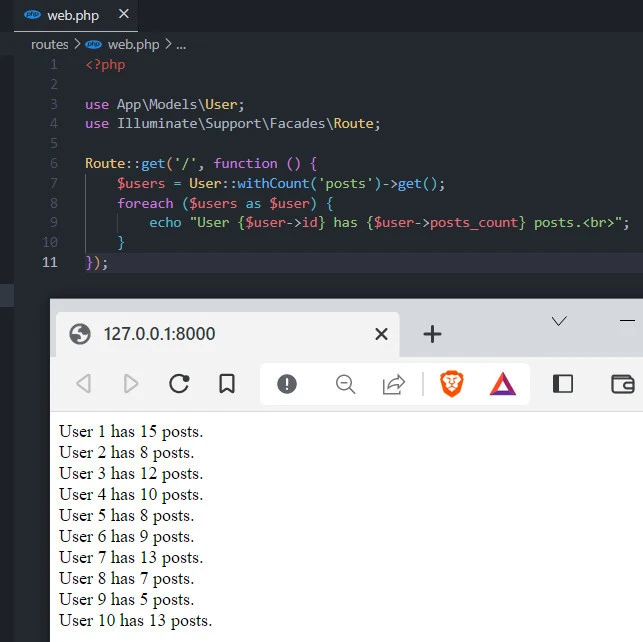
Using Laravel’s withCount method, we retrieve a list of all users and
their corresponding number of posts.
First, User::withCount('posts') retrieves all users with a count of
their related posts. This creates a new attribute called posts_count
on each user model instance, which contains the count of related
posts.
Next, get() gets called to execute the query and retrieve the results.
This returns a collection of user models, with the posts_count
attribute populated for each user.
The
foreach
loop then iterates over each user in the collection. For each user,
the id and posts_count attributes are used to display a message
indicating the number of posts each user has. The output of the code is
a list of all users and their corresponding post counts.
Example-2:Conditional Retrieval of Related Model Counts
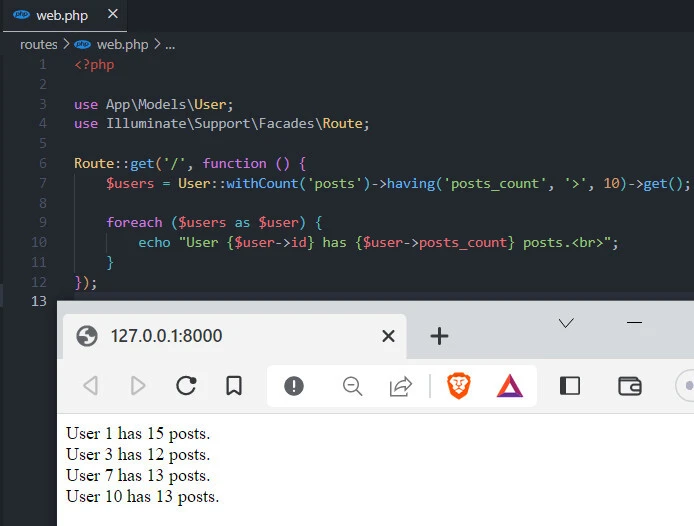
Let’s get only users with more than 10 posts.
<?php

use App\Models\User;
use Illuminate\Support\Facades\Route;

Route::get('/', function () {
    $users = User::withCount('posts')->having('posts_count', '>', 10)->get();

    foreach ($users as $user) {
        echo "User {$user->id} has {$user->posts_count} posts.<br>";
    }
});
Here’s a breakdown of the code:
User::withCount('posts')retrieves all users along with a count of their related posts. This creates a new attribute calledposts_counton each user model instance, which contains the count of relatedposts.having('posts_count', '>', 10)filters the results to only include users who have more than 10 posts. This method is called on the query builder instance returned bywithCount.get()executes the query and retrieves the results. This returns a collection of user models, with theposts_countattribute populated for each user.- The
foreachloop then iterates over each user in the collection. For each user, theidandposts_countattributes are used to display a message indicating the number of posts each user has.
The output is a list of users with more than 10 posts and their corresponding post counts.
Example-3:Renaming the Count Column
When using withCount(), Laravel by default names the count column as
relation_count. But you can customize this if required.
$users = User::withCount(['posts as articles_count'])->get();

foreach ($users as $user) {
    echo $user->name . " has written " . $user->articles_count . " articles.<br>";
}
Example-4: Chaining withCount() with other Eloquent Methods
Using withCount() in conjunction with with():
To get users with their posts and also the count of their posts:
$users = User::with('posts')->withCount('posts')->get();
Using withCount() with conditional constraints:
If you wanted to count only the posts with a specific condition, say, titles starting with “Hello”:
$users = User::withCount(['posts' => function($query) {
    $query->where('title', 'like', 'Hello%');
}])->get();
Example-4: Ordering Results Based on Relationship Count
Using the orderBy() method in conjunction with withCount().To get
users ordered by the number of their posts:
$users = User::withCount('posts')->orderBy('posts_count', 'desc')->get();
Example-5: Combining withCount() with Lazy Eager Loading
If you’ve already retrieved a model and want to get the related count
afterward, you can use loadCount().
$user = User::first();  // Retrieve the first user as an example
$user->loadCount('posts');  // Load the posts count for this user

echo $user->posts_count;
Conclusion
The withCount method in Laravel is a powerful tool that allows you to
retrieve the count of related records and the parent records in a single
query. This can optimize your database queries and reduce the queries
needed to retrieve data.
Using withCount, you can easily retrieve the count of related records
for each parent record and even filter the results based on specific
conditions using the having method. This makes retrieving data that
meets your requirements easy without resorting to multiple queries or
complex joins.
Overall, withCount is an excellent addition to Laravel’s query
builder, and it can save you a lot of time and effort when working with
related data. Whether you are building a simple blog or a complex
application with many relationships, withCount is a feature you should
have in your toolbox.
