
![How to perform Soft Delete in Laravel [Tutorial]](/laravel-soft-delete/laravel-soft-delete.jpg)
In this tutorial we’re going to cover how to implement Laravel soft deletes. You’ll learn how to handle and test soft deleted records, address some common pitfalls, and also get best practices for maintaining the integrity of your data and your users privacy in your applications.
Soft delete allows users to delete records from a database without totally wiping the record from the system. This feature is becoming more important as businesses and organizations try to keep their information as safe and accurate as possible. For example, let’s say you have an employee record system. With soft delete implemented in your database, employees can delete old records without removing them completely. So if they ever need to pull up that old deleted record it will always be there.
Steps to perform Soft Deletes in Laravel
Create Project (Optional)
If you already have a project where you plan to perform soft delete then you can skip this step. But let me create a project to demonstrate the implementation. We can use below command to create a project:
sudo mkdir -p /opt/projects
sudo chmod 777 /opt/projects
cd /opt/projects
composer create-project --prefer-dist laravel/laravel SoftDeleteDemo
Navigate to your project directory:
cd SoftDeleteDemo
Set up your .env file for database connection by editing the .env
file with your database credentials. I have already
created and configured MariaDB to
use as my backend DB for Laravel projects:
DB_CONNECTION=mysql
DB_HOST=127.0.0.1
DB_PORT=3306
DB_DATABASE=my_laravel_db
DB_USERNAME=user1
DB_PASSWORD=Passw0rd
Create a Migration for Soft Deletes
Generate a new migration file for a table, e.g., users, where soft
deletes will be implemented. You can modify this file based on your
environment which contains the table where you want to implement soft
delete.
php artisan make:migration create_users_table --create=users

Open the newly created migration file in the database/migrations
directory which in my case is 2024_02_18_144746_create_users_table.
You’ll need to add a deleted_at column to your table schema within the
migration’s up method. Laravel uses this column to mark records as
deleted. Here’s how you can modify the table structure:
Schema::create('users', function (Blueprint $table) {
    $table->id();
    $table->string('name');
    $table->string('email')->unique();
    $table->timestamp('email_verified_at')->nullable();
    $table->string('password');
    $table->rememberToken();
    $table->timestamps();
    $table->softDeletes(); // This line adds the soft delete column
});
Run the Migration
After modifying the migration, apply the changes to your database by running:
php artisan migrate

This will add a deleted_at column to your users table, which Laravel
will use to mark records as soft deleted.
Enabling Soft Deletes in the Model
To enable soft deletes for a model, you need to use the SoftDeletes
trait provided by Eloquent. Open the model file you wish to enable soft
deletes for, typically located in app/Models. For a User model, the
file would be app/Models/User.php. Within your model, import the
SoftDeletes trait and use it within the class. Here’s an example for
the User model:
<?php

namespace App\Models;

use Illuminate\Database\Eloquent\Factories\HasFactory;
use Illuminate\Database\Eloquent\Model;
use Illuminate\Database\Eloquent\SoftDeletes; // Import the SoftDeletes trait

class User extends Model
{
    use HasFactory, SoftDeletes; // Use the SoftDeletes trait

    // Your model's properties and methods
}
Huzzah! Your users table is now decked out with soft deletes, and it
only took a few steps. When you hit delete() on a User model
instance, Laravel won’t scrap the record from your database. Rather,
it’ll slap the current timestamp into the deleted_at column of that
record — which marks it as “deleted.” Magic! You can still get to these
finicky records by adding them to explicit model queries. And if you
ever need to bring your deleted records back from the grave? No
problemo.
Performing Soft Delete, Restoration and Verification
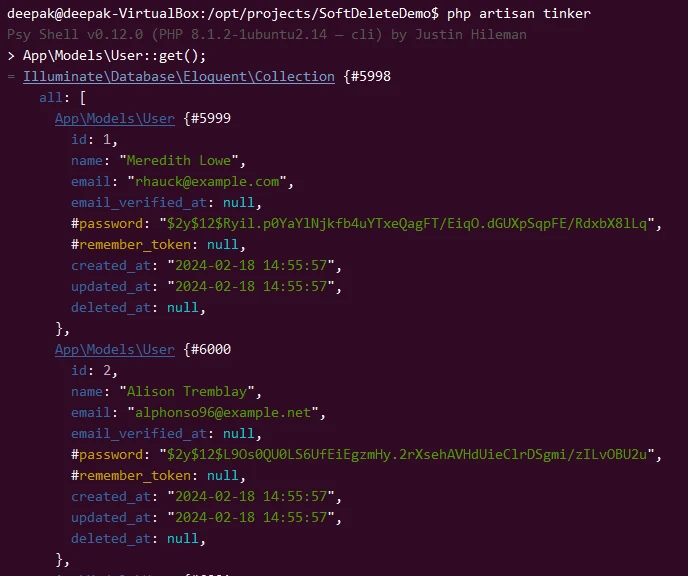
I have added some dummy users in my table to be able to test the soft delete operation in Laravel. Here is a list of all the users in my table:
php artisan tinker
> App\Models\User::get();
Soft Deleting a Record
Soft deleting a record marks it as deleted without actually removing it
from the database. This is achieved by setting a deleted_at timestamp
for the record.
php artisan tinker
> App\Models\User::find(1)->delete();
This command soft deletes the user with id 1. You can replace 1 with
any other user id you wish to soft delete.

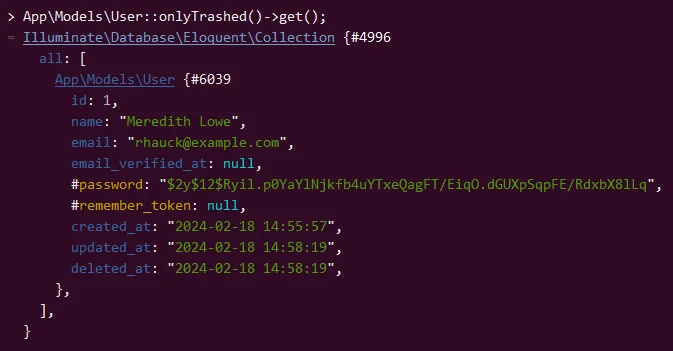
List Only Soft Deleted Records
Use the below command to only list the soft deleted users:
App\Models\User::onlyTrashed()->get();
Restoring a Soft Deleted Record
Restoring a soft-deleted record makes it available again for queries that don’t explicitly include soft-deleted models.
App\Models\User::withTrashed()->find(1)->restore();
This command restores the user with id 1. Adjust the id as necessary
for different users.

Permanently Deleting a Record
Permanently deleting a record removes it from the database entirely, ignoring the soft delete functionality.
App\Models\User::withTrashed()->find(1)->forceDelete();
This command completely removes the user with id 1 from the database.
Be cautious with this operation as it cannot be undone.
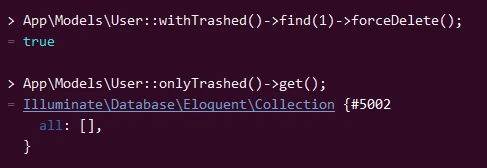
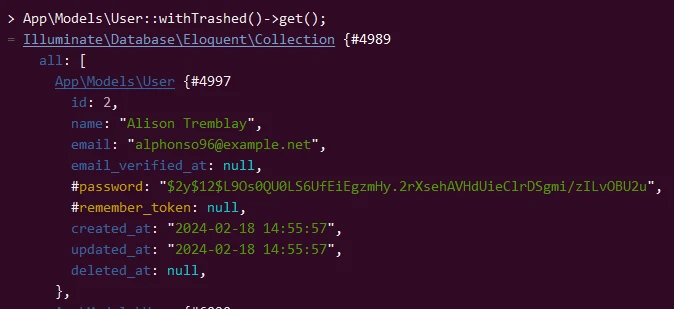
As expected, we don’t see any user with id 1 in our records any more
as it is permanently deleted:
App\Models\User::withTrashed()->get();
Writing tests for soft deleted models
To test these functionalities in a more structured way, you can write
tests in the tests/Feature directory. For example, create a test file
named UserSoftDeletesTest.php:
php artisan make:test UserSoftDeletesTest

Then, in your test file located at
tests/Feature/UserSoftDeletesTest.php, you can write tests to ensure
soft deleting, restoring, and force deleting work as expected:
<?php

namespace Tests\Feature;

use Illuminate\Foundation\Testing\RefreshDatabase;
use Tests\TestCase;
use App\Models\User;

class UserSoftDeletesTest extends TestCase
{
    use RefreshDatabase;

    /** @test */
    public function a_user_can_be_soft_deleted_and_restored()
    {
        $user = User::factory()->create();

        $user->delete();
        $this->assertSoftDeleted($user);

        $user->restore();
        $this->assertDatabaseHas('users', ['id' => $user->id, 'deleted_at' => null]);
    }

    /** @test */
    public function a_user_can_be_force_deleted()
    {
        $user = User::factory()->create();

        $user->forceDelete();
        $this->assertDatabaseMissing('users', ['id' => $user->id]);
    }
}
users name so
I had to delete that duplicate table
database/migrations/2014_10_12_000000_create_users_table.php or else I
was getting 1050 Table 'users' already exists
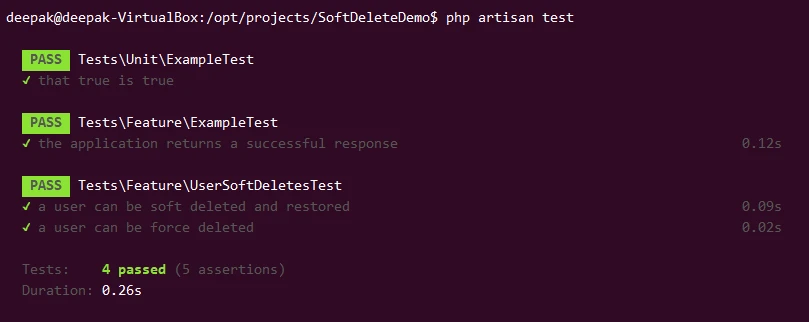
To run your tests, use the PHPUnit command:
./vendor/bin/phpunit
or simply:
php artisan test
Implementing Controllers and Route
We can create a Controller and use it to manage User records,
including handling soft deletes.
Run the following Artisan command to create a new controller named
UserController. This command will create a file named
UserController.php in the app/Http/Controllers directory.
php artisan make:controller UserController

Open the routes/web.php file to define routes for the actions you want
to perform on the User model. Here, we’ll specify routes for deleting
a user, restoring a user, viewing deleted user and permanently deleting
a user.
// Define the route for the index page of users
Route::get('/users', [UserController::class, 'index'])->name('users.index');

// Route to soft delete a user
Route::delete('/users/{user}', [UserController::class, 'delete'])->name('users.delete');

// Route to permanently delete a user
Route::delete('/users/{user}/force', [UserController::class, 'forceDelete'])->name('users.forceDelete');

// Route to show soft deleted users
Route::get('/users/deleted', [UserController::class, 'showDeleted'])->name('users.deleted');

// Route to restore a specific soft deleted user
Route::get('/users/{user}/restore', [UserController::class, 'restore'])->name('users.restore');
Next we will implement methods in UserController to handle the actions
defined in our routes in app/Http/Controllers/UserController.php.
class UserController extends Controller
{
    public function index()
    {
        $users = User::all(); // Get all users
        return view('users.index', compact('users')); // Return the view with users
    }

    public function showDeleted()
    {
        $deletedUsers = User::onlyTrashed()->get();
        return view('users.deleted', compact('deletedUsers'));
    }

    // Method to soft delete a user
    public function delete(User $user)
    {
        $user->delete();
        return redirect()->route('users.index')->with('status', 'User deleted successfully.');
    }

    // Method to restore a soft-deleted user
    public function restore($userId)
    {
        $user = User::withTrashed()->findOrFail($userId);
        $user->restore();
        return redirect()->route('users.index')->with('status', 'User restored successfully.');
    }

    // Method to permanently delete a user
    public function forceDelete(User $user)
    {
        $user->forceDelete();
        return redirect()->route('users.index')->with('status', 'User permanently deleted successfully.');
    }
}
Here are the list of implemented methods:
index(): Fetches all user records usingUser::all(). Returns theusers.indexview, passing the users data to it. This view can display a list of all users, making it useful for an admin dashboard or a user management page.showDeleted(): Retrieves only the soft deleted users withUser::onlyTrashed()->get(). This leverages Laravel’s soft delete functionality to get users marked as deleted (deleted_atis not null) without permanently removing them from the database. Returns theusers.deletedview, providing a list of these soft deleted users, likely with options to restore them.delete(User $user): Accepts aUsermodel instance, implicitly route model binding a user based on the ID passed in the route. Calls$user->delete(), which soft deletes the user (marksdeleted_atwith a timestamp) without removing the record from the database. Redirects back to theusers.indexroute with a success status message. This informs the user of the successful deletion.restore($userId): Finds a soft-deleted user by their ID usingUser::withTrashed()->findOrFail($userId). This includes users in the query that are normally hidden because of being soft deleted. Calls$user->restore(), which clears thedeleted_atcolumn for that user, effectively “undeleting” them. Redirects back to theusers.indexroute with a success status message indicating the user has been restored.forceDelete(User $user): Similar to thedeletemethod, it accepts aUsermodel instance. However, it calls$user->forceDelete()instead, which permanently removes the user’s record from the database, bypassing the soft delete functionality. Redirects back to theusers.indexroute with a success status message, indicating that the user has been permanently deleted.
Next we need to create a view with the forms for soft deleting,
restoring, and permanently deleting a user should be placed in the Blade
templates. I will create a new directory inside resources/views/ to
place my blade files.
mkdir resources/views/users
Next create a view file to list all users
resources/views/users/index.blade.php:
<a href="{{ route('users.deleted') }}" class="btn btn-secondary">View Deleted Users</a>

{{-- Loop through each user and display their information along with actions --}}
@foreach ($users as $user)
    <div>
        <p>{{ $user->name }}</p>
        {{-- Soft Delete Form --}}
        <form action="{{ route('users.delete', $user->id) }}" method="POST">
            @csrf
            @method('DELETE')
            <button type="submit">Delete</button>
        </form>

        {{-- Restore Form --}}
        {{-- Only show this if the user is soft deleted --}}
        @if($user->trashed())
        <form action="{{ route('users.restore', $user->id) }}" method="POST">
            @csrf
            <button type="submit">Restore</button>
        </form>
        @endif

        {{-- Permanent Delete Form --}}
        <form action="{{ route('users.forceDelete', $user->id) }}" method="POST">
            @csrf
            @method('DELETE')
            <button type="submit">Permanently Delete</button>
        </form>
    </div>
@endforeach
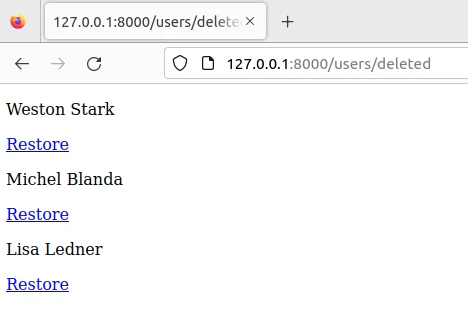
Similarly to list the deleted users we create
resources/views/users/deleted.blade.php:
{{-- Loop through each deleted user and display them --}}
@foreach ($deletedUsers as $user)
    <div>
        <p>{{ $user->name }}</p>
        {{-- Restore Button --}}
        <a href="{{ route('users.restore', $user->id) }}" class="btn btn-info">Restore</a>
    </div>
@endforeach
Make sure your Laravel application is running. If it’s not, you can
start it by running php artisan serve in your terminal. If you haven’t
specifically configured routes to change its location, and assuming
you’re using the default Laravel development server, the URL might look
something like http://127.0.0.1:8000/users based on your route
definition in routes/web.php.
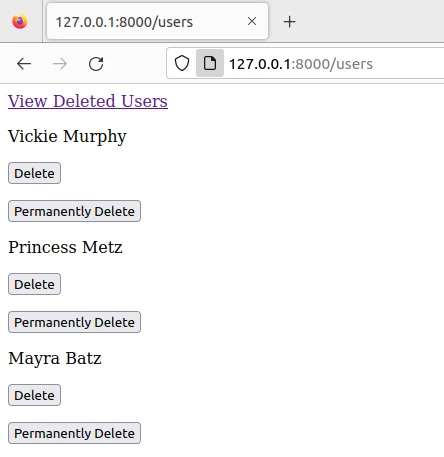
On the users/index page, you should see a list of users and next to
each, the “Delete” button you’ve set up in your Blade template. Clicking
this button will submit the form, sending a POST request with a
_method of DELETE to the URL specified in the form’s action
attribute. This action should correspond to the route you defined for
deleting a user, which should be processed by a method in your
UserController.
Cleaning Up Old Soft Deleted Models using Pruning Mechanism
In Laravel, you can use the framework’s pruning mechanism to tidy up
aging soft-deleted models. You basically get this feature by default and
it automatically removes old records that have been soft-deleted after a
certain time frame. Here’s how you’d implement it in your User model:
First, ensure your model uses the
Illuminate\Database\Eloquent\Prunable trait. This trait provides the
necessary functionality to prune (permanently delete) old records. We
will update our app/Models/User.php model file:
use Illuminate\Database\Eloquent\Model;
use Illuminate\Database\Eloquent\SoftDeletes;
use Illuminate\Database\Eloquent\Prunable;

class User extends Model
{
    use SoftDeletes, Prunable;

    /**
     * Determine which prunable model records should be pruned.
     */
    protected function prunable()
    {
        // Prune any records that have been soft-deleted for more than 365 days
        return static::onlyTrashed()->where('deleted_at', '<=', now()->subDays(365));
    }
}
Next, you need to schedule the pruning to run at a regular interval.
This is done in the app/Console/Kernel.php file within the schedule
method. Here you can define how often you want the pruning process to
run.
protected function schedule(Schedule $schedule)
{
    // Run model pruning every day at midnight
    $schedule->command('model:prune')->daily();
}
To test or manually trigger the pruning process, you can run the pruning Artisan command:
php artisan model:prune --model=App\Models\User
This command allows you to specify which model(s) you’d like to prune. It’s a good way to manually clean up your models or test that your pruning logic is set up correctly.
