
![How to PROPERLY clear cache in Laravel [SOLVED]](/laravel-clear-cache/laravel-clear-cache.jpg)
One of the key aspects of Laravel’s success is its caching system, which helps speed up applications and reduce server load. Caching involves storing frequently used data in memory to be quickly accessed when needed, rather than fetching it from the database every time.
While caching is beneficial for application performance, it can also lead to problems when changes are made to the code. Therefore, it’s important to regularly clear the cache to ensure the application uses the latest code and configurations.
In this article, we’ll explore the concept of caching in Laravel and why clearing the cache is essential. We’ll also discuss the different methods available for clearing the cache in Laravel.
Let’s get started.
Understand Caching in Laravel
Caching is an essential component of web development. Laravel’s caching system is designed to help speed up web applications by storing frequently accessed data in memory. Instead of fetching data from the database or executing heavy computations, a Laravel application retrieves the data from the cache, which is much faster.
The cached data is often stored in a fast data store like
Memcached, Redis, or DynamoDB. The configuration is
found at config/cache.php file, where you can specify the cache driver
to use. By default, Laravel uses the file cache driver. The driver
stores serialized, cached objects on the filesystem of the server.
You can obtain a cache instance using the Cache facade.
$value = Cache::get('key');
Cache::put('key', 'value', $seconds = 10);
Cache::forget('key');
$value = Cache::get('key'); retrieves the value stored in the cache
using the key ‘key’ and assigns it to the variable $value. If the key
is not found in the cache, null will be returned.
Cache::put('key', 'value', $seconds = 10); stores a value in the cache
using the key ‘key’. The second parameter, ‘value’, is the value to be
stored in the cache. The third parameter, ‘$seconds’, is the number of
seconds that the value should be stored in the cache. In this example,
the value will be stored for 10 seconds. After 10 seconds, the value
will expire and be removed from the cache.
Cache::forget('key'); removes the value stored in the cache using the
key ‘key’. This method is useful for clearing specific values from the
cache when they are no longer needed.
Alternatively, you can retrieve or store data in the cache using the
global cache function.
$value = cache('key');
cache(['key' => 'value'], now()->addMinutes(10));
$value = cache('key'); retrieves the value stored in the cache using
the key ‘key’ and assigns it to the variable $value. If the key is not
found in the cache, null will be returned.
On the ther other hand,
cache(['key' => 'value'], now()->addMinutes(10)); stores a value in
the cache using the key ‘key’. The first parameter is an associative
array where the key is the cache key and the value is the data to be
stored. The second parameter is a DateTime instance that specifies the
expiration time of the cached data. In this example, the data will be
stored for 10 minutes from the current time, as specified by
now()->addMinutes(10).
5 Reasons for Laravel clear cache
- Ensures that code changes are immediately reflected: When changes are made to the code, such as modifying routes or updating views, the cache may still contain the old data. Clearing the cache ensures the application uses the latest code and configurations. This prevents unexpected behavior and errors.
- Prevents routing issues: Clearing the cache can help avoid issues with routing, such as getting a 404 error when trying to access a page that exists in the code. This is because the cached routes may not be updated to reflect changes made to the code.
- Reduces inconsistencies and errors: Changes to views or configurations may only be reflected in the application if the cache is cleared regularly. Clearing the cache ensures that the latest changes are applied, reducing the risk of errors and inconsistencies.
- Improves application performance: Clearing the cache can improve the application’s performance by freeing up memory and reducing the number of requests made to the database. This can lead to faster load times and a better user experience.
- Ensures that the application runs smoothly and efficiently: Clearing the cache regularly is essential for ensuring that the application runs smoothly and efficiently. It can help prevent unexpected behavior and errors, reduce inconsistencies and improve performance.
How to Laravel clear cache
There are several methods for clearing the cache in Laravel. Here are some of the frequently used methods:
Use Artisan commands
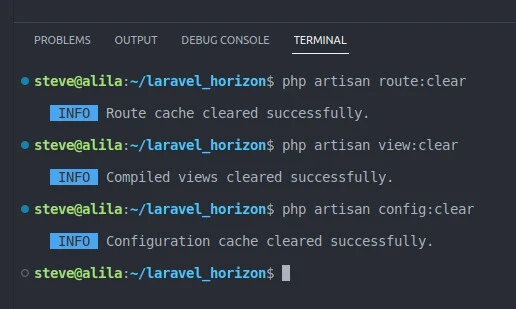
One of the easiest and most common ways to clear the cache in Laravel is to use Artisan commands. Artisan is Laravel’s command-line interface. It provides a convenient way to clear the cache. You can clear various cache types as follows:
Clear the route cache
php artisan route:clear
Clear the view cache
php artisan view:clear
Clear the configuration cache
php artisan config:clear
Manually delete cache files
Another way to clear the cache is to delete the cache files manually.
Laravel stores the cached data in the bootstrap/cache directory.
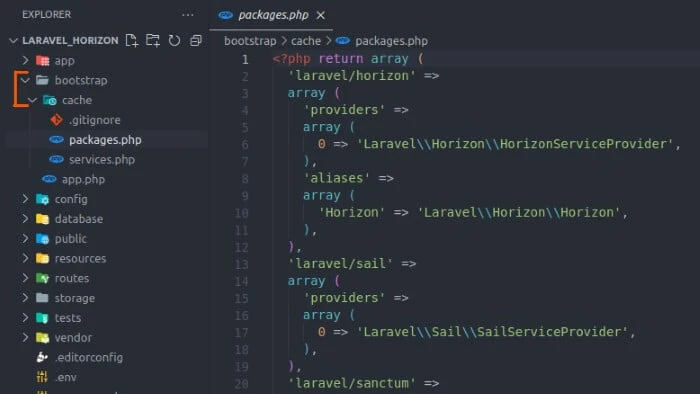
You can delete the files manually using your file manager or command-line interface running the following command at the root directory of your Laravel application:
rm -rf bootstrap/cache/*
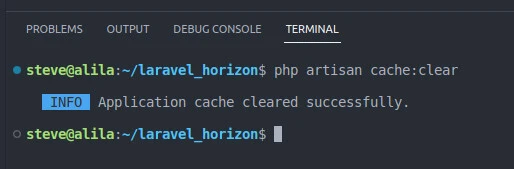
Use the cache:clear command
You can also use the cache:clear command to clear all cached data in
Laravel.
php artisan cache:clear
This command clears all cached data, including route cache, view cache, and configuration cache.
Conclusion
Caching is an essential feature in Laravel that can significantly improve application performance. However, caching can also cause problems when changes are made to the code. Therefore, clearing the cache regularly is crucial to ensure the application uses the latest code and configurations.
In this article, we discussed the importance of clearing the cache in
Laravel. We provided several methods, including using Artisan commands,
manually deleting cache files, and using the cache:clear command.
Regularly clearing the cache ensures your application runs smoothly and efficiently, reducing the risk of unexpected behavior and errors.
