
![Getting started with Laravel Boilerplate [Tutorial]](/laravel-boilerplate/laravel-boilerplate.jpg)
Laravel is a popular PHP framework that simplifies the development process of web applications. However, every new project requires a lot of initial setup work, such as configuring authentication, handling user roles and permissions, setting up email services, and so on.
Laravel Boilerplate comes to the rescue by providing a standardized, well-structured foundation that you can use to jumpstart your projects. This blog explores what Laravel Boilerplate is, its installation, and how it works.
Let’s get started!
What Is Laravel Boilerplate?
Laravel boilerplate is a pre-configured setup or template that provides a starting point for building web applications with Laravel. It saves time and effort by setting up a basic structure with pre-installed packages and configurations that can be used as a starting point for a new Laravel project.
Laravel boilerplate includes common features such as authentication, user management, and UI templates. Besides, it can be customized and extended to meet specific project requirements.
Using Laravel boilerplate can help avoid common errors and bugs, improve productivity, and ensure consistent project code structure.
Features of Laravel Boilerplate
Some features of Laravel Boilerplate include:
- Authentication and Authorization: Laravel Boilerplate includes a complete user authentication and authorization system out of the box. It provides user registration, login, password reset, and account activation functionality. Additionally, it supports role-based permissions and access control, allowing you to define user roles and manage their permissions easily.
- User Management: With Laravel Boilerplate, managing user accounts becomes effortless. It offers features like user profile management, user avatars, and account settings. You can easily extend the user management functionality to suit your project requirements.
- Admin Panel: Laravel Boilerplate includes an admin panel that allows you to manage various aspects of your application, such as users, roles, permissions, content, and settings. The admin panel provides a user-friendly interface for performing administrative tasks and can be customized to fit your specific needs.
- Frontend Templates: The boilerplate includes responsive and customizable frontend templates that provide a starting point for building user interfaces. These templates are designed to be visually appealing and can be easily modified to match your application’s branding and design requirements. Included are User Dashboards, User Account Management, Two Factor Authentication, Social Logins, and reCAPTCHA.
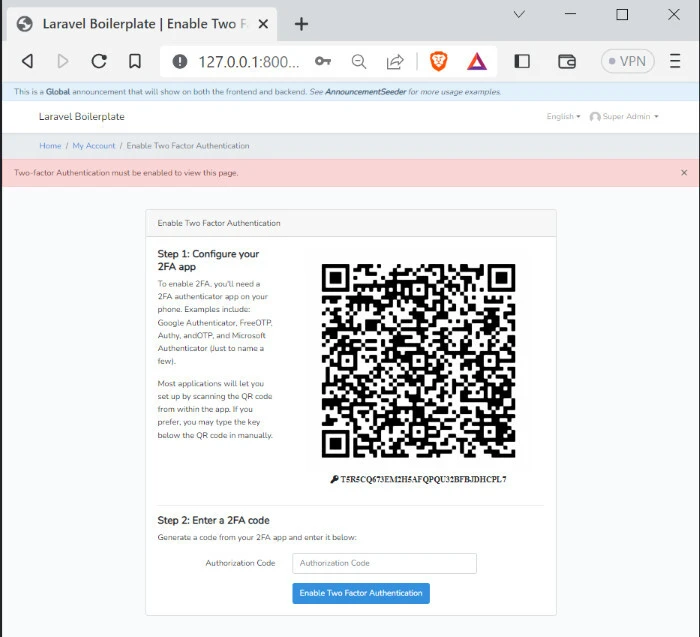
- Asset Management: Laravel Boilerplate utilizes Laravel Mix, a powerful asset management tool. It simplifies the process of managing CSS, JavaScript, and other assets by providing an elegant API and seamless integration with popular frontend frameworks and libraries.
- API Support: If you’re building an API-centric application, Laravel Boilerplate offers built-in support for building and consuming APIs. It includes features like API authentication, rate limiting, and API documentation generation using tools like Laravel Passport and Swagger.
- Testing and Debugging: Laravel Boilerplate encourages and facilitates writing tests for your application. It includes testing utilities and provides a testing environment preconfigured with popular testing frameworks like PHPUnit. It also integrates with Laravel Debugbar, a useful debugging toolbar that provides insights into the application’s performance and execution flow.
- Modular Structure: Laravel Boilerplate promotes a modular approach to application development. It organizes your codebase into modules, making it easier to manage and maintain large-scale projects. Modules encapsulate related functionality and can be developed and tested independently.
Installation and Setup
Prerequisites
- Ensure you have PHP installed on your system (compatible version with Laravel).
- Make sure you have Composer installed, which is a dependency manager for PHP.
Laravel Installation
Download the zip files and extract them to your preferred directory. Alternatively, you can clone the GitHub repository.
git clone https://github.com/rappasoft/laravel-boilerplate.git laravel_boilerplate
Copy the .env.example content to .env file.
cp -r .env.example .env
Next, configure the database details.
DB_CONNECTION=mysql
DB_HOST=127.0.0.1
DB_PORT=3306
DB_DATABASE=homestead
DB_USERNAME=homestead
DB_PASSWORD=secret
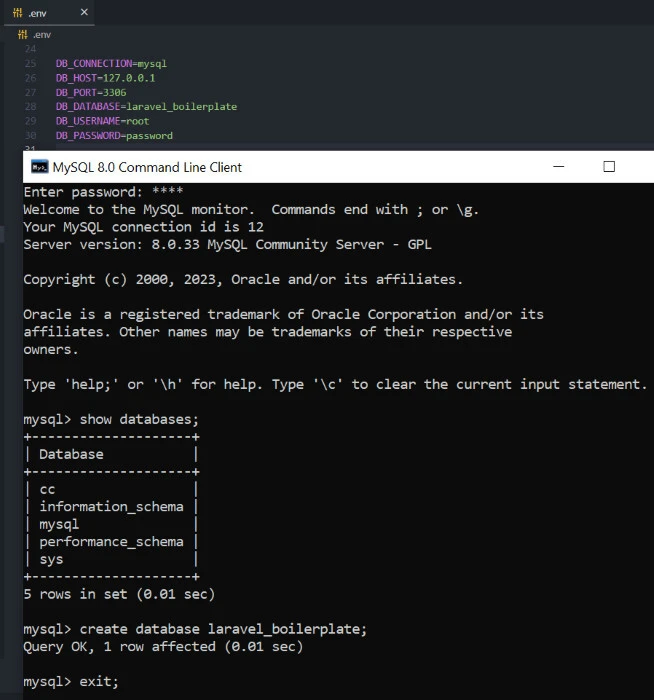
Now install the dependencies.
composer update
composer install
Then install the frontend assets.
npm install
Next, generate a unique key for your application.
php artisan key:generate
Then, migrate the changes while seeding the database.
php artisan migrate --seed
Link the assets to the public folder.
php artisan storage:link
Then, start the dev servers.
npm run dev
php artisan serve
You can now log in to the application using the following details:
Username: admin@admin.com
Password: secret
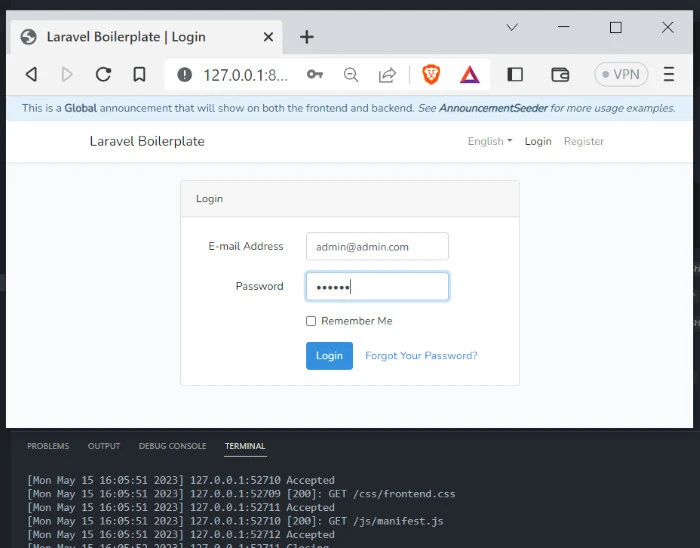
Laravel Boilerplate may have additional configuration steps depending on
the specific features you plan to use. You can change the default
configurations in the config/boilerplate.php file.
Directory Structure
The boilerplate follows Laravel’s standard directory structure but introduces additional directories and files to provide a modular and organized approach to building Laravel applications.
Here are the main components and directories specific to the Laravel Boilerplate.
app :This directory contains the core application code. It includes
directories for Models, Services, Http (Controllers, Middleware,
Livewire, Requests), and other components.
config:This directory contains various configuration files for
Laravel and additional configuration specific to Laravel Boilerplate.
These include files like
app.php, database.php, and boilerplate.php for
boilerplate-specific configuration.
database :The migrations directory includes database migration
files that define the structure of the database tables.
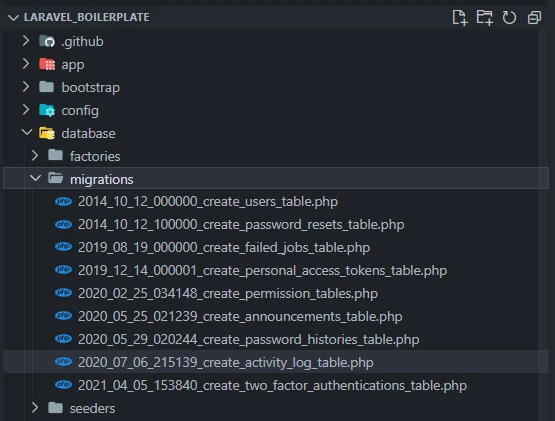
The seeders directory may include seed files for populating the
database with sample data.
public:The directory contains the publicly accessible files for the
application.
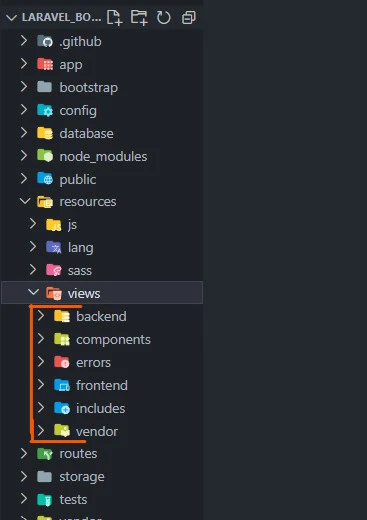
resources:It contains frontend-related assets and resources. The
lang/ directory includes language files for localization. The views/
directory contains Blade
templates for generating HTML views.
The views are grouped into backend, components, errors, frontend, includes and vendor.
routes:It contains route definitions for the application. The
web.php file includes routes for handling web requests. The api.php
file includes routes for handling API requests.
tests:The directory contains test cases for the application. It
includes both unit tests and feature tests to ensure the functionality
of the application.
vendor:This directory is generated after running the
composer install command and contains the installed dependencies
managed by Composer.
Core Components
Laravel Boilerplate core components work together to provide a solid foundation for building Laravel applications. Some of them include:
Models
Laravel Boilerplate organizes Models by domain and uses traits to organize each model:
- Attribute/MODELAttribute: Holds the attribute modifiers for the given model.
- Method/MODELMethod: Holds the methods for the given model.
- Relationship/MODELRelationship: Holds the relationships for the given model.
- Scope/MODELScope - Holds the scopes for the given model.
Controllers
Controllers handle the application’s HTTP requests and responses. They receive user input, interact with models and services, and return views or JSON responses.
For example, the DashboardController controller in the
app/Http/Controllers/Backend file handles requests related to the
backend/dashboard functionality.
<?php

namespace App\Http\Controllers\Backend;

/**
 * Class DashboardController.
 */
class DashboardController
{
    /**
     * @return \Illuminate\Contracts\Foundation\Application|\Illuminate\Contracts\View\Factory|\Illuminate\Contracts\View\View
     */
    public function index()
    {
        return view('backend.dashboard');
    }
}
The index method is reachable via the backend route located in the
routes/backend/admin.php.
Routes
Routes, defined in the routes/web.php file, define the endpoints of
your application and map them to the appropriate controller methods. For
example, here is the route leading to the backend dashboard.
<?php

use App\Http\Controllers\Backend\DashboardController;
use Tabuna\Breadcrumbs\Trail;

// All route names are prefixed with 'admin.'.
Route::redirect('/', '/admin/dashboard', 301);
Route::get('dashboard', [DashboardController::class, 'index'])
    ->name('dashboard')
    ->breadcrumbs(function (Trail $trail) {
        $trail->push(__('Home'), route('admin.dashboard'));
    });
On accessing the route, the index() method of the
DashboardController gets executed. Additionally, the route assigns the
name 'dashboard' to the route and sets up breadcrumbs with a single
item labeled 'Home', which is linked to the 'admin.dashboard' route.
The __('Home') is a localization function that retrieves the
translated label based on the application’s language settings.
Configuration Files
Laravel Boilerplate includes configuration files that allow you to
customize various aspects of your application. These files are located
in the config directory and cover settings such as database
connections, cache configurations, and session drivers. You can modify
these files to adapt the application to your specific requirements.
Middleware
Middleware provides a way to filter HTTP requests and take actions before they reach the intended destination.
Laravel Boilerplate includes middleware for authentication, role-based permissions, and other common scenarios.Most of the middleware that are not Laravel default. The most common ones and their namespaces include:
- App\Domains\Auth\Http\Middleware\AdminCheck - Checks whether the current user is an administrator.
- App\Domains\Auth\Http\Middleware\SuperAdminCheck - Verifies whether the current user is an administrator and has all roles and permissions.
- App\Domains\Auth\Http\Middleware\PasswordExpires - Sends users to the change password page if their passwords are expired based on the configs.
- App\Domains\Auth\Http\Middleware\ToBeLoggedOut - Verifies if the current users to_be_logged_out boolean is set to true and logs them out if so.
- App\Domains\Auth\Http\Middleware\TwoFactorAuthenticationStatus - Checks to see if 2FA is needed for the current route.
- App\Domains\Auth\Http\Middleware\UserCheck - Passes if the current user is of type user.
- App\Domains\Auth\Http\Middleware\UserTypeCheck - Checks to see if the current user is of the type passed in.
- App\Http\Middleware\LocaleMiddleware - Switches the current locale.
Authentication and Authorization
Laravel Boilerplate provides built-in authentication and authorization features integrated with Laravel’s native authentication system. These features enable you to handle user authentication, define roles and permissions, and control access to various parts of your application. Let’s explore some of these features.
Authentication
Laravel Boilerplate includes a pre-configured authentication system that
provides user registration, login, and logout functionality. The
register, login, and logout views are found in the respective routes in
the routes/frontend/auth.php file.
    Route::group(['middleware' => 'guest'], function () {
        // Authentication
        Route::get('login', [LoginController::class, 'showLoginForm'])->name('login');
        Route::post('login', [LoginController::class, 'login']);

        // Registration
        Route::get('register', [RegisterController::class, 'showRegistrationForm'])->name('register');
        Route::post('register', [RegisterController::class, 'register']);
    });
Likewise, you can access views in the frontend directory. For example,
the user details are collected in the
resources/views/frontend/auth/register.blade.php file.
Authorization
Laravel Boilerplate extends Laravel’s authorization features to include roles and permissions.
Roles
Roles define the access level and responsibilities of a user. Laravel
Boilerplate provides a pre-defined set of roles, such as admin and
user. Roles can be assigned to users, and access control can be
defined based on roles.
Here’s an example of assigning a role to a user:
$user = User::find(1);
$user->assignRole('admin');
Permissions
Permissions define specific actions or operations that users can perform. Permissions can be assigned to roles, and access control can be managed based on permissions.
Laravel Boilerplate defines permissions in the
database/seeders/Auth/PermissionRoleSeeder.php file and manages them
through the Spatie package. Here’s an example of assigning a permission
to a role:
// Create Roles
Role::create([
  'id' => 1,
  'type' => User::TYPE_ADMIN,
  'name' => 'Administrator',
]);
// Users category
$users = Permission::create([
  'type' => User::TYPE_ADMIN,
  'name' => 'admin.access.user',
  'description' => 'All User Permissions',
]);
Guards
Guards define how authentication is handled for different user types.
Laravel Boilerplate includes multiple guards, such as web (default web
guard), api (for API authentication), and admin (for admin panel
authentication). You can configure guards in the config/auth.php file.
'guards' => [
    'admin' => [
        'driver' => 'session',
        'provider' => 'admins',
    ],
],
By utilizing guards, you can protect routes or controller methods to allow only authenticated users with specific roles or permissions to access them.
Route::middleware(['auth:admin', 'role:admin'])->group(function () {
    // Routes accessible by authenticated admin users with 'admin' role
});
Conclusion
Laravel Boilerplate can save you significant time and effort when starting a new web application project with Laravel. It provides a solid, well-structured foundation and is easy to customize, allowing you to focus on building your application’s unique features rather than worrying about the initial setup.
Whether a beginner or an experienced developer, Laravel Boilerplate can be a valuable tool. It streamlines your development process and helps you deliver high-quality applications faster.
