

Introduction
You can achieve the JSON stringify pretty effect using the stringify()
method.
JSON.stringify(<object>, <replacer>, <indentation>)
The object can be literal or other object types like an array.
// literals
const objectLiteral = {
    name: 'Jane Doe',
    nickname: 'Lorem Ipsum',
    likesCoding: true
}

// special objects (array)
const arrayNumber = [1, 2, 3]
The replacer and indentation are optional parameters.
The replacer is a function that alters the stringification behavior. You
mainly use the function to add or filter out values. You can use null
or undefined to denote no function.
On the other hand, the indentation (string or number) determines the
space between the nested objects. For example, you can use the tab \t
or 2, as follows.
Input
// literals
const literal = {
    name: 'Jane Doe',
    nickname: 'Lorem Ipsum',
    likesCoding: true
}

// special objects (array)
const array = [1, 2, 3]

// JSON stringify pretty object literal
const stringifiedLiteral = JSON.stringify(literal, null, 2)
console.log(stringifiedLiteral)

// JSON stringify pretty array
const stringifiedArray = JSON.stringify(array, null, '\t')
console.log(stringifiedArray)
Output
{
  "name": "Jane Doe",
  "nickname": "Lorem Ipsum",
  "likesCoding": true
}
[
    1,
    2,
    3
]
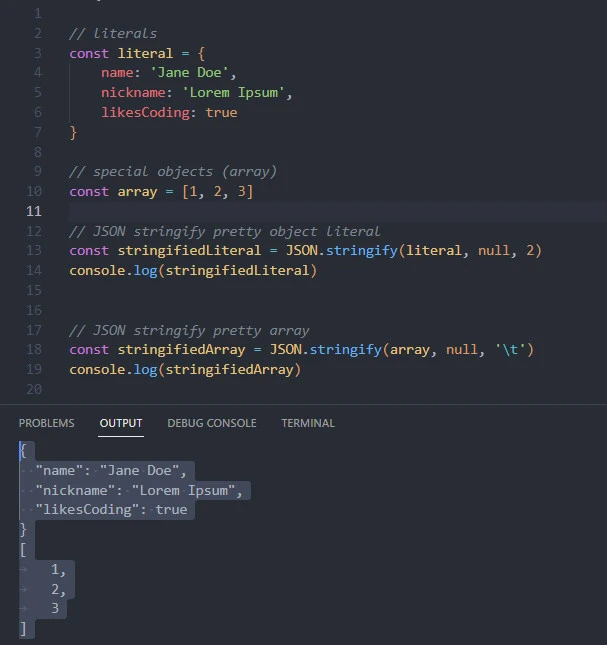
Now that you understand how to use JSON stringify pretty, here is a practical way to use it in Node.js and the browser.
Practical examples of JSON stringify pretty
Assume you want to fetch the first twousers from the JSONPlaceholder websiteand:
- Save the data in Node.js
- Show the data on a web page
Weuse Ubuntu 22.04 and Visual Studio Codeto create project files.
mkdir GoLinuxCloud && cd GoLinuxCloud
touch index.html test.js test_node.js
code .
In the examples section, we will implement Node.js code in the
test_node.js file and client-side code using the index.html and
test.js files.
Example-1: Node.js
Input
// in test_node.js
const { writeFile } = require('fs')

const getUsers = async () => {
    const res = await fetch('https://jsonplaceholder.typicode.com/users?_limit=2')
    const users = await res.json()
    // without json stringify pretty
    writeFile('users1.json', JSON.stringify(users), e => e ? console.log(e.message) : '')
    // using json stringify pretty
    writeFile('users2.json', JSON.stringify(users, null, 2), e => e ? console.log(e.message) : '')
}

getUsers()
We import the fs module’s writeFile() function. The function writes
to a file. Next, we create the getUsers() function to implement
asynchronous data fetching with the fetch API.
We then fetch two users’ data from the JSONPlacer website and store the
resulting JSON in the users variable. Using the writeFile()method we
imported earlier, we create two JSON files: users1.json and
users2.json.
The first JSON file saves an unpretty version of the fetched users
JSON data. On the other hand, the second JSON file stores prettified
JSON data.
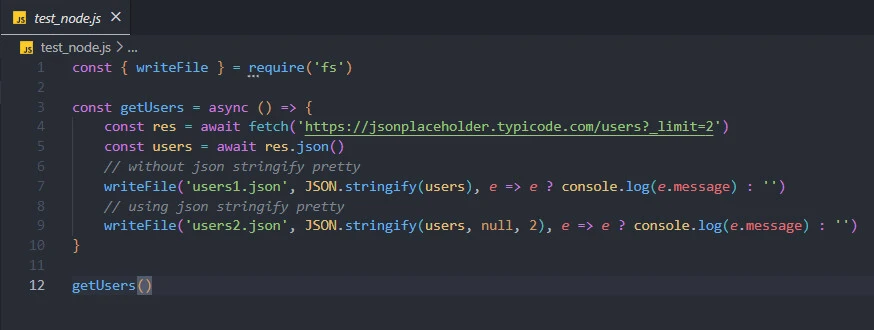
Run the test_node.js file to see the output.
node test_node.js
What did you notice?
Output
Two files, users1.json and users2.json, were created.
a) Without pretty options: users1.json
[{"id":1,"name":"Leanne Graham","username":"Bret","email":"Sincere@april.biz","address":{"street":"Kulas Light","suite":"Apt. 556","city":"Gwenborough","zipcode":"92998-3874","geo":{"lat":"-37.3159","lng":"81.1496"}},"phone":"1-770-736-8031 x56442","website":"hildegard.org","company":{"name":"Romaguera-Crona","catchPhrase":"Multi-layered client-server neural-net","bs":"harness real-time e-markets"}},{"id":2,"name":"Ervin Howell","username":"Antonette","email":"Shanna@melissa.tv","address":{"street":"Victor Plains","suite":"Suite 879","city":"Wisokyburgh","zipcode":"90566-7771","geo":{"lat":"-43.9509","lng":"-34.4618"}},"phone":"010-692-6593 x09125","website":"anastasia.net","company":{"name":"Deckow-Crist","catchPhrase":"Proactive didactic contingency","bs":"synergize scalable supply-chains"}}]
Yes, the first JSON file is not pretty because we did not prettify the data before saving it.
b) Using pretty options: users2.json
[
  {
    "id": 1,
    "name": "Leanne Graham",
    "username": "Bret",
    "email": "Sincere@april.biz",
    "address": {
      "street": "Kulas Light",
      "suite": "Apt. 556",
      "city": "Gwenborough",
      "zipcode": "92998-3874",
      "geo": {
        "lat": "-37.3159",
        "lng": "81.1496"
      }
    },
    "phone": "1-770-736-8031 x56442",
    "website": "hildegard.org",
    "company": {
      "name": "Romaguera-Crona",
      "catchPhrase": "Multi-layered client-server neural-net",
      "bs": "harness real-time e-markets"
    }
  },
  {
    "id": 2,
    "name": "Ervin Howell",
    "username": "Antonette",
    "email": "Shanna@melissa.tv",
    "address": {
      "street": "Victor Plains",
      "suite": "Suite 879",
      "city": "Wisokyburgh",
      "zipcode": "90566-7771",
      "geo": {
        "lat": "-43.9509",
        "lng": "-34.4618"
      }
    },
    "phone": "010-692-6593 x09125",
    "website": "anastasia.net",
    "company": {
      "name": "Deckow-Crist",
      "catchPhrase": "Proactive didactic contingency",
      "bs": "synergize scalable supply-chains"
    }
  }
]
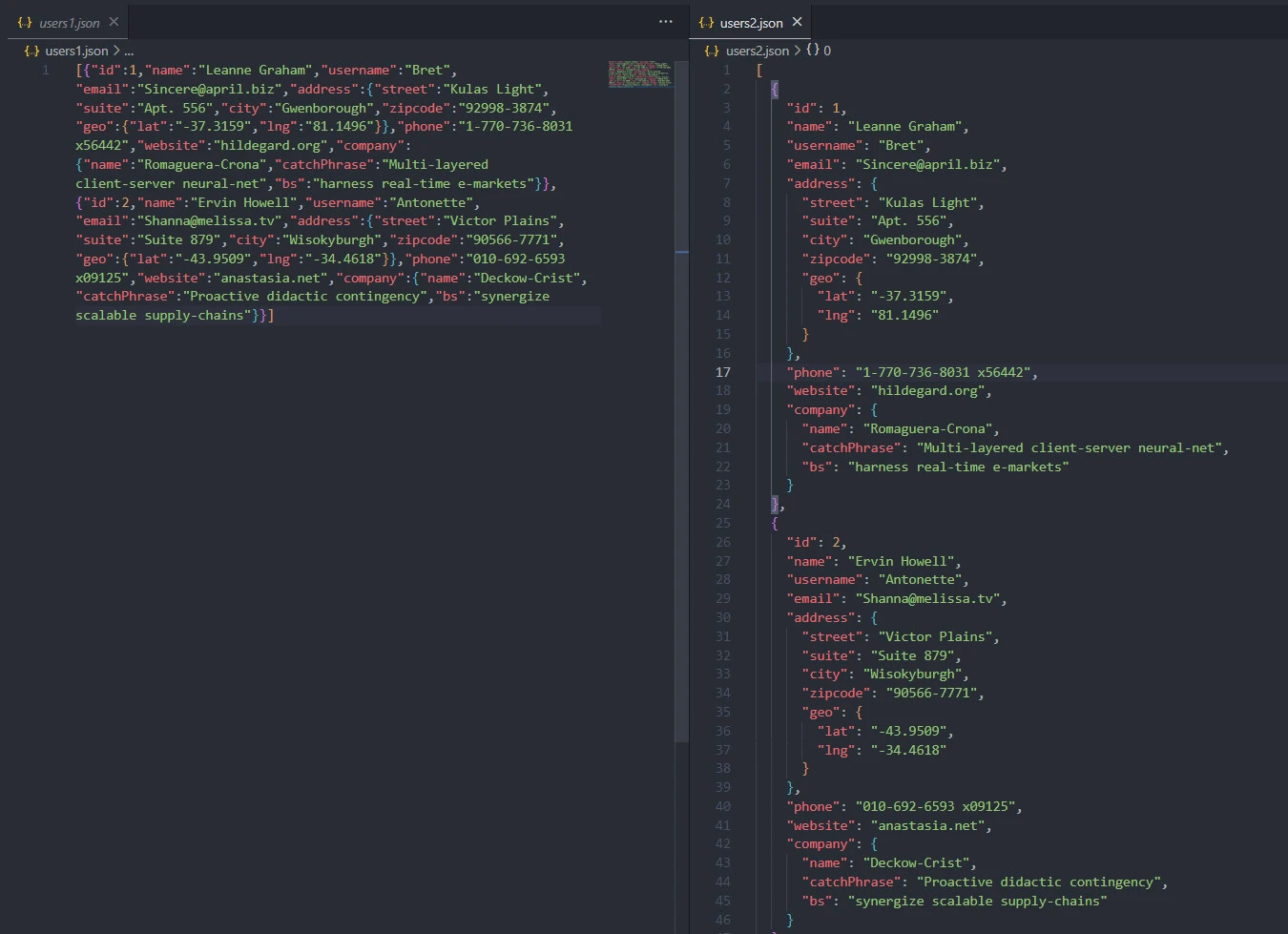
The second JSON file is admirable because we made the JSON string pretty with an indentation of two spaces.
That’s the main way of making (Node.js) server side JSON pretty. However, producing a similar effect on the client side can still be challenging. If that is your worry, let’s dive into example~2 below.
Example-2: Browser
index.html
<!DOCTYPE html>
<html lang="en">
<head>
    <meta charset="UTF-8">
    <meta http-equiv="X-UA-Compatible" content="IE=edge">
    <meta name="viewport" content="width=device-width, initial-scale=1.0">
    <title>json stringify pretty</title>
    <script src="test.js" defer></script>
</head>
<body>
    <h4>Users JSON</h4>
    <div id="div"></div>
</body>
</html>
We link the test.js file to the HTML file’s head section. In the body,
we create a div with div id. We then import and show the JSON file in
the div element using the test.js file.
test.js
const getUsers = async () => {
    const res = await fetch('https://jsonplaceholder.typicode.com/users?_limit=2')
    const users = await res.json()
    const div = document.getElementById('div')
    div.innerHTML = `<pre>${JSON.stringify(users, null, 2)}</pre>`
}

getUsers()
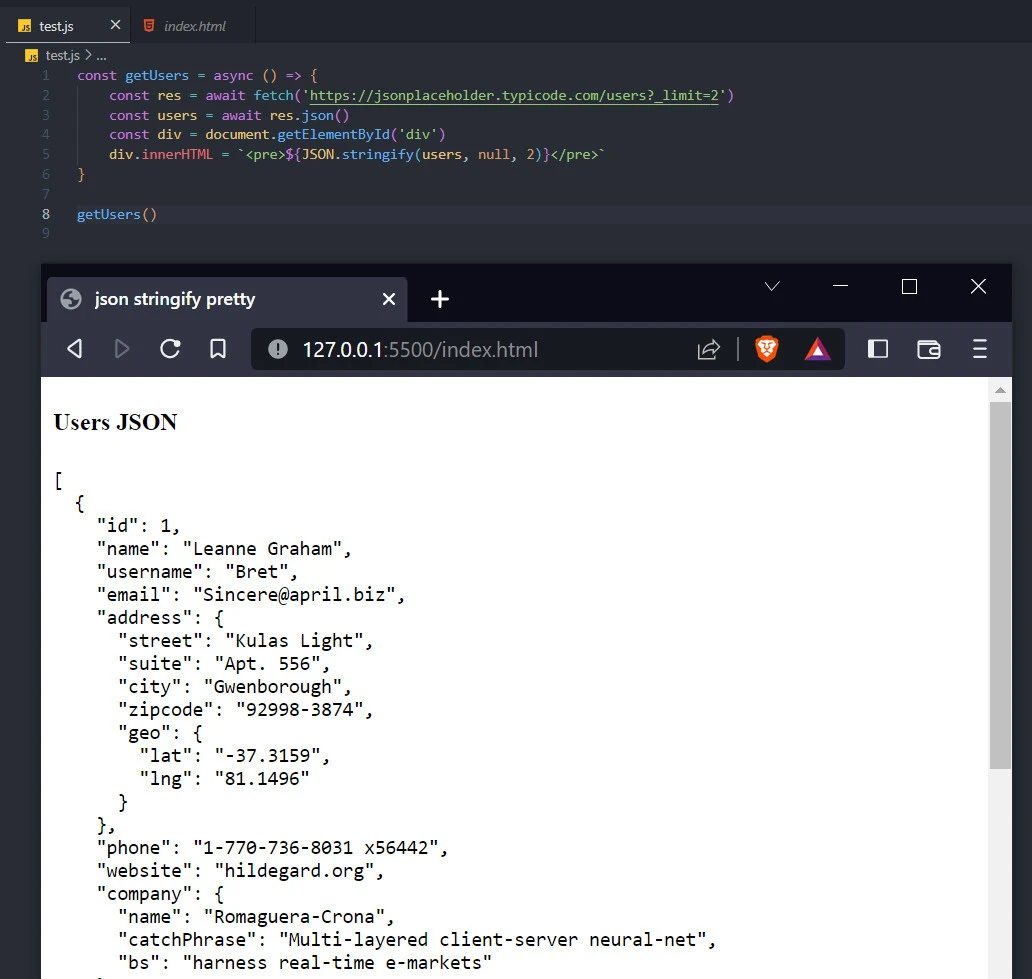
The main difference between output in Node.js and browser display is
that the indentation effect becomes effective inside the <pre> tags.
div.innerHTML = `<pre>${JSON.stringify(users, null, 2)}</pre>`
Conclusion
Congratulations on reaching this far! You now know to apply JSON
stringify pretty with the client-side and server-side JavaScript. Apart
from using the JSON.stringify()function, you know how to save unpretty
and pretty data with Node.js. Besides, you know how to prettify JSON
files using HTML pre tags.
