
![Check JavaScript String contains Substring? [SOLVED]](/javascript-string-contains/javascript-string-contains-1.jpg)
The includes() method checks whether a JavaScript string contains a
substring and returns a boolean.
// JavaScript string contains
<string>.includes(<searchString>)
<string>.includes(<searchString>, <startPosition>)
The check starts from the firstindex unless you specify the start
index. Also, the case-sensitive method searches the entire string if the
specified startPosition is a negative value.
This tutorial walks you through multiple examples of includes() method
as a way to check if a JavaScript string contains a substring.
It would be best to understand JavaScript strings before applying the
includes() method.
Let’s get started.
Understand JavaScript strings
A string is an array of characters. The characters (and spaces between them) are assigned indices. The first index is zero.
As a result, a string behaves similarly to an array when you loop
through its elements or apply functions like includes().
We can find the index of each
character
using a loop or the indexOf() method.
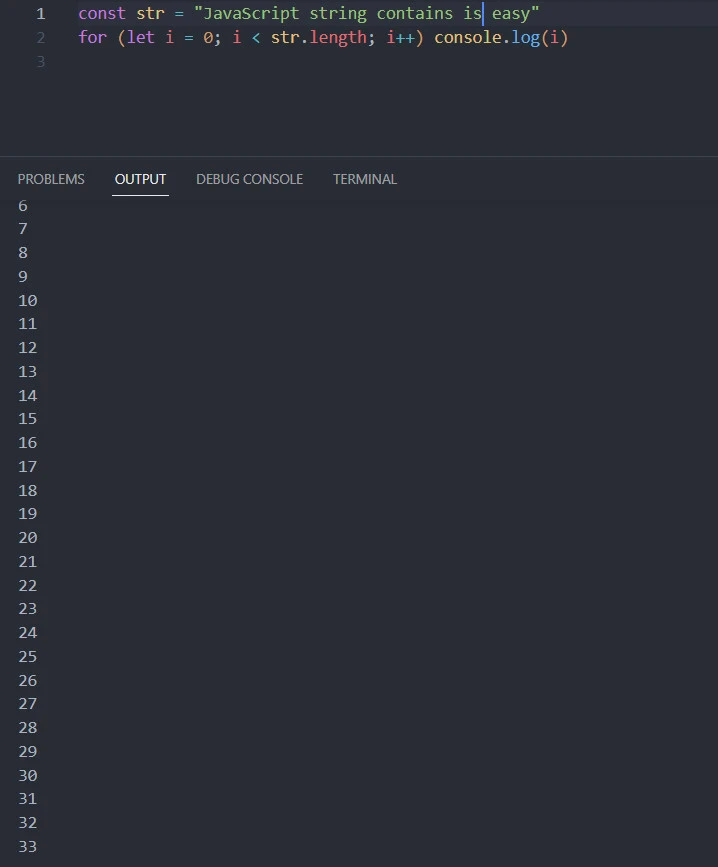
Looping
const str = "JavaScript string contains is easy"
for (let i = 0; i < str.length; i++) console.log(i)
The last index of the above str string is 33. The output is a sum of
the character indices and the spaces between them.
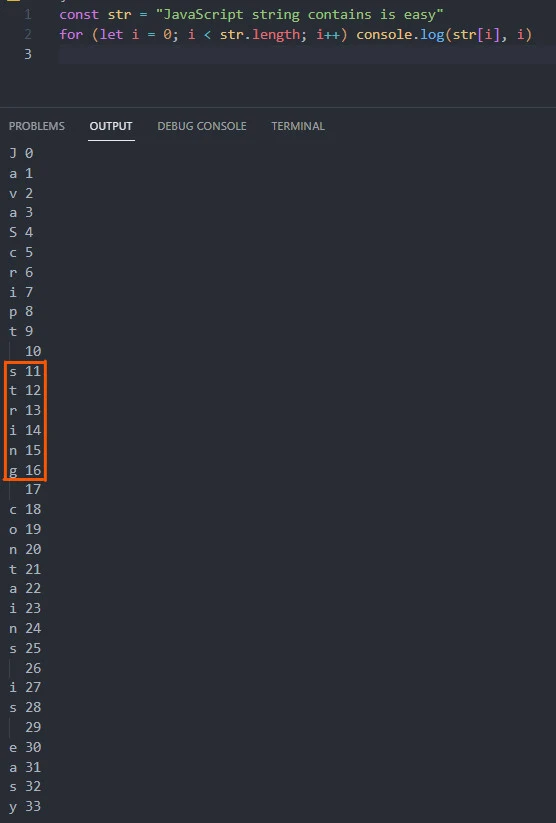
We can also print a value and its index.
const str = "JavaScript string contains is easy"
for (let i = 0; i < str.length; i++) console.log(str[i], i)
Knowing the starting index of a substring is crucial when checking
whether a particular string contains the substring. For example, we can
see that the string substring’s starting position in the str
stringis index 11.
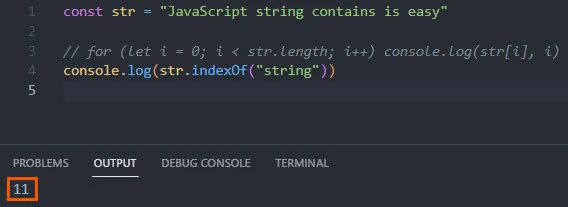
We can also find the substring’s starting
index using the indexOf() method.
indexOf() method
const str = "JavaScript string contains is easy"
console.log(str.indexOf("string")) // 11
Note: (1) The indexOf() method returns negative 1 if it does not find
the target substring in the string.
const str = "JavaScript string contains is easy"
console.log(str.indexOf("string") !== -1) // true
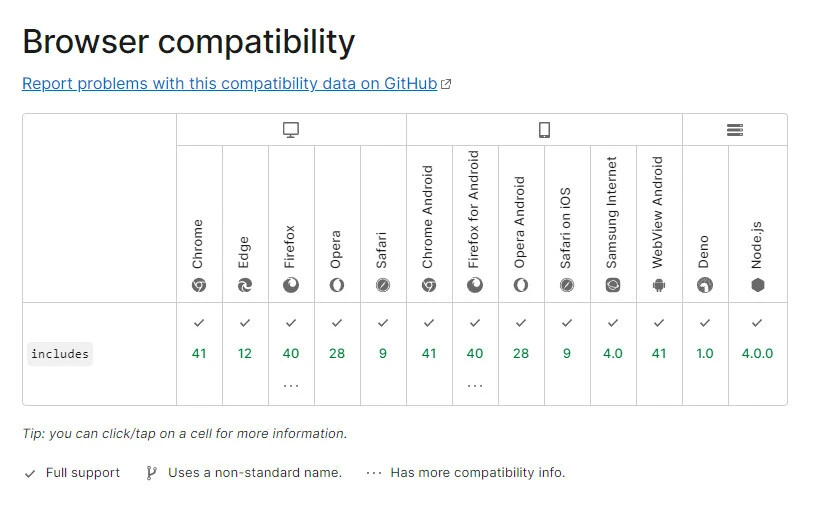
(2) Use the indexOf() method in browsers that don’t support ES6’s
includes() method.
Now let’s dive into practical examples of the includes() method.
Example-1: Using a substring only
<!DOCTYPE html>
<html lang="en">
<head>
    <meta charset="UTF-8">
    <meta http-equiv="X-UA-Compatible" content="IE=edge">
    <meta name="viewport" content="width=device-width, initial-scale=1.0">
    <title>Document</title>
</head>
<body>
    <p>JavaScript string contains is easy</p>
    <script>
        const str = document.querySelector('p').textContent
        console.log(str.includes("string")) // true
    </script>
</body>
</html>
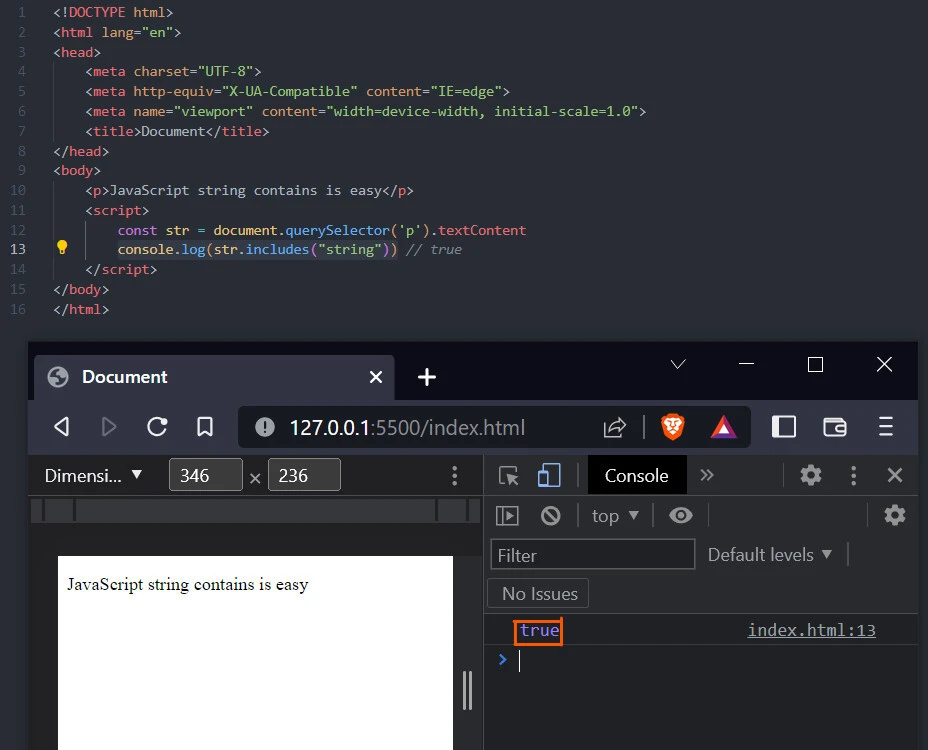
It is true that the stringJavaScript string contains is easycontains thestringsubstring.
Example-2: Using a substring and a starting position
We can also check whether the target substring is located at a specific index.
<!DOCTYPE html>
<html lang="en">
<head>
    <meta charset="UTF-8">
    <meta http-equiv="X-UA-Compatible" content="IE=edge">
    <meta name="viewport" content="width=device-width, initial-scale=1.0">
    <title>Document</title>
</head>
<body>
    <p>JavaScript string contains is easy</p>
    <script>
        const str = document.querySelector('p').textContent
        console.log(str.includes("string", 11)) // true
    </script>
</body>
</html>
It is true that thestringsubstring starts at index 11 in thestrstring. But does it start at index 13?
Let’s find out.
<!DOCTYPE html>
<html lang="en">
<head>
    <meta charset="UTF-8">
    <meta http-equiv="X-UA-Compatible" content="IE=edge">
    <meta name="viewport" content="width=device-width, initial-scale=1.0">
    <title>Document</title>
</head>
<body>
    <p>JavaScript string contains is easy</p>
    <script>
        const str = document.querySelector('p').textContent
        console.log(str.includes("string", 13)) // false
    </script>
</body>
</html>
No, the substring does not start at index 13.
Example-3: Using a substring and a negative starting position
Specifying a starting index less than the substring’s leads to searching the substring throughout the entire string. Here is an example using a negative index.
<!DOCTYPE html>
<html lang="en">
<head>
    <meta charset="UTF-8">
    <meta http-equiv="X-UA-Compatible" content="IE=edge">
    <meta name="viewport" content="width=device-width, initial-scale=1.0">
    <title>Document</title>
</head>
<body>
    <p>JavaScript string contains is easy</p>
    <script>
        const str = document.querySelector('p').textContent
        console.log(str.includes("string", -3)) // true
    </script>
</body>
</html>
Yes, thestrstring contains thestringsubstring.
Example-4: Using various capitalization cases
Will we locate the substring if we capitalize one of its characters?
Let’s find out right away.
<!DOCTYPE html>
<html lang="en">
<head>
    <meta charset="UTF-8">
    <meta http-equiv="X-UA-Compatible" content="IE=edge">
    <meta name="viewport" content="width=device-width, initial-scale=1.0">
    <title>Document</title>
</head>
<body>
    <p>JavaScript string contains is easy</p>
    <script>
        const str = document.querySelector('p').textContent
        // lower case
        console.log(str.includes("string")) // true
        // capitalize the first character
        console.log(str.includes("String")) // false
    </script>
</body>
</html>
The includes() method found the stringsubstring inJavaScript
string contains is easy. However, it could not locateStringin the
stringJavaScript string contains is easy, because it is case
sensitive.
One of the ways to solve the syntax error is to convert the string and the substring to the same case before searching.
<!DOCTYPE html>
<html lang="en">
<head>
    <meta charset="UTF-8">
    <meta http-equiv="X-UA-Compatible" content="IE=edge">
    <meta name="viewport" content="width=device-width, initial-scale=1.0">
    <title>Document</title>
</head>
<body>
    <p>JavaScript string contains is easy</p>
    <script>
        const str = document.querySelector('p').textContent
        // lower case
        console.log(str.toLowerCase().includes("String".toLowerCase())) //true
        // upper case
        console.log(str.toUpperCase().includes("String".toUpperCase())) //true
    </script>
</body>
</html>
Conclusion
You can check if a JavaScript string contains a substring using the
includes() method. The method is case-sensitive and returns a boolean:
a true value denotes a matching substring in the array.
You can prevent case-related errors by converting the string and the
target substring to the same case before comparing them. Alternatively,
as shown in this tutorial, you can check for the substring in the string
using the indexOf() method.
Further Reading
How
to check whether a string contains a substring in JavaScript?
Array.prototype.includes()
- JavaScript - MDN Web Docs
