
In the asynchronous world of JavaScript, Promises play a pivotal role,
acting as placeholders for values that might not be available yet.
Promises allow developers to handle asynchronous operations more
comfortably, providing a way to interact with values that are either
resolved successfully or rejected due to an error or unwanted result.
Among various methods associated with Promises, Promise.reject() holds
a specific significance. This
method returns a
Promise object that is rejected with a given reason, facilitating
error handling in promise chains.
In this tutorial, we will embark on a journey to unravel the nuances of
Promise.reject(). We aim to equip you with a solid understanding of
its syntax, usage, and various scenarios where it becomes particularly
essential. We will walk you through a plethora of examples, best
practices, and common pitfalls, ensuring you can proficiently utilize
Promise.reject() in your JavaScript projects. So, buckle up as we dive
deep into exploring the powerful capability of rejection in JavaScript
Promises, enhancing your asynchronous coding skills along the way.
Basic Concept and Syntax of Promise.reject()
Promise.reject() is a method that returns a Promise object that is
rejected with a specified reason. This method is typically used to
create a rejected promise intentionally, which can be useful for
testing, error handling, or conditional promise chains.
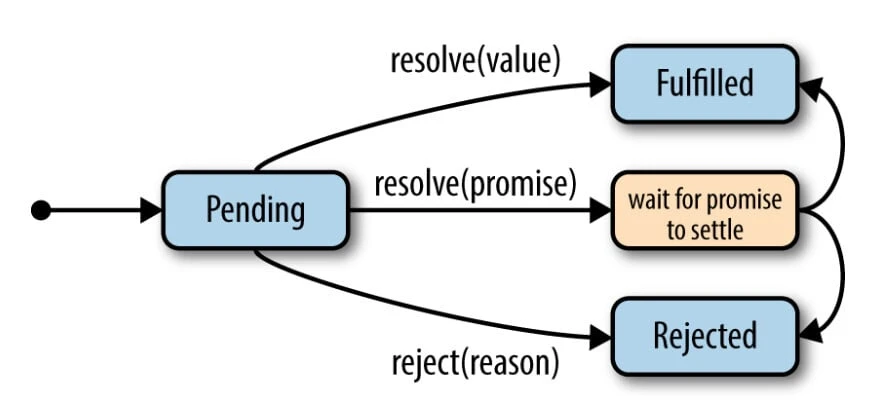
The syntax for Promise.reject() is straightforward. It takes a single
argument, which represents the reason for the rejection. Here is a
generic representation of the syntax:
Promise.reject(reason);
Let’s look at some examples to elucidate the concept:
Example 1: Basic Usage
const rejectedPromise = Promise.reject('This is a rejection reason.');

rejectedPromise.catch((reason) => {
    console.log(reason); // Output: This is a rejection reason.
});
Example 2: Using with Async/Await
async function exampleFunction() {
    try {
        await Promise.reject('Rejected!');
    } catch (error) {
        console.log(error); // Output: Rejected!
    }
}

exampleFunction();
Comparison with Other Promise Methods
Comparing Promise.reject() with Promise.resolve()
Both Promise.reject() and Promise.resolve() return a Promise object,
but they serve opposite purposes. Promise.resolve() returns a promise
that is resolved with a given value, while Promise.reject() returns a
promise that is rejected with a given reason.
Promise.resolve('Resolved!').then((value) => {
    console.log(value); // Output: Resolved!
});

Promise.reject('Rejected!').catch((reason) => {
    console.log(reason); // Output: Rejected!
});
Differences between Promise.reject() and throwing errors
Throwing errors and using Promise.reject() might seem similar as both
indicate an error or undesired outcome. However, Promise.reject() is
used specifically within the context of Promises to return a rejected
promise. Throwing
errors, on the
other hand, disrupts the normal flow of code execution, requiring a
try-catch block to handle the error.
// Using Promise.reject()
Promise.reject('An error occurred!').catch((error) => {
    console.log(error); // Output: An error occurred!
});

// Throwing errors
try {
    throw new Error('An error occurred!');
} catch (error) {
    console.log(error.message); // Output: An error occurred!
}
Common scenarios where Promise.reject() is used
- Testing Promise chains: To simulate error conditions and validate how your code handles promise rejections.
- Conditional rejection: To reject a promise based on certain conditions within a promise chain or an async function.
- Error propagation: To propagate errors through promise chains, enabling centralized error handling.
Example 1: Testing Error Handling
function testErrorHandling() {
    return Promise.reject('Simulated error');
}

testErrorHandling().catch((error) => {
    console.log(error); // Output: Simulated error
});
Example 2: Conditional Rejection
function fetchData(data) {
    return data ? Promise.resolve(data) : Promise.reject('No data available');
}

fetchData(null).catch((error) => {
    console.log(error); // Output: No data available
});
Example 3: Error Propagation
function processUser(id) {
    return id ? Promise.resolve(id) : Promise.reject('Invalid user ID');
}

processUser(null)
    .then((id) => {
        // Process the user ID
    })
    .catch((error) => {
        console.log(error); // Output: Invalid user ID
    });
Handling Rejected Promises
Using .catch() method
.catch() method can be appended to a promise chain to handle
rejections, catching errors and executing a function to handle them.
Promise.reject('Error occurred!')
    .catch((error) => {
        console.log(error); // Output: Error occurred!
    });
Using async/await with try-catch blocks
In an async function, you can use try-catch blocks to handle promise
rejections by awaiting the promise inside the try block.
async function asyncFunction() {
    try {
        await Promise.reject('Async error occurred!');
    } catch (error) {
        console.log(error); // Output: Async error occurred!
    }
}

asyncFunction();
Chaining with other Promises
Promises can be chained to execute multiple asynchronous operations sequentially, passing the result from one promise to the next.
Example 1: Successful Promise Chain
Promise.resolve('Success 1')
    .then((result) => {
        console.log(result); // Output: Success 1
        return 'Success 2';
    })
    .then((result) => {
        console.log(result); // Output: Success 2
    });
Example 2: Introducing Promise.reject() in the Chain
Promise.resolve('Success 1')
    .then((result) => {
        console.log(result); // Output: Success 1
        return Promise.reject('Failure in chain');
    })
    .then((result) => {
        // This won’t be executed
    })
    .catch((error) => {
        console.log(error); // Output: Failure in chain
    });
Error propagation in promise chains
Errors in a promise chain will propagate down the chain until caught by
a .catch() handler.
Promise.reject('Initial failure')
    .then((result) => {
        // This won’t be executed
    })
    .catch((error) => {
        console.log(error); // Output: Initial failure
        return 'Recovered';
    })
    .then((result) => {
        console.log(result); // Output: Recovered
    });
Error Types and Messages
Common error types with Promise.reject()
You can reject a promise with any type of error object or even a simple string.
Example 1: Rejecting with a String
Promise.reject('A simple string error')
    .catch((error) => {
        console.log(error); // Output: A simple string error
    });
Example 2: Rejecting with an Error Object
Promise.reject(new Error('A standard error object'))
    .catch((error) => {
        console.log(error.message); // Output: A standard error object
    });
Custom error messages
Custom error messages or objects can be used for more descriptive and helpful error handling.
class CustomError extends Error {
    constructor(message) {
        super(message);
        this.name = 'CustomError';
    }
}

Promise.reject(new CustomError('A custom error occurred'))
    .catch((error) => {
        console.log(`${error.name}: ${error.message}`);
        // Output: CustomError: A custom error occurred
    });
Frequently Asked Questions (FAQs)
What does Promise.reject() return?
Promise.reject() returns a Promise object that is immediately rejected
with the provided reason. This method is a convenient way to create a
rejected promise for testing, demonstrating, or triggering
error-handling logic in promise chains.
Can Promise.reject() be caught and handled?
Yes, a rejected promise returned by Promise.reject() can be caught and
handled using the .catch() method in a promise chain or by using a
try-catch block in an async function.
What type of values can be used as a rejection reason in
Promise.reject()?
You can use any type of value as a rejection reason in
Promise.reject(), such as strings, error objects, or even custom error
objects. It’s common to use error objects to provide more context and
facilitate error handling.
How does error propagation work with Promise.reject() in a promise
chain?
If Promise.reject() is used in a promise chain, the error will
propagate down the chain until it’s caught by a .catch() handler. Any
subsequent .then() handlers in the chain will be skipped, and the
first encountered .catch() handler will execute.
Is there a difference between throwing an error and using
Promise.reject() in a promise chain?
Yes, there is a difference. Throwing an error in a promise chain will
also return a rejected promise, but it’s more disruptive and immediate,
stopping code execution within a function. Promise.reject() creates a
rejected promise that flows naturally through the chain, allowing for
more graceful error handling.
Can Promise.reject() be used without a parameter?
Yes, Promise.reject() can be used without a parameter, and it will
return a promise that is rejected with an undefined reason. However,
providing a meaningful reason or error object is advisable for better
understanding and handling of the rejection.
How do you handle a Promise.reject() in an async function?
In an async function, you handle Promise.reject() by using a try-catch
block. You await the rejected promise inside the try block, and you
catch and handle the error in the catch block.
Is it necessary to always catch a rejected promise returned by
Promise.reject()?
It’s not strictly necessary, but it’s advisable. Unhandled promise rejections can lead to uncaught exception errors and might terminate Node.js processes. Handling rejections helps in managing errors gracefully and maintaining application stability.
Testing Promises
Testing promises, especially rejected ones, is crucial to ensure that
your asynchronous code behaves as expected under various conditions,
including failure scenarios. Below are strategies, tools, and examples
of testing rejected promises and mocking Promise.reject().
Strategies and Tools for Testing Rejected Promises
- Using Testing Frameworks: Utilize testing frameworks like Jest or Mocha to facilitate the testing of promises. These frameworks provide utilities to handle asynchronous code effectively.
- Assertion Libraries: Employ assertion libraries like Chai to write expressive assertions, helping validate the behavior of rejected promises.
- Handling Asynchronous Tests: Ensure that your testing framework
can handle asynchronous code, either by using
donecallbacks, returning promises, or using async/await syntax.
Example 1: Testing using Jest and Async/Await
test('should reject with an error', async () => {
    await expect(Promise.reject(new Error('An error occurred'))).rejects.toThrow('An error occurred');
});
Example 2: Testing using Mocha and Chai
const { expect } = require('chai');

describe('Promise rejection', function() {
    it('should be rejected with an error', function(done) {
        Promise.reject(new Error('An error occurred'))
            .catch((error) => {
                expect(error.message).to.equal('An error occurred');
                done();
            });
    });
});
Mocking Promise.reject()
Mocking Promise.reject() means simulating its behavior to control and
test how your code reacts to rejected promises.
Example 1: Mocking using Jest
jest.mock('./yourModule', () => ({
    yourFunction: jest.fn(() => Promise.reject(new Error('Mock error')))
}));

test('should handle mocked rejection', async () => {
    await expect(yourFunction()).rejects.toThrow('Mock error');
});
Example 2: Manually Mocking in a Test
function mockFunction() {
    return Promise.reject('Mock rejection');
}

mockFunction()
    .catch((error) => {
        console.log(error); // Output: Mock rejection
    });
Summary and Key Takeaways
In conclusion, understanding Promise.reject() is pivotal for effective
JavaScript programming, especially when dealing with asynchronous
operations. This tutorial delineated various aspects of
Promise.reject(), starting from its basic concept and syntax,
comparison with other promise methods, common use cases, and strategies
for error-handling and testing.
Key takeaways from this tutorial include:
Promise.reject()returns a Promise object that is rejected immediately with a specified reason.- It can be used to simulate error conditions, making it an essential tool in testing promise-based functionalities.
- Error handling is crucial, and rejected promises can be effectively
managed using
.catch()blocks or try-catch in async functions. - Testing strategies, such as using testing frameworks like Jest and
Mocha, and mocking
Promise.reject(), are essential for ensuring that your asynchronous code behaves as expected under failure scenarios.
By mastering these concepts, you’re well-equipped to manage, test, and debug asynchronous code involving rejected promises, ensuring the robustness and reliability of your JavaScript applications.
Official documentation for further information:
