

Introduction to JavaScript NodeList
In JavaScript, the Document Object Model (DOM) is the interface used to manipulate and interact with HTML and XML documents. One of the key components of the DOM is the NodeList, which represents a collection of nodes in the document.
Working with NodeLists in JavaScript can be useful for a variety of tasks, such as modifying or deleting multiple elements on a page, or iterating over a collection of nodes to perform a certain action on each one.
Use getElementsByTagName to work with NodeList
To work with NodeLists in JavaScript, you can use the
getElementsByTagName method, which returns a NodeList containing all
the elements in the document with the specified tag name. For example,
the following code gets a NodeList of all the “p” elements in the
document:
let pElements = document.getElementsByTagName("p");
Once you have a NodeList, you can access individual nodes in the list using array-style notation. For example, the following code gets the first “p” element in the NodeList:
let firstPElement = pElements[0];
In addition to accessing individual nodes in a NodeList, you can also
use the for loop to iterate over the entire list. This is often useful
for performing the same action on each node in the list. For example,
the following code uses a “for” loop to set the text content of all the
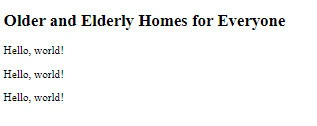
p elements in the NodeList:
<!DOCTYPE html>
<html lang="en">
    <head>
        <meta charset="UTF-8" />
        <meta http-equiv="X-UA-Compatible" content="IE=edge" />
        <meta name="viewport" content="width=device-width, initial-scale=1.0" />
        <title>Document</title>
    </head>
    <body>
        <h2>Older and Elderly Homes for Everyone</h2>
        <p>
            Built with functional and conducive facilities, EQERY comes
            first-class within the country
        </p>
        <p>You have access to the best staff and physicians in the country</p>
        <p>
            Furthermore, leveraging partnership with top firms and drug
            companies, we provide our clients with top medical services
        </p>
    </body>
    <script>
        let pElements = document.getElementsByTagName("p");

        for (let i = 0; i < pElements.length; i++) {
            pElements[i].textContent = "Hello, world!";
        }
    </script>
</html>
Output
Use querySelectorAll method to work with NodeList
Another useful method for working with NodeLists is the
querySelectorAll method, which allows you to use CSS selectors to
select elements in the document and return a NodeList. For example, the
following code uses the “querySelectorAll” method to get a NodeList of
all the elements with the class “my-class”:
let myClassElements = document.querySelectorAll(".my-class");
Once you have a NodeList, you can use the methods and techniques described above to work with the nodes in the list. For example, you can use the “for” loop to iterate over the list and perform a certain action on each node, or you can use array-style notation to access individual nodes in the list.
Traversing the Results from querySelectorAll()with forEach()
In modern browsers, you can useforEach()when working with
aNodeList(the collection returned byquerySelectorAll()):
// use querySelectorAll to find all list items on a page
const items = document.querySelectorAll('li');

items.forEach(item => {
  console.log(item.firstChild.data);
});
forEach()is an array method, butquerySelectorAll()produces
aNodeListwhich is a different type of object than an
array.Thankfully, modern browsers have built-in support forforEach,
allowing us to iterate over aNodeListas though it is an array.
Unfortunately, Internet Explorer (IE) does not support usingforEachin this way.If you’d like to support IE, the recommended approach is to include a polyfill that uses a standardforloop under the hood:
if (window.NodeList && !NodeList.prototype.forEach) {
  NodeList.prototype.forEach = function(callback, thisArg) {
    thisArg = thisArg || window;
    for (var i = 0; i < this.length; i++) {
      callback.call(thisArg, this[i], i, this);
    }
  };
}
Summary
NodeLists are an important part of working with the DOM in JavaScript.
By using the getElementsByTagName and querySelectorAll methods, you
can easily obtain NodeLists of elements in the document, and then use
various methods and techniques to work with the nodes in the list.
Whether you’re modifying multiple elements on a page, or iterating over
a collection of nodes to perform a certain action on each one, NodeLists
provide a powerful tool for working with the DOM in JavaScript.
