![Java WatchService Examples [Monitor Directory and Files]](/java-watchservice/java_watch_service.jpg)
Introduction to Java WatchService
The Java NIO.2 API includes theWatchServiceframework for monitoring
changes to directories in real time. In modern operating systems, it is
common for two processes to access the same files in the same directory
during their execution. If we expect a directory or its contents to be
changed over time by another process, we can use theWatchServiceAPI
to monitor the directory for changes and react to those changes as soon
as they occur.
Applying theWatchServiceAPI to monitor a directory requires a number
of steps. The following is a high-level overview of
theWatchServiceprocess:
- Create an instance ofWatchServicefrom the file system.
- Register each directory and event type.
- Create a loop that repeatedly queries theWatchServicefor changes.
- Retrieve aWatchKey.
- Retrieve all pending events for theWatchKeyand do something with them.
- Reset theWatchKey.
- Once you no longer need theWatchService, close the resource.
Creating and ShuttingDown theWatchService
The first step is the easiest. We use theFileSystemshelper class to
obtain a reference to the defaultFileSystem. We then use
theFileSystemobject to obtain a newWatchServiceinstance, as
shown in the following code snippet:
WatchService service = FileSystems.getDefault().newWatchService();
If theWatchServiceis being created and closed within a single
method, we can apply the try-with-resource syntax,
asWatchServiceextendsCloseablein order to complete the first and
last steps in an abridged fashion:
import java.io.IOException;
import java.nio.file.*;

public class WatchServiceSample {
   public static void main(String[] args) throws IOException {
      try (WatchService service = FileSystems.getDefault().newWatchService()) {
         ...
      }
   }
}
Alternatively, if we are not creating and closing
theWatchServiceinstance within a single method, we need to
explicitly call theclose()method on theWatchServiceinstance
after we have finished using it. Failure to close
theWatchServiceafter we have finished with it could lead to
resource-contention issues within the file system.
Different Events to monitor with Java Watcher
Next we should know the list of events which we would like to
monitor.TheWatchServicecan be used on any class that implements
theWatchableinterface, which requires the class to
implementregister()methods. In the NIO.2 API, thePathinterface
extends theWatchableinterface; therefore we can use
ourWatchServiceinstance to monitor any number ofPathobjects by
calling aregister()method.
Along with theWatchServiceinstance, theregister()method takes a
vararg ofStandardWatchEventKinds enumvalues, which indicates the
events for which we want to listen.
TheWatchService API supports the four event types listed in below
table:
| Enum Value | Description |
|---|---|
StandardWatchEventKinds.ENTRY_CREATE |
An element is added to the directory. |
StandardWatchEventKinds.ENTRY_DELETE |
An element is removed from the directory. |
StandardWatchEventKinds.ENTRY_MODIFY |
An existing element is modified in the directory. |
StandardWatchEventKinds.OVERFLOW |
An event may have been lost. It is possible to receive this event even if it is not registered for. |
How to create a Java Watcher?
The java watcher program will use java watchService API where you first register the directory to be watched. And then the events that you want to be notified for has to be registered into the program.
- Create an instance of the watchService
WatchService watcher = pathDirectory.getFileSystem().newWatchService(); - Register a path using the nio.path Path
pathDirectory = Paths.get("your directory path"); - Register the events that you want to be notified for
StandardWatchEventKinds.ENTRY_CREATE,StandardWatchEventKinds.ENTRY_DELETE,StandardWatchEventKinds.ENTRY_MODIFY - Create a java watch key.
- Create a java list in which the events occurring can be stored.
- Record the file name
- Check if it is updated, deleted or modified.
- Show the results.
Java WatchService Example
Monitor single directory
import java.util.*;
import java.nio.file.Path;
import java.nio.file.Paths;
import java.nio.file.StandardWatchEventKinds;
import java.nio.file.WatchEvent;
import java.nio.file.WatchKey;
import java.nio.file.WatchService;
public class javaWatcher {
public static void main(String[] args) {
// Java watcher : register the directory to be watched.
Path pathDirectory = Paths.get("C:/Users/Azka/Desktop/assignment 1");
while (true) {
try {
// java watcher : create an instance of the watch Service
WatchService watcher = pathDirectory.getFileSystem().newWatchService();
// java watcher : register the events that are to be notified.
pathDirectory.register(watcher, StandardWatchEventKinds.ENTRY_CREATE, StandardWatchEventKinds.ENTRY_DELETE,StandardWatchEventKinds.ENTRY_MODIFY);
// java watcher : watch key
WatchKey watchKey = watcher.take();
// java watcher : enter the events into a list
List<WatchEvent<?>> eventsList = watchKey.pollEvents();
//  for all events create a loop that iterates till the end of the
// list
for (WatchEvent event : eventsList) {
//  get the file name for the event
Path fileWatched = (Path) event.context();
if (event.kind() == StandardWatchEventKinds.ENTRY_CREATE) {
//file is created
System.out.println("File created: " + fileWatched);
}
// file is deleted
if (event.kind() == StandardWatchEventKinds.ENTRY_DELETE) {
System.out.println("File deleted: " + fileWatched);
}
//  file is modified.
if (event.kind() == StandardWatchEventKinds.ENTRY_MODIFY) {
System.out.println("File modified: " + fileWatched);
}
}
} catch (Exception e) {
System.out.println("Error: " + e.toString());
}
}
}
}
In my case the directory contains the following content
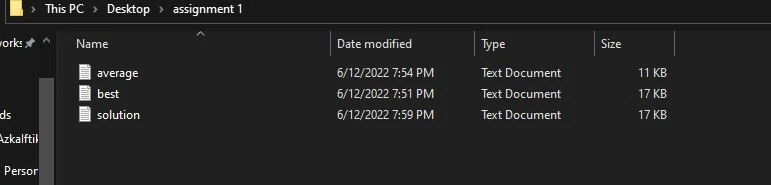
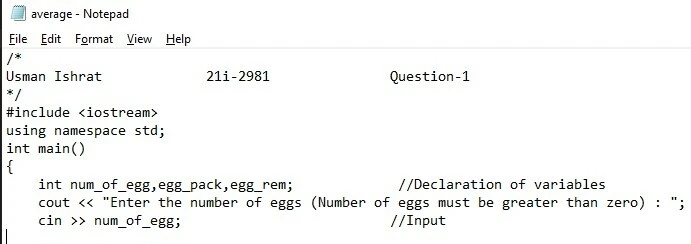
Now lets change the content of the file “average.txt” that originally contains the following content
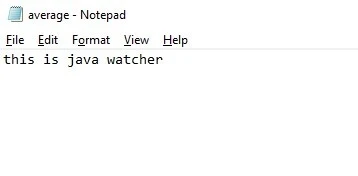
Now lets change it to
Lets see what is the output of the code
File modified: average.txt
Similarly if I delete a file, the output becomes
File modified: average.txt

File deleted: best.txt
All these actions are performed and updated on runtime which our Java WatchService was able to monitor and report.
Monitor sub-directories recursively
WatchService only watches the files and directories immediately beneath
it. What if we want to watch to see if eitherp.txtorc.txtis
modified?
/dir
  | - parent
        | - p.txt
        | - child
             | - c.txt
One way is to register both directories:
WatchService watcher = FileSystems.getDefault().newWatchService();
Path dir = Paths.get("/dir/parent")
dir.register(watcher, ENTRY_MODIFY);
Patch child = Paths.get("dir/parent/child");
child.register(watcher, ENTRY_MODIFY);
This works. You can type in all the directories you want to watch. If we
had a lot of child directories, this would quickly get to be too much
work. If we need to iterate through a whole directory hierarchy instead
of just a single directory, we can use aFileVisitor.
TheFileswalkFileTree()method takes a starting path and performs a
depth-first traversal of the file hierarchy, giving the
providedFileVisitora chance to “visit” each path element in the
tree.
Path myDir = Paths.get("/dir/parent");
final WatchService watcher = FileSystems.getDefault().newWatchService();
Files.walkFileTree(myDir, new SimpleFileVisitor<Path> () {
    public FileVisitResult preVisitDirectory(Path dir, BasicFileAttributes attrs) throws IOException {
        dir.register(watcher, ENTRY_MODIFY);
        return FileVisitResult.CONTINUE;
    }
});
This code goes through the file tree recursively registering each directory with the watcher.
Java WatchService Functions
Java WatchService have some important methods
| Modifier and Type | Method and Description |
|---|---|
| Void close() | Closes the service |
| WatchKey poll() | Retrieves and removes the next watch key |
| WatchKey take() | Retrieves and removes next watch key, waiting if none are yet present. |
Limitations of Java WatchService
- Even though the WatchService API allows us to monitor a directory for
changes, it does so with a number of known drawbacks. First off, it is
possible to miss directory change events, you can add code to check
whether
kind == OVERFLOW, but that just tells you something went wrong. You don’t know what events you lost. - Second, when events are lost, we do not get any information about the
lost events, other than we know that something was lost. Receiving no
information about precisely which events were lost might make some
people refrain from using the
WatchServiceAPI altogether. - Finally, some JVMs implementations of the
WatchServiceAPI are inefficient, with significant delays between the time that the directory is modified and the moment that the application is notified about the change. Some developers have even reported delays of up to five seconds. This may not seem like a significant amount of time to you, but for someone writing an application that continuously monitors a directory for changes, this may have a drastic impact on their application.
Conclusion
We have studied how a program can be a java watcher program and can be notified about any changes in a directory. The algorithm is further discussed, we can create an instance and register a path, after that we define the events that are to be notified within a directory, a list maintains these events and can be shown on the terminal or front-end of the program, this service helps a lot for security purposes, any changes in files will be notified on runtime.