
![10+ ipcs command examples in Linux [Cheat Sheet]](/ipcs-command-linux/ipcs_command.jpg)
Introduction to ipcs command
ipcs provides information on ipc facilities. ipc stands for Interprocess communication. It allows processes to communicate with each other. ipcs displays the information about message queues, shared memory segments, and semaphore arrays.
ipcs command syntax
The general syntax of ipcs command is:
$ ipcs [option]
You can use ipcs command without any option to view the information on
the ipc facilities.
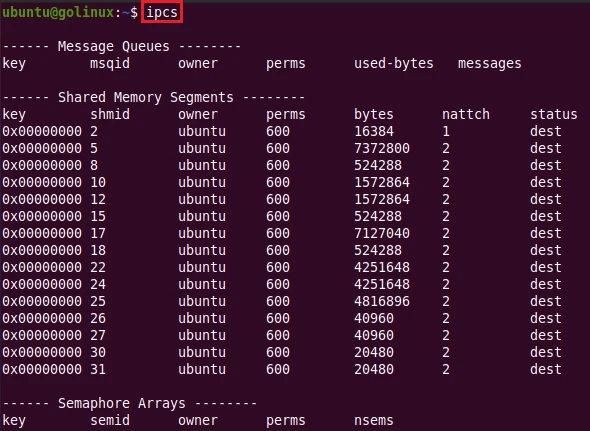
Now, let’s see different
examples to use
ipcs command in the Linux system.
Different examples to use ipcs command
1. ipcs command to display all information on ipcs facilities
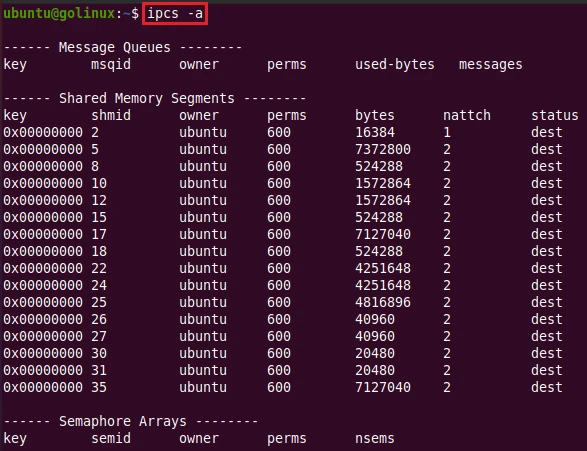
-a or --all option is used to display all information on ipcs
facilities. However, the output is the same as the default ipcs command
output.
$ ipcs -a
OR
$ ipcs -all
Sample Output:
2. ipcs command to display only message queues
With -q or --queues option, you can view only message queues. The
Message queues can be best described as an internal linked list within
the kernel’s addressing space. Messages can be sent to the queue in
order and retrieved from the queue in several different ways. Each
message queue (of course) is uniquely identified by an IPC identifier.
$ ipcs -q
OR
$ ipcs --queues
Sample Output:
ubuntu@golinux:~$ ipcs -q

------ Message Queues --------
key        msqid      owner      perms      used-bytes   messages
           0          root       660        5            1

ubuntu@golinux:~$ ipcs --queues

------ Message Queues --------
key        msqid      owner      perms      used-bytes   messages
           0          root       660        5            1
Here we see a single message queue which has an identifier of 0. It is
owned by the user root, and has octal permissions of 660, or
-rw-rw--. There is one message in the queue, and that message has a
total size of 5 bytes.
3. Display only shared memory segments using ipcs command
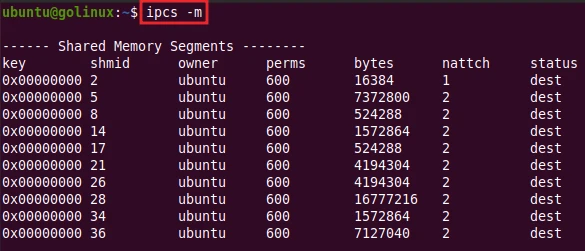
-m or --shmems option displays the information of shared memory
segments only.
$ ipcs -m
OR
$ ipcs --shmems
Sample Output:
4. Display only semaphore arrays using ipcs command
You can use -s or --semaphores option to view information of
semaphore arrays only.
$ ipcs -s
OR
$ ipcs --semaphores
Sample Output:
ubuntu@golinux:~$ ipcs -s

------ Semaphore Arrays --------
key        semid      owner      perms      nsems

ubuntu@golinux:~$ ipcs --semaphores

------ Semaphore Arrays --------
key        semid      owner      perms      nsems
Currently there are no active semaphore operations ongoing on our server, to check the semaphore recourse limit you can use:
~]# ipcs -ls

------ Semaphore Limits --------
max number of arrays = 32000
max semaphores per array = 32000
max semaphores system wide = 1024000000
max ops per semop call = 500
semaphore max value = 32767
5. Show attach/detach/change time with ipcs command
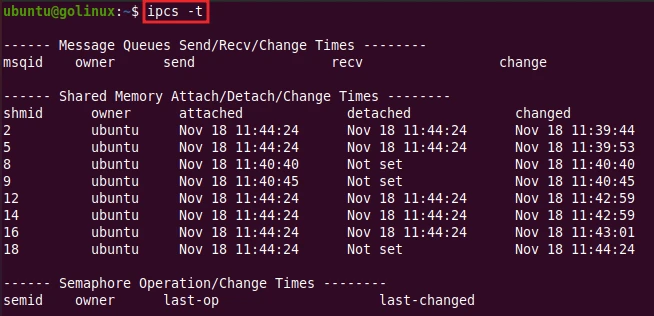
-t or --time option tells ipcs to show attach, detach and change
times in the output.
$ ipcs -t
OR
ipcs --time
Sample Output:
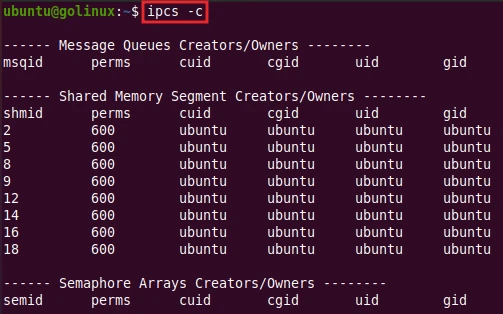
6. ipcs command display creator and owner
-c or --creator option helps to find the creator and owner of the
ipc facilities.
$ ipcs -c
OR
$ ipcs --creator
Sample Output:
7. Display PIDs of creator and last operator with ipcs command
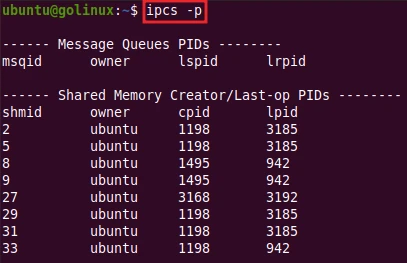
-p or --pid option shows PIDs of the creator and last operator in
the output.
$ ipcs -p
OR
$ ipcs --pid
Sample Output:
8. ipcs command to show resource limits
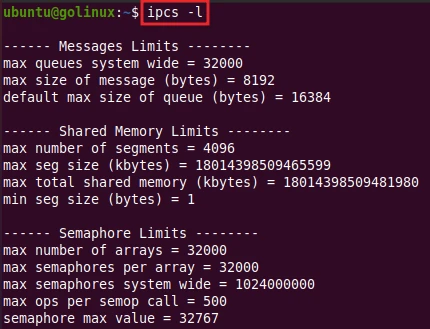
-l or --limits option helps to show resource limits of ipc
facilities.
$ ipcs -l
OR
$ ipcs --limits
Sample Output:
9. ipcs command to show information summary
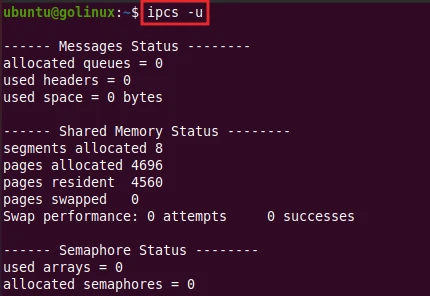
You can view the summary of information using -u or --summary option
with ipcs command.
$ ipcs -u
OR
$ ipcs --summay
Sample Output:
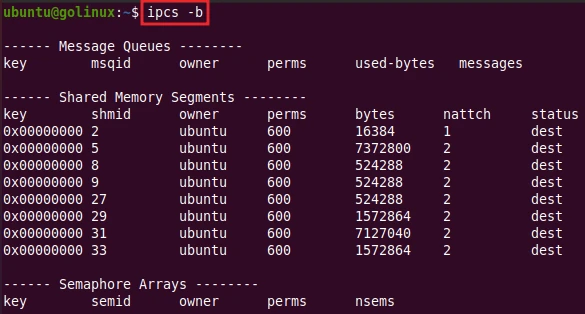
10. ipcs command to show sizes in bytes
-b or --bytes option displays the used bytes in the output.
$ ipcs -b
OR
$ ipcs --bytes
Sample Output:
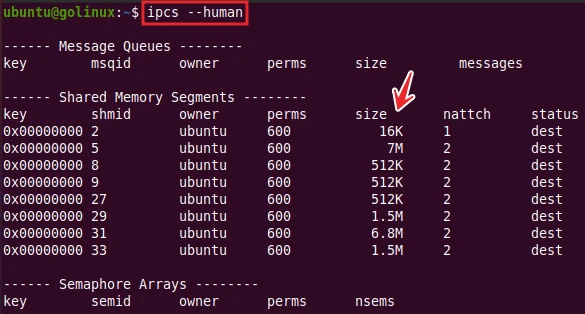
11. ipcs command to show sizes in human-readable format
--human option tells ipcs to show sizes in human-readable format,
i.e., in kilobytes, megabytes, etc.
$ ipcs --human
Sample Output:
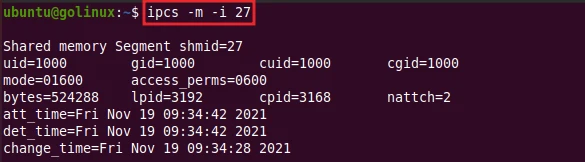
12. ipcs command to display information of specified ID
You can use -i option to specify an ID of the resource. It shows the
information of that particular resource. When using an -i option, you
must identify only a single resource. For example, to print details on
ID 27 of shared memory segments, you should use:
$ ipcs -m -i 27
Sample Output:
To print details on the ID of message queues, you can use:
$ ipcs -q -i ID
To print details on the ID of semaphore arrays, you can use:
$ ipcs -s -i ID
Conclusion
This is the end of our tutorial on ipcs command. We hope you will be now able to view information on the ipc facilities using ipcs command. If you still have any confusion, let us know in the comment section.
What’s Next
15+ lsof command examples in Linux [Cheat Sheet]
