

Quick Answer: Install DEB File in Kali Linux (Recommended)
cd ~/Downloads
sudo apt install ./package-name.deb
Note: You must include the ./ before the filename if you are in
the same folder.
This is the safest and most reliable way to install a .deb file in
Kali Linux because apt automatically resolves dependencies.
Install .deb file in Kali Linux using apt and dpkg
Introduction: Installing DEB Files in Kali Linux
Kali Linux is a Debian-based distribution, so it fully supports .deb
packages. However, unlike Ubuntu, Kali does not include a graphical
Software Center by default, which means .deb files must usually be
installed from the terminal.
If you downloaded a .deb file and are wondering how to install it
properly without breaking dependencies, this guide covers four
proven methods, ranging from beginner-friendly to advanced.
By the end of this article, you’ll know:
- The best method to install
.debfiles in Kali Linux - How to fix dependency errors
- When to use
dpkg,apt, orgdebi
Which Method Should You Use?
I will be covering different ways to install DEB files in Kali Linux. Based on the following table you can choose your preferred method:
| Method | Command | Best For… | Dependency Handling |
|---|---|---|---|
| APT (Best) | sudo apt install ./file.deb |
Daily use, beginners | Automatic |
| GDEBI | sudo gdebi file.deb |
Complex packages | Automatic & Safe |
| DPKG | sudo dpkg -i file.deb |
Offline / Lightweight | Manual (requires -f) |
Method 1: Install DEB File Using apt (Recommended ✅)
This is the recommended method for most users.
cd Downloads
sudo apt install ./vscode.deb
Sample Output:
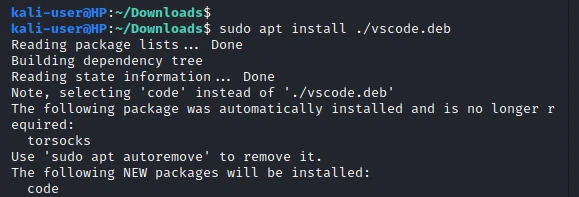
Why this method is best
- Automatically installs missing dependencies
- Prevents broken packages
- Uses
dpkginternally, but safely
📌 Requirement: Active internet connection
Method 2: Install DEB File Using dpkg (Offline Method)
dpkg is the low-level Debian package installer and comes preinstalled
in Kali Linux.
cd Downloads
sudo dpkg -i vscode.deb
sudo apt install -f
Sample Output:
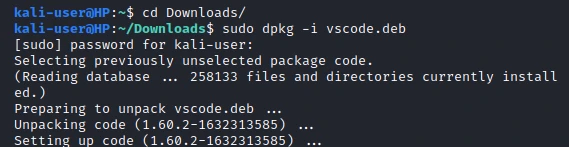
You will notice that we have an additional command
sudo apt install -f.
That’s because when you use dpkg to install a package on Linux, it will check your system for all the dependencies required to install and run the software. If even a single dependency is not satisfied (which is the case most of the time), the package is left in an “unconfigured” state and considered broken.
The apt install -f command tries to install any of the missing
dependencies. When you read the apt man page, you will see the -f
parameter stands for --fix-broken.
-f, --fix-broken
           Fix; attempt to correct a system with broken dependencies in place.
📌 Use this method only if you are offline or deliberately managing dependencies yourself.
Method 3: Check Dependencies Before Installing (Advanced)
If you want full control over what gets installed, inspect dependencies first.
View package details and dependencies
sudo dpkg -I vscode.deb
Sample Output:
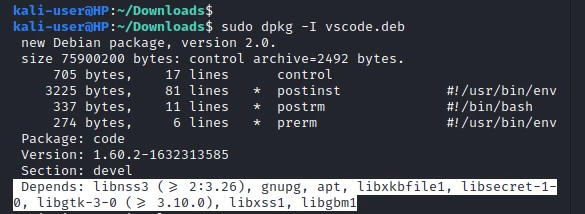
That will list all the dependencies required to install the vscode.deb
file. You can now install these dependencies using the apt command
shown below:
sudo apt install dependency-name
Then install the package:
sudo dpkg -i vscode.deb
⚠️ This method is not beginner-friendly and is rarely needed unless you are debugging package conflicts.
Method 4: Install DEB File Using gdebi (Dependency-Safe Alternative)
GDEBI is a command-line utility that enables you to install deb files smoothly by proper handling of dependencies. We say “smooth installation” because dpkg can be pretty aggressive at times when installing specific packages.
For example, when I tried installing the skype deb file with dpkg, it attempted to remove 96 packages, including system libraries necessary for running other tools and software. GDEBI works similarly to the apt command. It will first install all the required dependencies before installing the deb package.
GDEBI does not come pre-installed in Kali Linux. To install it, use the command below:
sudo apt install gdebi-core
Sample Output:

Once done, proceed to install the deb package with the syntax below.
cd Downloads
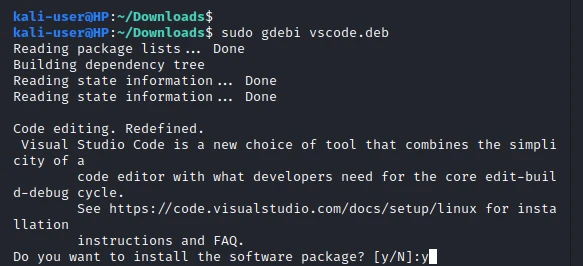
sudo gdebi vscode.deb
Sample Output:
When gdebi is useful
- When
dpkgattempts to remove critical system packages - When dependency chains are complex
gdebi behaves similarly to apt, but focuses solely on local .deb
files.
Can You Install DEB Files Graphically in Kali Linux?
By default, no. Kali Linux does not ship with a graphical Software Center.
However, you can:
- Install
gdebiand use it from the terminal - Install a desktop software manager manually (not recommended for minimal setups)
For stability and security, terminal-based installation is preferred in Kali.
Conclusion
Installing .deb files in Kali Linux is straightforward once you choose
the right method.
- ✅ Use
apt install ./file.debwhenever possible - ⚠️ Use
dpkg -ionly when offline - 🛡️ Use
gdebifor safer dependency handling
If you encounter errors, fixing broken dependencies with
apt install -f resolves most issues.
