

Introduction
There is a DOM method calledinsertBefore. You can use it to insert a
new element before an existing element. You must specify three things:
- the new element you want to insert,
- the target element before which you want to insert it,
- the parent of both elements.
Syntax of JavaScript insertBefore()
Here’s the syntax:
parentElement.insertBefore(newElement,targetElement)
You might not know what the parent element is. That’s okay. You can
always use theparentNodeproperty of the target element. The parent
of any element node must be another element node (attribute nodes and
text nodes can’t have element nodes as children).
For instance, this is how I could insert theplaceholderelement before the image gallery list, which has theid"imagegallery":
var gallery = document.getElementById("imagegallery");
gallery.parentNode.insertBefore(placeholder,gallery);
At the moment, theparentNodeofgalleryis thebodyelement.
Theplaceholderelement will be inserted as a new child of
thebodyelement. It will be inserted before its sibling
element,gallery.
I can also insert thedescriptionelement as a sibling of
thegalleryelement:
gallery.parentNode.insertBefore(description,gallery);
The placeholder image and description paragraph are inserted before the image gallery list
Example-1: Insert a new node using insertBefore
If you have a node and need to insert a new node (or element), the
insertBefore method is designed specifically for that. Using the
insertBefore method, we specify the reference node and place the new
node above it, however, if the node already exists, the insertBefore
method simply moves the node to the position above the reference node.
The insertBefore method inserts a node as a child, before an existing
child, which you specify. The syntax for the insertBefore is stated
below.
node.insertBefore(newnode, existingnode);
The method takes in two required parameters - newnode and
existingnode;
newnode: The node to insertexistingnode: The node before whichnewnodeis inserted
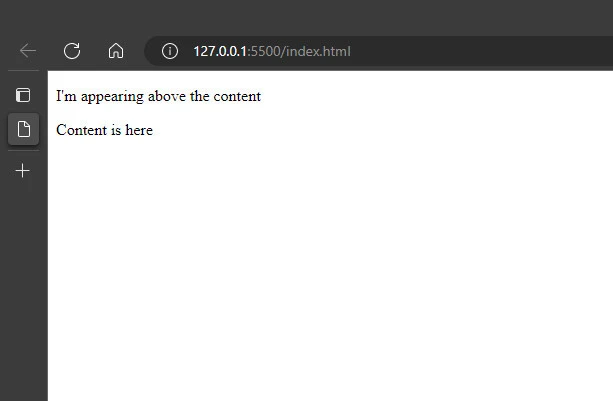
For example, we can insert a <p> element as the first child of a
<div> element:
<!DOCTYPE html>
<html lang="en">
    <head>
        <meta charset="UTF-8" />
        <meta http-equiv="X-UA-Compatible" content="IE=edge" />
        <meta name="viewport" content="width=device-width, initial-scale=1.0" />
        <title>Document</title>
    </head>
    <body>
        <div id="myDiv">Content is here</div>
    </body>
    <script>
        let newnode = document.createElement("p");
        newnode.innerHTML = "I'm appearing above the content";
        let existingnode = document.getElementById("myDiv").firstChild;
        document.getElementById("myDiv").insertBefore(newnode, existingnode);
    </script>
</html>
Output
Example-2: Inserting a New Element in a Specific DOM Location
You want to insert a new paragraph just before the third paragraph
within a div element. Use some method to access the third paragraph,
such asgetElementsByTagName(), to get all of the paragraphs for
adivelement. Then use thecreateElement()andinsertBefore()DOM
methods to add the new paragraph just before the existing third
paragraph:
// get the target div
const div = document.getElementById('target');

// retrieve a collection of paragraphs
const paras = div.getElementsByTagName('p');

// create the element and append text to it
const newPara = document.createElement('p');
const text = document.createTextNode('New paragraph content');
newPara.appendChild(text);

// if a third para exists, insert the new element before
// otherwise, append the paragraph to the end of the div
if (paras[2]) {
  div.insertBefore(newPara, paras[2]);
} else {
  div.appendChild(newPara);
}
Thedocument.createElement()method creates any HTML element, which
then can be inserted or appended into the page. In the solution, the new
paragraph element is inserted before an existing paragraph
usinginsertBefore().
Because we’re interested in inserting the new paragraph before the
existing third paragraph, we need to retrieve a collection of
thedivelement’s paragraphs, check to make sure a third paragraph
exists, and then useinsertBefore()to insert the new paragraph before
the existing one.If the third paragraph doesn’t exist, we can append
the element to the end of thedivelement usingappendChild().
Summary
To insert a node (or element) before another node, we can make use of
the insertBefore method in JavaScript. TheinsertBefore() method
requires two parameters: the node to be inserted and the reference node
in the document before which you would like the node inserted. If you do
not pass a second parameter to theinsertBefore()method, then it
functions just likeappendChild().
