

grep command in Linux searches for a pattern of characters in a file. grep is a short form for Global Regular Expression Print. It prints all lines that contain the matching pattern in a file. If no patterns are matched, it returns nothing.
grep command syntax
The basic syntax for grep command is:
$ grep [option] pattern file
Here,
- pattern: pattern of characters to search
- file: file name or path
- option: provides additional functionality to command, such as case-sensitive search, regex search, recursive search, count lines, etc.
You can find more detailed information in our article 20 grep command examples in Linux [Cheat Sheet].
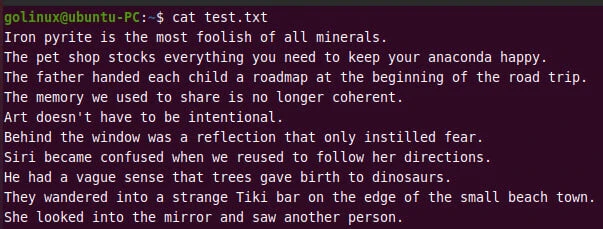
In this tutorial, we will discuss 25 grep command scenarios with examples in Linux.Sample text file which we will use through out this tutorial.
1. grep pattern and print next N lines
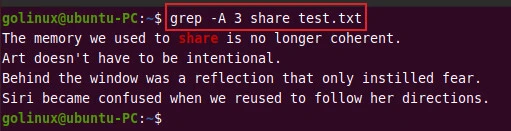
By default, grep prints lines that match the pattern. But sometimes, you may need to print N lines after matching the pattern.
The -A option allows you to print N lines after matching lines.
To print the next 3 lines after matching text share, execute the
following command.
$ grep -A 3 share test.txt
Sample Output:
2. grep pattern and print before N lines
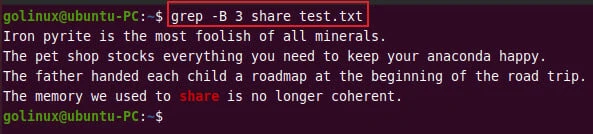
Similarly, you can use the -B option to print N lines before matching
lines.
$ grep -B 3 share test.txt
Sample Output:
3. grep and print specific lines after match
We will add line numbers to our sample file:
# cat -n test.txt
     1  Iron pyrite is the most foolish of all minerals.
     2  The pet shop stocks everything you need to keep your anaconda happy.
     3  The father handed each child a roadmap at the beginning of the road trip.
     4  The memory we used to share is no longer coherent.
     5  Art doesn't have to be intentional.
     6  Behind the window was a reflection that only instilled fear.
     7  Siri became confused when we reused to follow her directions.
     8  He had a vague sense that trees gave birth to dinosaurs.
     9  They wandered into a strange Tiki bar on the edge of the small beach town.
    10  She looked into the mirror and saw another person.
Next let us grep for string “Iron” and print 1st, 8th and
10th line after the match.
# cat -n test.txt | grep Iron -A 10 | awk "NR==1{print} NR==8{print} NR==10{print;exit}"
     1 Iron pyrite is the most foolish of all minerals.
     8 He had a vague sense that trees gave birth to dinosaurs.
    10 She looked into the mirror and saw another person.
4. grep pattern and print the next word
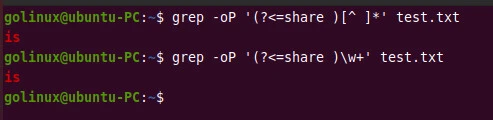
Use the following syntax to use grep and print the next word after each match.
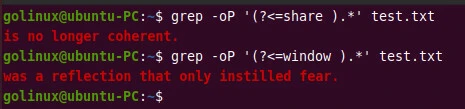
$ grep -oP '(?<=pattern )[^ ]*' file
OR
$ grep -oP '(?<=pattern )\w+' file
Sample Output:
To print everything in line after the match, run the below command.
$ grep -oP '(?<=pattern ).*' file
Sample Output:
5. grep pattern and print word before the pattern
The following example searches for a pattern and prints a word before the matching pattern.
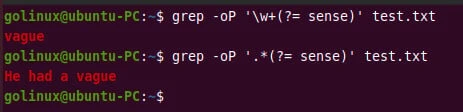
$ grep -oP '\w+(?= pattern)' file
To print everything in line before the matching pattern, use the following command.
$ grep -oP '.*(?= pattern)' file
Sample Output:
6. grep exact match (whole word)
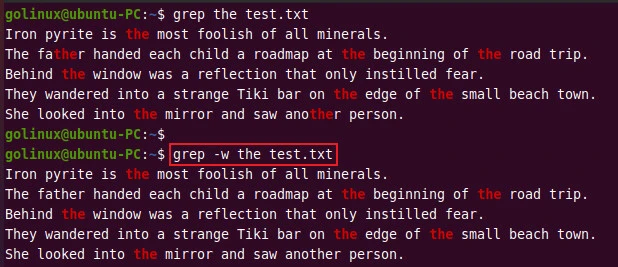
The -w option can be used to match whole words. For instance, if you
grep the, it will print only lines that contain the whole word the.
$ grep -w the test.txt
Sample Output:
As you can see, -w ignores matches that do not form the whole word.
7. grep next character after the match
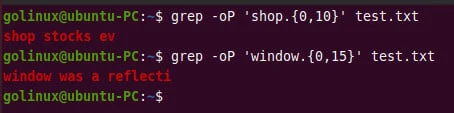
The following command prints the next 10 characters after the matching
pattern shop.
$ grep -oP 'shop.{0,5}' test.txt
And this command prints the next 15 characters after the match window.
$ grep -oP 'window.{0,15}' test.txt
Sample Output:
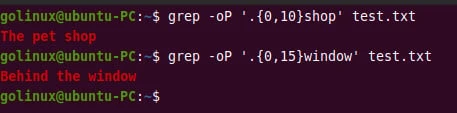
8. grep the previous character after the match
The following command prints the previous 10 characters after the
matching pattern shop.
$ grep -oP '.{0,10}shop' test.txt
And this command prints the previous 15 characters after the match
window.
$ grep -oP '.{0,15}window' test.txt
Sample Output:
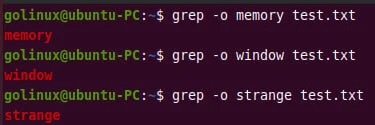
9. grep and print only matching pattern
The grep command with -o prints only the matching pattern instead of a
complete line.
grep -o the test.txt
Sample Output:
10. grep and print file name
The -H option prints the file name for each match. It is helpful when
there are multiple files to search for patterns.
$ grep -H pattern file
Sample Output:
The following example searches the text bar in all .txt files in the
current directory.

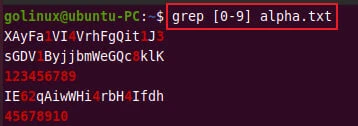
11. grep regex pattern
You can combine the grep command with regular expressions (regex) to perform an advanced search on the file. For example, the following command matches any line that contains numbers 0 to 9.
$ grep [0-9] file
Sample Output:
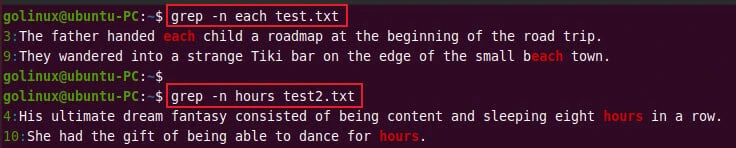
12. grep and print line number
The -n option forces grep to display matching lines along with their
line number at the beginning.
$ grep -n word test.txt
Sample Output:
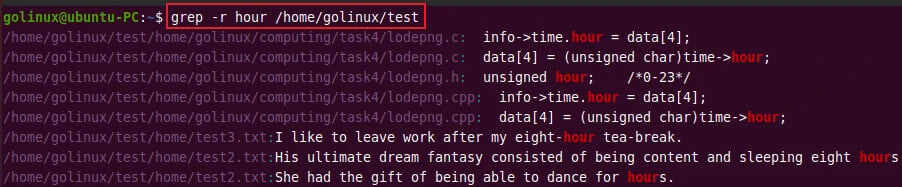
13. grep recursively in all directories and sub-directories
To search for words recursively in all directories and sub-directories,
you can use -R, -r, or --recursive option. For instance, the
following example greps recursively in the directory /home/golinux and
its sub-directories.
$ grep -r hour /home/golinux/test
Sample Output:
14. grep recursively only till a certain depth in the directory
You can use the grep command with the find command to perform a recursive search only till a certain depth in the directory.
$ find /home/golinux/test -maxdepth 2 -type f -exec grep -H hour {} \;
Sample Output:

15. grep pattern and delete a line from a file
You can also use the grep command to delete a matching line from a file.
The following command removes matching lines from a test.txt with the
help of grep and mv command.
$ grep -v strange test.txt > tmpfile && mv tmpfile test.txt
Here, the -v option is used to get non-matching lines and the output
is redirected to a file tmpfile. The second command moves tmpfile to
test.txt, replacing the old one.
Sample Output:
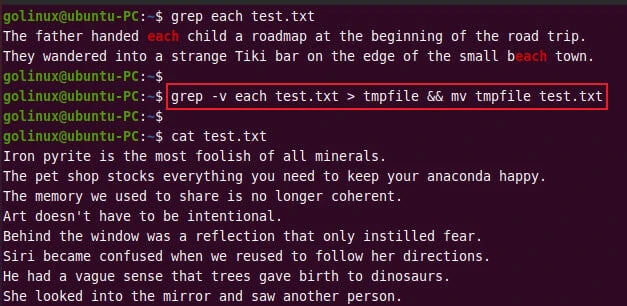
As you can see, all matching lines are removed.
16. grep pattern with spaces
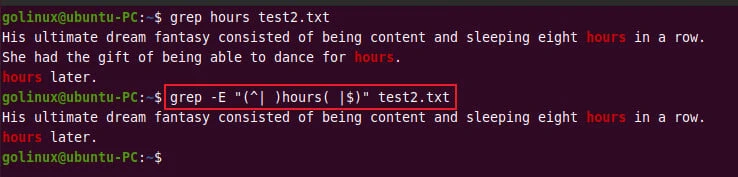
Grepping patterns with spaces is helpful when you only want to match patterns that contain spaces.
For example, this command searches for an exact match hours with
leading or trailing white space characters.
$ grep -E "(^| )hours( |$)" test2.txt
Sample Output:
17. grep pattern starts with
A caret (^) indicates the beginning of the line. To search for lines
that start with S, you can use ^S regex.
$ grep '^S' test.txt
Sample Output:

18. grep pattern ends with
Similarly, you can use the dollar sign $ to search lines that end with
a specific pattern.
This command finds lines that end with d.
$ grep 'd
Sample Output:

19. grep pattern1 or pattern2 (conditional)
You can use -E option to grep multiple patterns with OR condition. You
have to separate patterns with a | symbol.
It prints the lines that contain either of the matching patterns.
$ grep -E 'pattern1|pattern2' file
Sample Output:
The following example prints the lines that contain either hours or
movie in a test2.txt file.

You can also use -e option to search for multiple patterns with OR
condition.
$ grep -e hours -e movie test2.txt
Sample Output:

20. grep pattern1 and pattern2 (conditional)
To use grep command with AND condition, use the following syntax.
$ grep -P '^(?=.*pattern1)(?=.*pattern2)' file
Sample Output:

21. grep only IP address pattern
The following grep command gets all valid IPv4 addresses from a specified file.
$ grep -E "(25[0-5]|2[0-4][0-9]|[01]?[0-9][0-9]?)\.(25[0-5]|2[0-4][0-9]|[01]?[0-9][0-9]?)\.(25[0-5]|2[0-4][0-9]|[01]?[0-9][0-9]?)\.(25[0-5]|2[0-4][0-9]|[01]?[0-9][0-9]?)" file
Sample Output:
golinux@ubuntu-PC:~$ grep -E "(25[0-5]|2[0-4][0-9]|[01]?[0-9][0-9]?)\.(25[0-5]|2[0-4][0-9]|[01]?[0-9][0-9]?)\.(25[0-5]|2[0-4][0-9]|[01]?[0-9][0-9]?)\.(25[0-5]|2[0-4][0-9]|[01]?[0-9][0-9]?)" ipaddr.txt
121.186.42.74
147.137.3.201
166.32.6.111
144.145.125.243
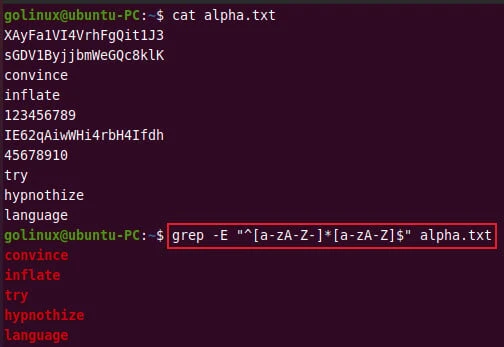
22. grep strings with alphabetic characters only
You can use the following command to match strings with alphabetic characters only.
$ grep -E "^[a-zA-Z-]*[a-zA-Z]$" file
Sample Output:
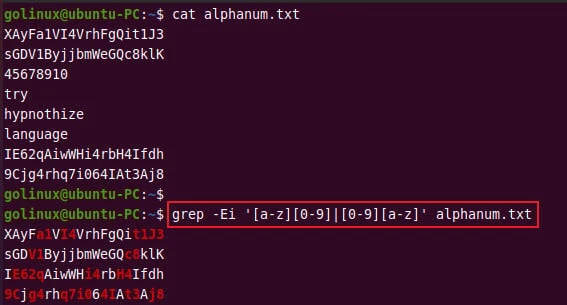
23. grep strings with alphanumeric characters only
To match strings with alphanumeric characters only, use the following syntax.
$ grep -Ei '[a-z][0-9]|[0-9][a-z]' file
Sample Output:
24. grep string with special characters (brackets, dot, colon, quotes, wildcard, etc)
We can provide the list of special characters to grep for using single quotes. Here I have a sample file with some special characters
# cat test1.txt
Opening bracket [
Closing bracket ]
Dot .
* asterisk
\ back slash
/ forward slash
" double quotes
' single quotes
We will try to grep some of them using grep. We have used -E with pipe
to provide conditional pattern which we have also used in our previous
examples.
# grep -E '\\|\/|\[|\]|\"|\.' test1.txt
Opening bracket [
Closing bracket ]
Dot .
\ back slash
/ forward slash
" double quotes
We can also utilize below options with grep when looking out for special characters:
-F,--fixed-strings: Interpret PATTERNS as fixed strings, not regular expressions.-G,--basic-regexp: Interpret PATTERNS as basic regular expressions
Here is an example to grep for backslash.
grep -F '\' test1.txt
\ back slash
But you should know that you cannot combine -F or -G with -E. In
such case you will get grep: conflicting matchers specified.
25. grep for 2 words with TAB between them
You can use the below grep command to search for 2 words with TAB between them.
$ grep 'word1'
Sample Output:

Conclusion
By this point, you should have understood how to use grep commands for advanced searching and filtering patterns in Linux. We hope you find these 25 examples of grep commands useful.
If you have any questions or feedback, please let us know in the comment section below.
What’s Next
Easy regex to grep exact match with
examples
3 simple and useful tools to grep multiple strings in
Linux
Further Reading
References
how to grep and print
the next N lines after the hit?
grep: output specific
line after match
To grep for a word
before matching pattern
Grep characters before
and after match?
Can grep show only
words that match search pattern?
How
do I recursively grep all directories and subdirectories?
How
to delete from a text file, all lines that contain a specific
string?
How do I grep for
multiple patterns with pattern having a pipe character?
Using grep to
get 12 letter alphabet only lines
How to grep for two
words with a tab in between them
