

How can I grep multiple strings in single line? Is it possible to grep
multiple strings using single command from a file? How to match two or
more patterns in single file?
There can be multiple scenarios where you would want to grep for
multiple strings in a file. I will try to cover the scenarios which I
can think of and based on user’s queries on the web, if you have any
additional question, feel free to drop your concern in the comment box
of this tutorial.
We will use below tools to cover all these questions:
- grep
- awk
- sed
grep multiple strings - syntax
By default with grep with have -e argument which is used to grep a
particular PATTERN. Now this pattern can be a string, regex or any
thing. We can add “-e” multiple times with grep so we already have a
way with grep to capture multiple strings.
Use -e with grep
grep [args] -e PATTERN-1 -e PATTERN-2 .. FILE/PATH
Use pipe with escape character
egrep [args] "PATTERN1\|PATTER2\|PATTERN3" FILE/PATH
Use pipe without escape character using extended grep (-E)
grep [args] -E "PATTERN1|PATTER2|PATTERN3" FILE/PATH
OR
egrep [args] "PATTERN1|PATTER2|PATTERN3" FILE/PATH
egrep is the extended grep. Direct invocation as either egrep
or fgrep is deprecated, but is provided to allow historical
applications that rely on them to run unmodified.
As you may have observed in the syntax, we can combine grep with many
more inbuilt “args” to enhance the grepping functionality. Now we will
use these syntax in different examples with more scenarios
Perform case-insensitive grep for multiple patterns
To perform case-insensitive search we must use “-i or
--ignore-case”, from the
man
page of grep:
-i, --ignore-case
       Ignore case distinctions, so that characters that differ only in case match each other.
In this section we will grep for all the lines containing error,
warning and fatal from /var/log/messages, based on the syntax you
can use:
# grep -i "error\|warn\|fatal" /var/log/messages
OR
# grep -i -e error -e warn -e fatal /var/log/messages
OR
# egrep -i "error\|warn\|fatal" /var/log/messages
OR
# grep -iE "error|warn|fatal" /var/log/messages
Now since we are combining our syntax to grep multiple strings with
-i, grep would perform an case in-sensitive search in
/var/log/messages file
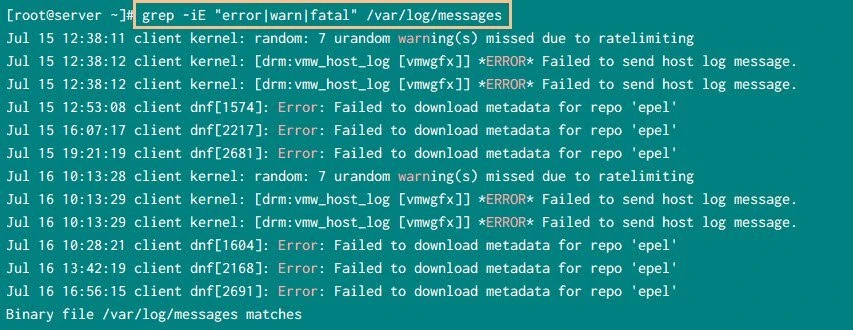
grep multiple string with case insensitive
Print filename along with the grep output
Now it is possible that you may try to grep for multiple strings in
some path for a bunch of files. In such case you may get the matching
pattern output with lines, but by default you will NOT get the
filename of individual matching PATTERN
To also print the filename with grep use -H or --with-filename
argument. From the
man
page of grep,
 -H, --with-filename
      Print the file name for each match.  This is the default when there is more than one file to search.
So again we will use our grep syntax in combination with -H argument
to also print filename along with the matched strings in the respective
lines:
# grep -Hi "error\|warn\|fatal" /var/log/*
OR
# grep -Hi -e error -e warn -e fatal /var/log/*
OR
# egrep -Hi "error\|warn\|fatal" /var/log/*
OR
# grep -HiE "error|warn|fatal" /var/log/*
Here if you observe, I have added -H with all our existing grep
commands to lookout for all the files under /var/log/* containing
error, warn, or fatal. There is no particular sequence to be
followed while assigning these arguments with grep.
For example:
# grep -HiE "error|warn|fatal" /var/log/*
can be also written as
# grep -iHE "error|warn|fatal" /var/log/*
OR
# grep -EHi "error|warn|fatal" /var/log/*
OR
# grep -H -i -E "error|warn|fatal" /var/log/*
and we will get the same output from all the commands. So as you see we can write the set of arguments in different order, combined or separately with grep so the sequence doesn’t matter as long as you are using the right arguments.
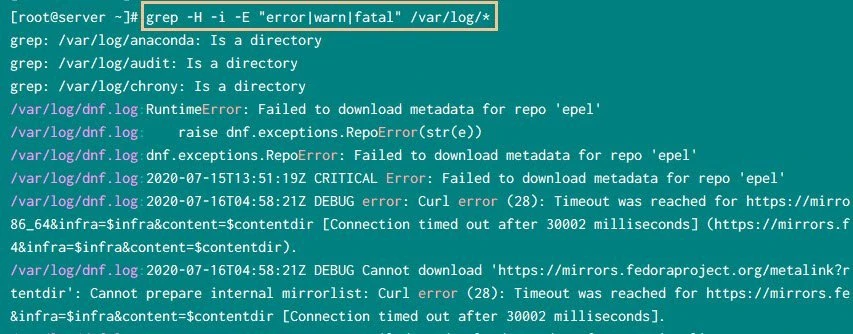
grep multiple strings in all files in a path
grep: /var/log/anaconda: Is a directory”, because by default grep
will only search in files under the provided directory but not in the
sub-directories hence it throws this error.
To
perform recursive search inside all directories and sub-directories use
-r or -R with grep
Grep for multiple exact pattern match in a file or path
By default when we search for a pattern or a string using grep, then
it will print the lines containing matching pattern in all forms.
For example, if you grep for “warn”, then grep will also match
“warning”, “ignore-warning” etc. Since all these words contain our
string i.e. warn. But if your requirement was to only print the
exact word match i.e. “warn” then we must use -w or
--word-regexp along with grep. From the
man
page of grep:
 -w, --word-regexp
      Select only those lines containing matches that form whole words.  The test is that the  matching  substring  must  either  be  at  the
      beginning  of  the  line,  or  preceded  by  a  non-word constituent character.  Similarly, it must be either at the end of the line or
      followed by a non-word constituent character.  Word-constituent characters are letters, digits, and the underscore.  This option has no
      effect if -x is also specified.
To search for multiple strings with exact word match in
/var/log/messages we will use
# grep -w "error\|warn\|fatal" /var/log/messages
OR
# grep -w -e error -e warn -e fatal /var/log/messages
OR
# egrep -w "error\|warn\|fatal" /var/log/messages
OR
# grep -Ew "error|warn|fatal" /var/log/messages
Following is a snippet from my server
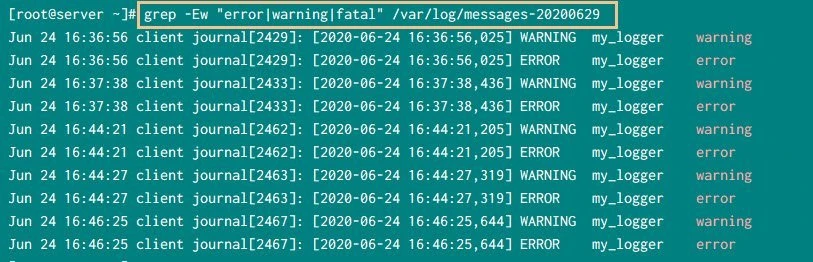
Match exact word with grep
grep multiple string with AND condition
In the earlier examples we were using OR condition to match multiple
strings. Now if you have a requirement to search for multiple strings
with AND condition i.e. all the provided patterns must match in the
same line
For example, I have this file:
# cat /tmp/somefile
Successfully activated sshd service
Successfully reloaded service
Successfully stopped service
Successfully enabled service
Successfully activated httpd service
I would like to grep for lines having both “success” and
“activated”. The easiest way to achieve this is to first grep for
the first match and then grep the next string
# grep -i "success" /tmp/somefile | grep -i activated
Successfully activated sshd service
Successfully activated httpd service
So we have now lines having both the strings, but the demerit of this method is if you have multiple strings then you will end up using grep multiple times which will not look tidy
Alternatively we can also use grep in this format.
# grep -ie "success.*activated" -e "activated.*success" /tmp/somefile
Successfully activated sshd service
Successfully activated httpd service
Since we do not know the order of occurrence for both the strings we are grepping both the patterns in both the possible order. This does the job but again can be messy for multiple strings search.
Exclude multiple patterns with grep
We can use grep with -v or --invert-match to invert the selection
i.e. to exclude the provided pattern from the match. We can provide
multiple strings to the exclusion list. In this example we want to have
all the lines except the ones having “sshd” or “activated” in
/tmp/somefile
# grep -v "sshd\|activated" /tmp/somefile
Successfully reloaded service
Successfully stopped service
Successfully enabled service
Search for multiple strings with awk - syntax
For most of the straight forward use cases, you can just use grep to
match multiple strings or patterns but for complex use cases, we may
consider
<a href="https://www.golinuxcloud.com/awk-examples-with-command-tutorial-unix-linux/" title="30+ awk examples for beginners / awk command tutorial in Linux/Unix" target="_blank" rel="noopener noreferrer">awk</a>
as an alternative. The basic syntax to match a single PATTERN with
awk would be:
awk '/PATTERN/' FILE
To match multiple patterns:
awk '/PATTERN1|PATTERN2/PATTERN3/' FILE
Match multiple patterns with OR condition
To perform case-insensitive search of a string or pattern we can use below syntax:
awk 'BEGIN{IGNORECASE=1} /PATTERN1|PATTERN2/PATTERN3/' FILE
For example to grep for all the lines having “Error” or “Warning” in
/var/log/messages we can use:
# awk '/Error|warning/' /var/log/messages
But to perform case-insensitive we will use IGNORECASE in this
example:
# awk 'BEGIN{IGNORECASE=1} /Error|warning/' /var/log/messages
Following is a snippet from my server:
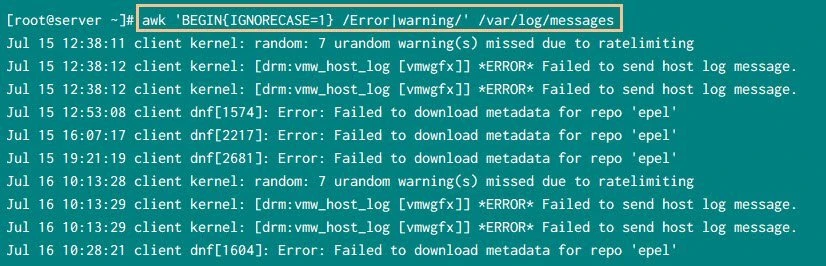
Search multiple patterns with awk
Search for multiple patterns with AND condition
In the above example, we are searching for pattern with OR condition
i.e. if either of the multiple provided strings are found, print the
respective matched line. But to print the lines when all the provided
PATTERN match, we must use AND operator. The syntax would be:
awk '/PATTERN1/ && /PATTERN2/ && /PATTERN3/' FILE
Now we will use this syntax to search for lines containing “Success”
and “activated” in our /tmp/somefile
# awk '/Success/ && /activated/' /tmp/somefile
Successfully activated sshd service
Successfully activated httpd service
To perform case-insensitive search we will use below syntax:
awk 'BEGIN{IGNORECASE=1} /PATTERN1/ && /PATTERN2/ && /PATTERN3/' FILE
Now we use this syntax in our example:
# awk 'BEGIN{IGNORECASE=1}; /success/ && /activated/' /tmp/somefile
Successfully activated sshd service
Successfully activated httpd service
Exclude multiple patterns with awk
We can also exclude certain pre-defined patterns from the search. The general syntax would be:
awk '!/PATTERN1/ && !/PATTERN2/ && !/PATTERN3/' FILE
In this syntax we want to exclude all the three PATTERNS from the
search. You can add or remove more patterns in the syntax based on your
requirement.
For example, to print all the lines except the ones containing
“activated”
# awk '!/activated/' /tmp/somefile
Successfully reloaded service
Successfully stopped service
Successfully enabled service
Match and print multiple strings with sed - syntax
Ideally we use sed for mostly search a pattern and then perform an
action on the search pattern or line such as delete, replace etc. But we
can also use sed in some specific scenarios to match a single or
multiple pattern and just print the matched content from a file.
The syntax to match and print single pattern would be:
sed -n '/PATTERN/p' FILE
Here we use -n (or you can use --quiet or --silent) in combination
with “p” to print the pattern space i.e. do not print unless a pattern
match is found
Similarly the syntax to match multiple strings with OR condition would
be:
sed -n '/PATTERN1\|PATTERN2\|PATTERN3/p' FILE
Alternatively we can also use sed with -e to add multiple scripts
(i.e. conditions) to match a pattern in our case.
# sed -e '/PATTERN1/b' -e '/PATTERN2/b' -e d FILE
Here from man page of sed,
-e script : add the script to the commands to be executed
b label    : Branch to label; if label is omitted, branch to end of script.
d          : Delete pattern space.  Start next cycle.
You can add or remove PATTERN using the provided syntax n no of
times based on your requirement
For example, to match “activated” and “reloaded” in our file
# sed -e '/activated/b' -e '/reload/b' -e d /tmp/somefile
Successfully activated sshd service
Successfully reloaded service
Successfully activated httpd service
Case in-sensitive match for multiple strings
There is no single argument similar to awk or grep in sed to perform
case insensitive match for single or multiple patterns. So we must
provide the uppercase and lowercase characters of the possible char for
which we assume there can be variations.
For example, in my case there is a possibility the file may contain
“success” or “Success” with uppercase “S” so I will put this in
our example:
# sed -e '/[Ss]uccess/b' -e '/reload/b' -e d /tmp/somefile
Successfully activated sshd service
Successfully reloaded service
Successfully stopped service
Successfully enabled service
successfully activated httpd service   <-- One with lowercase
So now sed will look for match of “success” with both uppercase and
lowercase “S”. So if you feel there can be variations for more
characters, then you must use the same method for all such possible
options
Exclude multiple strings
We can also exclude multiple strings using NOT(!) operator in the
above syntax.
sed -n '/PATTERN1\|PATTERN2/!p' FILE
For example to print all the lines except the ones having “sshd” and
“reload”
# sed -n '/sshd\|reload/!p' /tmp/somefile
Successfully stopped service
Successfully enabled service
successfully activated httpd service
Conclusion
In this tutorial we learned about different Linux tools which we can use
to grep multiple strings from a file or a path. The most reliable tool
in most straight forward cases would be grep but in more complex
scenarios we can use sed, awk, gawk etc. You have the flexibility
to perform match using case in-sensitive, recursive, excluding and many
other scenarios using these tools.
Lastly I hope the steps from the article to grep multiple strings on Linux was helpful. So, let me know your suggestions and feedback using the comment section.
