

This is a multi-part article where in a series of article we will learn about Gluster File System in Linux, below are the topics we will cover:
- What is GlusterFS?
- Types of Volumes supported with GlusterFS
- Install and Configure GlusterFS Distributed Volume with RHEL/CentOS 8
- Install and Configure GlusterFS Replicated Volume with RHEL/CentOS 8
- Install and Configure GlusterFS Distributed Replicated Volume with RHEL/CentOS 8
Lab Environment
I have created four Virtual Machines using Oracle VirtualBox which is installed on a Linux Server. These two VMs are installed with CentOS 8. Below are the configuration spec of these two virtual machines:
| Configuration | Node 1 | Node 2 | Node3 | Node4 |
|---|---|---|---|---|
| Hostname/FQDN | glusterfs-1.example.com | glusterfs-2.example.com | glusterfs-3.example.com | glusterfs-4.example.com |
| OS | CentOS 8 | CentOS 8 | CentOS 8 | CentOS 8 |
| IP Address | 10.10.10.6 | 10.10.10.12 | 10.10.10.13 | 10.10.10.14 |
| Storage 1 (/dev/sda) | 20GB | 20GB | 20GB | 20GB |
| Storage 2 (/dev/sdb) | 10GB | 10GB | 10GB | 10GB |
Name Resolution
You must configure
DNS to resolve hostname or alternatively use /etc/hosts
file. I have updated /etc/hosts file with the IPs of my GlusterFS
nodes
# cat /etc/hosts
127.0.0.1   localhost localhost.localdomain localhost4 localhost4.localdomain4
::1         localhost localhost.localdomain localhost6 localhost6.localdomain6
10.10.10.6   glusterfs-1     glusterfs-1.example.com
10.10.10.12   glusterfs-2     glusterfs-2.example.com
10.10.10.13   glusterfs-3     glusterfs-3.example.com
10.10.10.14   glusterfs-4     glusterfs-4.example.com
Install Gluster File system
Install GlusterFS on CentOS 8
Depending upon your environment you can download the repo file of glusterfs from the official page. I am using internal network on my CentOS 8 virtual machine so there is no internet connectivity in my VM which is why I downloaded the glusterfs repo on one of my RHEL 8 node and then created an offline repo by downloading the entire repository
Enable PowerTools repo
You must also enable PowerTools repo or
else you will get below error while installing glusterfs-server
python3-pyxattr is needed by glusterfs-srver which is provded by powertools repo from centOS 8 so this also needs to be enabled
To enable powertools you can manually enable the repo using
“enabled=1” param in /etc/yum.repos.d/CentOS-PowerTools.repo or you
can install yum-utils first
[root@glusterfs-1 ~]# yum -y install yum-utils
and then later using yum-config-manager you can enable the PowerTools
repo
[root@glusterfs-1 ~]# yum-config-manager --enable PowerTools
To list the available repos
[root@glusterfs-1 ~]# yum repolist
CentOS-8 - AppStream                                             5.1 kB/s | 4.3 kB     00:00
CentOS-8 - Base                                                  6.1 kB/s | 3.8 kB     00:00
CentOS-8 - Extras                                                256  B/s | 1.5 kB     00:06
CentOS-8 - PowerTools                                            815 kB/s | 2.0 MB     00:02
Extra Packages for Enterprise Linux 8 - x86_64                   6.1 kB/s | 7.7 kB     00:01
GlusterFS clustered file-system                                  2.9 MB/s | 3.0 kB     00:00
repo id                   repo name                                                   status
AppStream                 CentOS-8 - AppStream                                         5,001
BaseOS                    CentOS-8 - Base                                              1,784
PowerTools                CentOS-8 - PowerTools                                        1,499
epel                      Extra Packages for Enterprise Linux 8 - x86_64               4,541
extras                    CentOS-8 - Extras                                                3
Next install glusterfs-server to install GlusterFS
[root@glusterfs-1 ~]# rpm -Uvh https://buildlogs.centos.org/centos/8/storage/x86_64/gluster-9/Packages/g/glusterfs-server-9.4-1.el8.x86_64.rpm
Install GlusterFS on Red Hat 8 (RHEL 8)
There are various source and methods to install GlusterFS in RHEL 8
- To install Red Hat Gluster Storage 3.4 using ISO
- To install Red Hat Gluster Storage 3.4 using Subscription Manager
Next to install Red Hat Gluster Storage using redhat-storage-server
rpm
# yum install redhat-storage-server
Start glusterd service
Next before we create GlusterFS Distributed Replicated Volume start the
glusterd service on both the cluster nodes
[root@glusterfs-1 ~]# systemctl start glusterd
Verify the status of the service and make sure it is in active running state:
[root@glusterfs-1 ~]# systemctl status glusterd
● glusterd.service - GlusterFS, a clustered file-system server
   Loaded: loaded (/usr/lib/systemd/system/glusterd.service; disabled; vendor preset: disabled)
   Active: active (running) since Sun 2020-01-26 02:19:31 IST; 4s ago
     Docs: man:glusterd(8)
  Process: 2855 ExecStart=/usr/sbin/glusterd -p /var/run/glusterd.pid --log-level $LOG_LEVEL $GLUSTERD_OPTIONS (code=exited, status=0/SUCCESS)
 Main PID: 2856 (glusterd)
    Tasks: 9 (limit: 26213)
   Memory: 3.9M
   CGroup: /system.slice/glusterd.service
           └─2856 /usr/sbin/glusterd -p /var/run/glusterd.pid --log-level INFO

Jan 26 02:19:31 glusterfs-1.example.com systemd[1]: Starting GlusterFS, a clustered file-system server...
Jan 26 02:19:31 glusterfs-1.example.com systemd[1]: Started GlusterFS, a clustered file-system server.
Enable the service so that the service comes up automatically
[root@glusterfs-1 ~]# systemctl enable glusterd
Create Partition
If you already have an additional logical volume for Gluster File
System then you can ignore these steps.
We will create a new logical volume on both our CentOS 8 nodes to create
a GlusterFS distributed replicated volume. Now since I have already
explained the steps required to create a
partition, I won’t explain these commands again here.
[root@glusterfs-1 ~]# lvcreate -L 2G -n brick5 rhel  <-- Create logical volume named "brick1" with size 2GB using rhel VG
[root@glusterfs-1 ~]# mkfs.xfs /dev/mapper/rhel-brick5  <-- Format the logical volume using XFS File System
[root@glusterfs-1 ~]# mkdir /bricks/brick5  <-- Create a mount point
Mount the newly created logical volume
[root@glusterfs-1 ~]# mount /dev/mapper/rhel-brick5 /bricks/brick5/
Verify the same
[root@glusterfs-1 ~]# df -Th /bricks/brick5/
Filesystem              Type  Size  Used Avail Use% Mounted on
/dev/mapper/rhel-brick5 xfs   2.0G   47M  2.0G   3% /bricks/brick5
Similarly we will create /dev/mapper/rhel-brick2 on gcluster-2,
/dev/mapper/rhel-brick3 on gcluster-3 and /dev/mapper/rhel-brick4
on gcluster-4
[root@glusterfs-2 ~]# df -Th /bricks/brick6/
Filesystem              Type  Size  Used Avail Use% Mounted on
/dev/mapper/rhel-brick6 xfs   2.0G   47M  2.0G   3% /bricks/brick6

[root@glusterfs-3 ~]# df -Th /bricks/brick7/
Filesystem              Type  Size  Used Avail Use% Mounted on
/dev/mapper/rhel-brick7 xfs   2.0G   47M  2.0G   3% /bricks/brick7

[root@glusterfs-4 ~]# df -Th /bricks/brick8
Filesystem              Type  Size  Used Avail Use% Mounted on
/dev/mapper/rhel-brick8 xfs   2.0G   47M  2.0G   3% /bricks/brick8
/etc/fstab of these logical volume on the respective cluster
nodes to make sure these gluster file systems gets mounted post reboot
Configure Firewall
Enable port for glusterd service to use GlusterFS Distributed Replicated Volume on both the cluster nodes
# firewall-cmd --permanent --add-service=glusterfs
# firewall-cmd --reload
Add your nodes to the Trusted Storage Pool (TSP)
Let’s select one host (it doesn’t matter which one); we are going to
start our cluster.
We are going to do the following from this one server:
- Add peers to our cluster
- Create a GlusterFS distributed replicated volume
To add our peers to the cluster, we issue the following:
[root@glusterfs-1 ~]# gluster peer probe glusterfs-2.example.com
peer probe: success.

[root@glusterfs-1 ~]# gluster peer probe glusterfs-3.example.com
peer probe: success.

[root@glusterfs-1 ~]# gluster peer probe glusterfs-4.example.com
peer probe: success.
To check the connected peer status
[root@glusterfs-1 ~]# gluster peer status
Number of Peers: 3

Hostname: glusterfs-3.example.com
Uuid: 9692eb2e-4655-4922-b0a3-cbbda3aa1a3e
State: Peer in Cluster (Connected)

Hostname: glusterfs-2.example.com
Uuid: 17dd8f27-c595-462b-b62c-71bbebce66ce
State: Peer in Cluster (Connected)

Hostname: glusterfs-4.example.com
Uuid: 9d490e37-7884-4f32-9fd6-94638e9c7f4b
State: Peer in Cluster (Connected)
Set up GlusterFS Distributed Replicated Volume
Below is the syntax used to create glusterfs distributed replicated volume
gluster volume create NEW-VOLNAME [replica COUNT] [transport [tcp | rdma | tcp,rdma]] NEW-BRICK...
For example here I am creating a new glusterfs distributed replicated
volume “dis_rep_vol” on all my cluster nodes i.e. glusterfs-1,
glusterfs-2, glusterfs-3 and glusterfs-4.
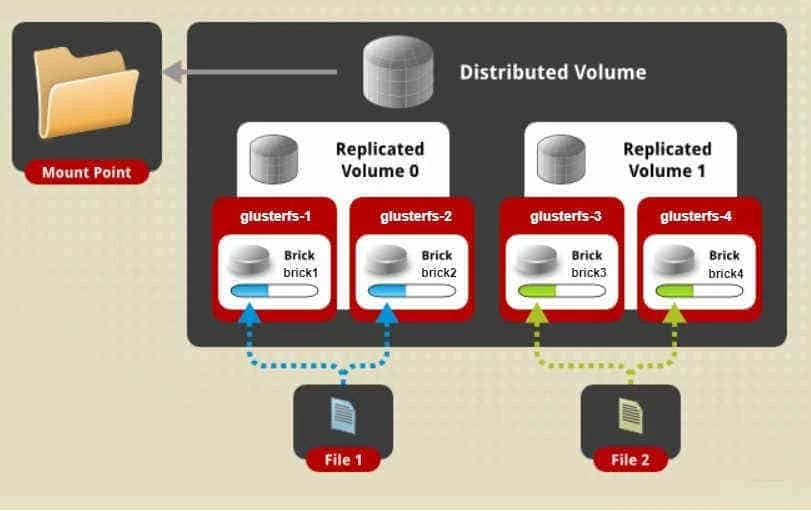
It is going to replicate all the files over the three bricks under the
new directory rep_vol which will be created by the below command:
[root@glusterfs-1 ~]# gluster volume create dis_rep_vol replica 2 glusterfs-1:/bricks/brick5/rep_vol glusterfs-2:/bricks/brick6/rep_vol glusterfs-3:/bricks/brick7/rep_vol glusterfs-4:/bricks/brick8/rep_vol
Replica 2 volumes are prone to split-brain. Use Arbiter or Replica 3 to avoid this. See: http://docs.gluster.org/en/latest/Administrator%20Guide/Split%20brain%20and%20ways%20to%20deal%20with%20it/.
Do you still want to continue?
 (y/n) y
volume create: dis_rep_vol: success: please start the volume to access data
What is Split Brain?
Split brain is where at least two servers serving the same application in a cluster can no longer see each other and yet they still respond to clients. In this situation, data integrity and consistency start to drift apart as both servers continue to serve and store data but can no longer sync any data between each other.
Next start the volume you created
[root@glusterfs-1 ~]# gluster volume start dis_rep_vol
volume start: dis_rep_vol: success
To get more info on the dis_rep_vol
[root@glusterfs-1 ~]# gluster volume info dis_rep_vol

Volume Name: dis_rep_vol
Type: Distributed-Replicate
Volume ID: 0944d404-1845-4d26-822c-3dc9a6048532
Status: Started
Snapshot Count: 0
Number of Bricks: 2 x 2 = 4
Transport-type: tcp
Bricks:
Brick1: glusterfs-1:/bricks/brick5/rep_vol
Brick2: glusterfs-2:/bricks/brick6/rep_vol
Brick3: glusterfs-3:/bricks/brick7/rep_vol
Brick4: glusterfs-4:/bricks/brick8/rep_vol
Options Reconfigured:
transport.address-family: inet
storage.fips-mode-rchecksum: on
nfs.disable: on
performance.client-io-threads: off
Started”, the files under
/var/log/glusterfs/glusterd.log should be checked in order to debug
and diagnose the situation. These logs can be looked at on one or, all
the servers configured.
Testing the GlusterFS Distributed Replicated Volume
For this step, we will use one of the servers to mount the volume.
Typically, you would do this from an external machine, known as a
“client”. Since using this method would require additional packages to
be installed on the client machine, we will use one of the servers as a
simple place to test first , as if it were that “client”.
On client gluster-fuse rpm must be installed manually
# rpm -Uvh https://buildlogs.centos.org/centos/8/storage/x86_64/gluster-9/Packages/g/glusterfs-fuse-9.4-1.el8.x86_64.rpm
Since I am using one of the gluster nodes, the client package is already installed here
[root@glusterfs-1 ~]# rpm -q glusterfs-fuse
glusterfs-fuse-9.4-1.el8.x86_64
Create a mount point
[root@glusterfs-1 ~]# mkdir /my_repvol
Mount the Gluster Distributed Replicated Volume as shown below:
[root@glusterfs-3 ~]# mkdir /dis_rep
[root@glusterfs-3 ~]# mount -t glusterfs glusterfs-1.example.com:/dis_rep_vol /dis_rep
[root@glusterfs-3 ~]# df -Th /dis_rep/
Filesystem                           Type            Size  Used Avail Use% Mounted on
glusterfs-1.example.com:/dis_rep_vol fuse.glusterfs  4.0G  135M  3.9G   4% /dis_rep
Repeat the same step on other cluster nodes
[root@glusterfs-3 ~]# mkdir /dis_rep; mount -t glusterfs glusterfs-1.example.com:/dis_rep_vol /dis_rep
[root@glusterfs-4 ~]# mkdir /dis_rep; mount -t glusterfs glusterfs-1.example.com:/dis_rep_vol /dis_rep
Next I will create 5 files on the dis_rep_vol
[root@glusterfs-2 ~]# touch /dis_rep/file{1..5}
Verify the list of files on the gluster nodes. As we see on
glusterfs-1 and glusterfs-2 the files are replicated
[root@glusterfs-2 ~]# ls -l /bricks/brick6/rep_vol/
total 0
-rw-r--r-- 2 root root 0 Jan 27 12:02 file3
-rw-r--r-- 2 root root 0 Jan 27 12:02 file4

[root@glusterfs-1 ~]# ls -l /bricks/brick5/rep_vol/
total 0
-rw-r--r-- 2 root root 0 Jan 27 12:02 file3
-rw-r--r-- 2 root root 0 Jan 27 12:02 file4
while on glusterfs-3 and glusterfs-4 the files are distributed
[root@glusterfs-3 ~]# ls -l /bricks/brick7/rep_vol/
total 0
-rw-r--r-- 2 root root 0 Jan 27 12:02 file1
-rw-r--r-- 2 root root 0 Jan 27 12:02 file2
-rw-r--r-- 2 root root 0 Jan 27 12:02 file5

[root@glusterfs-4 ~]# ls -l /bricks/brick8/rep_vol/
total 0
-rw-r--r-- 2 root root 0 Jan 27 12:02 file1
-rw-r--r-- 2 root root 0 Jan 27 12:02 file2
-rw-r--r-- 2 root root 0 Jan 27 12:02 file5
So here in our GlusterFS distributed replicated volume setup, we see
that files are replicated on glusterfs-1 and glusterfs-2, while the
files are distributed on glusterfs-3 and glusterfs-4
Lastly I hope the steps from the article to install and configure GlusterfS distributed and replicated volume on RHEL/CentOS 8 Linux was helpful. So, let me know your suggestions and feedback using the comment section.
