
![How to fetch images from Node.js server [100% Working]](/fetch-images-from-node-js-server/nodejs_fetch_images.jpg)
This tutorial teaches you how to fetch images from Node.js server using a vanilla Node.js server and an Express.js server.By the end of the tutorial, you will find it comfortable to fetch images from a Node.js server using a method of your choice. What is more?
Find out below.
Let’s walk through the basics first
A typical web development project is divided into frontend and backend. Frontend often entails static files:HTML, CSS, and JavaScript.
HTML provides structure to the web page; CSS provides presentation, while JavaScript adds interactivity. An HTML file can contain CSS, JavaScript, images, JSON, and SVG files.
The browser, also called the client, decodes the file type depending on its MIME type:
.html: text/html,.css: text/css,.js: text/javascript,.json: application/json,.png: image/png,.jpg: image/jpg, and.jpeg: image/jpeg.
As the name suggests, a web server (backend) serves the client with resources. The browser then interprets and relays the resource to the user.
It is a convention to store static files in the public folder. For
example, we can store the images folder and HTML files in the public
folder, as shown in the examples section.
The following sections teach you how to fetch images from Node.js server
through the URL. It assumes you want to load the index.html page with
an img element on visiting the home page. And exclusively fetch the
image through a URL.
Let’s set up a lab environment to do exactly that.
Setup lab environment
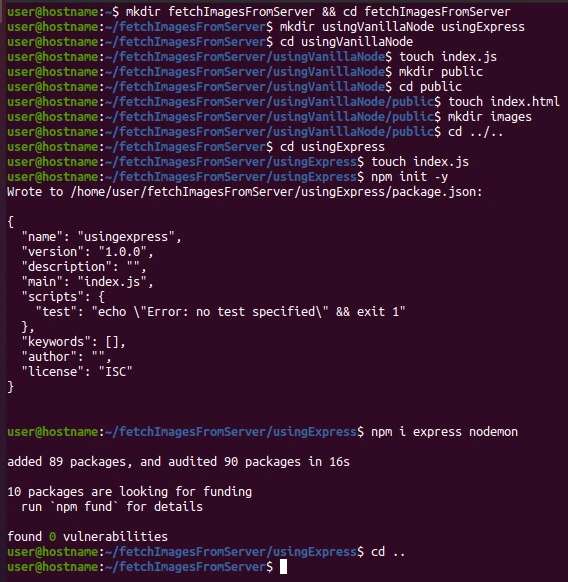
Launch the terminal and create the project directory with two subdirectories.
mkdir fetchImagesFromServer && cd fetchImagesFromServer
mkdir usingVanillaNode usingExpress
cd into usingVanillaNode subdirectory and create the script file and
a public directory.
cd usingVanillaNode
touch index.js
mkdir public
Inside the public directory, create index.html file and images
folder.
cd public
touch index.html
mkdir images
Then, save this image from pexels.com as
image1.jpg into the images directory.
We will use the same public folder in usingExpress subdirectory. So,
let’s set up the Express.js subproject and copy the public directory
into it.
cdinto usingExpress subdirectory and create index.js (script
file), then initialize an npm package. Next, install express
(server) and nodemon (watches the server). Finally, return to the main
directory.
cd ../..
cd usingExpress
touch index.js
npm init -y
npm i express nodemon
cd ..
Now, let’s dive into practical examples of how to fetch images from Node.js server.
Example-1: How to fetch images from node.js server built with http module
cd into the usingVanillaNode directory and update the index.html
and index.js files with the following content.
Public folder
index.html
<!DOCTYPE html>
<html lang="en">
<head>
    <meta charset="UTF-8">
    <meta http-equiv="X-UA-Compatible" content="IE=edge">
    <meta name="viewport" content="width=device-width, initial-scale=1.0">
    <title>Load jpg</title>
</head>
<body>
    <h2>How to load images from Node.js server</h2>
    <div>
        <img src="/images/image1.jpg" width="300" alt="Image">
    </div>
</body>
</html>
index.js
const fs = require('fs')
const path = require('path')
const { createServer } = require('http')

createServer((req, res) => {

    // create a dynamic file path
    let filePath = path.join(__dirname, 'public', req.url === '/' ? 'index.html' : req.url)

    // default content type
    let contentType = 'text/html'

    // extract the extension from the filepath
    let mimeType = path.extname(filePath)

    // load various image types
    switch (mimeType) {
        case '.png': contentType = 'image/png'; break;
        case '.jpg': contentType = 'image/jpg'; break;
        case '.jpeg': contentType = 'image/jpeg'; break;
    }

    // read the target file and send to the client.
    fs.readFile(filePath, (error, data) => {
        // stop the execution and send nothing if the requested file path does not exist.
        if (error) return

        // otherwise, fetch and show the target image
        res.writeHead(200, { 'Content-Type': contentType })
        res.end(data, 'utf8')

    })

})
.listen(3000)
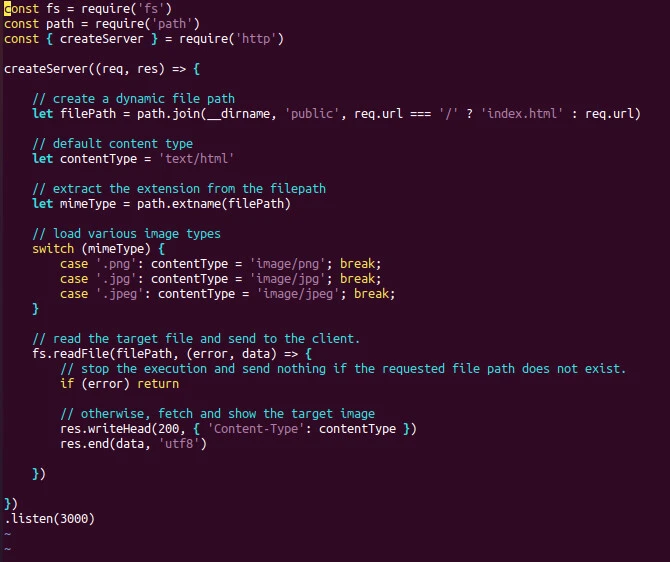
The file path filePath displays the home page index.html or fetches
the target image through the URL. Since content type changes according
to the given image extension, we make the file path dynamic enough to
load PNG, JPG and JPEG image types.
We then read the matching file and send the data to the frontend.
Although we could specify the encoding option when reading the file, it
would be best to do so when sending the data to the client because the
images may not load if we do not send the encoding format with the data
res.end(data, 'utf8').
Save the files and return to the terminal, then start the server.
node index.js
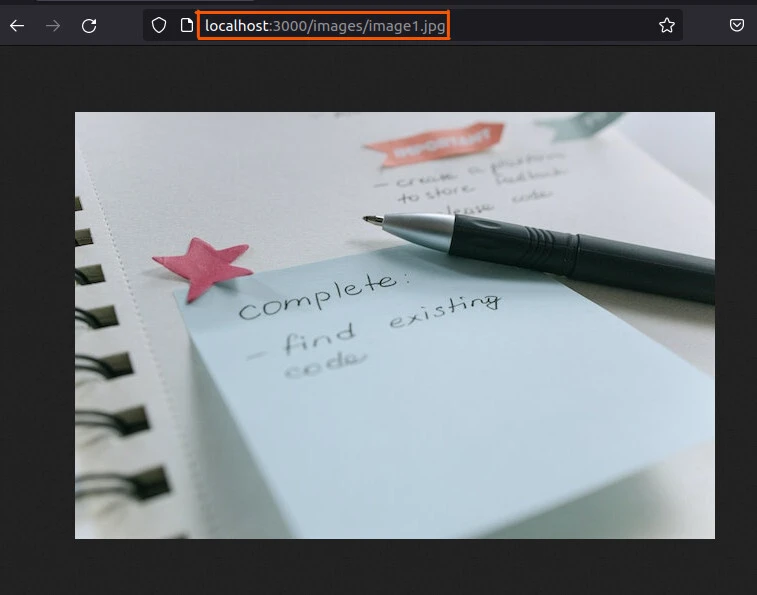
Now visit the browser and fetch the stored image by searching
localhost:3000/images/image1.jpg. And voila, the saved image appears!
Although we fetched the image without installing a third-party module, we had to do massive work to load a simple file. That is why learning how to fetch images from Node.js server built with Express plays a critical role.
Example-2: How to fetch images from node.js server built with the express framework
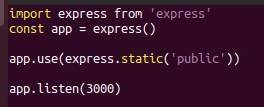
In just four lines of code, we can fetch an image from a Node.js server!
import express from 'express'
const app = express()

app.use(express.static('public'))

app.listen(3000)
This time around, we do not do the heavy work of configuring the URL to
load static files of various image types. The express.static() method
does that for us. We tell the express server the directory from which to
read the static files.
Next, we start the server.
npm start
And visit the URL to fetch the target image:/images/image1.jpg.
Let’s do that practically.
The File structure
Stop the server (running vanilla Node.js web server) by simultaneously
pressing ctrl+c keys and cd into usingExpress subproject.
Write the above code in index.js file.
Next, open the package.json file and configure the application to use
the ECMAScript
modules
and nodemon.
{
  "name": "usingexpress",
  "version": "1.0.0",
  "description": "",
  "main": "index.js",
  "type": "module",
  "scripts": {
    "start": "nodemon index"
  },
  "keywords": [],
  "author": "",
  "license": "ISC",
  "dependencies": {
    "express": "^4.18.1",
    "nodemon": "^2.0.19"
  }
}
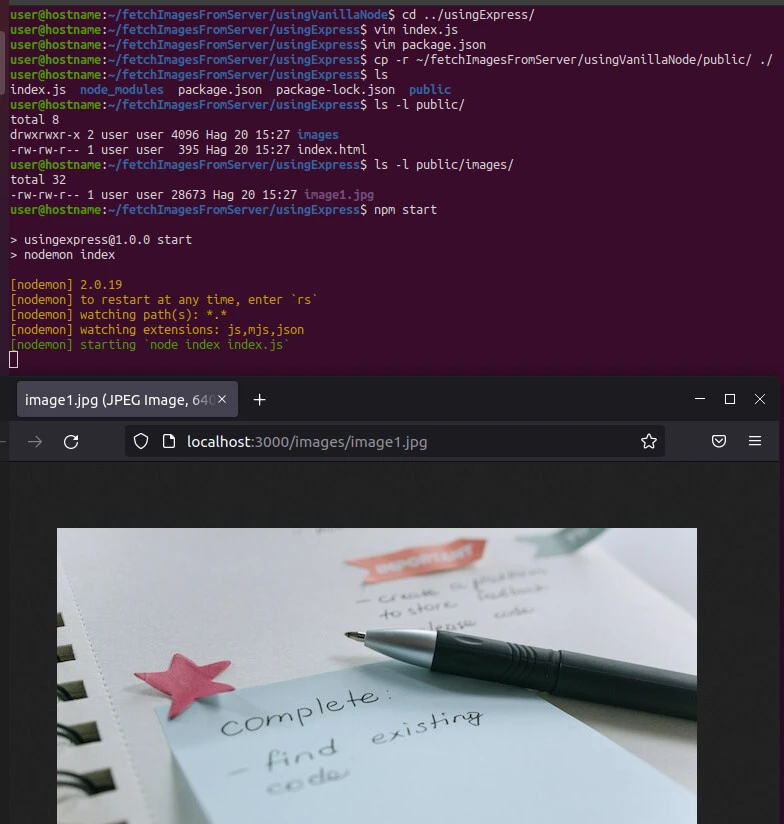
With the exact contents of the public folder as that of part~1, let’s start the server.
cp -r ~/fetchImagesFromServer/usingVanillaNode/public/ ./
npm start
And move to the browser to fetch image1.jpg through the URL:
localhost:3000/images/image1.jpg
Summary
The Express framework’s static() method simplifies fetching images
from a URL. Besides, it would help to learn how to fetch images from
Node.js server without using a framework.
